

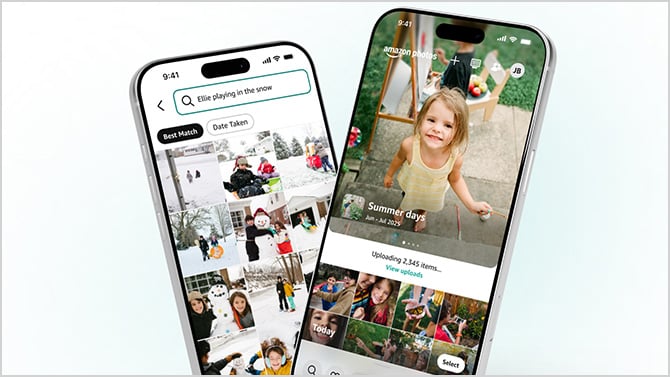
Amazon Photos unlimited storage is a genuinely useful perk buried inside Prime membership that most people didn't know they have. This unlimited photo storage is nothing to dismiss, especially as phone libraries balloon into the tens of thousands of images. But the Amazon Photos app has always had a problem: finding anything in it felt like rummaging through a shoebox. A new redesign, rolling out now on iOS with Android to follow, aims to fix that, and the most important upgrade is a natural language search that lets you describe a photo in plain English instead of guessing the exact date it was taken.
Search the way you think
The old Amazon Photos search required you to know something concrete: a date, a recognized face, a location tag. That works for me if I remember exactly when a thing happened. It fails completely when my memory is fuzzy, which is most of the time.
I know firsthand how frustrating that gap is. My mom was sick for several years before she passed, and I had set up an Amazon Echo Show in her room so we could video chat and she could see family photos. During visits, we would often start reminiscing about something we had done together years before, and I would try to find related photos to put on her device. It was almost impossible. Thousands of images, organized by date, with no good way to surface the ones that actually mattered in that moment.

Natural language would have let me type descriptions like "beach sunset last summer" or "kids playing in the snow" and get relevant results back without knowing a specific date or album name. Amazon does not detail exactly how the feature works under the hood, but it is clearly drawing on AI image recognition and semantic understanding of your descriptions. The results will vary depending on how well Amazon has tagged your photos, and new libraries with less history to analyze may not perform as well as older ones.
What else changed in the redesign
The bigger visual overhaul replaces the default photo grid with a curated carousel of memories at the top of the screen. Open the app, and instead of a wall of thumbnails, you will see collections grouped by event or theme, presented as full-screen slideshows you can tap into. The app decides what to surface automatically.
“On This Day,” which surfaces photos from the same calendar date in previous years, gets promoted to a more visible spot in the carousel. I’ve always enjoyed it, and making it easier to find is a smart move. Amazon is also leaning harder into Echo Show and Fire TV integration, with a Daily Memories feature that rotates through your library automatically. If you have Alexa+, you can ask Alexa to pull up specific photos by description, and they will appear on your Echo Show or Fire TV.
What you need to know about storage
Prime membership includes unlimited high-resolution photo storage, which is the real value here. Video is capped at 5 GB, which fills up fast if you shoot a lot of footage. Additional video storage runs $0.99 per month for 50 GB, $1.99 for 100 GB, $6.99 for 1 TB, and $11.99 for 2 TB. Photos remain free and unlimited regardless of plan.
The updated app is available now on iOS. Android users are still waiting, with no specific date given. Amazon says more updates are coming later in 2026.
If you have a Prime membership and have not set up Amazon Photos yet, this redesign is worth a second look. The natural language search alone closes the biggest gap the app has had for years.
Read next: Amazon’s brings Alexa+ to its budget Fire TV streaming stick
[Image credit: Amazon]

