

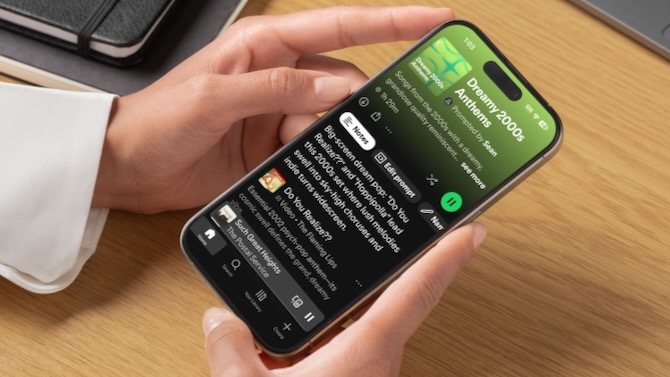
If you have ever felt like Spotify's algorithm is stuck playing the same 10 songs on repeat, the company's new Prompted Playlist feature might be what you need. Instead of relying on Spotify's usual recommendations, this feature lets you describe exactly what you want to hear, and the AI makes a playlist for you.
The feature, currently in beta, is rolling out to Premium subscribers in the U.S. and Canada by the end of January. It builds on Spotify's existing AI Playlist tool, but provides much finer control over what ends up in your queue.
How Prompted Playlist works
The feature lets you start by typing a prompt describing what you want. You can ask for something broad like "mood-boosting indie-pop for getting ready to go out" or more specific like "warm acoustic songs for a slow Sunday morning, plus hidden gems from singer-songwriters trending globally right now." Spotify then generates a playlist using your activity, along with real-time data about charts, trends, and pop culture.
Read More: ChatGPT Can Now Launch Apps Like Spotify, Canva, and Expedia
My Gen X colleague Sean tried the prompt, "I like songs from the 2000s that are a bit dreamy and grandiose like the Flaming Lips." Spotify cranked for about 30 seconds and returned the 1 hr 33min "Dreamy 2000s Anthems" list with what he dubbed "emo bangers" from bands like Arcade Fire, Mercury Rev, Broken Social Scene, and of course, the Flaming Lips.
What sets this apart from a standard playlist is that you can set it to auto-refresh daily or weekly based on your original prompt. Or you can tap "Update playlist" at any time to refresh on demand. So instead of a regular playlist that gets stale, your playlist refreshes while sticking to what you asked for.
Each song also comes with a short note explaining why it was included, which is a nice touch for understanding how the algorithm interpreted your request. I can see this being helpful for tuning future prompts to get the playlists more tailored to your needs. (It described Arcade Fire's song "Tunnels" as, "Massive church-organ surge turns small-town nostalgia into a life-affirming anthem.")
Refining your playlists
If the AI does not quite get it right on the first try, you can tweak the results without starting over. Click "Edit prompt" and type something like "make it less pop, more indie" to adjust the mix. This is much easier than manually deleting and adding songs one by one until the playlist feels right.
The feature also pulls from your entire Spotify history since you first signed up, so it can resurface songs you loved years ago but have not heard in a while.
Read more: AirPods Pro 3 vs Bose QC Ultra 2: Which Earbuds Win?
Premium only, and getting pricier
Prompted Playlist requires a Spotify Premium subscription, which now costs $12.99 per month after the company's latest price increase earlier this month. That is the third hike in four years for U.S. subscribers, and it makes Spotify more expensive than Apple Music, YouTube Music, and Amazon Music Unlimited.
I get why a feature like this would be behind a paywall, and it does seem like a nifty capability to add to the premium tier. However, I’m not sure the tool will get much repeated use. You can only make so many playlists. Sean, however, thinks it would be a handy way for friends to collaborate on the perfect lineup when they get together for dinner or a party.
To decide for yourself once it is available to you, open Spotify and tap Create, then select Prompted Playlist.
Sean Captain contributed to this article.
[Image credit: Screenshot and Canva template via Sean Captain/Techlicious]

