
ChatGPT is often where I start my day and is one of the sites I return to throughout (along with Gmail and AI-enabled Google search). Now I can stay there even longer. This week, ChatGPT maker OpenAI added the ability to launch and control online-based apps directly from the prompt line – with a handful currently enabled. ChatGPT doesn't directly control programs that are installed on your phone or computer, but rather provides an alternate interface to cloud services like streaming media players, booking services, or online design tools.
This new feature saves having to remember how the disparate and perhaps unintuitive interfaces of myriad apps work – which I tried for one of my least-favorite apps to navigate – Spotify. Now you can just tell ChatGPT, in plain language, what you want the app to do, such as creating a playlist or making images in a graphics program.
The other apps currently available are Booking.com and Expedia for travel, Canva and Figma for design, Coursera for education, and Zillow for real estate. As with Apple and Google app stores, any app maker will be able to develop and submit an integrated app for OpenAI to review and approve. That process will start "later this year," says the company in its announcement.
Read more: AI Chatbots 101: How to Get the Best Results from AI Assistants
Connecting and Launching an App in ChatGPT
Let's take Spotify as an example. ChatGPT has good intuition, most of the time. So when I typed "make me a spotify playlist for relaxation," it not only listed out suggested songs but also offered to build a playlist in Spotify.
But first, I had to connect the two online services. It's the same type of process, called OAuth authorization, that you would use to connect Spotify to Amazon Alexa to control it from your smart speaker. After clicking through three approval screens (more on that in a moment), I was set up and could click the "Open in Spotify" button. This will launch Spotify or other services in your web browser. If you also have the app installed on your computer or phone, you can set the browser to automatically trigger the app, just as, say, clicking a Zoom link can launch its desktop program.
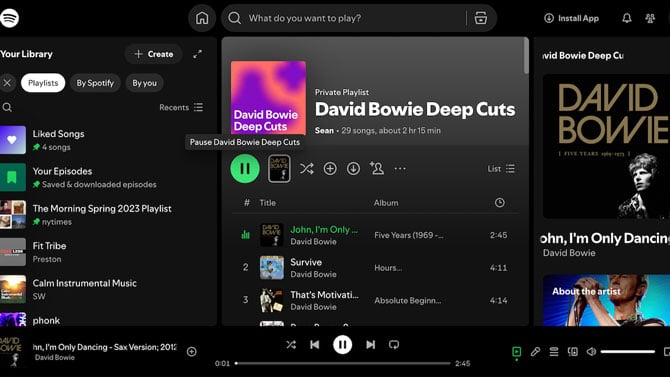
It wasn't perfect, however. The next day, I gave ChatGPT a more interesting task: "name some of David Bowie's lesser-known but well reviewed songs." ChatGPT created an interesting, eclectic mix and offered to build a Spotify playlist – which kept failing. It seems that ChatGPT forgot my account was connected. But it offered to remedy the problem without making me go through all the authorization screens. This may just be an isolated glitch or growing pains of the new feature.
Regardless, I'm happy with the result: "David Bowie Deep Cuts." I don't know if I'd find such a pre-made playlist on Spotify (there is one with a similar name that is actually quite different). And it would be tedious to copy and paste all these song names from ChatGPT into Spotify to make my own.
As for privacy, remember that this is a chat like any other in the app, and content could be used to improve its models. OpenAI's privacy controls have options to limit this usage. You can also exempt individual conversations by clicking the temporary chat button in the upper right of the ChatGPT screen. What's more, the apps you connect to can see some of the information that OpenAI has on you. The company says that it limits what apps can collect to the minimum needed.
Read next: Teen Accounts Come to ChatGPT – Here’s What Parents Need to Know
[Image credit: Screenshots by Sean Captain/Techlicious]