

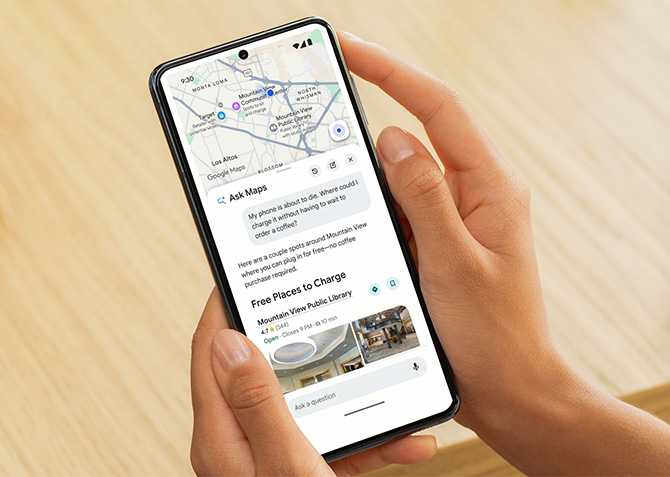
Google Maps is finally getting the full AI treatment, and I actually like it this time around. This major update brings two major new features powered by Gemini AI models. One is a conversational tool called Ask Maps that answers the kind of specific, real-world questions you'd normally spend 20 minutes researching on your own. The other is dubbed Immersive Navigation, and it’s the app's biggest navigation redesign in over a decade.
The first big addition is Ask Maps. Instead of typing a search query and scrolling through results, you can now ask Google Maps a full question like you would ask an AI assistant. You can ask for something like a quiet cafe nearby where you can get some work done, or a playground that's not too far and has shade. Maps will then give you recommendations based on its massive catalogue of 300 million places, and these recommendations draw on reviews from more than 500 million contributors. Not only that, but it also personalizes these results using your Maps history, like your saved places, cuisines you tend to search for, and other relevant details.
This is one of those AI use cases that actually makes sense. It makes planning outings easier by taking care of much of the legwork. You can use it to plan your trips as well. For example, you could ask it for good stops along a road trip route, and Maps will get you directions, ETAs, and tips pulled from real reviews. Once you pick a place, you can reserve it, save it to a list, or share it with friends right from the conversation. Ask Maps is rolling out now in the U.S. and India on Android and iOS, with desktop coming soon.
Read more: Waze Is About to Get Better at Warning You What’s Ahead
The other half is a navigation overhaul
The navigation side of Maps is also getting a full visual refresh. You’ll now see your route in a 3D view that reflects the actual buildings, overpasses, and terrain around you, similar to Apple Maps. Maps will also highlight lane markings, crosswalks, traffic lights, and stop signs to help you merge or turn with more confidence. Google is again using Gemini models here to analyze fresh Street View and aerial imagery data to make sure you see an accurate 3D interpretation. It's a big upgrade over the existing navigation UI, which I never really found to be lacking by any means, but these upgrades sure are nice.
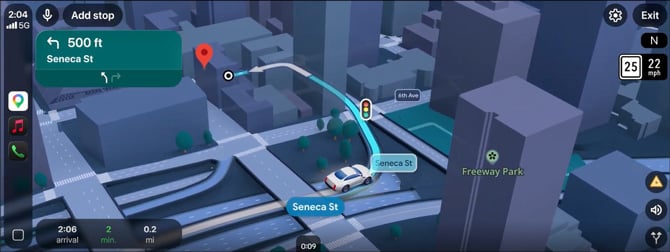
Although the visuals are great, the functionality is where it gets interesting for me. You now get a broader view of your route with smart zooms and transparent buildings, so you’ll be able to see the tricky turns well in advance. Voice guidance has gotten an upgrade as well, sounding more natural like a friend giving you directions than a GPS barking robot-like commands at you. Maps will also show you tradeoffs for alternate routes, like whether a longer route has less traffic or a faster one has a toll. That kind of route context is something I always felt was missing from Google Maps. I frequently take longer routes to avoid traffic, so if you’re like me, you’ll find this feature pretty useful.
Google is overhauling even the final stretch of your drive. You can preview your destination with Street View before heading out, get parking recommendations, and see which side of the street the entrance is on as you approach. If you have parking anxiety, this feature will save you a few trips around the block.
This update is a bunch of exactly the right changes that Maps could use. Immersive Navigation is rolling out across the U.S. on iOS and Android, with CarPlay, Android Auto, and cars with Google built-in getting support over the coming months.
[Image credit: Google]

