

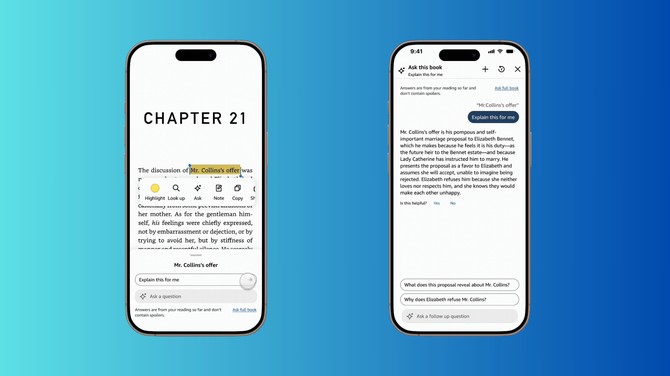
Amazon is adding AI to its Kindle mobile app to let readers ask questions about the book. The feature promises to give you context without giving you spoilers. “Ask this Book” is now available on the Kindle iOS app (version 7.47) for readers located in the U.S. Amazon plans to bring Ask this Book to Android phones and Kindle e-readers sometime in 2026.
It seems like a nifty feature for readers to keep track of complex plots or a lot of characters (or both). But Amazon isn’t letting authors opt out at the moment, a spokesperson told PubLunch.
What that means is that books available on Kindle could be scanned with AI now. This raises questions about copyright and whether the AI will use the materials it scans for training purposes.
What “Ask This Book” Does
The feature lets you highlight a passage and ask questions directly about the text. You can get instant answers about plot points, character backstories, or specific themes. The Kindle app did let you search a specific passage on the web before, but this feature does it all within the app.
Read more: How to Share Your Amazon Prime Benefits with Someone Else for Free
To use this feature in iOS, first upgrade the Kindle app to version 7.47. Then, whenever you have a question while reading, just press and hold on the first word in the text until you see a popup window with options such as Highlight, Ask, and Note. Then drag the blue bar on the right side of that first word down to highlight all the text you want to ask about , and click “Ask”.
Amazon also has a “spoiler guard” for this feature. The AI will only give you answers based on the pages you have read.
Ask this Book also automatically suggests relevant questions based on what you're reading, though you can also type your own questions. Amazon says the feature works with thousands of English-language best-sellers.
The company also recently launched another AI feature called Recaps. It does as the name suggests – giving you a quick summary of books you own or have rented.
A Controversial Move from Amazon
As a spokesperson confirmed, authors and publishers can't opt their books out of this feature. Ask this Book feature is "always on" with no option to disable it for specific titles. Amazon also launched this without giving authors or publishers any advance warning.
Read More: Amazon Is Taking Away a Key Prime Benefit
This has sparked backlash from the publishing industry. Writers are upset that Amazon is using AI to process their copyrighted works without permission or the ability to decline. Amazon is basically creating AI-generated summaries and analyses of books without compensating or even notifying the people who wrote them.
Bottom Line
“Ask this Book” is a nifty feature in theory, given that it solves a real problem for forgetful readers. However, the controversy over author and publisher consent is real and worth paying attention to. Given the spate of lawsuits from authors and publishers against AI companies, we may see a lawsuit soon – which could affect if and how long this feature lasts.
[Image credits: Amazon, composited by Palash Volvoikar/Techlicious]

