

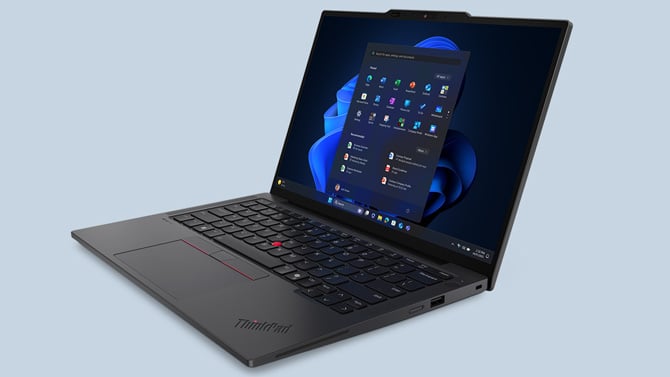
The ThinkPad X13 Gen 7, available starting this month at $1,499, is Lenovo's lightest ThinkPad ever made. The Intel version starts at 2.05 lbs; the AMD version at 2.10 lbs. To put that in perspective, a MacBook Air 13 M4 starts at 2.7 lbs. That's a meaningful difference if you're hauling a laptop through airports or across a campus every day.
But the weight alone isn't what makes the X13 Gen 7 worth paying attention to. What's more interesting is that Lenovo managed to build a laptop this thin and light – under 18mm at its thickest point – without doing what most manufacturers do at this size: soldering everything shut and making it essentially disposable.
The X13 Gen 7 earns a 9 out of 10 repairability score from iFixit, which is extraordinary for a premium thin-and-light. Five components are user-replaceable without voiding the warranty: the main and backup batteries, the SSD, the WWAN module, and the bottom panel of the laptop (the D cover). For most people, that means a failing battery or a full storage drive can be swapped out by a careful owner or a local tech, rather than requiring a manufacturer depot repair.
Both versions – the X13 Gen 7 with Intel Core Ultra Series 3 (up to the Ultra 7) and the X13 Gen 7 with AMD Ryzen AI PRO 400 Series – run the same NPU at up to 50 TOPS, qualify as Copilot+ PCs, max out at 64GB of LPDDR5x memory, and top out at 1TB of PCIe Gen 5 storage. The display is a 13-inch WUXGA IPS panel at 400 nits with 100% sRGB coverage, with an 87.8% screen-to-body ratio that makes it feel larger than the footprint suggests. Both support Wi-Fi 7 and optional 5G.
Surprisingly for such a thin and light laptop, Lenovo managed to get a solid lineup of ports onboard. Both the AMD and Intel models offer two Thunderbolt 4 ports, one USB-A 3.2 Gen 1, HDMI 2.1, and a 3.5mm audio jack.
The practical differences between the two versions are narrow. The Intel model is 23g lighter and ships with Intel Unison and Intel Connectivity Performance Suite preloaded. The AMD model uses RDNA 3.5 integrated graphics, compared with Intel Iris Xe, giving it a modest edge in GPU-intensive tasks. Neither version is going to replace a dedicated workstation, but for everyday business use, including video calls, document creation, and browser-based work, both are more than capable. Your choice will likely come down to brand preference or whether you're already invested in an Intel or AMD ecosystem.
The 5MP IR camera should easily handle Windows Hello face recognition and hold up well in video calls, backed by Lenovo's Clear Voice AI noise suppression. The keyboard has 1.5mm of travel with tactile markers on the home row keys, and the TrackPoint nub is still here for those who prefer it. The battery comes in 41Whr and 54.7Whr configurations, like the ThinkPad X13 Gen 6. While Lenovo doesn't publish a total-hours figure, the Gen 6 model clocked 23 hours in PC Labs’ Battery Rundown test. I expect we’ll see the same type of performance for the Gen 7
Where Lenovo has an advantage over most competitors at this price is the warranty program. Premier Support and Premier Support Plus both include next-business-day onsite service, meaning a technician comes to your home, office, or – and this matters for parents buying a laptop for a college student – your kid's dorm room. The previous-generation X13 carried Premier Support starting at $34.95 per year; expect similar pricing for the Gen 7 once it's listed.
The X13 Gen 7 is built for people who want a serious, long-lived work machine rather than something they'll cycle out in two years. The combination of a sub-kilogram chassis, excellent repairability, a comprehensive port selection, and affordable on-site warranty support is harder to find than it should be in this category, and Lenovo has put them all in the same box
The ThinkPad X13 Gen 7 is available later this month on Lenovo.com, starting at $1,499.
Read next: Googlebook is Google's answer to the MacBook. Here's what we know
[Image credit: Lenovo]

