

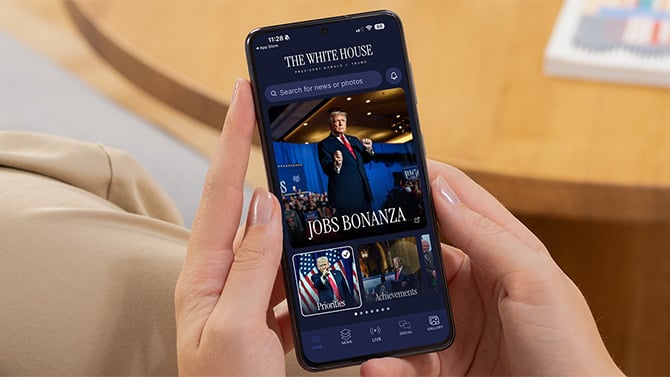
The Trump administration launched its official White House app on March 27 with the kind of buildup usually reserved for a product Apple has spent two years teasing. Cryptic social media posts. Pixelated images. Then: a free news app. The White House called it "the fastest, most powerful way to stay informed and engaged with the Trump Administration" and promised "unparalleled access."
What a security researcher found when he pulled the app apart suggests the administration spent more time on the marketing than on the code.
Web developer Thereallo decompiled the Android version of the app and published a detailed technical breakdown of what's running under the hood. The findings paint a picture of a government app built with the care and security standards of a rushed side project – one that injects code into third-party websites, relies on a random developer's personal GitHub account, and has location-tracking infrastructure sitting fully compiled and ready to switch on.
The app silently rewrites every website you open through it
When you tap a link inside the White House app, it opens in a built-in browser. Every time a page loads in that browser, the app automatically injects a snippet of JavaScript and CSS – code that hides cookie consent banners, GDPR privacy notices, login walls, signup prompts, upsell messages, and paywalls. The app also forces pages to remain scrollable even when a consent dialog would normally lock the screen until you respond.
To be clear about what this means: every website you visit through the app has its consent dialogs silently removed before you ever see the page. You're never asked whether you agree to that site's data practices, because the app has already made that choice for you by hiding the question entirely.
This isn't a minor UX convenience feature. Cookie consent dialogs exist because privacy laws, including U.S. state laws, require websites to give you a choice about how your data is handled. Stripping those dialogs doesn't just make browsing cleaner; it denies you a legal right. And circumventing paywalls means the U.S. government has built a tool that lets users access paid content without paying for it.
There is no mention of this behavior in the app's description, and there's no setting to turn it off.
GPS tracking is baked in
Headlines about this app have led with "it tracks your GPS every 4.5 minutes," which is technically accurate but missing important context.
The app uses OneSignal, a push notification and user engagement platform. OneSignal includes location-tracking code, and that code is fully compiled into the app – including GPS polling intervals of 4.5 minutes when the app is open and 9.5 minutes when it's running in the background. Location data (latitude, longitude, accuracy, and timestamp) would be sent to OneSignal's servers, not to government infrastructure.
Critically, the tracking is not running by default. Three things have to happen before it fires: the app's developers have to flip a server-side switch to enable it, you have to grant location permission when the app asks (and it will ask), and your device has to have a working location provider.
So: don't grant this app location permission. There's no reason a news app needs to know where you are, and given the infrastructure that's sitting ready to activate, there's no reason to make that easier.
Your data is going everywhere but the government
An app bearing the official White House seal runs almost entirely on third-party commercial infrastructure that the government doesn't control. Push notifications and user profiling run through OneSignal. Email signups go to Mailchimp. Images are served from Uploadcare, a Ukrainian content delivery service. YouTube embeds load their player code from a personal GitHub Pages site belonging to a developer in India. Social media widgets run JavaScript from Elfsight, a commercial widget platform.
The GitHub dependency is perhaps the most serious of these issues. If the India developer's GitHub account is compromised – through a phishing attack, a leaked password, anything – whoever takes it over can push arbitrary code that runs inside the White House app on every user's device. No government app should be loading executable code from a random person's personal hosting.
The app shipped in a half-finished state
Thereallo also found development artifacts that have no business being in a production release: a localhost URL pointing to a developer's test server, a developer's local IP address hardcoded in the app's string resources, and the full Expo development toolkit compiled into the release build. A component used only during development was also left exported in the app's manifest in a way that could be exploited.
These aren't security catastrophes on their own, but they signal that the app wasn't put through a serious pre-release review process. Basic quality control catches this stuff.
The app also has no certificate pinning, meaning that if you're on a compromised network – a sketchy public Wi-Fi hotspot, a corporate network with a tampered security certificate – traffic between the app and its servers could be intercepted. Using a VPN on public Wi-Fi reduces this risk, though it won't help on a corporate device where your employer controls the security certificates.
Should you download it?
If you're already getting White House updates through the web or social media, there's nothing here you can't get without the app. The content is pulled from whitehouse.gov via a WordPress backend, and most of it is publicly accessible without downloading anything.
If you do decide to download it, deny location permission when it asks. And be aware that anything you open through the app's built-in browser is being loaded through a layer of injected code designed to strip consent and privacy mechanisms from third-party sites. Use your phone's regular browser for anything you'd prefer to load normally. And if you're using public Wi-Fi, use a VPN.
An official government app should be held to a higher standard than this – not because government developers are infallible, but because the app asks for your trust and, in the case of the paywall and consent bypass, is actively making decisions on your behalf without disclosing that it's doing so. That's not "unparalleled access." That's just bad software shipped fast.
Read more: The best VPNs for protecting your privacy
[Image credit: screenshot via Suzanne Kantra/Techlicious, phone mockup via Canva]

