
In Partnership with MSI
We may earn commissions when you buy from links on our site. Why you can trust us.

MSI Raider 16 Max: The Gaming Laptop That Doubles as a Pro Workstation
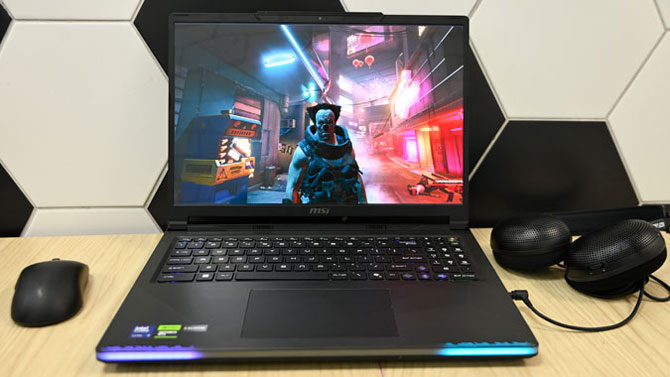
Over the course of my almost 20-year career, I’ve reviewed more than my fair share of laptops. And without a doubt, my favorite class of notebook is a gaming rig. They’re powerful, flashy, and let me game without hogging the TV for hours on end. But these days, a gaming laptop has to do more than let you run marathon sessions. It should also handle productivity, content creation, local AI, and more. And it doesn’t hurt if it looks good while doing it.
Enter the MSI Raider 16 Max, a gaming laptop that’s chock full with power by way of the top-of-the line Intel Core Ultra 200HX Plus processors and up to NVIDIA GeForce RTX 5090 graphics. A captivating 16-inch OLED display, great battery life, comfortable keyboard, and strong speakers only sweeten the pot. The result is a mobile gaming rig that can do it all with minimal sacrifice. It’s a perfect option for gamers, content creators, mobile professionals and people running local LLMs and AI agents.
Key Specs
The Raider 16 Max has several different configurations and price ranges to choose from. My review unit costs $2,099.99 ($2,999.99 MSRP) at Micro Center and has a 2.7-GHz Intel Core Ultra 9 290HX Plus processor with 32GB GB of RAM, a 1TB SSD, a Nvidia GeForce RTX 5070 Ti GPU with 12GB of VRAM, integrated Intel Graphics, and a 16-inch, 2560 x 1600 non-touch OLED display with a 240Hz refresh rate.
If you want even more graphical oomph Micro Center has the Max configured with 5080 and 5090 cards, but it will cost your $2,499.99 ($3,299.99) and $3,099.99 ($4.299.99), respectively.
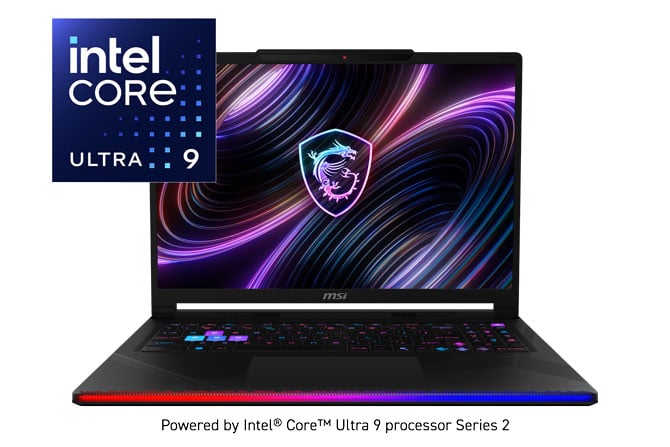
Design
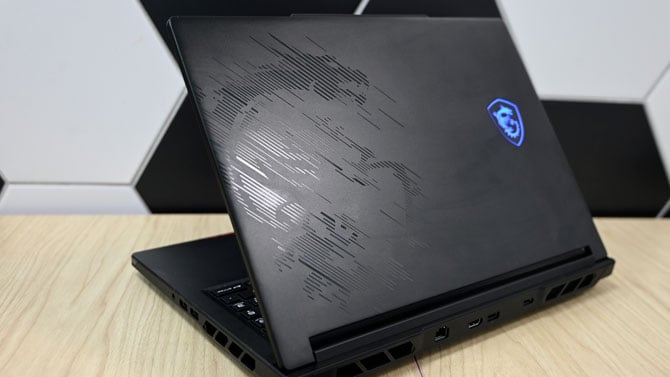
Gone are the days of aggressive angles with black and red coloring that screams “I’M A GAMER.” With its lighting disabled the Raider 16 Max could pass as your run-of-the-mill workstation. It can’t completely hide that gaming pedigree. Lucky, MSI’s dragon mascot, cuts a majestic profile on the right side of the lid. Created with a series of strategically placed embossed strips, it’s a stylish, eye-catching interpretation of the mascot. To the immediate left is the backlit MSI logo with the words Raider Max engraved closer to the bottom.
Depending on whether you’re in full gamer mode or incognito, opening the notebook will reveal a captivating light show by way of the light bar that extends the length of the keyboard deck. The RGB lighting doesn’t stop there, radiating outward from the center of the island-style keyboard in the default lighting mode. A large trackpad sits below in the palm rests which is adorned with several striped patterns. And directly below that sits a glowing customizable RGB light bar that flashes so prettily it’d put K.I.T.T. from Knight Rider to shame.
Held in place by a sturdy hinge, the display sits ensconced in some relatively slim bezels. A 1080p web webcam resides in the lip of the laptop lid ready for face recognition logins, video calls or some good old-fashioned streaming. Flip the laptop over and you’ll find the quick access maintenance panel held in place by two screws. It gives easy access to the RAM and SSD in case you want to upgrade either.
At 5.73 pounds, I’d primarily use the Raider as a desktop replacement system, especially as a New Yorker who has to seriously consider space in my apartment. But I also had no problem slipping the laptop’s 14.3 x 10.6 x 0.86~1.14-inch frame into my backpack and schlepping around the city.
Display and Audio
To date, there’s never been a time when I’ve poopooed an OLED display. And today is definitely not going to be the day. How can it be when the Raider 16 Max’s massive display produces stunning colors with deep contrast and sharp detail. Whether I was making my way through the neon-saturated streets of Cyberpunk 2077 or battling my way through verdant green forests and snowy fields in Black Myth Wukong, the 16-inch panel served up gorgeous vistas. Zooming in on the text of this review in Google Docs revealed smooth lines, which is always nice.
When I watched the trailer for the movie “Is God Is”, I couldn’t help but focus on actor Kara Young’s deep cerulean blue jacket against her warm bronze skin as her near platinum blonde braids swung wildly with frenetic energy. The views were just as good when I started gaming. The streets of Night City were a neo-Noir paradise awash in various shades of neon in Cyberpunk 2077. And after I managed to clear out a rather pesky nest of enemies in Black Myth: Wukong, I took some time to enjoy the verdant hills and snowy mountains.
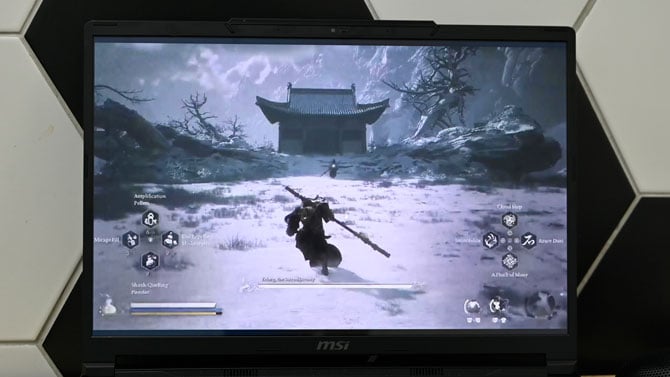
The Raider has a side-mounted speaker on both sides with a 2-watt speaker and woofer. Paired with the preinstalled Nahimic produces clear, balanced audio that’s loud enough to fill a small room in case you want to forgo headphones. I discovered that firing guns and explosives in Cyberpunk 2077 had a surprising amount of weight to them. Dialogue was clear, even amidst chaotic action scenes filled with the fast-paced soundtrack. I got similar results playing through Black Myth: Wukong, especially during the Headless Monk scenes where I heard the clear twang of the sanxian as his haunting melody healed The Destined One after a long, grueling battle.
In addition to its five audio presets (Music, Gaming, Movie, Communication, and Smart) the preinstalled utility also has surround sound, sound sharing – where you can connect two headphones, and sound tracker, which enhances softer audio like enemy footprints so you’re never taken by surprise. I found myself using the Gaming preset the most, but for those who want to take the guesswork out of their listening experience I suggest Smart as it automatically cycles between presets depending on the current content.
Ports and Connectivity
MSI outfitted the Max with just enough ports to function as both a gaming battlestation and a traditional work station. There’s three USB-A 3.2 Gen 2 ports with a pair of Thunderbolt 4 ports, HDMI 2.1, an SD card reader, a Gigabit Ethernet jack, and a headset jack. A Kensington lock slot is there as an anti-theft measure.
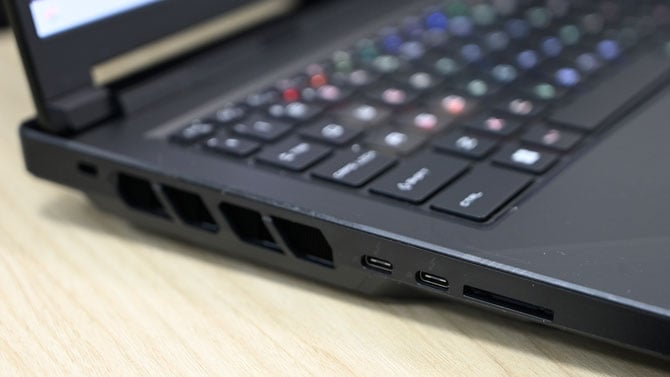
For Wi-Fi, you have an Intel Killer Wi-Fi 7 BE1750 chip with support for Bluetooth 5.4.
Keyboard and Usability
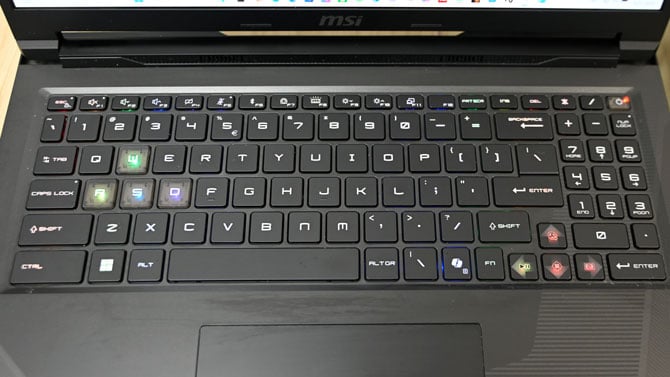
I really enjoyed typing on the Raider. Whether I was writing this review or playing Hades II, the keys were springy with a solid click when pressed. I easily hit my 70 word-per-minute average on the MonkeyType test. The keys are nice and big with generous spacing. The backlighting was bright enough to see in my darkened bedroom, especially with the RGB backlighting.
You can create your own custom backlighting on the per-key keyboard via the SteelSeries GG app. Or if you’re not feeling particularly creative, you can choose from one of the 22 presets or six effects. The app also offers 3D Aim Trainer which can help hone those twitch reflexes that are crucial for FPS games. There’s also Moments, which lets you quickly capture video for your greatest hits.
The trackpad is massive with good palm rejection and agile response for regular navigation and multitouch gestures. The bottom corners of the pad deploy with a firm, meaty click.
Webcam
I took some test shots with the Max’s 1080p webcam as well as took a few video conference calls. The stills were pretty accurate, capturing the red undertones in my skin along with the different colors in my locs. Details were sharp enough to catch some of the fine folds in the ruffles along the straps and neckline of my dress.
During the video calls, other participants reported clear, vivid images and loud clear audio thanks to the Hi-Res Dynaudio Array Microphone. Both the webcam and mic can definitely be used in a high-quality livestream setup.
Gaming
I threw a lot at the Max and its Nvidia GeForce RTX 5070 Ti, a GPU that sits firmly in the middle of Nvidia’s Blackwell lineup of chips. That means even if you’re gaming at native resolution with full ray tracing and Nvidia’s DLSS (Deep Learning Super Sampling), squeezing out every bit of graphical performance, you can expect high frame rates on the most demanding games. When I wasn’t working my way through Pragmata, I was putting the notebook through the wringer with some of my more heavy duty gaming benchmarks on my roster. But, try as I may, I couldn’t trip the Raider up. Instead, I didn’t see a frame rate result under 60 frames per second.
The Raider 16 Max was off to the races during the Cyberpunk 2077 benchmarking delivering 60 fps at 2560 x 1600 at Ultra. The frame rate jumped slightly to 62 fps with ray tracing and DLSS enabled. Dropping the resolution to 1920 x 1080 yielded more dramatic results at 142 fps and 80 fps (ray tracing and DLSS), respectively.
Running the benchmarks on Black Myth: Wukong was just as good. I saw frame rates of 104 fps on Cinematic (the highest game setting) at 1600p. Enabling ray tracing and DLSS boosted the result to 162 fps. At 1920 x 1200, I saw scores of 95 fps and 157 fps (ray tracing and DLSS).
I also saw great performance on the Hitman with an average 140 fps sans ray tracing and DLSS at 1600p at the highest settings. The frame rate jumped to 185 fps with everything enabled. And as expected, I saw higher results when I switched to 1200p. The regular run produced 159 fps while the DLSS version hit a whopping 262 fps.
And when you’re not working on anything that demands a discrete chip, the laptop can switch over to the integrated Intel graphics chip via a reboot via the MUX switch. Or you can choose MSHybrid Graphics Mode in MSI Center and the computer will switch between the two automatically.
Performance
My workload was not enough for the Core Ultra 9 CPU, and trust me I tried. I started with my usual loadout of 80 open Google Chrome tabs with its mix of G-Suite apps, social media, videos, and news sites. Then I started batch resizing a large cache of photos in Adobe Photoshop and encoding a 4K video from 4K to 1080p. There was a slight stutter when I started video encoding, but the Raider quickly righted the ship and pushed through like a hot knife through butter. And if you’re a heavy duty AI or LLM user, the Max can rise to the occasion with aplomb.
Content Creation
In addition to handling graphically demanding games, the 5070 Ti GPU is also just as capable with content creation tasks such as photo and video editing. While working on the review, I edited several 4K videos, cutting, adding sound tracks and graphics, and finally encoding from 4K to 1080p. The Raider worked nimbly, with the encoding for four 7-minute videos only taking 5 minutes and 28 seconds.
The Raider can also handle workstation applications like Auto CAD as well as music production. But if you need more power than default settings can provide, simply go into the MSI Center and select Extreme Performance in the User Scenario.
It’s been firmly established that the Max is more than capable of handling graphically demanding games. But how does it hold it up against productivity tasks? The answer is pretty well. The laptop’s Intel Core Ultra 9 290HX Plus processor sits at the top of Intel’s Arrow Lake Refresh mobile chip architecture. It’s designed specifically to handle gaming and workstation as it brings a level of desktop power to mobile systems, bridging the gap between the two.
The laptop took mere minutes to crunch through the SEO/GEO data in my spreadsheets along with calculating current and projected revenue. But something this powerful should be like catnip to accountants, data scientists, or anyone else that deals with large data sets.
AI Usage
AI is everywhere. You can even summon Microsoft's version via the Copilot key on the keyboard. Whenever you decide you're ready to ask Copilot, ChatGPT or Claude a question or run a local LLM, the Raider can provide the muscle. And the notebook can load those heavy LLM model without an internet connection so your data remains secure and private while cutting down on AI token usage.
AI model users can use LM Studio or Ollama for private, local LLMs directly on the Raider 16 Max. While creative professionals can utilize ComfyUI or FLUX.1 to assist with making images and concepts design. Or programs like Stable Diffusion can be used for large batch creative production projects with advanced diffusion workflows, essentially transforming the Raider into a one-stop shop of a creative studio.
But outside of chatbots, AI agents, and creative pursuits, the Raider 16 can also be used with robotics and AI development, placing it firmly into workstation territory. Using Nvidia Isaac Sim or ROS 2, engineers and developers can build and test systems and autonomous workflows on a portable, high-performance system. The Raider’s portability is a bonus as it allows workers to conduct sophisticated simulations and refine robotics code without relying on remote servers. It’s a solid solution for working on complex technical research and development on the go.
Battery Life
Usually most gaming laptops tend to falter at this section. Because let’s face it, all those high-powered specs can be murder on a battery. However, I was pleasantly surprised by the Raider 16 Max. With the brightness set to 50% the notebook lasted 5 hours and 38 minutes on the PCMark Productivity battery test which is a looping script of simulated web browsing, spreadsheets, social media, photo editing, and video conferencing.
The time was noticeably shorter when I ran the gaming iteration of the test with the Max tapping out at 3:48. It’s still a solid time for a gaming laptop.
Verdict
Don’t call it a gaming laptop. Or rather, don’t pigeon hole the MSI Raider 16 Max as just a gaming laptop. Look beyond the glittering light show and dragon motif and you have a powerful notebook capable of heavy multitasking, content creation, running local AI, and so much more. And yes, it can game like nobody’s business. This is the result of the pairing of high-end specs such as the Intel Core Ultra 9 290HX Plus CPU and the RTX 5070 Ti which fully earns the Raider the designation desktop replacement.
But let’s not forget the sprinkles on this power sundae. You’ve got a massive 16-inch OLED display that serves up beautiful colors and crisp detail. Next, you’ve got a solid pair of speakers, a great webcam, comfy, colorful keyboard, and a healthy assortment of ports. And then there’s the battery life that places the Raider at the top of the heap for a gaming laptop of this size. And for the specs, it’s one of the most affordable rigs in its class. Ultimately, if you’re looking for desktop power in a mobile chassis that can handle work, play and everything in between, at a reasonable price, the MSI Raider 16 Max is the way to go.
FAQ
Is the MSI Raider 16 Max suitable for professional productivity, content creation, and AI model users or is it strictly for gaming?
Yes. Thanks to its high-end specs, such as the Intel Core Ultra 9 290HX Plus processor and Nvidia GeForce RTX 5070 graphics card, the Raider 16 Max can handle heavy-duty productivity tasks as well as photo and video editing as well as AI agents and local LLMs.
How does the MSI Raider 16 Max perform in battery life for general productivity compared to gaming?
The Raider 16 Max has a longer battery life conducting general productivity tasks such as working on documents and spreadsheets or even running local AI compared to gaming. Most productivity tasks aren’t as demanding on the GPU as playing a game. If the notebook is in its default MSHybrid Graphics Mode in the MSI Center utility, the laptop will automatically switch between discrete or integrated graphics depending on the workload.
Does the MSI Raider 16 Max offer a sufficient variety of ports to function as a professional workstation?
Yes. Boasting three USB-A 3.2 Gen 2 ports, two Thunderbolt 4 ports, HDMI 2.1, and an SD card reader, the Raider 16 Max has more than enough ports to satisfy most workstation users.
Can you upgrade the MSI Raider 16 Max?
Yes. There’s an easy access maintenance hatch located on the bottom of the laptop. Remove the two screws and open the hatch to gain access to the RAM and SSD which can be swapped out.
How does the OLED display benefit creative professionals and gamers?
The 16-inch, QHD OLED display produces stunning, vivid colors with deep contrast and sharp detail. It’s a great choice for content creators searching for a color-accurate display for photo and video editing. For gamers, the screen provides eye-catching views that thanks to the display’s 240Hz refresh rate, image tearing and unsightly jaggies will be practically nonexistent.
Discussion 

I’m looking for a solid desktop replacement that can handle 4K rendering on the go. The display color accuracy looks promising on paper, but I’d love to see a deeper analysis of the DCI-P3 coverage.

Great review! The price point is a bit high, but the build quality and port selection seem to justify it for professional use.

From Tech Enthusiast on July 12, 2026 :: 9:17 am
The specs on this Raider 16 Max are incredible. How is the battery life when performing non-gaming tasks like video editing? Does the fans get too loud under heavy load?
Reply