

If you've ever sent a Snap to someone and noticed it never went through, or you suddenly can't see a friend's Stories anymore, you might be wondering if they quietly unadded you. I've been asked about this quite a bit, and the short answer is that Snapchat makes it pretty difficult to tell. There's no direct notification or alert to let you know about it, which is by design.
You do have several ways to figure it out, though. Some are quick checks, others take a bit more digging. I'd recommend checking at least two or three of these before jumping to conclusions, since no single method is foolproof. Pro tip: these methods can take a while to take effect, so I recommend closing the app, clearing it from memory, and reopening it to refresh the data. Logging out and back in again helps, too, so you can attempt that before you go through these methods.
And if you're concerned about looking like a stalker, Snapchat won't notify anyone that you've used these methods. So, there's no awkwardness from giving them a shot.
Signs that confirm you've been unadded on Snapchat
These methods are a sure way to confirm you have been unfriended. If you notice any of these signs, you’re no longer friends on Snapchat.
Look for the "Add" button in the chat
When you're friends with someone on Snapchat, you'll see voice and video call buttons at the top of your chat with them. If someone removes you, the call buttons are replaced with a blue "Add" button. This is a pretty hard-to-miss change, and is the quickest way to check if you’ve been removed.
- Open a chat conversation with the person.
- Look at the top of the chat screen, near their name.
- If you see a blue "Add" button where the call icons used to be, they've removed you as a friend.
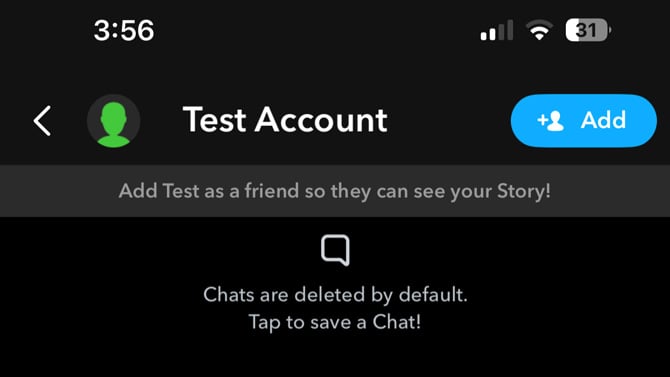
You might also notice that the camera icon next to their name on the Chat screen has changed to an "X" icon. That's another giveaway, and you can spot it without even opening the conversation.
Check their Snap Score
This is the method I’ve found to be the most reliable. Your Snap Score is only visible to mutual friends on Snapchat, and there's no way to hide it from specific people. So if you could see someone's score before, and now you can not, you're no longer on their friends list.
- Tap the Search icon at the top of the Snapchat screen.
- Type in the person's username.
- Tap on their profile when it appears.
- Look below their username for a number. That's their Snap Score.
Th Snap Score is a binary thing: either you see it, or you do not, which makes it such a solid indicator.
Search your Friends list
You can also go straight to your friends list and search for the person there. It's the most direct way to check.
- Tap your Bitmoji or profile icon in the top-left corner of the screen.
- Select "My Friends."
- Search for their username.
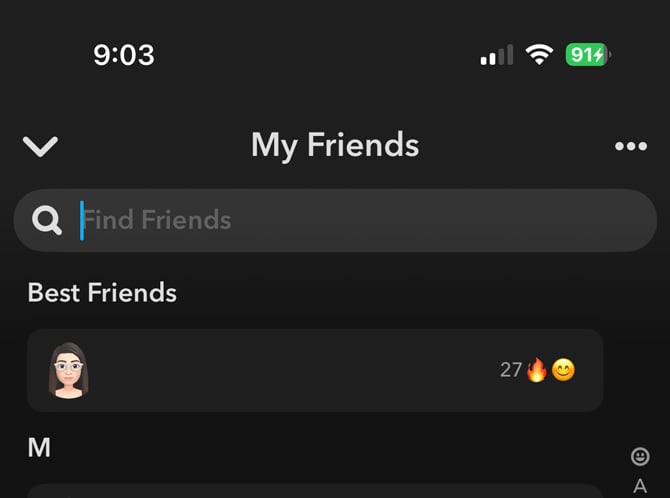
If the person doesn’t appear on this list, it’s possible they've unfriended you. Their profile might still show up in Snapchat's general search, though. That just means they have not blocked you, only removed you as a friend. There's a difference, which I'll get to in a moment (or you can jump down to unadded versus blocked section).
Other signs that might mean you've been unfriended
These methods point to clues that may or may not indicate that you’ve removed. As such, use them as additional verification instead of relying on these methods to confirm your removal from someone’s friends list.
Check for the gray arrow on Snapchat
If you send a Snap or a message to someone and see a grey arrow labeled "Pending" instead of the usual blue (chat) or red/purple (Snap) delivery arrow, that's a strong sign you've been unadded.
- Open Snapchat and click on the chat icon on the bottom bar to go to your Chat screen.
- Find the conversation with the person you're checking on.
- Send them a message or Snap.
Look at the status icon under their name. If it shows a grey arrow with "Pending," your message isn't being delivered.
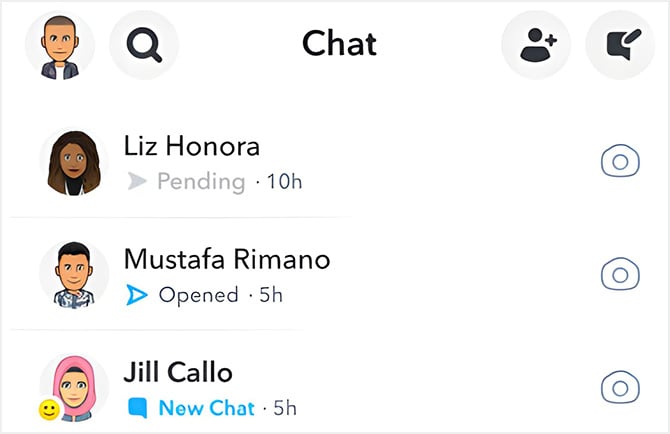
You might also see "Pending" if the person has their privacy settings set to receive messages from "Friends Only" and you were never friends to begin with, or if there's a temporary glitch (which I’ve actually had happen to me on numerous occasions). On the flip side, if the person who removed you has their "Contact Me" setting set to "Everyone," your message might still be delivered even though you're no longer friends. So this is a relatively strong clue, but I would not rely on it alone.
Check where their Stories appear
If the person posts Stories with their visibility set to "Everyone," you can still see them after being removed, but you won't find them in the same place. When you're friends, their Stories appear in the Friends section. Once you've been unfriended, you'll see them in the Following or Subscriptions section instead.
If their Stories are set to "Friends Only," they'll vanish from your feed. So a missing Story could mean you've been unadded, or it could just mean they haven't posted in a while.
Removed vs. blocked: How to tell the difference
Being removed as a friend versus being blocked are two different things on Snapchat, and you should know which one happened to you.
If someone removed you, you can still find their profile in search, send them a friend request, and send messages (though they'll show as Pending). You are not friends anymore, but you can still interact with their account. You'll see your saved messages and the chat thread in your list too, even though the status indicators change.
If someone blocked you, you won't be able to find them in search, you can not message them, and the conversation disappears from your Chat feed. If you think you've been blocked, ask a mutual friend to search for the person's profile. If your friend can find them but you can not, that confirms you've been blocked.
What to do if you've been unfriended
People clean up their friends lists for all sorts of reasons, and it's not always personal. A lot of users accumulate “adds” from Quick Add suggestions over the years and eventually decide to pare things down. Or, maybe your former friend mixed up your user name with someone else they wanted to unfriend. So, keep all of that in mind before reading too much into it.
If you've confirmed that someone did unfriend you, you can tap that "Add" button to send them a new friend request, or you can leave it be and focus on your other Snap friends.
Read More: What Every Snapchat Symbol Means
[Image credits: Snapchat, phone mockup via Canva]

