

Palash Volvoikar contributed to this article.
You can say a lot with a snapshot – and that’s the beauty of Snapchat. You can capture quick images or short videos, add captions or filters, and send them off to as many friends as you’d like. Because Snaps usually disappear after 24 hours, conversations feel faster and more spontaneous than on most social networks.
But Snapchat’s interface isn’t always obvious. The app uses dozens of emojis, arrows, dots, and icons to signal what’s happening in your chats, stories, and friend list. Some indicate message status, others show activity or relationships, and newer features like Snapchat+ and Snap Map have added even more symbols to decode.
If you’ve ever wondered what those arrows, hearts, dots, and stars mean, here’s a clear guide to every Snapchat symbol.
What do Snapchat icons mean?
Snapchat icons show the status of messages, relationships with friends, activity on the app, and special features. The main categories include:
- Friend emojis
- Message status icons (arrows and squares)
- Notification dots
- Story symbols
- Snap Map indicators
- Snapchat+ badges
Below is a complete breakdown of what each symbol means.
Snapchat friend emojis
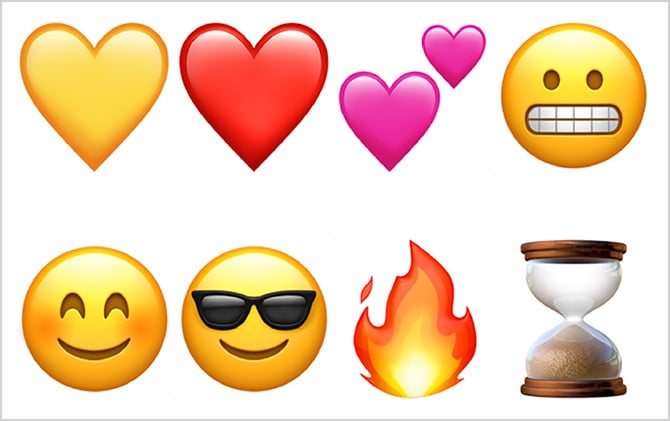
The emojis that show up next to your friends' names on your friends list aren't random – they say something specific about your relationship. This is what each one means:
- 💛 Yellow heart (Besties): You're #1 best friends with each other.
- ❤️ Red heart (BFF): You've been #1 best friends for two weeks.
- 💕 Pink hearts (Super BFF): You've been #1 best friends for two months.
- 😬 Grimacing face: You share a #1 best friend.
- 😊 Smiling face (BFs): You are best friends, but not #1 best friends.
- 😎 Sunglasses face: You share a best friend.
- ⭐ Gold star: Someone replayed this person's snaps.
- 👶 Baby: You just became friends.
- 🔥 Fire: You're on a Snapstreak.
- 💯 Hundred: 100-day Snapstreak milestone.
- ⌛ Hourglass: Your Snapstreak is about to end.
- 🎂 Cake: It’s your friend’s birthday.
Don't like the default emoji? You can customize them. To edit your friend emoji, just:
- Tap the profile icon in the top left to open your profile
- Tap the gear icon in the top right to open Settings
- Scroll down and select Manage under Additional Services
- Tap Friend Emojis and click on each friend's status to pick a custom emoji to use
Important note: Friend emojis update automatically based on your snap activity. If your friend emojis change unexpectedly – including losing BFF or Super BFF status – Snapchat Support won't be able to add, restore, or replace them for you.
Snapchat Snap and message status icons
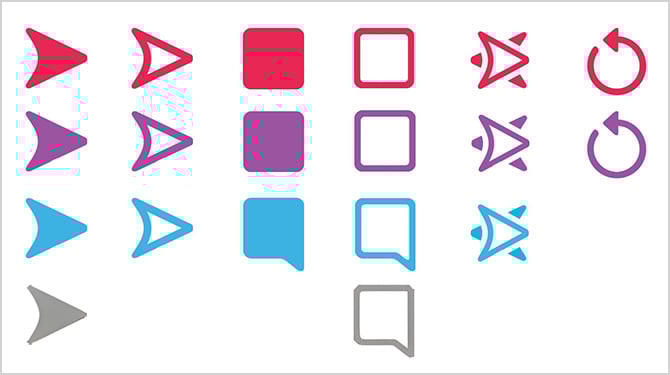
Snapchat uses colored arrows and shapes to show the status of Snaps and messages. The color tells you the type of message, while the shape shows what happened to it.
Red icons represent Snaps without audio. Purple icons represent Snaps with audio. Blue icons represent Chat messages. While gray icons represent an issue of some sort.
With shapes, solid arrows mean a sent item wasn't opened. Unfilled arrows mean a sent item was opened. A solid square means an item you received hasn't been opened. An unfilled square means an item you received has been opened. Double arrows mean someone took a screenshot of your Snap or Chat. While a circle arrow means an item you sent was replayed. Snapchat allows someone to replay a Snap once after opening it, and when they do, the circular arrow symbol appears to indicate the replay.
That's a lot of shapes and colors to remember, so it can be a little confusing. Putting those together for you, here is what every Snapchat symbol means:
- Red solid arrow: You sent a Snap without audio that hasn’t been opened
- Red unfilled arrow: Your friend opened your Snap without audio
- Red solid square: You received a Snap without audio
- Red unfilled square: You viewed a Snap without audio
- Red double arrows: A screenshot was taken of your Snap
- Red circle arrow: Someone replayed your Snap
- Purple solid arrow: You sent a Snap with audio that hasn’t been opened
- Purple unfilled arrow: Your Snap with audio was opened
- Purple solid square: You received a Snap with audio
- Purple unfilled square: You viewed a Snap with audio
- Purple double arrows: Someone took a screenshot
- Purple circle arrow: Someone replayed your Snap
- Blue solid arrow: You sent a chat message
- Blue unfilled arrow: Your message was opened
- Blue solid square:& You received a chat message
- Blue unfilled square: You read the chat message
- Blue double arrows: Someone screenshot the chat
- Gray arrow: Your message is pending, or the friend request hasn’t been accepted
- Gray square: A Snap or message expired before it was opened
Chat and messaging symbols
Beyond just sending messages, Snapchat has several indicators that show you what's happening in your conversations:
- Bitmoji peeking (bottom-left corner of the chat): Someone is currently viewing your chat. If you can see their full torso, they're actively looking at your chat screen or typing a message.
- Bitmoji holding phone (Snapchat+ only): Your friend is present in the chat but not currently typing.
- 📌 Pushpin icon: You've pinned this chat.
- 🌙 Moon icon: Do Not Disturb is enabled for this chat.
Notifications
Snapchat uses colored dots to alert you to new content, notifications, and when friends are actively online:
- Red dot: There's a notification or message waiting for you on your Bitmoji, Spotlight, or Stories icon. It can also indicate that there's a Snapchat memory to look at.
- Yellow dot: You have a new friend request, a friendship-related notification, or there's an available app update.
- Green dot: The person you're viewing is currently active on Snapchat. Keep in mind that users can disable this in their privacy settings with Ghost Mode, so the absence of a green dot doesn't guarantee someone is offline.
- Blue dot: You have an unread chat message.
- Purple dot: You have unread Stories.
Opening the related section clears the notification.
Story icons
Snapchat has icons that represent both controls for interacting with a Story and the privacy status of a given Story.
When you post a photo or video to a Story (or feed), it's usually visible to all of your friends, and they can share your Story. Snapchat also lets you control the privacy settings for each of your Stories. The specific privacy level is represented by a unique icon:
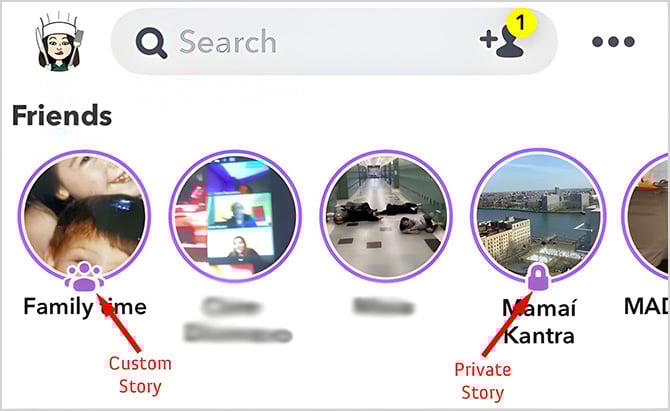
- Private Story (🔒 lock icon): A private Story is limited to your friends, whom you allow to view it, but not contribute to it. You know if you are viewing a private Story if you see a lock symbol on it. When the Stories are laid out on your Discover tab, you will see a lock on the bottom of each private story. If you are viewing them in succession, you will notice a small lock on the top left of the screen. You cannot see who else can view a private Story, and you cannot post to another person's private Story.
- Custom Story (👥 multi-person icon): This is a Story shared with a select group of friends who can both view and contribute to it. When Stories are laid out on your Discover tab, you'll see three dots at the bottom of each custom Story. If you're viewing them in succession, you'll notice three dots in the top-left corner of the screen. Contributors can view other contributing members and post their own content, but they can't add or remove friends from the Story.
- Public Story (no icon): This Story is visible to everyone.
- 👀 Rewatch indicator (Snapchat+ only): If you subscribe to Snapchat+, you'll see an eyes emoji with a number showing how many times people rewatched your story.
When you're viewing or managing Stories, you'll see several icons for interacting with them:
- 📷 Camera icon: Reply with a Snap.
- 💬 Chat bubble: View or send replies.
- ❤️ Heart: Save or bookmark the Story.
- 🔁 icon: Repost this snap.
- ➡️ Arrow: Share the Story.
- ⋮ Three dots: The more options menu lets you edit the Story, add/remove friends, rename it, or delete specific Snaps from the Story.
 Circle arrow with a play button inside: This shows your Story has been replayed.
Snap Map symbols and Bitmoji status
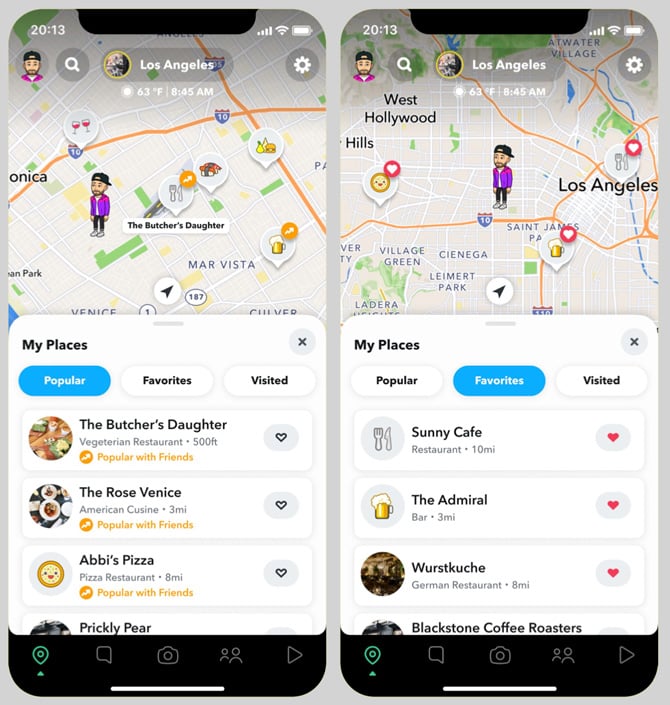
Your Bitmoji on Snap Map changes automatically based on your activity, location, time of day, and what Snapchat detects from your phone. Here's what the different indicators mean:
Activity indicators
- Blue dot next to Bitmoji: This person recently opened Snapchat
- Shrinking circle around Bitmoji: Their location isn't updating in real-time; this is their last known position
- Grey or faded Bitmoji: This person hasn't opened Snapchat in a while and is likely offline
- Bitmoji doesn’t appear: The user is in Ghost Mode (privacy setting enabled)
- Stars around your Bitmoji: You've been very active on Snap Map today
Automatic status changes (Actionmoji)
Your Bitmoji automatically updates to show what you're doing. Common ones include:
- Holding a phone (active in a voice call)
- At the gym or lifting weights (near a gym)
- On a plane or with luggage (at or near an airport)
- Sleeping in bed (nighttime, phone stationary)
- Driving a car (moving in a vehicle)
- Listening to music (headphones connected)
- At specific locations (coffee shop, beach, concert venue, etc.)
Special events
On your birthday, your Bitmoji celebrates with party hats, cake, and balloons. During special events or festivals, you might see purple or gold backgrounds.
These status updates typically last about four hours or until your activity changes. Some Snap Map features, like ghost trails that show where friends have traveled, are exclusive to Snapchat+ subscribers.
Snapstreaks
Snapstreaks show how many consecutive days you and a friend have sent Snaps to each other. Here are the symbols associated with them:
- 🔥 Fire emoji: You're on a Snapstreak! This shows up next to the number of consecutive days.
- 💯 Hundred emoji: You've hit a 100-day Snapstreak milestone. This appears next to the fire emoji.
- ⌛ Hourglass emoji: Your Snapstreak is about to end. Both you and your friend need to send a Snap within 24 hours to keep it going.
Restore Streak feature: If your Snapstreak ends, you might see a "Restore Streak" button or banner at the top of that chat for a limited time. You may also see a fire emoji button next to the chat that was on a streak. Tap it to recover your streak. This feature is only available shortly after a streak expires – if you don't see the fire button or restore option, it has been too long since the streak ended and you can’t bring it back.
Verified account emoji
Snapchat shows verified accounts with a gold star emoji (⭐) or badge on public profiles. If you see this next to a username on a public account, it confirms they're who they claim to be – typically celebrities, brands, or public figures.
Don't confuse this with: The black star (✪) next to regular users, which indicates a Snapchat+ subscriber, not a verified account.
Snapchat+ exclusive symbols
If you've noticed symbols that your friends don't seem to have, they might be Snapchat+ exclusive features. Here's what they mean:
- Black star badge (✪): This appears next to someone's name if they subscribe to Snapchat+. It's optional and can be disabled in settings, so not all subscribers will display it.
- Friend Solar System badges: When you tap on a Snapchat+ subscriber's profile, you might see special badges:
- "Best Friends" badge with gold ring: You're one of each other's eight closest friends. Tap it to see which planet you are in their solar system.
- "Friends" badge with gold ring: You're one of their eight closest friends, but they're not one of yours.
- Planet icons: Each planet represents your position on their Best Friends list (Mercury = #1 closest friend, Venus = #2, Earth = #3, and so on).
- 👀 Eyes emoji with number: If you're a Snapchat+ subscriber, you'll see this on your Stories, showing how many times people rewatched them. The number indicates the total number of rewatches, not the number of individual viewers.
- 📌 Pushpin icon: Snapchat+ users can pin a friend as their #1 Best Friend, overriding the algorithm.
Note: Some features, like the Friend Solar System, only work if both you and your friend have Snapchat+.
My AI symbols
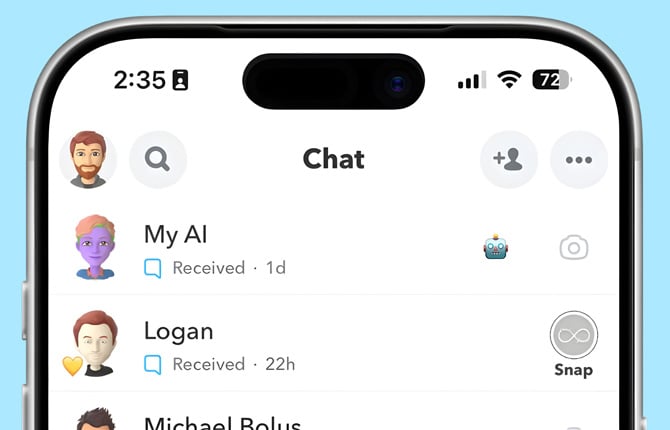
Snapchat's built-in AI chatbot has its own symbols you'll see:
- ✨ Sparkle icon: This appears next to AI-powered features, like the Extend tool that uses AI to make a Snap appear more zoomed out. You'll also see sparkles next to someone's name when you're in a group chat together.
- Robot avatar: My AI's default purple/blue profile icon, unless the user has customized it.
- Ghost with sparkles watermark: When you save an AI-generated image to your Camera Roll, Snapchat adds a translucent ghost logo with sparkles. This indicates the content was created using AI and doesn't depict real events. Removing this watermark violates Snapchat's Terms of Service.
What about the purple boxes next to my friends’ names?
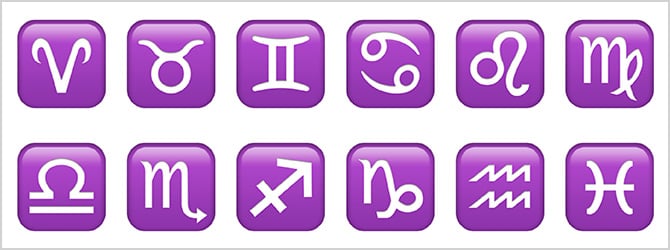
If your friend has entered a birthday in Snapchat, their zodiac sign usually shows up as a purple box – though depending on the system you're using, they may look a little different than the one above. As long as you realize what you're looking at, these icons give you an idea of when their birthday is, even if you don’t know the exact date. If it is your friend’s birthday, a birthday cake emoji will show up as well.
From left to right, top to bottom, the symbols above indicate Aries (March 21 – April 19), Taurus (April 20 – May 20), Gemini (May 21 – June 20), Cancer (June 21 – July 22), Leo (July 23 – Aug 22), Virgo (Aug 23 – Sept 22), Libra (Sept 23 – Oct 22), Scorpio (Oct 23 – Nov 21), Sagittarius (Nov 22 – Dec 21), Capricorn (Dec 22 – Jan 19), Aquarius (Jan 20 – Feb 18), and Pisces (Feb 19 – Mar 20).
[Image credit: Phone with Snapchat logo Suzanne Kantra/Techlicious via ChatGPT, Snapchat, Techlicious/Snapchat screenshot]


From Misty on April 11, 2023 :: 8:47 pm
Was wondering if anyone knows why my name in a chat with my friend turned green. Their name is still in blue like normal for me.
Reply