

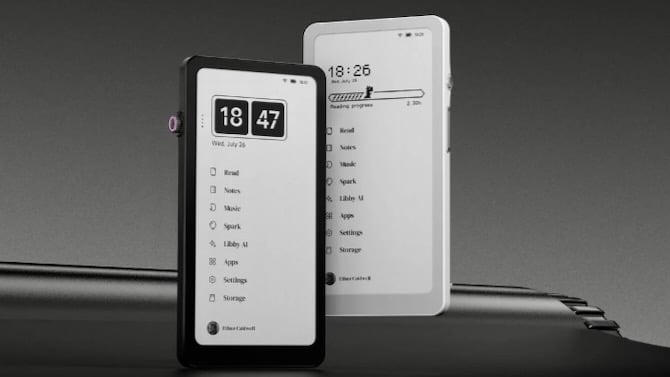
Is it an ereader, a smart notebook, or a cool little dictation device? For the DuRoBo Krono, the answer is: "Yes." But it’s so much more, without being too much. DuRoBo's team has created a device that goes heavy on productivity by stripping out all the colorful distractions that smartphones and tablets can bring. The Krono is an intriguing look at what the future of smart notebooks and e-ink devices could be.
It's available now for pre-order at $279, with shipping later this month. (DuRoBo hasn't specified exactly when.)
DuRoBo calls the Krono a “smart epaper focus hub” where you’ll capture all your ideas and take a break every now and then to curl up with a good book or listen to a podcast. There’s an eight-core processor with 6GB of RAM to ensure everything runs smoothly. And 128GB of onboard storage provides plenty of room for hundreds of books, voice notes, and podcasts. As with everything else these days, there’s a healthy sprinkling of AI in the mix to help keep things organized.
Read more: TCL Unveils a Paper-Like Tablet With AI Note-Taking Tools
But the first thing you’ll notice about the Krono is that sleek, minimalist design. The only embellishments on the device’s black or white soft-touch plastic frame are the company name stamped on the back and a series of lights along the raised circular band, or "Axis," that accommodates the multi-function Smart Dial. The knob is how you’ll navigate and interact with the widgets and apps on the device. It’s also how you’ll launch quick actions such as refreshing the screen or creating a voice memo. Buttons for power and volume, and a USB charging port are the only other external elements.
And while many ereaders and e-ink devices are beginning to embrace color, you won’t find any hues on the Krono’s 6.13-inch display. The 824 x 1648-pixel capacitive touch panel has adjustable front lights, so you’re not straining your eyes because the environment’s too bright or too dark.
Seeing as the Krono is an e-ink device, the urge to whip out a pen and start jotting down notes in earnest is real. But alas, the Krono doesn't offer pen support. You press the Smart Dial to enter voice record mode in the native Spark app. After you’re finished with your monologue, everything you said can be transcribed, edited, and summarized with Libby AI, DuRoBo’s artificial intelligence. Libby can also answer questions similarly to other popular AI chatbots.
Read more: This New $199 Tablet Feels Like Reading on Paper
Krono's Read app supports several popular ereader file types, including EPUB, MOBI, AZW3, and PDF. You can also download apps for formats such as Kindle and Google Books because the Krono runs an open version of Android with access to apps on the Google Play Store. You can download a myriad of apps, including many for note-taking, reading, podcasts, or music. That can’t be said for many ereaders or smart notebooks currently on the market, which use their own operating systems. (Although it's not certain if every Android app will work well on this device.)
I think my favorite thing about the Krono is its size. At 6.1 ounces and 6.06 x 3.15 x 0.35 inches, the Krono is on a par with a regular smartphone. I can just imagine sliding it out of my pocket and capturing all my pithy musings while I’m on the road or finishing a few of those books in my library. It could definitely help me cut down on doomscrolling.
[Image credit: DuRoBo]

