

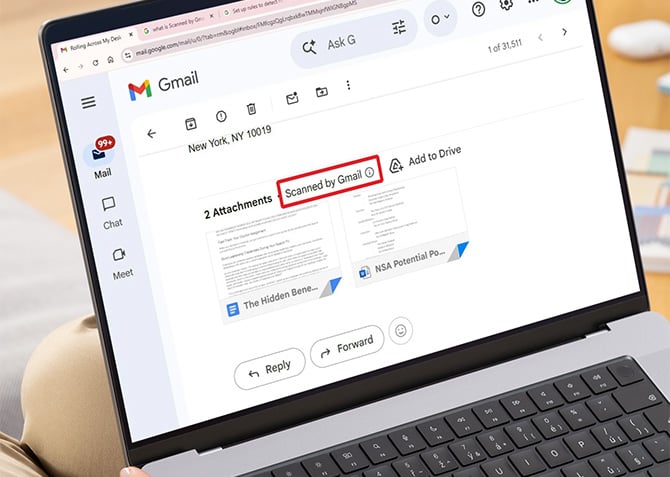
The little message that appears on Gmail attachments saying "Scanned by Gmail" is supposed to tell you the file is safe to open. It isn't, and it hasn't been for a while. Google knows about the problem and has no fix scheduled.
Security researcher Ben Ilkashi at Pentera Labs published findings on May 11 showing that attackers can route a malicious file directly to your Gmail inbox with that trusted label intact, even when Gmail's own scanner has already flagged the file as dangerous. Google confirmed the issue months ago. The research was filed through Google's Bug Hunters program on December 14, 2025, and on January 22, 2026, Google told Pentera that no fix timeline was available. The full technical write-up was released after the standard 90-day responsible disclosure period.
Here's how the bypass works. Gmail blocks certain file types from being sent as direct attachments, and when it detects a malicious file, it refuses to deliver it at all. The gap is in how Gmail treats files that come through Google Drive. Ilkashi found that a file Gmail explicitly flags as a virus can be uploaded to Google Drive and then shared with anyone via Gmail's built-in Drive sharing feature. When it arrives in the recipient's inbox, it carries the "Scanned by Gmail" label, visually indistinguishable from any other safe attachment. Gmail appears to extend automatic trust to files originating from within Google's own ecosystem, bypassing its standard verification steps entirely.
There's a second problem layered on top of that one. When you download a suspicious file directly from Google Drive, Drive normally displays a warning pop-up before the file lands on your device. Ilkashi found that when the same file is shared through Gmail's Drive integration, that warning disappears. You download it with no alert at all.
The proof of concept Ilkashi used was a crafted ransomware executable. In a demonstration, the file reached a test inbox stamped as scanned and downloaded without any safety warning. He noted the payload could be modified to execute a full attack chain using Google's own products as the delivery mechanism.
Google's response, provided to Forbes, was that Gmail "automatically blocks the vast majority of malicious files, including dangerous executable attachments, before they can ever reach an inbox," and that "this fundamental security boundary has not changed." That statement is technically accurate for direct email attachments. It sidesteps the Drive-routing issue entirely.
Until Google patches this, here's what you need to know. The "Scanned by Gmail" label on a Drive-shared file tells you nothing about whether the file is actually safe. Treat any unexpected Google Drive file share with the same skepticism you'd apply to an unsolicited email attachment from an unknown sender. Before opening any shared file, check whether you were actually expecting it, and whether you recognize the sender's full email address (not just the display name). If a file prompts a download immediately without a Drive preview, pause before clicking.
Windows Defender and macOS's built-in security tools scan files on download automatically, and in many cases will catch something malicious before it can execute. The complication here is that some security tools extend the same implicit trust to Google's servers that Gmail does. If you receive an unexpected Drive-shared file and you're not certain it's clean, upload it to VirusTotal before opening it. The service runs the file against dozens of antivirus engines simultaneously and takes about 30 seconds.
The irony here is that the attack works precisely because Google has trained billions of users to trust its safety labels. The more convincing the trust signal, the more useful it becomes as a lure.
[Image credit:screenshot via Techlicious, laptop mockup via Canva]

