

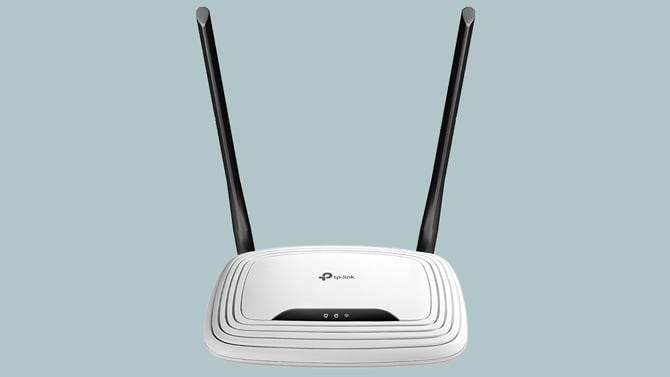
If you have a TP-Link or MikroTik router at home, Russian military hackers (GRU) may have quietly turned it into a surveillance tool. By changing a single setting on the router, they could see every password, email, and login token that passed through your home network, and you would have had no idea it was happening.
The FBI announced (PDF) on April 7 that they disrupted this operation, called Operation Masquerade, by remotely accessing compromised routers across the United States and undoing the damage. But the scope of the campaign is staggering: at its peak in December 2025, more than 18,000 devices across at least 120 countries were communicating with the attackers' infrastructure. In its research, Microsoft reported that if found more than 200 affected organizations and 5,000 compromised personal devices. Intelligence agencies from 16 additional countries joined forces on this advisory.
The GRU's attack compromised routers indiscriminately and then filtered stolen data for targets of intelligence value, primarily people connected to military, government, and critical infrastructure organizations. But every device on a compromised network was exposed, which means if you were checking your personal email on a hijacked network, your credentials were being collected regardless of whether you were a spy or a schoolteacher.
How the attack worked
Your router has a function called DNS (Domain Name System) that serves as a phone book for the internet. When you type "techlicious.com" into your browser, your router's DNS settings tell your device which server to contact. Normally, that setting points to your internet provider's DNS servers or a trusted alternative like Cloudflare or Google.
The Russian hackers exploited vulnerabilities in popular TP-Link and MikroTik routers to quietly swap out those legitimate DNS settings and replace them with servers the GRU controlled. The primary target was TP-Link's WR841N, one of the most widely sold budget routers in the world. That router has a known vulnerability that allows an attacker to extract the router's stored credentials without logging in at all, according to CISA, America’s Cyber Defense Agency.
Once the hackers controlled a router's DNS settings, those poisoned settings were automatically pushed to every device on the network through DHCP, including laptops, phones, and tablets. When someone on that network tried to reach Microsoft Outlook Web Access or other targeted services, the router silently redirected them to a fake version of the site controlled by Russian intelligence. That fake site sat between the user and the real service, capturing passwords, OAuth authentication tokens, and email content as it passed through. (Bleeping Computer has a great diagram.)
The only visible clue that something was wrong would have been a browser warning about an invalid security certificate, the kind of pop-up that most people dismiss without a second thought.
The FBI's response
The FBI obtained court authorization to remotely access compromised TP-Link routers in the United States and undo the damage. Agents sent commands to the routers that reset their DNS settings back to legitimate servers and blocked the method the GRU had been using to maintain access. The government says it tested the operation extensively before deploying it and confirmed that the cleanup did not affect the routers' normal operation or collect any user data.
This is the second time in recent years that the FBI has used court orders to remotely clean up compromised routers. In 2024, the bureau conducted a similar operation against a Chinese botnet that had hijacked hundreds of SOHO routers.
Here's the catch, though: most people will never know whether their router was one the FBI fixed. The FBI says it is working with internet service providers to notify affected users, but the agency hasn't said exactly how or when those notifications will go out, and ISPs haven't been specific about their plans either. There's no FBI lookup tool you can check.
Would a VPN have protected you?
In this specific attack, yes, a VPN would have made a real difference. A VPN creates an encrypted tunnel for all your internet traffic and routes your DNS requests through the VPN provider's own DNS servers, bypassing your router's DNS settings entirely. That means even if your router had been hijacked, a VPN would have prevented the GRU's fake DNS servers from redirecting your traffic to their phishing pages.
That said, a VPN is not a magic shield for every type of router compromise. It protects against DNS hijacking specifically because it takes the DNS lookup out of your router's hands. If an attacker had compromised your router in a different way, say by installing malware that intercepted traffic at a deeper level, a VPN alone might not be enough. Still, for the exact scenario described in this FBI alert, running a reputable VPN on your devices would have stopped the attack cold.
If you work from home and your employer provides a VPN for accessing company resources, make sure you're using it consistently. If you don't have a VPN, this is a good reason to consider one. We use and recommend Surfshark and NordVPN and, for a free option, Proton VPN.
What you should do right now
This incident is a wake-up call for anyone who set up a home router years ago and hasn't thought about it since. The advisory lists more than 20 TP-Link models that were targeted, including the Archer C5 and C7, the WDR3500, WDR3600, and WDR4300, the MR3420 and MR6400, and several variants of the WR740N, WR840N, WR841N, WR842N, WR845N, and WR941ND (see TP-Link’s Security Advisory for a full list). MikroTik routers were also compromised.
- First, figure out which router you have. Many people have no idea what brand or model their router is. If your internet provider gave you a combined modem/router box, the model name is usually printed on a label on the bottom or back of the device. If you bought your own router, the same applies. Look for a sticker that lists the manufacturer, model number, and hardware version. You can also log into your router's admin page (typically at 192.168.0.1 or 192.168.1.1 in your browser) and find the model information on the main status or dashboard screen.
- Check and update your router's firmware. While you're in the admin panel, look for a firmware update option. If your router hasn't been updated in over a year, it's almost certainly vulnerable to known exploits. Download firmware only from your router manufacturer's official website.
- Look at your DNS settings. In the admin panel of your router, check the DNS server addresses under your DHCP or network settings. They should be set to your ISP's default servers or a trusted public DNS like Cloudflare (1.1.1.1), Google (8.8.8.8), or Quad9 (9.9.9.9). If you see unfamiliar IP addresses there, your router may have been compromised.
- Change your router's admin password. If you're still using the default username and password that came with the router (often "admin/admin"), change it immediately. This is one of the easiest ways attackers gain access.
- Turn off remote management. Most home users don't need the ability to manage their router from outside the home network. If this feature is enabled, it gives attackers a direct path in. Disable it in your router's settings.
- Check whether your router has reached end-of-life. This is the step most people skip, and it's arguably the most important. An end-of-life router is one the manufacturer has stopped supporting with security patches, which means every new vulnerability that's discovered will remain unpatched forever. TP-Link maintains an end-of-life product list on its website, where you can search for your model number and hardware version. Other router manufacturers maintain similar lists on their support sites. If your router is on the list, no firmware update or password change will keep it secure long-term. It's time to replace it.
- Pay attention to certificate warnings. If your browser or email client shows a warning about an invalid or untrusted security certificate, do not ignore it. That warning may be the only sign that your traffic is being intercepted.
The bigger picture
The unassuming router sitting in your living room is now a target for nation-state espionage. Most people treat their router as an appliance they plug in once and forget, and that's exactly what makes these devices so attractive to attackers. They run 24/7, rarely get updated, and control everything about how your home network connects to the internet.
So, it is critical to examine the current state of your router security. If you believe your router has been compromised, the FBI asks that you report it to your local FBI field office or file a complaint at ic3.gov, including details about your router model and DHCP configuration.
[Image credit: Josh Kirschner/Techlicious]

