

Suzanne Kantra/Techlicious generated by ChatGPT
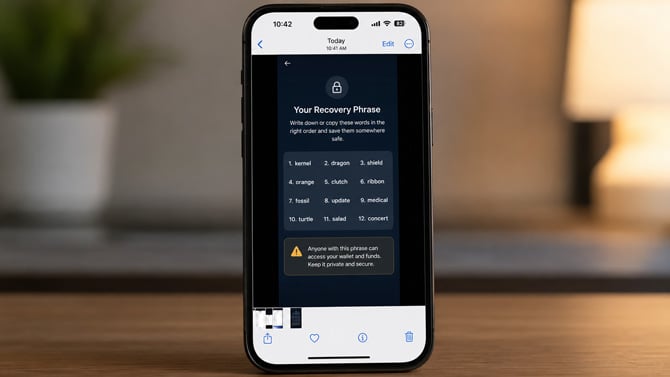
A malware family called SparkKitty is combing through photo galleries on iPhones and Android phones, looking for one specific thing: pictures of cryptocurrency wallet recovery phrases. A recovery phrase, also called a seed phrase, is the string of 12 or 24 words that unlocks a crypto wallet. Whoever has it can empty the wallet. SparkKitty finds that text using optical character recognition, the same technology that turns a scanned document into searchable text, then sends whatever it finds to servers controlled by attackers, according to Check Point.
Both major app stores allowed apps infected with the malware to be distributed. On iOS, it hid inside a cryptocurrency app called "币coin." On Android, it posed as a messaging and trading app called SOEX, which racked up more than 10,000 downloads on Google Play before it was pulled. Other versions have shown up in modified TikTok clones, gambling apps, and apps distributed outside the official stores altogether.
Once you install it and grant photo access, SparkKitty scans new and existing images in the background for seed phrases, passwords, and QR codes, then transmits whatever it finds along with basic device information. You never have to open the app again after that first install. The scanning just keeps running.
The malware's approach is successful because people treat their camera roll like a filing cabinet. A recovery phrase screenshot taken years ago (and, perhaps, long forgotten) is the prime target. SparkKitty is just automating what a thief with stolen access to your photos would do by hand.
So it's a smart idea to find those screenshots now. Delete any recovery phrase photos from your camera roll and your cloud backups, and move that information to a hardware wallet or a paper backup you keep somewhere physical, not digital. Check what permissions your installed apps already have, and revoke photo access from anything that doesn't need it. Before you install a new crypto, messaging, or trading app, stick to established names and skip anything sideloaded from outside the App Store or Google Play. And if a wallet's balance changes without explanation, disconnect the device from the network immediately, move whatever funds remain to a clean device, and change every related password.
There's no dedicated on-device scanner for SparkKitty yet. Watch for unfamiliar apps requesting broad photo access with no obvious reason, unexpected battery drain, or crypto funds moving on their own. Any one of those is worth acting on. And while the approach is currently being used specifically for crypto wallets, it wouldn't be surprising to see hackers modifying it to identify login backup images for email and other critical accounts.
Read next: The best antivirus apps for Android in 2026

