


Image credit: Suzanne Kantra/Techlicious generated by ChatGPT
Google Calendar just gave meeting organizers a way to stop the pileup of RSVP emails every time a guest accepts, declines, or marks themselves tentative on a calendar invite. Google's newly launched meeting setting turns those notifications off without hiding anyone's response in the event itself.
The setting is a checkbox labeled "Get an email when guests respond." It's on by default, so Calendar will keep operating as normal if you do nothing. Uncheck it, and the meeting organizer stops getting notified when a guest responds – including those annoying automatic out-of-office and vacation-responder replies.
For a recurring meeting, the setting applies to the entire series, not a single occurrence. Guest responses still show directly on the event in Calendar, so you can see who accepted or declined.
The feature will be available for all Workspace editions, Workspace Individual subscribers, and personal Google Accounts. If you use Google Workspace, there is no admin control for the feature, so every organizer manages it individually rather than an org-wide default.
Google didn't specify which Calendar clients (web, Android, iOS) show the toggle at launch. If you don't see it yet, check again after the next app update. The rollout itself is also staggered, with some people seeing it now and most after September 10, 2026 (It's not appearing in our personal or Workspace calendars yet).
Read more: The Google Calendar setting that could put you at risk
How to turn off RSVP emails in Google Calendar
- Open the event you organized in Google Calendar.
- Locate the checkbox labeled "Get an email when guests respond."
- Uncheck it.
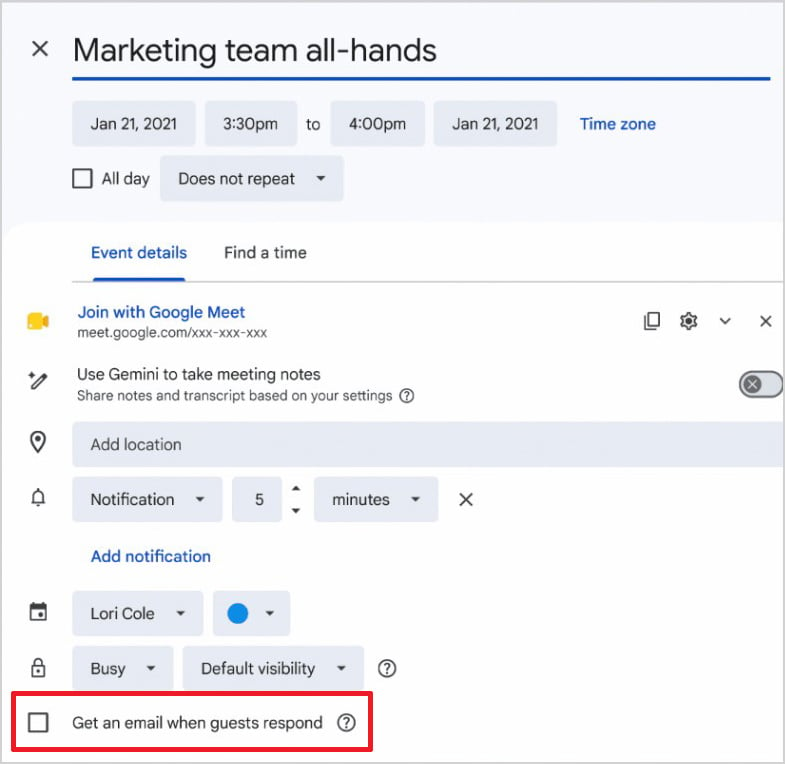
Image credit: Google

