

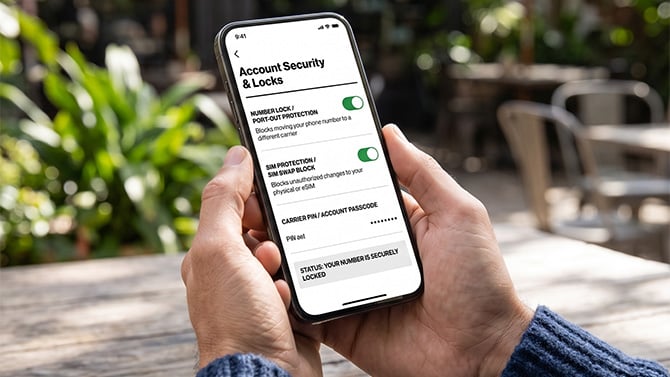
Generated with Google Gemini
In a SIM swap, a scammer takes over your phone number to intercept your calls and texts, including the security codes your bank, email, and social media accounts use to confirm it's you. From there, they can reset your passwords and walk straight into your accounts. Your phone number, not your password, becomes the master key.
It's a serious threat, though not a common one. The FBI's Internet Crime Complaint Center logged 982 SIM-swap reports and about $26 million in losses in 2024, according to its 2024 Internet Crime Report. The encouraging part is that all three major U.S. carriers now offer free tools to lock your number down, partly because the FCC started requiring stronger protections in 2023, under its rules on SIM swap and port-out fraud. Let me walk you through how a SIM swap works and how to shut the door on one before it happens.
How a SIM swap works
SIM swapping doesn't require you to do anything wrong. You can keep a perfect grip on your own security and still end up a victim, because the weak link is the carrier, not you. A scammer gains control of your number by convincing your cell carrier that they're you and asking to move the number to a new phone, the same way you would when upgrading. Sometimes they bribe an employee at a carrier store to do it. Either way, the scammer doesn't have to hack anything. The carrier does the work for them.
Once your number lands on their SIM, your phone goes dark, and theirs starts receiving your calls and texts. That's when they trigger password resets on your important accounts and type in the codes as they arrive.
Lock your number using your carrier's app
This is the single most effective step, and it didn't exist when SIM swapping first made headlines. Each major carrier now lets you put a free lock on your line that blocks anyone, including the carrier's own staff, from moving your number to a new SIM or another carrier until you turn the lock off yourself. If you do one thing from this article, make it this.
Carrier app menus change often, so if a setting name below doesn't match what you see, check the carrier's security or account settings page for the closest equivalent.
Lock your SIM on AT&T
- Open the AT&T app.
- Tap the person icon.
- Scroll to Wireless Account Lock and switch it on.
On a standard postpaid account, it's a single master switch that covers every line and device, and it blocks SIM swaps, number transfers, and billing changes, even from inside an AT&T store. (On AT&T Prepaid, the path runs through Profile & Settings > Account Info & Preferences, and you lock one number at a time.) AT&T rolled this out to all customers in 2025.
Lock your SIM on Verizon
- Open the My Verizon app.
- Go to Account > Profile and settings > Security settings.
- Turn on Number Lock (blocks moving your number to another carrier).
- Turn on SIM Protection (blocks SIM card changes). Repeat for each line on your account.
Lock your SIM on T-Mobile
For T-Mobile, you need two features, since they cover different attacks.
- Open the T-Life app and go to Manage (the person icon) > [your phone line].
- For SIM Protection, scroll down, select SIM Protection, and toggle on SIM Protection.
- For Account Takeover, scroll down and select Device details > Manage add-ons and data, and turn on Port Out Protection in the Line-level service section.
SIM Protection on its own won't stop a port-out; you need both features turned on.
Turning these on takes about a minute, and it doesn't stop you from upgrading your own phone later. You just switch the lock off when you actually want to make a change, then switch it back on.
Set a carrier PIN or passcode for your account
On top of the lock, every carrier lets you add a PIN or passcode that you have to provide before anyone can make account changes. It's a second layer, and it's the thing that trips up a scammer trying to sweet-talk a call center rep. Store it in a password manager so you don't forget it.
- AT&T: Go to Settings > Passcode.
- Verizon: Go to Me > Profile & settings > Security > Account PIN
- T-Mobile: Go to Manage > Settings (cog icon) > Security > T-Mobile ID and then PIN/Passcode (only available to the primary account holder).
Move off SMS two-factor where you can
SIM swapping does so much damage because so many accounts still verify you with a text message. If you move your most important logins, your bank and your email especially, to one of our top picks for an authenticator app, Ente Auth or Proton Authenticator, a stolen phone number can't intercept those codes. The code lives on your device, not on your phone number. Not every service offers this yet, but the ones that matter most usually do. This step protects your accounts directly, so even if someone does grab your number, there's far less they can do with it.
Read more: Our complete guide to two-factor authentication
Warning signs you've been SIM swapped
The clearest sign is your phone suddenly losing service for no reason, showing "SOS only" or "No Service" when you're somewhere with normal coverage. You might also stop getting calls and texts, or get an unexpected notice that your SIM or number was changed. If your phone goes dark and a reboot doesn't fix it, don't just assume it's a network glitch. Treat it as a possible swap and move quickly.
What to do if you are SIM swapped
If you think you've been swapped, and losing all service is the big tell, call your carrier right away, from another phone if you have to. They can confirm whether your number was moved to a new SIM and reverse it. Once that's done, check your accounts for damage and change your passwords and security questions. Start with your email, since that's the account a scammer uses to reset everything else, then move to your bank and anything financial.
Read More: How to Tell if Your Phone Has Been Cloned or SIM Swapped
FAQ
Is SIM swapping common?
Not especially. The FBI logged fewer than 1,000 reported SIM-swap cases in 2024, but the losses per victim can be severe since attackers use it to drain bank accounts and take over email.
Can I be SIM swapped without doing anything wrong?
Yes. The scam targets your carrier, not you directly, so strong passwords and careful browsing habits won't stop it. Locking your SIM through your carrier's app is the step that actually blocks it.

