

Last night, I saw a pop-up on my Google Pixel 9 phone. I clicked to authorize the install, and it was cranking for at least half an hour. This December update is a biggie, with new features for Pixel owners and a lot of security patches for everyone running Android 13 and later: Google lists 107 updates in its release notes. Many patches are just described with baffling number-and-letter codes, which are not very helpful, but the security updates are detailed and generally a bit scary. (Malwarebytes provides more understandable descriptions than Google's very technical pages.)
This is an update you don't want to put off once it's available for your Android phone or tablet. Google's bulletin warns that two of the Framework bugs are already under "limited, targeted exploitation," and there's also a separate critical remote denial-of-service flaw. To get a sense of the seriousness, here are some examples:
- Critical remote DoS in Framework: A bug that can let a remote attacker crash or render your device unusable, using a denial of service (DoS) attack.
- Information-disclosure in Framework: A flaw that can let a malicious, installed app read sensitive data it shouldn't see; Google says this one is already targeted for exploitation.
- Elevation-of-privilege in Framework: This bug can let a malicious app gain higher privileges and execute arbitrary code.
Supported Pixel phones typically get these patches first and will keep nudging you to install. For other Android brands, the picture is murkier. For example, Samsung has announced a December security package that includes 57 of Google's fixes plus Samsung-specific fixes, while marking some of the rest as "not applicable" to Galaxy devices.
Read more: Android 16 Rolls Out Top-Level Security for Everyone
Android updates aren't universal because not all devices run the same type of Android. For instance, the latest Samsung phones run One UI 8, and OnePlus phones run OxygenOS 16. Both are based on Android 16. So, Google can fix a flaw, but your phone or tablet only gets the patch when your manufacturer ships it for their OS. Some models get updates quickly. For others, it's slower, and some older models may not get them at all. The availability of updates depends as much on the device maker as on Google.
While exactly which phones and tablets get which patches, and when, depends on the manufacturer, it's worth checking to see if there is a patch. And when you're prompted to update, don't put it off.
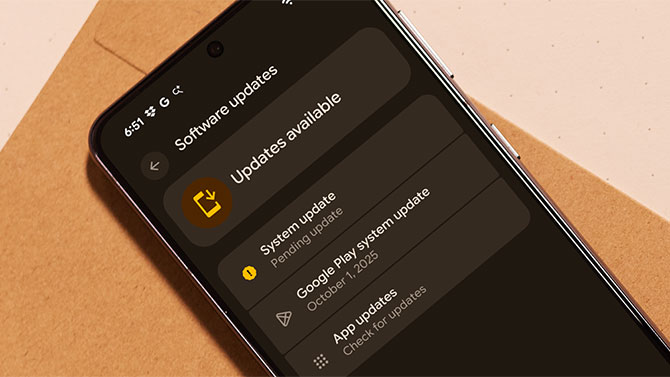
Here are general instructions for some of the leading phone brands. They may vary a bit by model and operating system version. These also provide general guidelines for other vendors.
Google Pixel: Go to Settings > System > Software (or System) updates.
Samsung: Settings > Software update > Download and install (enable "Auto download over Wi-Fi" to get patches automatically).
Motorola: Settings > System > Advanced > System updates > Check for updates.
OnePlus: Settings > System & update > Software update > Check for updates / Download & Install.
Read more: How to Remove Any Virus from an Android Phone in 4 Steps
[Image credit: Screenshot via Techlicious, phone mockup via Canva]
















From Rich Moser on December 03, 2025 :: 3:19 pm
107?!?! Seriously? This is the problem with the capitalist system. I’m not saying there’s a better one, but when a product is rushed to market so fast that nobody really checks to see if there are major issues with it—just to raise stock prices initially—then we have a real problem. I never buy first-run versions of anything, especially digital things. And I wait for product reviews to tell me what people are experiencing with an item before I decide whether to buy it.
Reply