

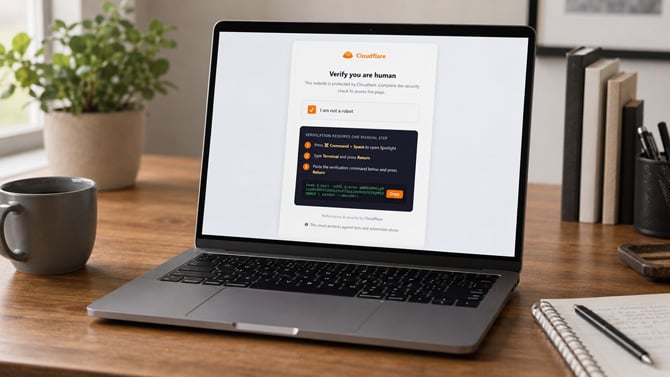
Suzanne Kantra/Techlicious generated by ChatGPT
Security researchers at Group-IB have identified a new strain of Mac malware that locks victims out of every application on their computer until they type in their password, then uses that access to drain browser logins, cryptocurrency wallets, and password manager vaults. The malware, which Group-IB named ClickLock Stealer, has already been discovered in at least 33 countries since May, and it doesn't need a software bug or special privileges to work. It just needs you, the victim, to follow its instructions.
Group-IB hasn't directly observed the webpage that delivers ClickLock, but the malware's design strongly points to a technique called ClickFix. In ClickFix attacks, a fake webpage, often dressed up as a Cloudflare "verify you are human" check, tells the visitor to open the Terminal app and paste in a command to prove they aren't a bot. Terminal is the program on a Mac that lets someone type commands directly to the operating system, bypassing its usual point-and-click interface.
Once a victim pastes and runs that command, the infection begins immediately. An orchestrating script hides the Terminal cursor, disables the keyboard shortcut a victim would normally use to cancel it, and displays a fake loading animation that cycles through messages like "Verifying you are not a bot" and "Collecting browser signals." While that animation plays, the script downloads four separate components in the background: a credential stealer, a Keychain stealer, a cryptocurrency wallet stealer, and a backdoor installer.
The script's first move is a fake password prompt, styled to look identical to a real macOS system dialog right down to a downloaded Apple logo. If the victim types a password, ClickLock checks it against the Mac's own login system to confirm it's the right one, then sends it to the attacker over Telegram. If the victim clicks cancel instead, the malware doesn't give up. It installs itself to launch automatically the next time the Mac starts, then begins killing every visible application, including Finder, the Dock, and even Activity Monitor until the password is entered.
Group-IB says Activity Monitor and Terminal are targeted deliberately, since those are the two apps a victim would normally use to investigate or stop what's happening. The malware also disables macOS's Notification Center for about six hours at a stretch, keeping any Gatekeeper or security alerts from appearing on screen while it works.
Once a password is captured, a second module goes after Chrome's Safe Storage key, the encryption key Chrome and Chromium-based browsers like Brave and Edge use to protect every password, cookie, and autofill entry saved locally. To get it, the malware has to trigger a genuine Keychain prompt (Keychain being the encrypted vault where macOS stores saved passwords and Wi-Fi credentials) and get the victim to approve it. This module runs its own lockout loop while it waits, repeatedly killing apps until that approval happens.
A separate module built specifically for cryptocurrency targets 31 different wallet browser extensions in total, including MetaMask, Coinbase Wallet, Phantom, and Trust Wallet, plus desktop wallet apps like Exodus and Electrum, extracting both wallet files and plaintext blockchain addresses across six different networks. The same sweep collects saved logins from password manager extensions including 1Password, LastPass, Bitwarden, and Dashlane, along with shell command history and saved FTP server credentials. Group-IB only documents active vault decryption for the wallets, not the password managers. The risk runs through the Mac login password itself. Many password manager users unlock their vault with that same system password or a Touch ID tied to it, so a stolen Mac password can work as a key into the manager even without its encryption being cracked directly.
The malware also collects a fingerprint of each infected machine, including its username, macOS version, processor, memory, storage size, and public IP address, and sends that along with the stolen credentials.
ClickLock isn't the only Mac-targeted stealer using this approach. Malwarebytes documented a related campaign in March called Infiniti Stealer, which used the same ClickFix delivery method paired with a fake CAPTCHA page and a Python based stealer compiled to look like a native Mac application, specifically to dodge detection tools. Microsoft has separately tracked copycat ClickFix pages impersonating Anthropic's Claude Code documentation and Mac disk cleaning utilities.
Group-IB pointed out that Mac malware has historically had to work harder than Windows malware to succeed, since macOS's Gatekeeper, System Integrity Protection, and mandatory code-signing requirements typically demand either an exploit or elevated access to get anything installed. Both ClickLock and Infiniti Stealer both sidestep that entirely.
What to do if you encounter the ClickLock malware
No legitimate verification system, whether from Cloudflare, Google, or anyone else, will ever ask a visitor to open Terminal and paste in a command. If your Mac suddenly starts closing every open application and a password prompt is the only thing left on screen, don't type anything into it. Hold the power button to force a shutdown, then restart while holding Shift to boot into Safe Mode before investigating further. Anyone who thinks they already ran a ClickFix command should treat every password, cookie, and crypto wallet key stored on that Mac as compromised and change them from a separate device.
The built-in redundancy features make ClickLock difficult to fully clear off a Mac. For most Mac owners without security training, wiping the drive and reinstalling macOS from scratch is the most reliable way to be certain every trace of the backdoor is gone.
To secure your password manager, regenerate the account's Secret Key, deauthorize the infected laptop, and change your account password, all from a separate, clean device.
How to factory reset your Mac to remove the malware
To factory reset your Mac, you'll need to restart it in Recovery Mode.
For Macs with Apple chips: Press and hold the power button again. As you continue to hold it, your Mac turns on and loads startup options. When you see “Loading startup options” or the Options icon, release the power button. Click on "Options" and then "Continue."
For Macs with Intel chips: Press and release the power button to turn on your Mac, then immediately press and hold these two keys on your keyboard: Command (⌘) and R. Keep holding them until you see an Apple logo or spinning globe.
Once you see the Recovery window, use Disk Utility to erase the hard drive, and then reinstall macOS. Once completed, your Mac will restart to the Setup Assistant, ready to be configured as a new machine. Follow the steps to set up your Mac from a prior backup.
If you installed the malware and entered your Mac's local password, assume that all passwords you have saved in your web browser's password manager, Apple Keychain, and Apple Passwords have been compromised. Change the passwords for all important accounts and turn on two-factor authentication (2FA) on accounts if you haven't already.
Our top pick for password managers is 1Password, which is easy to use and will flag weak passwords, breached sites, and accounts missing two-factor authentication. It also has a built-in authenticator that generates Time-based One-Time Passwords (TOTP), so you can use it for 2FA on sites that support authenticator apps. If a site doesn't support authenticator apps, check out my recommendations for which 2FA method is the safest to protect your account.
Read next: FTC warns that fake CAPTCHAs are installing malware on Macs and Windows PCs

