

Palash Volvoikar/Techlicious, composited with Canva
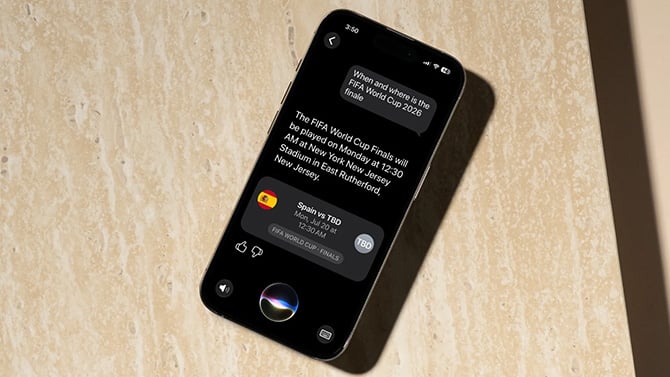
Apple released the iOS 27 public beta on July 13, and the big draw is a much smarter Siri built on the next generation of Apple Intelligence. I've been running it since day one of the beta on my iPhone 17 Pro, and I'm now on the developer beta 3, which is identical to the public beta 1 that Apple just released. I've tested every version of iOS since iOS 4, so I've sat through plenty of rough early builds. For most people, I recommend waiting for the stable release this fall.
Read More: Apple's much smarter Siri AI is finally here
What you get with iOS 27
Siri is the star, and I'll get to it. Apple is also promising some big speed gains, with apps launching up to 30% faster, new photos appearing up to 70% faster, and AirDrop up to 80% faster. Safari can sort your tabs into topics and watch webpages for changes. Photos picks up smarter editing tools, including one that recomposes a shot after you've taken it. Screen Time got a redesign, and the Liquid Glass look from iOS 26 gets some polish too.
The new Siri is the reason to be tempted
So Siri is finally good. It follows context across a conversation and answers the way you'd expect a capable AI assistant to, which puts it roughly on par with what Google has offered for a while. That's a big shift from the Siri we've all been ignoring for years.
Where it stumbles is in controlling your phone. I asked it to pull up my email, and because I use the Gmail app, it didn't work. Siri only reaches into Apple's own Mail app, so if you live in Gmail like I do, a lot of its mail tricks don't apply yet. The smarter Siri and the other Apple Intelligence features also need an iPhone 15 Pro or newer.
Apple said you'll be able to swap in Claude, Gemini, or Grok as the model behind Siri instead of ChatGPT. In this build, only the ChatGPT extension shows up in Settings (with the default backend for the heavy requests being Gemini as previously revealed). I use Claude, so I'm still waiting on that one. If you want the background on why a third-party model for Siri matters, we dug into why Apple's Gemini-powered Siri could finally be useful. Gemini is doing good work here, but I still want to see how a swap to Claude for the heavy background lifting would work.
It still feels like a beta (of course)
Bugs are expected from a beta. Some of my app icons have vanished, and I've hit general slowdowns here and there. App open times have felt slower to me, but I won't call that a verdict, since a beta installed over all your existing apps tends to be a bit messy and the final version may behave differently. Photography has been inconsistent, sometimes quick and sometimes much slower.
Battery life took the biggest hit for me. Apple Intelligence features like notification summaries draw more power, and I felt it much more because I'd turned that stuff off on iOS 26 after it didn't win me over. It's solid enough now that the tradeoff might be worth it on the stable release. On the beta, there's likely even more running in the background, so your battery pays for it. Rolling back to stable iOS 26 is a pain too, with no clean, easy way off once you're on. You can roll back if you absolutely need to, but the process requires you to plug your phone into a computer, and comes with the further hassles of setting up your iPhone afresh.
So should you install the iOS 27 beta?
If you're an enthusiast who doesn't mind the rough edges, or you've got a spare iPhone that isn't doing much, you should go ahead and enjoy the early look. For everyone else, I'd recommend waiting, the same as I would with any beta. A beta comes with no guarantees, and you could leave your only phone half-broken for some of the apps you rely on.
Palash Volvoikar/Techlicious
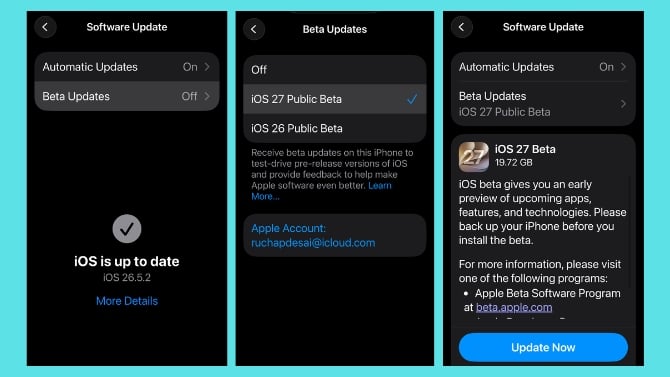
If you're set on it, back up your iPhone first and make it an archived backup, so it won't get overwritten automatically. Then enroll at Apple's Beta Software Program site by signing up with your iCloud ID. Once done, on your iPhone, open Settings > General > Software Update > Beta Updates, and pick iOS 27 Public Beta. You will then see the iOS 27 beta appear under your software updates, where you can choose to install it.

