

A recent Google Consumer Survey commissioned by Lookout, a mobile security company, found that one in three people have looked at another person's phone without their permission. Of those admitted peepers, 40 percent checked out their spouse or significant other’s phone and 10 percent browsed a co-worker’s phone.
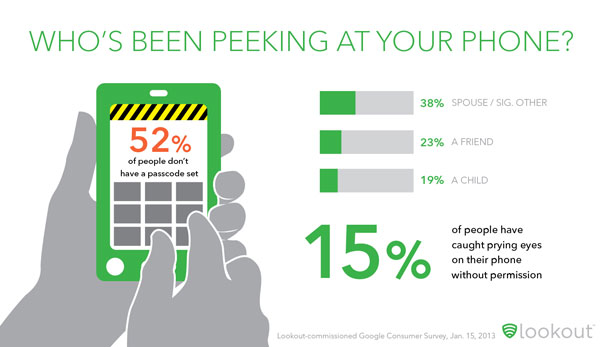
What do they look at? Men tend to look at photos while women check out texts, emails and recent calls. But what are people most concerned about? The number one is a fear of a phone thief accessing their financial information. Here are the top privacy concerns:
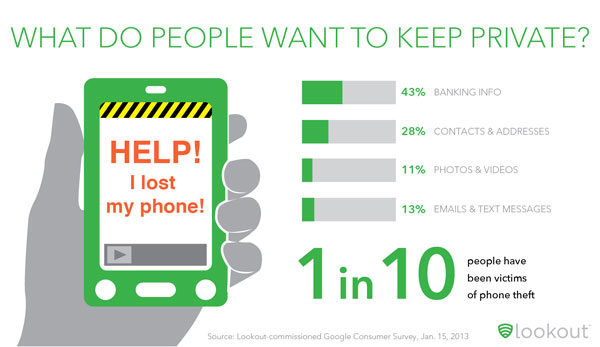
The easiest way to prevent someone from spying on your phone is to put a passcode on your phone and use your phone's recovery app to locate your phone and wipe the data if your phone is stolen.
But what if you just want to find out if someone’s been snooping? There are apps for that too and, not surprisingly, Lookout has one. The company’s Lookout Security & Antivirus for Android (free on Google Play) was just updated with new free feature called Lock Cam. If someone enters the lock screen password incorrectly three times, Lock Cam silently takes a picture and emails it to you, along with the device’s location.
The standalone app GotYa! Face trap! ($1.99 on Google Play) provides the same functionality with a few bells and whistles. The app can be controlled from another phone via text message—even turned on, if you’re like me and have kids who are constantly trying to unlock your phone. You also have more control over how many failed log-in attempts are permitted before it starts taking photos and tracking location.
For iOS device owners, the available option for whole phone access isn’t quite as robust. You can go with Best Phone Security Pro ($0.99 in iTunes) if you’re looking to trap a peeper. You have to set the alarm each time and the apps is motion sensitive, so you’ll trigger the alarm when you pick up the phone as well. Inputting the correct passcode will deactivate the alarm and the app will only capture a photo and location information if the passcode is input incorrectly.
Otherwise, consider an app like NQ Vault (free on iTunes and Google Play), which locks up your photos, videos and messages. For iOS devices, a $0.99 in-app purchase of Break-In Monitor will let you set the app to capture a photo of anyone who enters an incorrect passcode. For Android, you’ll need to subscribe to the premium version for $2.99 per month for Break-In Monitor, a hidden Vault for your files and cloud-based secure file backup.


From Jeffrey Deutsch on January 28, 2013 :: 4:58 pm
Very good listing - thank you!
I also highly recommend Cerberus. It’s very reasonably priced - a one-time payment of €2.99 (as of now, just over $4) to protect up to five Android devices.
Also, Lookout is a great deal for free. And of course there are other great security apps out there.
Thanks, and keep up the good work!
Jeff Deutsch
PS: Is there any way you can adjust the comment field so that in case of an error (such as if the word verification has changed since we started and thus the word we input no longer works), when we go back to the comment field we still have our original comment waiting and won’t have to re-type it?
Reply