

Is your keychain or wallet weighed down by customer loyalty cards? Use a loyalty card app on your cell phone to store them instead.
Adding your loyalty cards into the apps is a simple process—you either take a picture of the card or manually enter the bar code number. The latter usually has better results if there’s an option.
When you go to use your card, you simply pull up the picture of your loyalty card’s bar code and the clerk scans it. Not all establishments will accept a digital copy of their card and not all scanners will work well with your phone’s display, so be sure to bring your physical card the first time you try it .
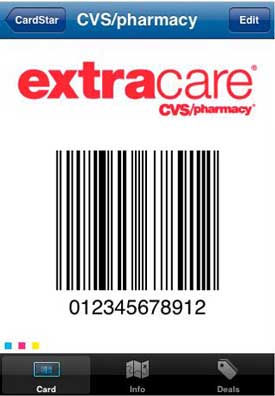 CardStar (free)
Basic app that lets you store loyalty card bar codes and information. Available for iPhone on iTunes and on Android and Blackberry at CardStar.com.
Key Ring (free)
Basic app that lets you store loyalty card bar codes and information. Available for Android on your phone's Android Marketplace.
MyDigiWallet (free)
Basic app that lets you store loyalty card bar codes and information. Available for BlackBerry on BlackBerry Appworld.
LoyaltyCard ($1.99)
When you use your card for the first time at a store, the app registers your location. Next time you go, LoyaltyCard will pull up the card automatically. Available for iPhone on iTunes.
CheckOut (free)
Not only does this application organize loyalty cards, it also stores gift cards. You can then track when you’ve redeemed the value of the card. Available for iPhone on iTunes.



From Matt Kaplan on February 24, 2010 :: 3:44 pm
Just wrote a blog post related to this topic.
http://conflictedbrain.com/2010/02/24/smart-loyalty-programs-are-no-brainers/
Reply