

Suzanne Kantra/Techlicious generated by ChatGPT
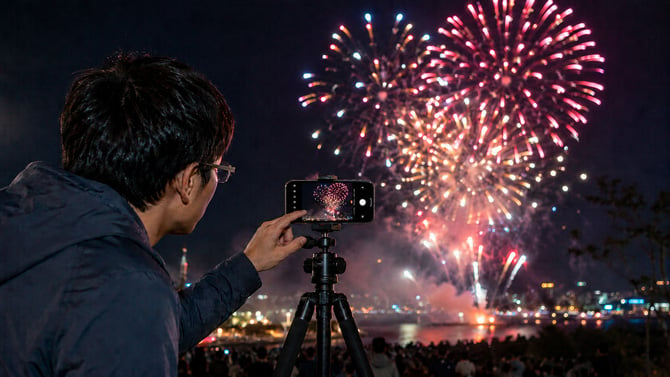
I live in New York City, where the 4th of July means fireworks in every direction – some official, some definitely not. From our apartment, I mostly see the neighborhood displays, which can start with no warning and disappear just as quickly. So I’ve learned to set up my phone before I hear the first boom. A few simple settings and a tripod make the difference between blurry bursts and fireworks photos you’ll actually want to keep.
1. Stabilize your phone to minimize camera shake
Fireworks are easiest to photograph when your phone stays perfectly still. Because the camera keeps the shutter open long enough to capture the burst, even a small movement can create motion blur. For sharper shots, I recommend securing your phone on a tripod or another stable surface and using a Bluetooth remote to take photos without tapping the screen and accidentally shaking the phone.
If you want a small tripod that you can adjust for uneven ground, I like JOBY’s products, including their latest model, the JOBY PodZilla ($39.99). It has flexible arms that can wrap around trees and poles or stand on the ground, plus small suction cups on the arms for gripping smooth surfaces. I also recommend the TONEOF 68” Tripod ($26.49, usually $29.99), which we use at Techlicious for shooting videos. It’s lightweight and easy to set up if you have a flat surface to put it on, and it comes with a Bluetooth remote control.
If you just need a Bluetooth remote, the Xenov Shutterbug ($18.99) is my pick. It checks all the right boxes: a light to let you know it’s paired, a physical on/off switch so you don’t run down the battery, and a hand strap.
2. Turn off the flash in your camera app
Your phone’s flash will not light up fireworks hundreds of feet away. At best, it does nothing; at worst, it lights up smoke, people, or nearby objects and throws off the shot. Turn it off before the show starts.
Look for the lightning-bolt icon in the Camera app. On newer Samsung Galaxy phones running One UI 7 or later, you may need to tap the Quick controls icon first, then tap Flash and choose Flash Off.
3. Lock focus and exposure on the sky
By default, your phone’s camera automatically tries to find something to focus on. With fireworks, that often means a dark, mostly empty sky while you wait for the next burst. When the sky does light up, autofocus may hunt, shift focus, or react too late. Before the show starts, frame the part of the sky where the fireworks will appear, then lock focus on that area.
On an iPhone, open the Camera app, and press and hold on the sky until you see AE/AF Lock. This locks focus and exposure for the shot. After the first few fireworks go off, check your photo. If the bursts look washed out or too bright, tap and hold to lock focus again, then lower the exposure slightly before taking more shots. On iPhone 16 models and later, you can also use Camera Control to lock focus and exposure: go to Settings > Camera > Camera Control and turn on “Lock Focus and Exposure.” Then, in the Camera app, lightly press and hold Camera Control until you see AE/AF Lock. Keep your finger on Camera Control to maintain the lock.
For iPhone users who want an easy way to capture fireworks with light trails, the NightCap Camera app ($2.99) offers a Light Trails mode designed for moving lights. Once you’ve turned on Light Trails, use a tripod, set focus on the sky, and tap the shutter button to start and stop capturing the photo.
On a Google Pixel, use the Pixel Camera app to tap where the fireworks will appear and use the Lock control when it appears to hold focus and exposure. After the first burst, adjust exposure only if the fireworks look blown out. On supported Pixel Pro models, Pro Controls let you manually adjust focus, shutter speed, and ISO.
For Samsung Galaxy and other Android phones, I recommend downloading and installing the free Open Camera app instead of using your preloaded camera app. It offers exposure lock, infinity focus, and other manual controls.
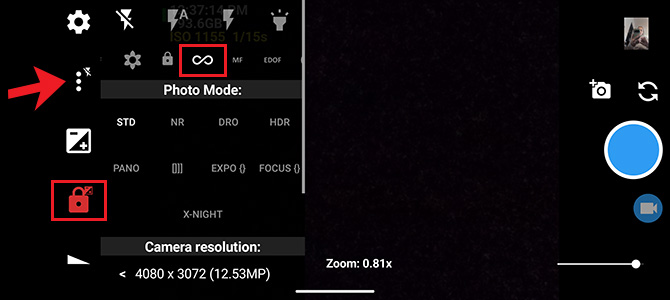
The Open Camera app is easy to set up for fireworks. The padlock icon gives you exposure lock. Tapping the triple dots next to the flash icon (lightning bolt) opens additional features, including infinity focus.
Suzanne Kantra/Techlicious
If you're an advanced photographer, some Galaxy models have a Pro mode for adjusting settings such as ISO, shutter speed, exposure value, manual focus, and white balance. Exact controls vary by Galaxy model and One UI version, so check your Camera app before the fireworks begin.
4. Test your setup before the fireworks start
Set up your phone while there is still some light, make sure the tripod is stable, and pair your Bluetooth remote if you have one. Open your camera app, set the AE/AF lock, turn off the flash, and then take a few test shots of the sky or distant lights. You do not want to spend the best part of the show, as I have in years past, hunting through menus.
Updated on 7/3/2026 with new products and tips for current model phones.


From PhotoEnthusiast on July 12, 2026 :: 9:18 am
Would you recommend using a tripod for smartphones, or is hand-holding sufficient if I use the night mode settings?
Reply