

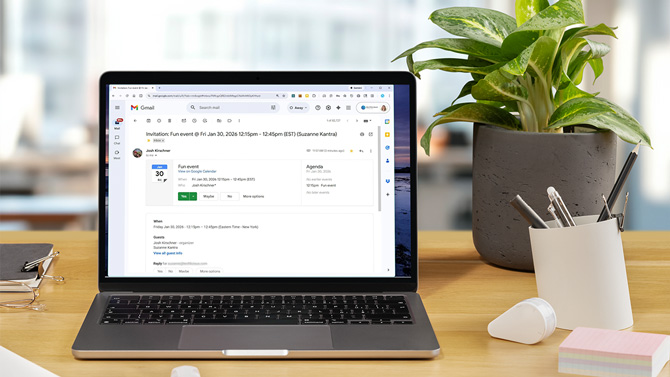
Researchers recently uncovered – and Google quickly fixed – a vulnerability that allowed a malicious Google Calendar invite to influence how Gemini responded to a person’s questions. The specific flaw is patched. The bigger issue is not.
This episode highlights something all of us should be concerned about: the growing risk created when our apps automatically trust incoming information and then feed that information directly into AI tools that are designed to read, summarize, and act on our personal data.
In this circumstance, two common app features that we think of as “conveniences” were co-opted to create a very inconvenient security risk.
The first is something most of us barely think about anymore. Google Calendar often places invites directly onto our schedule as soon as they arrive. That’s why flight confirmations, ticket bookings, work meetings, and random event invites magically appear on our calendar without us doing anything. It’s so normal that I get peeved when a website doesn't offer it.
The second is Google’s expanding integration of Gemini across Gmail, Calendar, and other services. With features like message summaries and schedule overviews – and now its new “Personal Intelligence” initiative – Gemini can, with permission, read across your Gmail, Photos, Search history, YouTube activity, and eventually more services to tailor its answers to you.
Researchers at Miggo Security showed how those two conveniences can combine into a serious security problem. If a malicious calendar invite gets automatically added to your schedule via an email from hackers, Gemini will read the text fields inside that invite when reviewing your appointments. And those text fields can contain hidden prompt-injection instructions designed to manipulate Gemini into recommending a scam website, fake meeting links, or other misleading information when you interact with it.
Read more: Chrome's New AI Can Shop and Log In for You – Should You Let It?
Google says it has closed this particular barn door, but the access of AI to our digital lives is likely to open more. In fact, Microsoft recently patched a similar prompt-injection issue in Copilot. As Google deepens Gemini’s reach, Microsoft expands Copilot, ChatGPT integrates more apps, and Apple builds its own AI features on top of connected services, more of our personal data is being fed into systems that weren’t originally designed to treat that data as potentially hostile.
How to protect yourself
Most people assume calendar invites, emails, and shared documents are passive content. AI systems don’t see them that way. They see text to interpret, summarize, and act on. That changes the threat model.
You don’t need to abandon Gemini or Google Calendar. But you do want to be more intentional about what gets automatic trust.
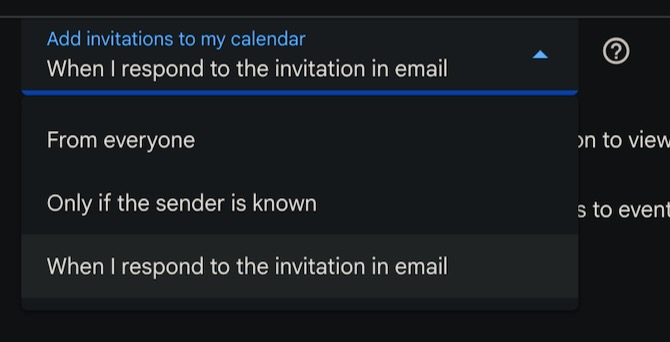
In Google Calendar’s web settings, you can change how invitations are added so they don’t automatically appear unless you respond to them. This prevents unknown or malicious invites from silently landing on your schedule. (These instructions are for the web-based versions of each.)
Disable auto-accept for Google Calendar
Open Google Calendar on the web. Click the gear icon and then "Settings." Select "Event settings" and scroll to "Add invitations to my calendar." Click the dropdown and select "When I respond to invitations in email" for the best security.
Disconnect Gemini from apps
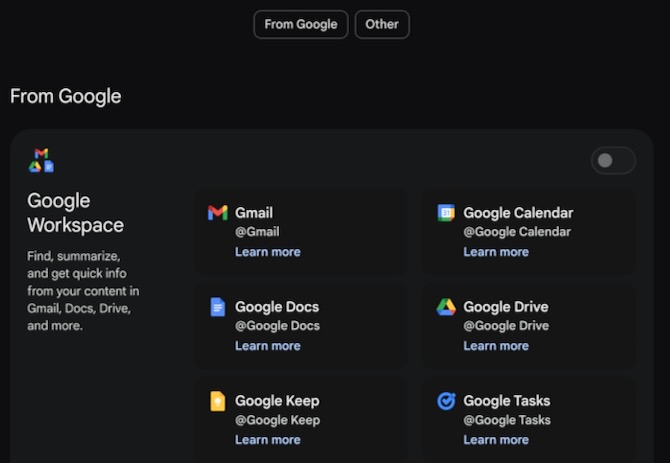
Google provides a page that shows which apps Gemini can read from. If you’re not comfortable with Gemini reading your Calendar, Gmail, or other services, you can turn those connections off. With app access disabled, Gemini no longer pulls information from those sources. This reduces Gemini’s usefulness as an assistant, but if you’re not using it, there’s not much point in giving it access.
To see what Google services Gemini has access to, go to your Gemini Apps page. If you have a Gemini account (free or paid), this will show all the apps Gemini currently does or could access if enabled – from Google and third parties. Toggle on or off whatever you feel comfortable with, including Calendar. If all app access is disabled, Gemini is not reading data from those services.
[Image credit: Screenshots by Sean Captain/Techlicious, laptop mockup via Canva]

