

With additional reporting by Palash Volvoikar
Blocking of spam callers has gotten better, with all major carriers implementing STIR/SHAKEN (more on that below) and other methods of preventing spam calls before they ever ring on your phone. But even with the newest technologies, it is clear from comments from our readers and my own experience that plenty of spam callers are still getting through. And if you do not answer those calls, they will fill up your mailbox with sketchy messages about your car warranty or vacation club offers.
Unfortunately, preventing spam callers from leaving a voicemail on your cell phone can be tricky. I have researched the options from each carrier and tested a number of call-blocking apps to see what really works. Here are the best solutions I have found for blocking spam calls and voicemails directly through your phone, via your carrier, or a third-party app, and the features and limitations of each method.
Blocking spam voicemail on iPhones
Direct blocking numbers – not great
To block a specific number on your iPhone, go to the Recent Calls tab in the Phone app and tap the "i" icon next to the number you want to block. If the number is in your Contacts list, you can open that contact's page in the Contacts app instead. From the contact page, scroll to the bottom and tap Block This Caller.
This method has two drawbacks, though. First, someone has to call you in order to block the number. And since spammers rarely use the same number or use the "neighborhood spoofing" technique (where they use your area code and three-number prefix), this will not block the majority of spam calls you get. Second, those blocked calls still go to voicemail, though these voicemails show up in a "Blocked Messages" folder at the bottom of your list of voicemails and you will not get a notification.
Silence unknown callers – a better option
A more effective option is to silence all unknown callers, meaning anyone not in your Contacts, your recent outgoing calls, or Siri Suggestions. You can turn this on by going to Settings > Apps > Phone > Silence (under Screen Unknown Callers). When it is enabled, your iPhone will not ring for unknown numbers. The calls will still show up in your recent calls list and callers can still leave voicemail.
What makes this more useful now is Live Voicemail, which Apple introduced a couple of years ago. When an unknown caller goes to voicemail, your iPhone transcribes their message in real time right on your lock screen. You can read what they are saying as they say it, and if it turns out to be a legitimate call, you can tap to pick up mid-message. If it is spam, you just let it go.
Call screening on iOS 26 – the best option
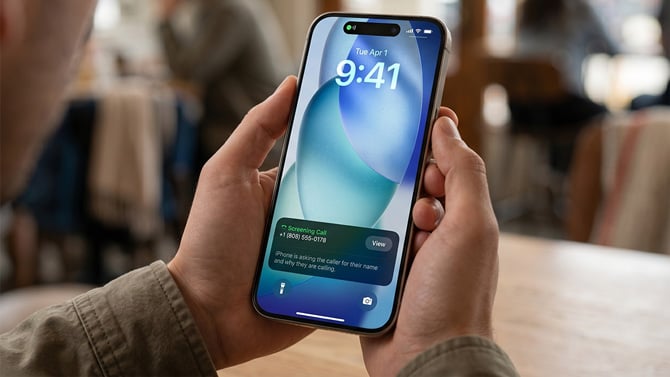
If you are running iOS 26, there is an even more effective option. Apple has added call screening that works a lot like what Google Pixel phones have offered for years and can completely prevent spam voicemail. You can find it at Settings > Apps > Phone > Screen Unknown Callers. There are three options: Never, Ask Reason for Calling, and Silence.
"Ask Reason for Calling" is the standout here. When someone who is not in your Contacts calls, your iPhone answers with an automated message asking for their name and why they are calling. The caller is placed on hold while their response gets transcribed to text on your screen, so you can decide whether to pick up, decline, or ask for more information. Since the phone already answered the call, declining it will not send the caller to voicemail, which is exactly what you want for spam prevention.
This feature works on iPhone 11 and newer, and it runs entirely on your device, so no call data is sent to Apple.
Blocking spam voicemail on Android phones
Built-in call blocking – somewhat effective
Android has the option in the Phone app settings to automatically identify and block suspected spam calls so they do not ring on your device. It should be on by default, but you can check by going to Settings in your Phone app, then "Caller ID & spam," and making sure "See caller and spam ID" is toggled on. If you have a Samsung phone, open the Phone app, go to Settings, and make sure "Caller ID and spam protection" is toggled on. In our experience, while this blocks some spam calls, many still get through.
Android also has built-in call blocking, similar to iOS. You can tap a number in your call log and hit Block/report spam. And like Apple, this method has the same two drawbacks – the spammer has to call you first and blocked callers still go to voicemail.
Call screening on Google Pixel – the best option
If you have a Google Pixel phone, you get what is probably the best built-in spam defense on any phone right now. Pixel's Call Assist can answer a suspected spam call, ask who is calling and why, and show you a real-time transcript of their response. Since Call Assist already picked up the call, hanging up will not send it to voicemail.
Google has made this considerably more aggressive than it used to be. Call Assist now uses AI-powered replies to respond to callers in context and can fully deflect known spam before your phone even rings. You can choose between Maximum, Medium, and Basic protection levels depending on how aggressively you want calls filtered. To set it up, go to Settings in your Phone app, then "Spam and Call Screen," and make sure "See caller & spam ID" is toggled on. Tap "Call Screen" and choose your protection level. Under "Unknown call settings," you can select which types of callers to screen: Spam, Possibly faked numbers, First-time callers, and Private or hidden.
Spam call blocking apps for Android and iOS
There are dozens of apps in the Apple App Store and Google Play that are labeled as call blockers. But you have to be careful about which you install. These apps typically need access to your phone, contacts, and call logs to function, which means there is real potential for misuse if the app is not from a trustworthy developer. Stick with well-known, established apps and be wary of anything that requests permissions that don't make sense for what it does.
Also, while these apps will block calls, due to restrictions imposed by the Android and iOS operating systems, most will not prevent those calls from going to voicemail. That said, the built-in call screening on Pixel phones and iPhones running iOS 26 has closed this gap considerably, since both answer the call on your behalf, and hanging up does not send the caller to voicemail.
Our app recommendations
We previously recommended the Call Control app for Android as one of the few apps that could actually prevent spam callers from leaving voicemail, using a disconnect feature that hangs up on blocked calls before they reach your mailbox. The app still offers this feature, but recent user reviews suggest it is not as reliable as it used to be, and spammers rotating through new numbers can bypass the community blocklist. At $29.99 per year (or $9.99 per quarter), it is still an option worth trying if voicemail blocking is your main concern, but your results may vary.
Another approach is YouMail, which works differently from traditional call blockers. YouMail replaces your carrier's voicemail service entirely and maintains its own spam database. When a known spam number calls, YouMail plays a "number disconnected" tone that tricks autodialers into thinking your number is out of service, so they hang up and can not leave a message. Over time, this can actually get your number removed from spam caller lists. YouMail has a free tier, though it limits you to 50 stored messages and only transcribes the first 15 seconds. Paid plans start at $5.99 per month.
For straight call blocking and caller ID without voicemail prevention, I prefer Hiya, which white-labels its technology to Samsung, AT&T, and others has an extensive community-driven blacklist, allows you to block neighborhood-spoofing calls, and provides caller ID features you would usually have to pay for with your carrier. Hiya is $3.99 per month or $24.99 per year. Robokiller is another option at $4.99 per month or $39.99 per year, though it is worth knowing that some existing subscribers have reported renewal prices jumping to as high as $89.99 per year, so you should check your renewal terms carefully.
If you have a Pixel phone or an iPhone running iOS 26, the built-in call screening features honestly do a better job of preventing voicemail spam than most third-party apps at this point, and they do it without requiring you to hand over your contacts and call history to another company.
Note: If you use a third-party app as your default Caller ID and spam app, you'll need to select it in your settings for it to work. Go to the main Settings app, select "Apps" and "Default apps," then select "Caller ID & spam app" and choose an app.
Read More: How to Tell if Your Phone Has Been Hacked
Blocking spam calls via Google Voice
Google Voice provides another way to block pesky spam calls and prevent them from going to voicemail. The trick is you need to switch to Google Voice as your main number and stop giving out your old carrier number. With Voice, you can block known spam calls in three ways: by sending calls to voicemail, by treating the call as spam (letting the caller leave voicemail but tagging it as spam), or by call blocking (in which case the caller will hear a "Number not in service" message and will not be able to leave voicemail).
The big drawback here is that your Google Voice number now becomes your main number and you need to use the Google Voice app as the main calling app on your phone. And there is still no guarantee that spam callers will not call your carrier number directly, which would then ring on your phone, either because it is already out there or simply because the robodialers are going through every number combination.
Read More: How to Tell if Your Phone Has Been Cloned or SIM Swapped
Carrier-level call blocking is how it should work
Truly effective call blocking and voicemail prevention need to be at the carrier level – it is the carriers who have the technical capability to identify call origination sources and create services that prevent spam and blocked calls from going to voicemail (since they are the ones that control the voicemail service). Under the TRACED Act, carriers have the legal authority to block suspected spam calls before they reach your device. To do that, they are leveraging both proprietary solutions and a joint technology framework called STIR/SHAKEN that should reduce spam calls (at least in theory).
How STIR/SHAKEN prevents spam calls
The FCC has been working with carriers for years to deploy a caller ID authentication system called STIR/SHAKEN. The technology helps carriers verify that a call is actually coming from the phone number displayed on your screen, making it harder for scammers to spoof legitimate numbers. When a call originates, the originating carrier digitally signs the caller ID information. The receiving carrier can then validate that signature before the call reaches you.
Major U.S. carriers have implemented STIR/SHAKEN and may display labels such as “Verified Call,” “Caller Verified,” or similar wording when a call has been authenticated. However, the exact labels and indicators vary by carrier and phone platform.
A verified call does not necessarily mean the caller is trustworthy – only that the number was authenticated and likely was not spoofed during transmission. Likewise, the absence of a verification label does not automatically mean a call is fraudulent. Some legitimate calls still cannot be fully authenticated because of older phone systems, call forwarding, or international routing.
The FCC has also expanded STIR/SHAKEN requirements to gateway providers that route overseas calls into U.S. networks and has increased carrier obligations aimed at reducing illegal robocalls.
Even with the STIR/SHAKEN protections, many spam calls are getting through, as I experience daily. So all the major carriers offer various flavors of spam blocking services, some free and some for which you have the privilege of paying extra.
Call blocking on AT&T with ActiveArmor
At a basic level, AT&T postpaid customers can activate AT&T's free ActiveArmor service on their accounts with the ActiveArmor app. ActiveArmor will block known spam calls entirely, preventing them from leaving a voicemail and letting you block specific numbers. You will also see "Valid Number" if the call has been verified.
If you want more features, you can upgrade to ActiveArmor Advanced for $7 a month per line. That is up from $3.99 previously, though it is included at no extra cost if you are on an AT&T Unlimited Premium PL or Extra EL plan. ActiveArmor Advanced users can block categories of calls, including private callers, political calls, telemarketers, account services, and general spam. You can choose to have these calls go to voicemail or be blocked entirely. And you can do a reverse number lookup to see who is calling. The Advanced tier also includes a VPN and identity monitoring features. (Note: Caller ID is included in the free tier for AT&T wireless customers.)
Call blocking with T-Mobile Scam Shield
T-Mobile customers can manage scam protection features in the T-Life app, which now includes Scam Shield. You can enable Scam Block directly in the app or by dialing #662# and pressing the call button. If a call has been authenticated through caller ID verification systems, you may also see "Caller Verified" in the call information on supported devices.
For $4 a month, Scam Shield Premium can block many "Scam Likely" calls before they ring through, show Caller ID for people not in your contacts, and send categories of calls – like telemarketing calls, survey calls, political calls, and charity calls – straight to voicemail. You can also do a reverse number lookup to see who is calling.
Call blocking on Verizon
Verizon's Call Filter service offers spam blocking for free. You will get a warning of incoming likely spam and can send those calls to voicemail. With the app, you can block spam calls by risk level (either send to voicemail or hang up), report calls to improve Verizon's community blocking list, and add neighborhood spoofing protection. For $3.99 a month (or $10.99 a month for three or more lines), you can get Call Filter Plus, which offers more advanced caller ID, including viewing incoming-call risk level, and reverse number lookup features.
Frequently asked questions
Why do blocked spam calls still go to voicemail?
Blocking a number on your iPhone or Android phone tells your phone not to ring – it does not disconnect the call. Your carrier still receives it and routes it to voicemail before your phone is ever involved. That is why carrier-level blocking is more effective than phone-level blocking: carriers can reject the call entirely before it reaches the voicemail system. Tools like AT&T’s ActiveArmor, Google’s Pixel Call Assist, and Apple’s iOS 26 call screening get around this by answering or intercepting the call directly, so there is nothing left to route to voicemail.
What is ringless voicemail and can you block it?
Ringless voicemail is a technique that delivers a pre-recorded message directly to your voicemail inbox without your phone ever ringing. It bypasses the call entirely, which means call screening tools, carrier spam filters, and third-party blocking apps will not catch it – they only work on incoming calls. YouMail is one of the few services that can address this, because it replaces your carrier voicemail entirely and maintains its own spam database. If a known ringless voicemail sender tries to drop a message, YouMail can block it at the inbox level. Otherwise, your best option is to report the number and delete the message.
Does reporting spam calls to the FCC actually help?
Filing a complaint with the FCC at fcc.gov/consumers/guides/filing-informal-complaint does not trigger an investigation into your specific call, and you will not get a personal response. What it does do is feed data into the FCC’s enforcement database, which regulators and carriers use to identify patterns, pursue action against major violators, and refine STIR/SHAKEN implementation. The Do Not Call Registry, managed by the FTC rather than the FCC, works similarly – it will not stop illegal robocallers who ignore it, but it gives regulators grounds to pursue fines. Reporting is more useful at scale than it is individually, but it takes about 30 seconds and costs nothing.
Why are spam calls using numbers that look local?
This is neighborhood spoofing, where autodialers generate caller ID numbers that match your area code and sometimes your exact prefix to make the call look like it is coming from nearby. People are more likely to answer a local number than an 800 number or an unfamiliar area code, which is the entire point. STIR/SHAKEN authentication has made it harder to spoof numbers wholesale, but spoofing a local number format is still relatively easy for callers operating outside U.S. jurisdiction. Most major call-blocking apps, including Hiya and the carrier tools, let you block calls flagged as neighborhood spoofing specifically.
Updated on 05/18/2026 with iOS 26 call screening, updated carrier and app pricing, and refreshed instructions for iPhone and Android spam blocking.
[Image credit: Screenshots by Palash Volvoikar/Techlicious, cover image generated by Palash Volvoikar/Techlicious using Gemini]


From Scott on April 10, 2017 :: 6:51 pm
Like the subject line says, unless you’re using an older version of Android, the “pick up and hang up” function of all call blockers no longer works. Guess who you can thank? Google! I guess the telemarketers and bill collectors got to them?
Reply
From Betty on March 12, 2020 :: 2:39 pm
Yeah that sounds about right. We used to be able to trust Google with no exceptions and now…???
Reply