

Screenshot by Palash Volvoikar/composited with Gemini
Scammers have found a new way to get malware onto your computer, and this one starts with an email that comes from Zoom. Security researchers have been tracking a phishing campaign that abuses Zoom Events, the tool companies use to run webinars, to send out fake file-sharing notifications. Because the messages go out through Zoom's own systems, they show up from a legitimate address, noreply-zoomevents@zoom.us. This makes them sail right past the automated checks email providers use to catch forged senders.
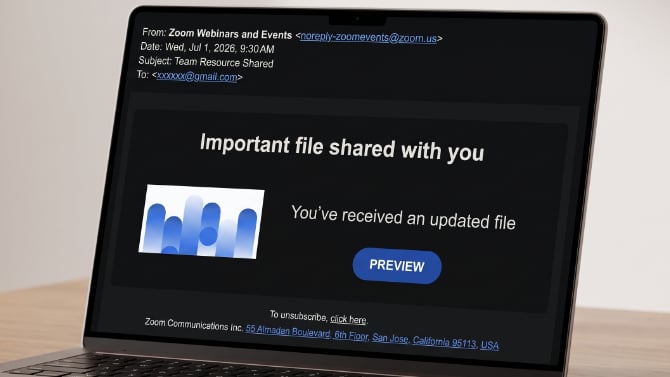
One of these recently landed in the inbox of Techlicious co-founder and CEO Josh Kirschner. The subject line read "Team Resource Shared," and the body said an "updated file" had been shared, with a "PREVIEW" button to open it. It looks like a totally routine notification, which is exactly why it works.
Read More: How to Tell if Your Phone Has Been Hacked
How the attack works
The attackers aren't spoofing Zoom's address or putting up a lookalike site. They appear to be using hijacked Zoom accounts that can reach the Zoom Events email builder, and they send their bait through it. So the "from" line is authentic, the behind-the-scenes checks that normally flag a fake sender all come back clean, and your spam filter has little reason to stop it.
If you click that button, you get bounced to a real Zoom document on docs.zoom.us, another web address that looks perfectly safe. From there the chain splits in two. Some victims land on a fake Microsoft login page that's built to steal their password. Others get prompted to download a "desktop app" that's actually ConnectWise ScreenConnect, a legitimate remote-support tool that IT teams use every day.
The same malware, a new delivery method
If ScreenConnect sounds familiar, that's because it's the same tool misused with the fake-invitation scam we wrote about earlier this year. Once it's on your machine, an attacker can watch your screen, dig through your files, install more malware, and grab your saved passwords. And because it's a genuine, digitally signed tool, Windows and a lot of antivirus programs don't treat it as a threat. Both scams lean on your trust. Last time we saw it, the message came from the hacked email account of a colleague. This time it comes from Zoom itself, which is arguably even more nefarious.
Read More: How to Tell if Your Phone Has Been Cloned or SIM Swapped
How to protect yourself
The big takeaway is that a message coming from a company you know is no longer a guarantee that it's safe. So you should treat any unexpected "shared file" or "review this document" email with suspicion, even when it clearly comes from a service you actually use. If you weren't expecting a file, you shouldn't click the button. You're better off checking with the person or company through some other channel you already trust.
Use common sense and never download and install a desktop app or an installer file just because an email told you to. A link to a shared document usually opens in your browser. It shouldn't ask you to download and install a program to see it.
Beyond that, you can follow two habits that add an extra layer of protection if you slip up. The first is two-factor authentication on your important accounts, which means a stolen password on its own won't get anyone in. The second is a password manager, which won't autofill your login on a lookalike page whose web address doesn't match the actual site. When that autofill doesn't happen, that's your cue to stop.
[Image credit: Screenshot by Palash Volvoikar/composited with Gemini]

