

There are plenty of reasons why you'd want to stay anonymous online. Maybe you want to avoid those creepy targeted ads for things you Googled earlier in the week. Or perhaps you just don't want your previously visited websites turning up in your partner's browsing session. Whatever the reason, privacy online is becoming a big deal as it becomes clear how little of it we really have, thanks to ubiquitous website trackers that collect data on our movements.
From turning on your browser's incognito mode, to downloading a plugin to erase your tracks, here are some tips on surfing the web without leaving (too much of) a trail.
Use a private browser window
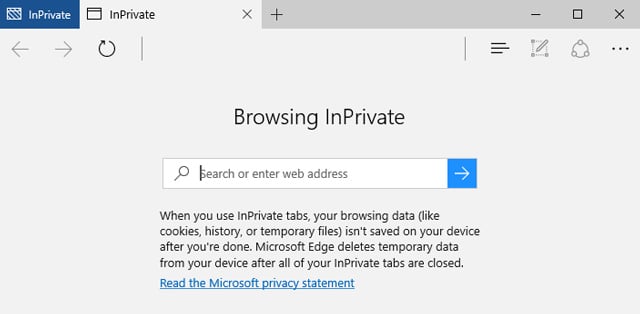
If you share a computer – or are at a public computer – turning on private mode prevents your browsing history from being stored on the computer, thus preventing the sites you visited from popping up later, say, in an auto-completed web address.
Third-party cookies – small text files that track your movement between various sites – are also blocked, and first-party cookies (which track your movement within a site in order to keep track of, say, your shopping basket or preferences) are deleted at the end of the session, so that the next time someone visits that site, it won't be clear that you'd been there too.
What to do: Head into the toolbar of your browser and select a private or incognito mode.
Kill all cookies
Blocking or deleting third-party cookies (do it by heading into your browser's Privacy settings) stops some kinds of tracking, but not all. Flash cookies, or so-called super cookies, can store more information and are left by sites that run Flash, which is almost any site with video content. These super cookies can track your movements across different browsers and even regenerate third-party cookies you previously deleted.
What to do: Download the free CCleaner to clear both Flash and regular cookies, but be warned – some sites use third-party cookies to track you within the site, so you may find yourself having to sign in repeatedly.
Stop your browser sending location data
Nearly all browsers have a feature that sends your geographical location to sites you visit, in theory to provide you with more relevant, useful experiences – for example, so a flight comparison site automatically knows where you’re booking from, or so Google can return with nearby search results. However, advertisers or sites can use that very same information to add to that ad profile of you.
What to do: Deny location requests from websites where it isn’t vital. While the default option is always opt-in, i.e., your browser will ask you the first time a website wants your location, you can also disable the feature entirely:
Chrome – Preferences > Settings > Advanced > Content settings, and choose to either disallow any site to track your physical location, or ask when a site wants to track.
Safari – Preferences > Privacy, where you can disable location services, or let each website make a request.
Firefox – Type “about:config” in the URL bar, then “geo.enabled”. Double-click to disable location entirely. Otherwise, Firefox always asks before sending your location to a website.
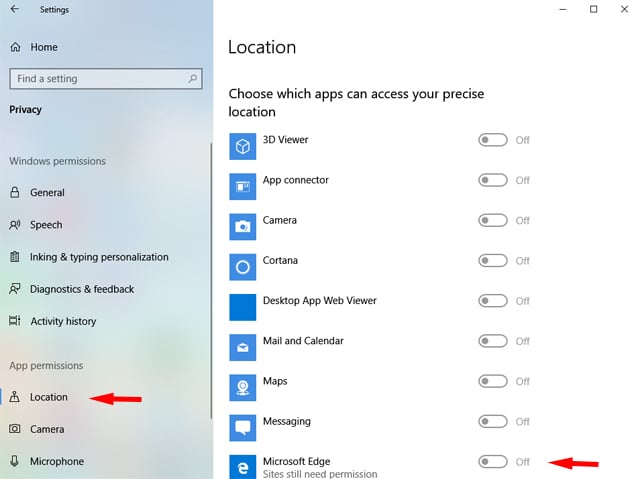
Microsoft Edge – You don't set this using the Edge browser. You'll need to turn off location tracking using your computer's main Settings > Privacy and then scroll down to Choose apps that can use your precise location and toggle Microsoft Edge to Off.
Search anonymously
Google accounts for 93% of U.S. search traffic, with billions of search queries processed each month. It uses this data to deliver ever more personalized search results, which are highly relevant for most of us, but it also creates a bubble of you-centric search that could prevent you from seeing certain webpages based on what you've clicked on in the past.
What to do: You can turn off Google's personalized search by hitting Search Tools > All Results > Verbatim. To prevent your searches being tracked – and affecting the ads you're shown – switch to a private search engine such as DuckDuckGo.
Stop Google tracking you
Thanks its varied combination of services – Gmail, Calendar, Google+, YouTube, Search – Google is in a unique position to build a profile of who you are, what you like and what you do online. Its unified privacy policy means that it can track you across all its services – including scanning your email - and use the information cross-product to personalize your experience. The pros are handy things like getting location-specific calendar reminders, but the cons include targeted ads based on your email content or your picture turning up on items you've liked while logged into Google+.
What to do: Opt out of “shared endorsement” in ads and turn off ad personalization (you'll still be shown ads, but they won't be targeted). Finally, download the Google Analytics Browser Add-on to stop Google Analytics using data on your movements to create profiles for its ad partners
Stop social sites figuring you out
It's no secret that social network sites have amassed a huge amount of information on us based on what we do within their sites – things we like, people we click on most and what we search for. But sites like Facebook, Twitter and LinkedIn track users even after they've logged out of their accounts. One way is when you click on social media sharing buttons, such as a Facebook Like button, or a Twitter share button. But even if you don't share content, the very act of visiting a webpage that contains such buttons sends the information back to the mothership, allowing advertisers to continue showing the same ad to someone who has visited their webpage and left (perhaps because they browsed but didn't buy).
Facebook, which operates its own mobile ad network, uses an alternative to a tracker called a conversion pixel that advertisers use to track how many clicks or sales they receive. The information goes back to Facebook, regardless of whether the advertiser's site had a Facebook button on it.
What to do: Head to Facebook's Settings / Adverts to control whether ads are targeted based on your clicks in and out of Facebook; for Twitter, Settings / Security and Privacy, then uncheck the box for “Tailor ads...”; for LinkedIn, Privacy & Settings / Account / Manage Advertising Preferences.
(You can check out our giant guide to Facebook privacy settings too.)
In each of these cases, you won't receive ads based on your browsing, but you'll still be tracked, ostensibly for security reasons. (However, some sites, including Twitter, honor the Do Not Track setting found in your browser's privacy settings, which means they will not log your presence at their site.)
Opt out of tracking
Every site on the internet is embedded with tracking cookies in the various pieces of content they contain – for example, ads, comment boxes, sponsored links. These cookies are placed by different ad networks comprised of myriad advertisers who get data on what sites you click on within particular ad networks. This data is then used to create a profile that’s shared among the members of an ad network so they can target advertising based on your perceived preferences and habits.
What to do: Head into your browser’s privacy settings and turn on Do Not Track. To minimize data collection on your web movements further, you can also opt-out of tracking at Network Advertising Initiative and Digital Advertising Alliance, by any advertisers who are part of these organizations. You can also opt-out directly at major ad networks including BlueKai and Acxiom. You’ll still see ads - but they won’t be targeted.
Block all trackers
Opting out can stop you being tracked by many sites, but many more may not honor such requests. Anti-tracker browser plugins can prevent these cookies from “following” you around the internet.
What to do: Download an anti-tracker plugin such as the Electronic Frontier Foundation's Privacy Badger, Ghostery, or Disconnect, which blocks tracking cookies to prevent ad analytics companies from building a grand profile of just where you like to go on the internet.
Disable Java and unused plugins
Plug-ins are downloadable, tiny programs that enhance your browser’s capabilities, for example, playing certain video or animations. (These are not to be confused with browser Extensions, which are essentially web pages that load information within another web page.) Unfortunately, two of the most commonly required plugins, Adobe Flash and Java, are also to blame for exposing identifying details about your browser.
In particular, Java is well-known to “fingerprint” a browser by displaying to sites a glut of identifying details such as IP address, fonts downloaded and more.
What to do: Since plugins are also a common way for malware to find its way into a browser, it’s not a bad idea to disable them, particularly lesser-used ones. And, where once the vast majority of sites needed Java to run their various animations or interactive pieces, these days more and more sites are built using code that can be natively run by browsers.
Chrome:Settings > Privacy and security > site settings. There you'll find Java and Flash. We recommend that you set both the disable. If you use a site frequently that uses Flash or Java, you can add websites under Allow, so it will run just on approved sites.
Firefox: Settings > Addons then select Plugins. You can choose to activate the plugins always, never, or only after asking permission.
Safari: Head to Preferences > Security > Plug-in Settings to turn each on or off.
Microsoft Edge: Go to Settings > Advanced. There you can turn off Flash. There is no support for Java.
If you receive messages on certain sites that you need to run these plug-ins, you may want to invest in a script-blocker extension such as NoScript (Firefox) or ScriptNo (Chrome). These stop all Flash and Java by default, with options to build a whitelist of trusted sites that need these plugins.
Use a proxy network
All of the above options are great for dodging tracking cookies that can give marketers what they need to create incredibly detailed profiles of who you are. But you can still be tracked and identified via the IP address of your browser. IP addresses can identify your approximate location, as well as how often you visit particular sites.
To regain a little more anonymity, a virtual private network (VPN) masks your IP address and reassigns you a new one, so that you appear to be surfing from a separate location. Each time you log into the VPN, you get a new IP address, preventing people (such as your employer, say) from monitoring what websites you visit.
In countries where certain sites are banned, such as China, many people make use of VPNs to surf via IP addresses that appear to be from another country, in order to access social media including Facebook. Here in the U.S., it’s worth noting that the FBI has the power to hack any computer using a VPN.
What to do: Not all VPN services are created equal. Some do a far better job of protecting your privacy than others, offer faster speeds and better usability. Based on our own testing, as well as third-party analysis, such as PC Mag, we recommend NordVPN. Keep in mind that services like Netflix may not let you connect if you're using a VPN service. Check out our tips on how to use a VPN and still access Netflix. Using a VPN is also a good way to protect your data on public WiFi networks.
Download a private, anonymous browser
Plugins, proxies and remembering to turn on private browsing can make for a cumbersome web experience. If you're willing to give up the comfort of your favorite browser, you can download a whole new browser that offers all of the above features – including the ability to turn on a proxy network through a switch in the toolbar.
The Epic browser is based on the Chrome browser but with privacy settings dialed up so that third-party cookies are automatically blocked, search and browsing history is never logged, and trackers are always blocked. You'll still see ads, but you won't be tracked – and the homepage displays a fascinating counter showing how many trackers tried to log your movements today.
What to do: Get Epic Privacy Browser. Privacy doesn't necessarily come at the expense of convenience – you can enable auto-fill to complete web forms with previously entered data (assuming it isn't a problem that someone else with access to your computer sees this), and though passwords can't be saved within your accounts' sign-in forms, you can download a password extension that does the work for you.
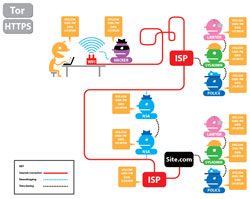
Click for interactive graphic from the EFF
Go dark with TOR
For the deepest level of anonymity, check out the TOR browser, which distributes your internet traffic through a network of TOR servers (nodes) so that a website you visited can view only the IP address of the exiting node. Using TOR makes it very difficult for anyone to track you, but it does slow down browsing. For extra anonymity, TOR can be used in combination with VPN. TOR can be used for any kind of browsing that requires privacy and security, including visits to sites in the Deep Web not accessible by regular browsers. While these sites largely tend towards illegal activity and products, safe havens for whistle blowers and political dissidents also exist – and TOR is one of the only ways they can be accessed.
Use digital currency
Purchasing things online is a great way to tie your identity to particular profiles and websites – after all, you're using your credit card details. If you don't want certain purchases associated with a profile – for example, maybe you want to make a private donation to a controversial site such as Wikileaks - you should consider using a digital currency such as Bitcoin, which, like cash, isn't tied to any identifying details about you.
However, because bitcoin transactions are public, a determined sleuth could track specific amounts to eventually build a profile about who's spending it – and tie it back to an individual. A growing crop of anonymity-focused digital currencies are rising, such as are rising, such as Zcash, which has a market cap of 331 million. However, it's not as widely accepted as Bitcoin (which itself isn't exactly the next Mastercard).
At the end of the day, staying anonymous online takes extreme effort – tech giants and service providers go to great pains to make It very convenient and easy for us to display our movements and profiles in exchange for a free service. While there are benefits to being tracked, perhaps the key issue today is for people to realize that not only are free services at the expense of our privacy, but that our information is valuable – and we should question every company that requests it, invisibly or not.
Updated with new recommendations 9/5/2019
[image credit: private browsing concept via BigStockPhoto, Microsoft, EFF]











From Louise on April 24, 2012 :: 4:13 pm
When asked if I want my login info to be remembered “for this site”, will private browsing prevent this from happening.
It also begs another question. Is someone picking up my login and password when I agree to this query?
Thanks.
Reply
From Josh Kirschner on April 25, 2012 :: 2:53 am
Yes, private browsing will prevent storing of usernames and passwords. Though it’s possible certain third party id/password vaults may not recognize the private browsing function on certain browsers and ask to store usernames and passwords.
When you agree to the query, the username and password are stored on your computer. The information won’t be transmitted to anyone else, but other people who use your computer with the same login will have access to those usernames and passwords.
Reply
From Pramanik on December 10, 2019 :: 11:20 pm
Despite the Settings being optimum,my P.B.in FF still shows the searches when I right Click on FF. Why is that and how to remedy this?
Reply
From Tired Mom on October 11, 2017 :: 4:48 am
What can be done when someone steals your ID more than once? Does anyone know what to do about this? Do not trust
Do not trust anyone that uses sex to get what they want.
Reply
From Baboon2 on May 10, 2020 :: 9:17 pm
Our dear parents used sex to get us .
Reply