

 Loss and theft were two big reasons I thought twice about getting a smartphone for my tween daughter. These days, though, the chances are pretty good that I'd be able to track it down if it goes missing — even if it's lost power — with the right apps loaded and the phone's built-in GPS and Internet access.
My favorite recovery app is Prey because it provides one place to track all of the mobile devices in my home, whether they run on iOS, Blackberry or Android (It covers Macs and PCs as well). Once you've installed the app on a device and created a Prey account, you're ready to start locating.
Depending on your issue—loss or theft –you can set your device to respond in different ways when you notify Prey the phone is missing. First, the phone determines its location and sends it back with a time stamp to the Prey website (for laptops, you can choose to have your laptop's webcam take a picture too). Then you can have the phone sound an alarm, receive a text message that states the phone is lost or stolen or operate in stealth mode.
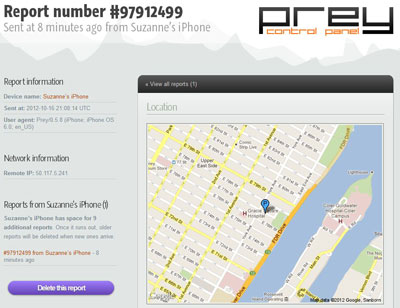 The free version covers three devices and will store the last 10 location reports (you can get as many as you want, but the older ones are deleted as new ones come in). You can upgrade to a pro account, which provides continuous tracking, saves 100 location reports per device and generates reports more quickly when you report a device missing. There's a $5 per month plan for three devices and a $15 per month plan for 10 devices.
There are also free, integrated solutions for iOS, Android and Windows Phone. For iOS devices, go to Settings, then Privacy, then Location Services and turn on "Find My iPhone." To find your phone, go to icloud.com and log in with your Apple ID. In addition to a map showing your device's location, you can play a sound, lock your device or erase it.
For Windows Phone, go to Settings, then Location and turn Location Services on. Then go to windowsphone.com and log in with your Windows ID and select the "Find My Phone" option. There you can see a map with your location, ring your phone, lock it or erase it. You can also go to "find my phone" under Settings and choose to save your location every few hours, which will help you find the phone if it has been turned off or runs out of batteries.
For casual tracking, I like Google Latitude for Android devices. On the phone, you'll find it as a feature of Google Maps. Within the app, you select the Google Maps icon and then select Latitude. You'll need to "Enable Location Sharing" and "Reporting from this device" in order for the phone to be seen by the app. Then you can go to www.google.com/latitude to see a map with your location.
I also like Lookout Security & Antivirus (free in Google Play). In addition to providing protection against malware, it has a few lost phone features. After logging onto the lookout.com website, you can see your phone's location on a map, sound an alarm on your phone, even if it's set to silent mode, lock your phone or wipe it. One unique feature is Signal Flare, which will automatically turn on GPS and send your phone's location to your Lookout account every time your phone shows you a low-battery warning (usually at 10% and 5% life) to help you find your phone even when it's dead.
So the next time a smartphone or tablet goes missing in your home, you won't have to panic. There's an app for finding it.











From Jeffrey Deutsch on October 25, 2012 :: 2:09 pm
Namely, Cerberus. You can get a license to protect up to five Android devices, owned by the same individual, for €2.99 (as of right now that’s just around $4.00 including a small currency exchange fee).
Meanwhile, whatever kind of phone you use, that’s another consideration in favor of a model with a front-facing camera. If your security app can take a picture, that can help catch a thief or otherwise find your phone.
Jeff Deutsch
Reply