<?xml version="1.0" encoding="utf-8"?>
<feed xmlns="http://www.w3.org/2005/Atom"
      xmlns:media="http://search.yahoo.com/mrss/"
      xml:lang="en">

    <title type="text">Techlicious Latest Articles</title>
    <subtitle type="text">Techlicious: Tech Made Simple</subtitle>
    <link rel="alternate" type="text/html" href="https://www.techlicious.com/" />
    <link rel="self" type="application/atom+xml" href="https://www.techlicious.com/blog/atom/" />


    <updated>2026-04-09T20:50:51Z</updated>


    <rights>Copyright (c) 2026, Techlicious, LLC</rights>
    <generator uri="https://expressionengine.com/" version="1.7.0">ExpressionEngine</generator>
    <id>tag:techlicious.com,2026:04:09</id>


    <entry>
      <title>FTC warns about texts claiming your rewards points are expiring</title>

      <link rel="alternate" type="text/html" href="https://www.techlicious.com/blog/ftc-warns-about-texts-your-rewards-points-are-expiring/" />

      <id>tag:techlicious.com,2026:/www.techlicious.com/blog/1.8347</id>
      <published>2026-04-09T20:50:49Z</published>
      <updated>2026-04-09T20:50:51Z</updated>

      <author>
        <name>Josh Kirschner</name>
        <uri>https://www.techlicious.com/about/</uri>
      </author>

            <media:content url="https://www.techlicious.com/images/phones/phishing-woman-smartphone-1200x675.png" medium="image" type="image/jpeg" />
      <media:thumbnail url="https://www.techlicious.com/images/phones/phishing-woman-smartphone-1200x675.png" />
      

      <category term="News"
        scheme="https://www.techlicious.com/blog/category/news/"
        label="News" />

      <category term="Phones and Mobile"
        scheme="https://www.techlicious.com/blog/category/phones-mobile/"
        label="Phones and Mobile" />

      <category term="Computer Safety &amp; Support"
        scheme="https://www.techlicious.com/blog/category/safety-support/"
        label="Computer Safety &amp; Support" />

      <category term="Blog"
        scheme="https://www.techlicious.com/blog/category/blog/"
        label="Blog" />

      <category term="Privacy"
        scheme="https://www.techlicious.com/blog/category/protecting-your-privacy/"
        label="Privacy" />

      <summary type="html"><![CDATA[
<div>Did you get a text about your rewards points expiring? The FTC says there&rsquo;s a chance it&rsquo;s a phishing scam to steal your personal data.</div>
      ]]></summary>

      <content type="html"><![CDATA[
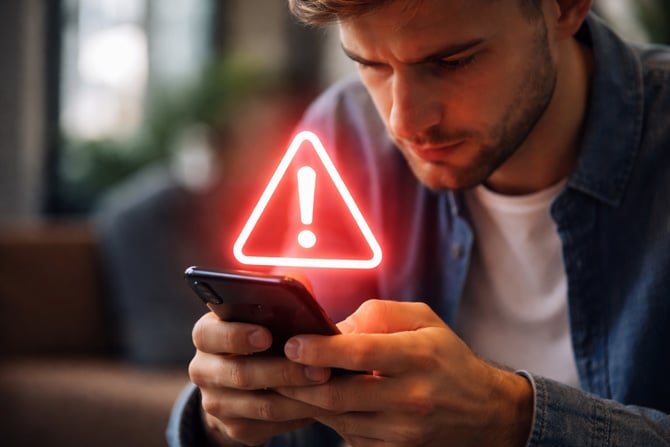
  <p><img alt="Woman looking surprised by what is on smartphone she's holding" class="imagecenter" src="https://www.techlicious.com/images/phones/phishing-woman-smartphone-670.png" style="width: 670px; height: 376px;" /></p>
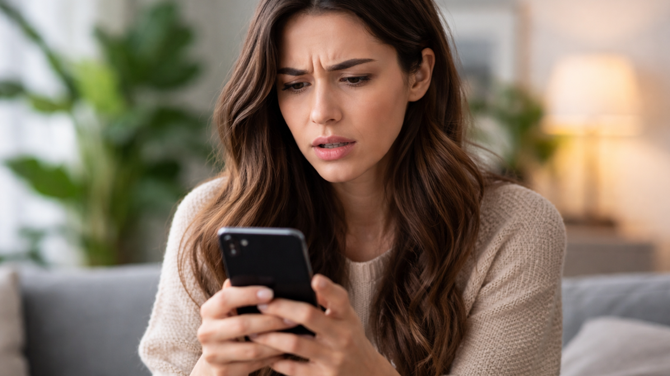
<p>Did you get a recent text about your rewards points expiring? The <a href="https://consumer.ftc.gov/consumer-alerts/2026/04/got-text-about-expiring-reward-points-look-closer" target="_blank">FTC is warning</a> that some of those messages are phishing scams designed to steal your personal or financial information, such as SSNs and credit card details.</p>
<p>According to the FTC, scammers are sending texts with threatening language that your rewards points will expire if you don&rsquo;t take immediate action. The message will be accompanied by a link for you to click to save your points. Instead of taking you to a legitimate company site, you will be directed to a lookalike phishing page.</p>
<p>While the FTC didn&rsquo;t specify which companies are being referenced in the scam, reports from security researchers and consumers indicate that AT&amp;T and Verizon reward programs have both been used in recent messaging. And it&rsquo;s probable the scammers will add more company names to the list they use to avoid detection and improve victim response rates.</p>
<h2>How to avoid getting fooled by a phishing text</h2>
<p>As with any unsolicited text, the best advice for staying safe is to never click any links or call any phone number directly from the message. Instead, login to the official company app or website to verify that the message you received is valid. When calling, look up the company customer service number yourself through its official app or verified website, not just what comes up at the top of a Google search.</p>
<p>The same guidance holds true for email. And it&rsquo;s important to be aware that scammers can spoof the sender&rsquo;s address to make it appear as though an email came from a specific company. Here&rsquo;s a quick way to <a href="https://www.techlicious.com/how-to/how-to-tell-if-email-has-been-spoofed/">check whether an email has been spoofed or is a valid customer service notification</a>.</p>
<p>[Image credit: ChatGPT/Techlicious]</p>
      ]]></content>
    </entry>


    <entry>
      <title>Is Your Router Compromised? FBI Exposes Russian Hacking Campaign</title>

      <link rel="alternate" type="text/html" href="https://www.techlicious.com/blog/russian-hackers-hijacked-home-routers-fbi-warning/" />

      <id>tag:techlicious.com,2026:/www.techlicious.com/blog/1.8346</id>
      <published>2026-04-09T20:34:10Z</published>
      <updated>2026-04-09T20:36:11Z</updated>

      <author>
        <name>Suzanne Kantra</name>
        <uri>https://www.techlicious.com/about/</uri>
      </author>

            <media:content url="https://www.techlicious.com/images/computers/tp-link-wr841n-1200px.jpg" medium="image" type="image/jpeg" />
      <media:thumbnail url="https://www.techlicious.com/images/computers/tp-link-wr841n-1200px.jpg" />
      

      <category term="News"
        scheme="https://www.techlicious.com/blog/category/news/"
        label="News" />

      <category term="Computers and Software"
        scheme="https://www.techlicious.com/blog/category/computers-software/"
        label="Computers and Software" />

      <category term="Computers &amp; Accessories"
        scheme="https://www.techlicious.com/blog/category/computers-accessories/"
        label="Computers &amp; Accessories" />

      <category term="Internet &amp; Networking"
        scheme="https://www.techlicious.com/blog/category/internet-networking/"
        label="Internet &amp; Networking" />

      <category term="Blog"
        scheme="https://www.techlicious.com/blog/category/blog/"
        label="Blog" />

      <category term="Privacy"
        scheme="https://www.techlicious.com/blog/category/protecting-your-privacy/"
        label="Privacy" />

      <summary type="html"><![CDATA[
<p>Russian hackers hijacked home routers to steal passwords and emails. Here's how to tell if yours was one of them and what everyone should do now.</p>
      ]]></summary>

      <content type="html"><![CDATA[
  <p><img alt="TP-Link WR841N router" class="imagecenter" src="https://www.techlicious.com/images/computers/tp-link-wr841n-670px.jpg" style="width: 670px; height: 377px;" /></p>
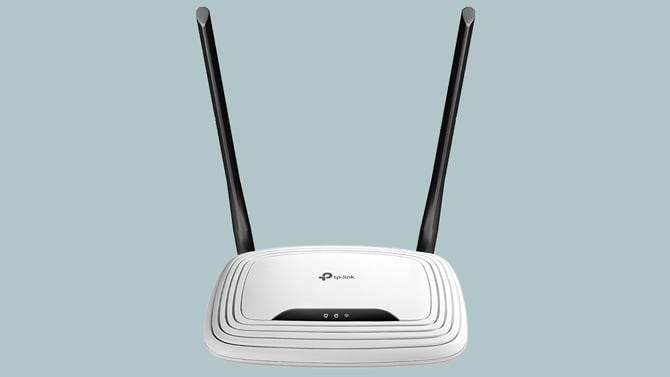
<p>If you have a TP-Link or MikroTik router at home, Russian military hackers (GRU) may have quietly turned it into a surveillance tool. By changing a single setting on the router, they could see every password, email, and login token that passed through your home network, and you would have had no idea it was happening.</p>
<p>The <a href="https://media.defense.gov/2026/Apr/07/2003907743/-1/-1/0/I-260407-PSA.PDF">FBI announced</a> (PDF) on April 7 that they disrupted this operation, called <a href="https://www.justice.gov/opa/pr/justice-department-conducts-court-authorized-disruption-dns-hijacking-network-controlled">Operation Masquerade</a>, by remotely accessing compromised routers across the United States and undoing the damage. But the scope of the campaign is staggering: at its peak in December 2025, more than 18,000 devices across at least 120 countries were communicating with the attackers' infrastructure. In its research, <a href="https://www.microsoft.com/en-us/security/blog/2026/04/07/soho-router-compromise-leads-to-dns-hijacking-and-adversary-in-the-middle-attacks/">Microsoft reported</a> that if found more than 200 affected organizations and 5,000 compromised personal devices. Intelligence agencies from 16 additional countries joined forces on this advisory.</p>
<p>The GRU's attack compromised routers indiscriminately and then filtered stolen data for targets of intelligence value, primarily people connected to military, government, and critical infrastructure organizations. But every device on a compromised network was exposed, which means if you were checking your personal email on a hijacked network, your credentials were being collected regardless of whether you were a spy or a schoolteacher.</p>
<h2>How the attack worked</h2>
<p>Your router has a function called DNS (Domain Name System) that serves as a phone book for the internet. When you type &quot;techlicious.com&quot; into your browser, your router's DNS settings tell your device which server to contact. Normally, that setting points to your internet provider's DNS servers or a trusted alternative like Cloudflare or Google.</p>
<p>The Russian hackers exploited vulnerabilities in popular TP-Link and MikroTik routers to quietly swap out those legitimate DNS settings and replace them with servers the GRU controlled. The primary target was TP-Link's WR841N, one of the most widely sold budget routers in the world. That router has a <a href="https://nvd.nist.gov/vuln/detail/cve-2023-50224">known vulnerability</a> that allows an attacker to extract the router's stored credentials without logging in at all, according to <a href="https://www.cisa.gov/known-exploited-vulnerabilities-catalog?field_cve=CVE-2023-50224">CISA</a>, America&rsquo;s Cyber Defense Agency.</p>
<p>Once the hackers controlled a router's DNS settings, those poisoned settings were automatically pushed to every device on the network through DHCP, including laptops, phones, and tablets. When someone on that network tried to reach Microsoft Outlook Web Access or other targeted services, the router silently redirected them to a fake version of the site controlled by Russian intelligence. That fake site sat between the user and the real service, capturing passwords, OAuth authentication tokens, and email content as it passed through. (<a href="https://www.bleepingcomputer.com/news/security/authorities-disrupt-dns-hijacks-used-to-steal-microsoft-365-logins/">Bleeping Computer</a> has a great diagram.)</p>
<p>The only visible clue that something was wrong would have been a browser warning about an invalid security certificate, the kind of pop-up that most people dismiss without a second thought.</p>
<h2>The FBI's response</h2>
<p>The <a href="https://www.justice.gov/opa/pr/justice-department-conducts-court-authorized-disruption-dns-hijacking-network-controlled">FBI obtained court authorization</a> to remotely access compromised TP-Link routers in the United States and undo the damage. Agents sent commands to the routers that reset their DNS settings back to legitimate servers and blocked the method the GRU had been using to maintain access. The government says it tested the operation extensively before deploying it and confirmed that the cleanup did not affect the routers' normal operation or collect any user data.</p>
<p>This is the second time in recent years that the FBI has used court orders to remotely clean up compromised routers. In 2024, the bureau conducted a similar operation against a Chinese botnet that had hijacked hundreds of SOHO routers.</p>
<p>Here's the catch, though: most people will never know whether their router was one the FBI fixed. The FBI says it is working with internet service providers to notify affected users, but the agency hasn't said exactly how or when those notifications will go out, and ISPs haven't been specific about their plans either. There's no FBI lookup tool you can check.</p>
<h2>Would a VPN have protected you?</h2>
<p>In this specific attack, yes, a VPN would have made a real difference. A VPN creates an encrypted tunnel for all your internet traffic and routes your DNS requests through the VPN provider's own DNS servers, bypassing your router's DNS settings entirely. That means even if your router had been hijacked, a VPN would have prevented the GRU's fake DNS servers from redirecting your traffic to their phishing pages.</p>
<p>That said, a VPN is not a magic shield for every type of router compromise. It protects against DNS hijacking specifically because it takes the DNS lookup out of your router's hands. If an attacker had compromised your router in a different way, say by installing malware that intercepted traffic at a deeper level, a VPN alone might not be enough. Still, for the exact scenario described in this FBI alert, running a reputable VPN on your devices would have stopped the attack cold.</p>
<p>If you work from home and your employer provides a VPN for accessing company resources, make sure you're using it consistently. If you don't have a VPN, this is a good reason to consider one. We use and recommend <a href="https://get.surfshark.net/SH1rq" rel="sponsored" target="_blank">Surfshark</a> and <a href="https://go.nordvpn.net/aff_c?offer_id=15&amp;aff_id=3685">NordVPN</a> and, for a free option, <a href="https://protonvpn.com/free-vpn/" target="_blank">Proton VPN</a>.</p>
<h2>What you should do right now</h2>
<p>This incident is a wake-up call for anyone who set up a home router years ago and hasn't thought about it since. The advisory lists more than 20 TP-Link models that were targeted, including the Archer C5 and C7, the WDR3500, WDR3600, and WDR4300, the MR3420 and MR6400, and several variants of the WR740N, WR840N, WR841N, WR842N, WR845N, and WR941ND (see <a href="https://www.tp-link.com/us/support/faq/5058/">TP-Link&rsquo;s Security Advisory</a> for a full list). MikroTik routers were also compromised.</p>
<ol>
	<li><strong>First, figure out which router you have.</strong> Many people have no idea what brand or model their router is. If your internet provider gave you a combined modem/router box, the model name is usually printed on a label on the bottom or back of the device. If you bought your own router, the same applies. Look for a sticker that lists the manufacturer, model number, and hardware version. You can also log into your router's admin page (typically at 192.168.0.1 or 192.168.1.1 in your browser) and find the model information on the main status or dashboard screen.</li>
	<li><strong>Check and update your router's firmware.</strong> While you're in the admin panel, look for a firmware update option. If your router hasn't been updated in over a year, it's almost certainly vulnerable to known exploits. Download firmware only from your router manufacturer's official website.</li>
	<li><strong>Look at your DNS settings.</strong> In the admin panel of your router, check the DNS server addresses under your DHCP or network settings. They should be set to your ISP's default servers or a trusted public DNS like Cloudflare (1.1.1.1), Google (8.8.8.8), or Quad9 (9.9.9.9). If you see unfamiliar IP addresses there, your router may have been compromised.</li>
	<li><strong>Change your router's admin password.</strong> If you're still using the default username and password that came with the router (often &quot;admin/admin&quot;), change it immediately. This is one of the easiest ways attackers gain access.</li>
	<li><strong>Turn off remote management.</strong> Most home users don't need the ability to manage their router from outside the home network. If this feature is enabled, it gives attackers a direct path in. Disable it in your router's settings.</li>
	<li><strong>Check whether your router has reached end-of-life.</strong> This is the step most people skip, and it's arguably the most important. An end-of-life router is one the manufacturer has stopped supporting with security patches, which means every new vulnerability that's discovered will remain unpatched forever. TP-Link maintains an <a href="https://www.tp-link.com/us/support/faq/3562">end-of-life product list on its website</a>, where you can search for your model number and hardware version. Other router manufacturers maintain similar lists on their support sites. If your router is on the list, no firmware update or password change will keep it secure long-term. It's time to replace it.</li>
	<li><strong>Pay attention to certificate warnings.</strong> If your browser or email client shows a warning about an invalid or untrusted security certificate, do not ignore it. That warning may be the only sign that your traffic is being intercepted.</li>
</ol>
<h2>The bigger picture</h2>
<p>The unassuming router sitting in your living room is now a target for nation-state espionage. Most people treat their router as an appliance they plug in once and forget, and that's exactly what makes these devices so attractive to attackers. They run 24/7, rarely get updated, and control everything about how your home network connects to the internet.</p>
<p>So, it is critical to examine the current state of your router security. If you believe your router has been compromised, the FBI asks that you report it to your local FBI field office or file a complaint at <a href="https://www.ic3.gov/">ic3.gov</a>, including details about your router model and DHCP configuration.</p>
<p>[Image credit: Josh Kirschner/Techlicious]</p>
      ]]></content>
    </entry>


    <entry>
      <title>How to Unlock an Android Phone If You Forgot the Password</title>

      <link rel="alternate" type="text/html" href="https://www.techlicious.com/tip/what-to-do-if-you-forget-your-android-password/" />

      <id>tag:techlicious.com,2026:/www.techlicious.com/tip/6.6365</id>
      <published>2026-04-09T17:21:15Z</published>
      <updated>2026-04-09T17:23:16Z</updated>

      <author>
        <name>Josh Kirschner</name>
        <uri>https://www.techlicious.com/about/</uri>
      </author>

            <media:content url="https://www.techlicious.com/images/phones/google-pixel-phone-wrong-pin-alert-1200px.jpg" medium="image" type="image/jpeg" />
      <media:thumbnail url="https://www.techlicious.com/images/phones/google-pixel-phone-wrong-pin-alert-1200px.jpg" />
      

      <category term="Phones and Mobile"
        scheme="https://www.techlicious.com/phones-mobile/"
        label="Phones and Mobile" />

      <category term="Cell Phones"
        scheme="https://www.techlicious.com/cell-phones/"
        label="Cell Phones" />

      <category term="Tips &amp; How&#45;Tos"
        scheme="https://www.techlicious.com/tips-how-to/"
        label="Tips &amp; How&#45;Tos" />

      <category term="Tech 101"
        scheme="https://www.techlicious.com/tech-101/"
        label="Tech 101" />

      <summary type="html"><![CDATA[
<p>Forgot your Android password, PIN, or pattern? Here&rsquo;s the only reliable way to unlock your phone and get back in.</p>
      ]]></summary>

      <content type="html"><![CDATA[
  <p><img alt="Google Pixel 10 Pro with Wrong PIN. Try again. on the screen" class="imagecenter" src="https://www.techlicious.com/images/phones/google-pixel-phone-wrong-pin-alert-670px.jpg" style="width: 670px; height: 377px;" /></p>
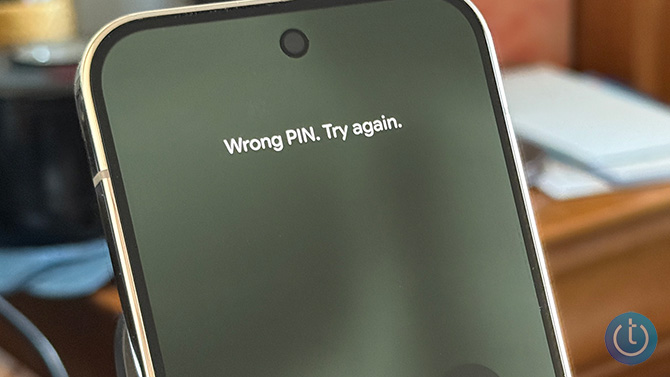
<p>Forgot your Android phone password, PIN, or lock pattern and can&rsquo;t get past the lock screen? On modern Android phones, there&rsquo;s no way to unlock your phone without resetting it. To use it again, you must do a factory reset, then sign back in with the Google account originally used to set up the device.</p>
<p>Resetting your phone does not necessarily mean losing all your data. If you still know your Google account credentials and your photos, contacts, and other files were backed up to your Google account, you can restore most of your data after the reset. If they weren&rsquo;t backed up, anything stored only on the phone will be gone for good.</p>
<p>If you can&rsquo;t log in to the Google account originally used to set up the phone, you won&rsquo;t be able to complete the setup process after the reset. This is called Factory Reset Protection (FRP), and it&rsquo;s designed to prevent stolen phones from being reused. The good news for Samsung owners in this situation is that you can take your phone to an <a href="https://www.samsung.com/us/support/service/locations/?product=N0055221" target="_blank">authorized Samsung service center</a>, and they can flash it back to factory settings. You will need to prove that you are the original owner of the device with either a purchase receipt or an email purchase confirmation.</p>
<p>Below are the official ways to reset a locked Android phone and get back in.</p>
<h2>How to reset a locked Android phone</h2>
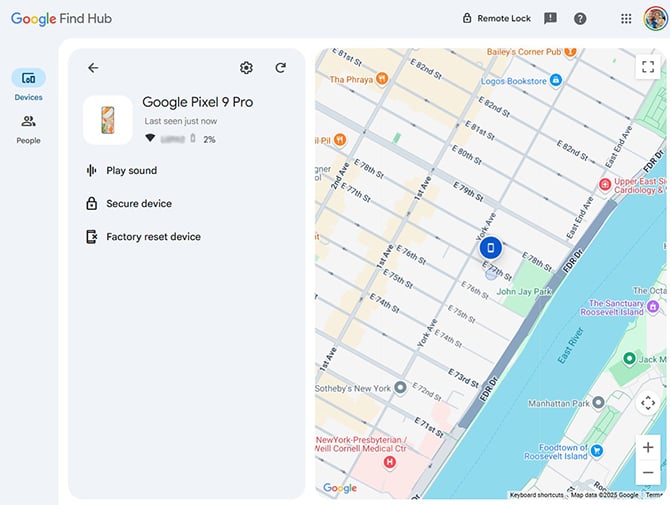
<p>There are two methods to factory reset an Android phone if you&rsquo;ve forgotten the password and can&rsquo;t get past the lock screen. The first is to use Google&rsquo;s Find Hub (formerly Find My Device), which allows you to erase your phone online remotely. If you don&rsquo;t have Find Hub turned on (it should be on by default), you&rsquo;ll have to use the second method below, Android&rsquo;s &ldquo;Recovery Mode.&rdquo;</p>
<p><strong>How to reset your Android phone through Find Hub</strong></p>
<ol>
	<li>Go to <a href="https://android.com/find" target="_blank">Google Find Hub</a>. If you&rsquo;re not already, sign in to the Google account that is the main profile on your device. If you have more than one device, select the phone you want to erase at the top-left of the screen.</li>
	<li>Select &quot;<strong>Factory reset device</strong>.&quot;</li>
	<li>Click the &quot;<strong>Next</strong>&quot; button.</li>
	<li>Re-authenticate your Google account.</li>
	<li>Click on the &quot;<strong>Reset</strong>&quot; button.</li>
	<li>Follow the steps to set up your phone again &ndash; note that you will need to verify the Google account information you <em>originally</em> used to set up the phone in order to proceed with setting up the device.</li>
</ol>
<p><img alt="Screenshot of Google Find Hub showing the location of a Google Pixel 9 Pro with the option to Factory Reset Device " class="imagecenter" src="https://www.techlicious.com/images/phones/google-android-find-hub-pixel-9-pro-670px.jpg" style="width: 670px; height: 505px;" /></p>
<p><strong>Read more</strong>: <a href="https://www.techlicious.com/tip/how-to-back-up-everything-on-your-android-phone/"><em>How to Back up Everything on Your Android Phone</em></a></p>
<h2>How to reset your Android phone through Recovery Mode</h2>
<p>Basic steps for resetting your Android phone are to power it off, restart your phone in Recovery Mode, and use the Recovery Mode menu to perform a factory reset/data wipe.</p>
<p>Most manufacturers &ndash; including current Samsung models, Google Pixel, and other stock Android devices &ndash; use the same steps to enter Recovery Mode. However, there are slight variations with older Samsung phones and some other manufacturers. Follow the steps below based on your device.</p>
<h3>How to reset most Android phones</h3>
<p>Google advises you to charge your phone to at least 70% before attempting to reset your locked phone.</p>
<ol>
	<li>Press the <strong>Power and Volume Up buttons</strong> to bring up the <strong>Power</strong> menu. Then select &quot;<strong>Power off</strong>&quot; to turn off your device.</li>
	<li>Press and hold the <strong>Power and Volume down</strong> buttons for 10 to 15 seconds.</li>
	<li>Use the <strong>Volume up and Volume down</strong> buttons to navigate through the menu options until you get to &quot;<strong>Recovery Mode</strong>,&quot; then press the <strong>Power</strong> button to select it.</li>
	<li>You&rsquo;ll see an Android robot with a red exclamation mark and the words &quot;<strong>No command.</strong>&quot;</li>
	<li>Press and hold the <strong>Power </strong>button. While you hold the Power button, press the <strong>Volume up button</strong>. Then release both buttons quickly.</li>
	<li>A new menu will pop up. Use the Volume buttons to scroll to &quot;<strong>Wipe data/factory reset</strong>&quot; and use the <strong>Power </strong>button to select it.</li>
	<li>Use the volume buttons to scroll to &quot;<strong>Factory data reset</strong>&quot; and press the <strong>Power </strong>button to select it.</li>
	<li>When the reset is finished, you'll see &quot;<strong>Data wipe complete</strong>.&quot; Using the volume buttons, scroll to and select &quot;<strong>Reboot system now,</strong>&quot; and use the <strong>Power</strong> button to select it.</li>
</ol>
<p>If your phone isn&rsquo;t a Pixel and uses a customized version of Android, use the instructions below for your brand.</p>
<h3>How to reset old Samsung phones (with a Home or Bixby button)</h3>
<p>Samsung recommends plugging in your phone to power before going into recovery mode.</p>
<ol>
	<li>Power down your phone by waiting for it to run out of battery. Then charge it to at least 25%. (For older versions of Android, you may not be able to power down your phone when it's locked without inputting your password.)</li>
	<li>For Samsung phones with a separate Power button (Galaxy S8, Galaxy S9, Galaxy S10), press and hold the <strong>Volume up</strong> button, <strong>Power </strong>button, and <strong>Bixby </strong>button until your phone vibrates and goes into Recovery mode. For Samsung phones with a physical Home button (including the Galaxy S6 and Galaxy S7), Press and hold the <strong>Volume up</strong>, <strong>Home</strong>, and <strong>Power </strong>buttons until your phone vibrates, and then release just the <strong>Power </strong>button.</li>
	<li>A screen with the recovery menu will appear. When you see this, release the remaining buttons.</li>
	<li>Use the Volume buttons to highlight &quot;<strong>Wipe data/factory reset</strong>.&quot; Press the <strong>Power </strong>button/<strong>side key</strong> to select.</li>
	<li>Press the <strong>Power </strong>button/<strong>side key</strong> again to select &quot;<strong>Yes</strong>,&quot; &quot;<strong>Yes - delete all user data</strong>,&quot; or &quot;<strong>Factory data reset</strong>.&quot;</li>
</ol>
<h3>How to reset Huawei phones</h3>
<ol>
	<li>Hold down the <strong>Power </strong>and <strong>Volume Up</strong> buttons and then select &quot;<strong>Power off</strong>&quot; to power off your device.</li>
	<li>Press and hold the <strong>Volume up</strong> and <strong>Power </strong>buttons until your phone goes into Recovery mode. (If your phone doesn't have physical volume buttons, press the <strong>Power </strong>button five times after the phone vibrates while powering on.)</li>
	<li>Use the Volume buttons to select &quot;<strong>Recovery mode</strong>.&quot;</li>
	<li>Use the Volume buttons or touchscreen to select the option to clear data. If you're using the buttons, use the <strong>Power </strong>button to select it.</li>
	<li>Use the Volume buttons to select &quot;<strong>restore your device to its factory settings</strong>&quot; and use the <strong>Power </strong>button to select it.</li>
	<li>Once your phone is restored to factory settings, you'll see the Recovery screen. Select the option to restart your device.</li>
</ol>
<h3>How to reset Sony Xperia phones</h3>
<ol>
	<li>Hold down the <strong>Power </strong>button to power off your device.</li>
	<li>Press and hold the <strong>Volume down</strong> and <strong>Power </strong>buttons until the &quot;Sony/Xperia&quot; logo appears, then release the buttons.</li>
	<li>Use the Volume buttons to highlight and select &quot;<strong>Wipe data/factory reset</strong>,&quot; and use the <strong>Power </strong>button to select it.</li>
	<li>Press the <strong>Power </strong>button/<strong>side key</strong> again to select &quot;<strong>Yes</strong>,&quot; &quot;<strong>Yes - delete all user data</strong>,&quot; or &quot;<strong>Factory data reset</strong>.&quot;</li>
	<li>Your phone will reboot when it's done.</li>
</ol>
<h3>How to reset TCL phones</h3>
<ol>
	<li>Hold down the <strong>Power </strong>and <strong>Volume Up</strong> buttons and then select &quot;<strong>Power off</strong>&quot; to power off your device.</li>
	<li>Press and hold the <strong>Volume up</strong> and <strong>Power </strong>buttons until your phone goes into Recovery mode.</li>
	<li>Use the Volume buttons to highlight &quot;<strong>Wipe data/factory reset</strong>&quot; (or &ldquo;Yes&rdquo; for some phones). Press the <strong>Power </strong>button/<strong>side key</strong> to select.</li>
	<li>Press the Volume buttons to select &ldquo;<strong>Factory data reset</strong>,&rdquo; the <strong>Power </strong>button/<strong>side key</strong> again to confirm deleting all data.</li>
	<li>When the factory reset is complete, press the Volume buttons to select &quot;<strong>reboot system now,</strong>&quot; then press the <strong>Power</strong> button to confirm.</li>
</ol>
<h3>How to reset Xiaomi phones</h3>
<ol>
	<li>Hold down the <strong>Power </strong>button to power off your device.</li>
	<li>Press and hold the <strong>Volume down</strong> and <strong>Power </strong>buttons until the &quot;Mi&quot; logo appears, then release only the <strong>Power </strong>button.</li>
	<li>Continue to hold Volume down until the &quot;<strong>Android Recovery&quot;</strong> screen appears.</li>
	<li>Use the Volume buttons to highlight and select &quot;<strong>Wipe data/factory reset</strong>,&quot; and use the <strong>Power </strong>button to select it.</li>
	<li>Use the Volume buttons to highlight and select &quot;<strong>Wipe data/factory reset</strong>&quot; a second time, using the <strong>Power </strong>button to select it.</li>
	<li>Your phone will reboot when it's done.</li>
</ol>
<h2>FAQs</h2>
<h3>Can I unlock my Android phone without losing data?</h3>
<p>In almost all cases, no. Modern Android devices encrypt data by default, which means there&rsquo;s no supported way to unlock a locked device without resetting it first. Your only chance of recovering photos or other information is from a cloud backup after the reset.</p>
<h3>What if I forgot both my phone PIN and my Google password?</h3>
<p>You&rsquo;ll need to <a href="https://support.google.com/accounts?source=404&amp;sjid=12065909000087329802-NA#topic=3382255" target="_blank">recover your Google account</a> before you can set the phone up again after a reset. Start the Google account recovery process from a familiar device and network to improve your chances of verification.</p>
<p>Samsung owners can take their phone to an <a href="https://www.samsung.com/us/support/service/locations/?product=N0055221" target="_blank">authorized Samsung service center</a>, where the device may be restored after they verify ownership.</p>
<h3>Can a repair shop or my carrier unlock my phone?</h3>
<p>Repair shops cannot unlock your Android phone without wiping the device. Similarly, you may see software online that claims it can bypass your lock screen to unlock your phone or recover the data. In all cases, if someone claims they can unlock a modern Android phone, that&rsquo;s a red flag you're about to be scammed.</p>
<h3>How many wrong PIN attempts before Android locks permanently?</h3>
<p>Most Android phones will temporarily lock you out after multiple incorrect attempts. Lockout time increases with repeated failures. On newer devices, there is no permanent lockout &ndash; but you will eventually need to reset the phone if you can&rsquo;t remember the correct PIN.</p>
<h2>Keep your data safe before you need a reset</h2>
<p>A few simple safeguards can keep you from losing access to your phone or your Google account &ndash; and from having to wipe a device. The most important safeguard is making sure your phone is backed up automatically.</p>
<ul>
	<li>Turn on Google&rsquo;s built-in cloud backup so photos, contacts, and settings are saved regularly.</li>
	<li>Make sure your Google account recovery email and phone number are current.</li>
	<li>Store your Google password in a password manager so you can access it from another device if needed. We recommend and use <a href="https://sovrn.co/1pzp3nr" rel="sponsored" target="_blank">1Password</a> and <a href="https://sovrn.co/1gh5wdq" rel="sponsored" target="_blank">Dashlane</a>.</li>
	<li><a href="http://www.techlicious.com/blog/google-recovery-contact-can-save-your-account/">Set up a Google trusted recovery contact</a> to help regain access if all else fails.</li>
</ul>
<p>If your phone is still unlocked but acting unstable &ndash; overheating or glitching &ndash; you may want to quickly copy important files before it locks you out. In that situation, a small USB-C flash drive can be useful for temporary transfers. I recommend the <a href="https://www.amazon.com/SanDisk-256GB-Phone-Drive-Android/dp/B0DFJ5KBH2?th=1&amp;linkCode=ll1&amp;tag=techlicious-20&amp;linkId=fa565429309ed82155c8779ce76b2568&amp;language=en_US&amp;ref_=as_li_ss_tl" id="Link to buy SanDisk Phone Drive for Android on Amazon" rel="sponsored" target="_blank">SanDisk Phone Drive for Android</a> because it plugs directly into your phone's USB-C port and can copy selected folders without needing a computer. It&rsquo;s available in 128GB, 256GB, and 512GB capacities, starting under $20. Just keep in mind that standard flash drives are not encrypted by default, so they should not be your primary long-term backup.</p>
<p><strong>Read next</strong>: <a href="https://www.techlicious.com/guide/the-best-flash-drives-and-ssd-drives-for-backing-up-your-phone/"><em>Back Up Your Phone in Minutes &ndash; Best USB-C Flash Drives &amp; SSDs</em></a></p>
<p><em>Updated on 4/9/2026</em></p>
<p>[Image credit: Josh Kirschner/Techlicious, screenshot via Techlicious]</p>
      ]]></content>
    </entry>


    <entry>
      <title>How to Tell if Your Phone Has Been Hacked</title>

      <link rel="alternate" type="text/html" href="https://www.techlicious.com/tip/how-to-tell-if-your-phone-has-been-hacked/" />

      <id>tag:techlicious.com,2026:/www.techlicious.com/tip/6.5840</id>
      <published>2026-04-08T19:49:16Z</published>
      <updated>2026-04-08T20:21:17Z</updated>

      <author>
        <name>Palash Volvoikar</name>
        <uri>https://www.techlicious.com/about/</uri>
      </author>

            <media:content url="https://www.techlicious.com/images/phones/woman-phone-spyware-1200px.jpg" medium="image" type="image/jpeg" />
      <media:thumbnail url="https://www.techlicious.com/images/phones/woman-phone-spyware-1200px.jpg" />
      

      <category term="Phones and Mobile"
        scheme="https://www.techlicious.com/phones-mobile/"
        label="Phones and Mobile" />

      <category term="Mobile Apps"
        scheme="https://www.techlicious.com/mobile-apps/"
        label="Mobile Apps" />

      <category term="Tips &amp; How&#45;Tos"
        scheme="https://www.techlicious.com/tips-how-to/"
        label="Tips &amp; How&#45;Tos" />

      <category term="Privacy"
        scheme="https://www.techlicious.com/protecting-your-privacy/"
        label="Privacy" />

      <summary type="html"><![CDATA[
<p>Check for the warning signs your phone has been hacked, what settings to review, and what to do next to secure your accounts and device.</p>
      ]]></summary>

      <content type="html"><![CDATA[
  <p><img alt="Phone spying concept" src="https://www.techlicious.com/images/phones/woman-phone-spyware-670px.jpg" style="width: 670px; height: 377px;" /></p>
<p><em>Updated on 4/8/2026 with new research and interviews with Sandra Glading, Online Safety Expert at McAfee, and Ignas Valancius, VP of Engineering at NordPass.</em></p>
<p>From banking to email to social media, our phones hold the most sensitive parts of our digital lives. That also makes them a prime target for scammers, malicious apps, and in some cases, spyware installed by someone with physical access to the device.</p>
<p>Attacks on smartphone users jumped 29% in the first half of 2025, according to <a href="https://securelist.com/mobile-threat-report-2025/119076/" target="_blank">Kaspersky</a>, while a <a href="https://zimperium.com/resources/mobile-becomes-the-chosen-attack-vector-for-enterprises-zimperium-researchers-find" target="_blank">Zimperium</a> report found that 82% of phishing sites now target mobile devices. And scam messages are getting harder to spot. McAfee says Americans now receive an average of 14 scam messages a day across text, email, social media, and phone calls.</p>
<p>For most people, the bigger risk is not a government-grade attack. It is a scam that steals account access, a malicious app, or spyware installed by someone close to them. &ldquo;You can&rsquo;t rely on how a message looks as your main signal anymore,&rdquo; says Sandra Glading, online safety expert at McAfee. &ldquo;Typos or awkward writing used to be red flags, and while those still exist today, many scams are much more sophisticated &ndash; with the help of AI, they can look completely legitimate and still be a scam.&rdquo;</p>
<p>Here&rsquo;s how to spot the warning signs, check the most important settings, and protect yourself from the most common ways phones get compromised.</p>
<h2>Can you quickly tell if your phone has been hacked?</h2>
<p>Usually, no. There isn&rsquo;t a secret number to dial or a quick code that will tell you for sure whether your phone has been hacked. Viral tips about dialing codes like *#21# or ##21# are not reliable ways to tell whether your phone has been hacked. They only check call-forwarding settings.</p>
<p>What you can do is watch for a pattern of warning signs. A single issue like battery drain or overheating does not automatically mean your phone has been hacked. But when several problems show up together &ndash; like unfamiliar apps, unusual data usage, strange account activity, and unexplained performance issues &ndash; it is worth taking a closer look.</p>
<h2>What Are the Signs Your Phone May Have Been Hacked?</h2>
<h3>1. Noticeable decrease in battery life</h3>
<p>While a phone&rsquo;s battery life naturally declines over time, a compromised phone may start draining much faster than usual. Malware or spyware can run constantly in the background, using your phone&rsquo;s resources to scan the device and send information back to a server.</p>
<p>Of course, battery drain alone is not proof your phone has been hacked. Older batteries, heavy app use, and weak cell signals can all shorten battery life, too. But if a sudden drop happens alongside other red flags, it is worth taking seriously.</p>
<h3>2. Sluggish performance</h3>
<p>If your phone suddenly starts freezing, crashing, or running unusually slowly, malicious software could be overloading its resources or interfering with other apps. You may also notice apps refusing to close properly, random restarts, or the phone becoming unresponsive more often than normal.</p>
<p>That said, low storage can cause many of the same symptoms. If your phone is sluggish, check how much storage you have left before assuming the worst.</p>
<h3>3. Phone feels hot when not in use or when charging</h3>
<p>Apps running in the background can make any phone warm, but unexplained heat can also be a sign of malware. If your phone feels hot even when it is not being used, something may be working behind the scenes &ndash; whether that is a buggy app, aggressive adware, or in rarer cases, malware.</p>
<p>Try restarting the phone and see whether the problem goes away. If it keeps happening and you are also seeing battery drain or strange activity, look more closely.</p>
<h3>4. High data usage</h3>
<p>A sudden spike in data use is another warning sign. Malware or spyware may quietly send information back to a remote server, which can eat through your monthly data plan faster than usual.</p>
<p>On iPhone, go to Settings &gt; Cellular and scroll down to see which apps are using cellular data. On Android, you can usually find this under Settings &gt; Network &amp; Internet or by searching Settings for &ldquo;data usage.&rdquo; If one unfamiliar app is consuming an unusual amount of data, that deserves a closer look.</p>
<h3>5. Outgoing calls or texts you didn&rsquo;t send</h3>
<p>If your call log or text history shows activity you do not recognize, take it seriously. Some forms of malware can send texts or place calls to premium-rate numbers, generating charges that benefit the attacker.</p>
<p>Check your phone bill for charges you do not recognize and look for repeated calls or texts to unfamiliar numbers.</p>
<h3>6. Mystery pop-ups and apps</h3>
<p><a href="https://www.techlicious.com/tip/do-pop-ups-mean-your-phone-has-been-hacked/">Constant pop-ups can be a sign of adware</a>, especially if they appear outside your browser or seem tied to no app you intentionally opened. You may also notice apps you do not remember downloading.</p>
<p>If you find an unfamiliar app, check where it came from. On Android, press and hold the app icon, tap App info, and look for the App details section to see whether it came from the Google Play Store. On iPhone, open the App Store, tap your profile icon, choose Purchased &gt; My Purchases, and search for the app.</p>
<h3>7. Unusual activity on accounts linked to your phone</h3>
<p>If someone gets access to your phone or the accounts connected to it, the signs often show up elsewhere first. You may see password-reset emails you did not request, sign-in alerts from unfamiliar locations, sent emails you do not remember writing, or new accounts opened using your email address.</p>
<p>This can quickly turn into identity fraud. If you notice unusual account activity, change your most important passwords from a different device before doing a full security sweep of your phone.</p>
<p>If you&rsquo;re seeing more than one of these warning signs, don&rsquo;t panic. Many of these symptoms can also be caused by an aging battery, low storage, buggy apps, or poor connectivity. But if several signs are happening at once, the next step is to think about how your phone may have been compromised and lock down your accounts and device.</p>
<h2>How Phones Usually Get Compromised</h2>
<p>If your phone shows signs of being compromised, the explanation is usually not a sophisticated remote attack. More often, it starts with a phishing message, a malicious app, weak security on your Google or Apple account, or spyware installed by someone with access to your device. Here are the most common ways it happens and what you can do to protect yourself.</p>
<h3>1. Phishing messages</h3>
<p>For most people, phishing is the most likely starting point. A text, email, or social media message may look like it came from your bank, a delivery company, or even someone you know. The goal is to get you to click a link, scan a QR code, download an app, or simply start a conversation that leads to stolen account information.</p>
<p>These scams have gotten much harder to spot. AI tools now let scammers generate convincing messages in minutes, often copying the tone and branding of companies you trust. The old advice to look for typos and awkward grammar is no longer enough. McAfee found that many people now respond to suspicious messages that do not even include a link, which is how some long-running scams begin.</p>
<p>QR code scams have grown, too. Sometimes called &ldquo;quishing,&rdquo; these attacks use malicious QR codes in emails, texts, flyers, or even public places to send people to phishing sites or trigger malware downloads.</p>
<p><strong>Likelihood:</strong> Very high.</p>
<p><strong>How to protect yourself:</strong> Don&rsquo;t click links in unexpected texts or emails, even if they appear urgent. Be cautious with QR codes from any source you were not already expecting. If a message appears to be from your bank, delivery company, or the IRS, go to the company&rsquo;s app or website directly instead of using the link you were sent. And if a message starts an odd or urgent conversation, stop and verify the person another way before replying.</p>
<h3>2. Unauthorized access to your iCloud or Google account</h3>
<p>Someone does not always need to hack your phone itself to get access to the information on it. If they get into your Apple or Google account, they may be able to reach your backed-up photos, contacts, saved passwords, messages, location history, and email. Once they control your email, they can often use it to reset passwords on your other accounts, too.</p>
<p>This kind of account takeover is one of the most damaging forms of compromise because it can create a chain reaction. One weak password or one successful phishing message can open the door to your social media, shopping, banking, and mobile carrier accounts.</p>
<p><strong>Likelihood:</strong> High if you reuse passwords, rely on weak passwords, or do not use strong two-factor authentication.</p>
<p><strong>How to protect yourself:</strong> Use a unique password for every account and store them in a password manager. Turn on login alerts so you know when a new device signs in. Use passkeys where available, or an authenticator app instead of text-message verification. (Check <a href="https://www.techlicious.com/guide/the-best-two-factor-authentication-apps/" target="_blank">our picks for the best authenticator apps</a>.) Apple users should consider enabling Advanced Data Protection for iCloud, and Google users can enroll in the Advanced Protection Program.</p>
<h3>3. Malicious or overly invasive apps</h3>
<p>Some apps do far more than they claim. They may request access to your location, files, camera, microphone, or contacts when they do not need it to function. In other cases, the app itself may contain malicious code designed to steal data, bombard you with ads, or quietly run in the background.</p>
<p>This is especially common in categories people do not think twice about downloading, such as QR code scanners, PDF tools, battery boosters, memory cleaners, VPNs, camera filters, and unofficial game mods. The risk is even higher if you install apps from outside the Play Store or App Store.</p>
<p><strong>Likelihood:</strong> Moderate to high, especially on Android if you sideload apps or install utilities from unfamiliar developers.</p>
<p><strong>How to protect yourself:</strong> Stick to official app stores and avoid apps that ask for more permissions than they clearly need. On Android, make sure installs from unknown sources are turned off and check that Google Play Protect is enabled. On both Android and iPhone, review your installed apps regularly and remove anything you do not recognize or no longer use. If an app category has a long history of abuse, like cleaners or QR code scanners, be extra skeptical before installing one.</p>
<h3>4. Spy apps installed by someone with physical access</h3>
<p>Spy apps are one of the more realistic threats for ordinary people because they do not require an elite hacker. They usually require physical access to the phone, which means the person installing them is often a spouse, partner, employer, or parent. Once installed, these apps can monitor location, texts, calls, email, browsing history, and photos. Some can even activate the microphone.</p>
<p>That is part of what makes this category so disturbing. It is also why the threat often gets overlooked. Many people think about phone hacking as something done by strangers halfway around the world when, in reality, the person snooping may be someone who already knows the phone&rsquo;s passcode.</p>
<p><strong>Likelihood:</strong> Moderate for people in controlling or abusive relationships, lower for everyone else.</p>
<p><strong>How to protect yourself:</strong> Use a strong passcode that no one close to you can guess. Review your apps regularly for anything unfamiliar. On Android, make sure &ldquo;install unknown apps&rdquo; is turned off. On iPhone, do not jailbreak your device. If you see signs that your iPhone has been jailbroken, such as alternative app stores like Cydia or Sileo, back up your data and reset the phone.</p>
<h3>5. SIM swapping</h3>
<p>With SIM swapping, a criminal convinces your carrier to move your phone number to a different SIM card they control. Once that happens, they can receive your texts and calls, including one-time security codes used to log into your accounts.</p>
<p>This is still a real threat, especially for people with valuable financial accounts or cryptocurrency holdings. But it can also be used against anyone whose phone number is tied too closely to account recovery.</p>
<p><strong>Likelihood:</strong> Lower than phishing, but serious when it happens.</p>
<p><strong>How to protect yourself:</strong> Put a strong account PIN on your wireless account and turn on your carrier&rsquo;s available account lock, SIM protection, or number lock features. And wherever possible, stop relying on SMS for two-factor authentication. Passkeys and authenticator apps are safer. (Read more in our article <a href="https://www.techlicious.com/tip/how-to-tell-if-your-phone-has-been-cloned/" target="_blank"><em>How to Tell if Your Phone Has Been Cloned or SIM Swapped</em></a>.)</p>
<h3>6. Snooping through fake public WiFi networks</h3>
<p>Public WiFi is safer than it used to be because most sites now use HTTPS, but that does not mean it is risk-free. One common trick is for scammers to create a fake hotspot that looks like the legitimate network for a caf&eacute;, hotel, or airport. Once you connect, they may try to redirect you to lookalike login pages or phishing sites.</p>
<p><strong>Likelihood:</strong> Moderate, especially when traveling or connecting to open WiFi in public places.</p>
<p><strong>How to protect yourself:</strong> Use apps rather than the browser for sensitive tasks like banking and email, and avoid entering passwords after connecting to an unfamiliar network. A VPN adds another layer of protection, especially on public WiFi. We recommend <a href="https://get.surfshark.net/SH1rq" rel="sponsored" target="_blank">Surfshark</a> and <a href="https://go.nordvpn.net/aff_c?offer_id=15&amp;aff_id=3685">NordVPN</a> and, for a free option, <a href="https://protonvpn.com/free-vpn/" target="_blank">Proton VPN</a>.</p>
<h3>7. Remote exploits that target your camera or microphone</h3>
<p>This is one of the most common misconceptions about phone hacking. Ignas Valancius, VP of Engineering at NordPass, says that &quot;while many people fear their phone's microphone or camera is being used for spying, such attacks are technically difficult, expensive, and time-consuming. They are not practical for mass attacks and are typically reserved for highly targeted campaigns against high-value individuals, such as political leaders or government contractors. A far more realistic, and often dismissed, threat is a malicious app or website stealing your sensitive data.&quot;</p>
<p><strong>Likelihood:</strong> Low for most people.</p>
<p><strong>How to protect yourself:</strong> Install software and app updates quickly. Security patches matter because attackers often move fast once new vulnerabilities become public.</p>
<h3>8. SS7 and weak points in the phone network</h3>
<p>SS7 is an older telecom protocol that can be exploited to intercept texts, calls, and location data. It is not the kind of thing most people need to worry about day to day, but it is one reason text-message verification is not as secure as many people assume.</p>
<p><strong>Likelihood:</strong> Low as a targeted attack on an ordinary person, but relevant to anyone relying on SMS for account security.</p>
<p><strong>How to protect yourself:</strong> Use passkeys where you can, and use an authenticator app instead of text messages for two-factor authentication when passkeys are not available. For private conversations, use end-to-end encrypted apps like <a href="https://www.whatsapp.com/download/">WhatsApp</a> and <a href="https://signal.org/en/">Signal</a> instead of relying on regular SMS.</p>
<h3>9. Fake cellular towers, such as Stingrays</h3>
<p>Cell-site simulators, often referred to as Stingrays, mimic legitimate cellular towers so nearby phones connect to them instead. That can let operators monitor calls, texts, and location information from phones in the area.</p>
<p>This is real technology used by law enforcement and government agencies, but it is not the kind of threat most people are likely to face in everyday life. It belongs in the &ldquo;rare but real&rdquo; category.</p>
<p><strong>Likelihood:</strong> Very low for most people.</p>
<p><strong>How to protect yourself:</strong> Use encrypted messaging and voice apps if you are in situations that may attract government scrutiny, such as a protest or other sensitive event. Encrypted apps make intercepted data far less useful.</p>
<p>The threats to our phones have gotten more sophisticated, but so have the tools to fight them. In most cases, protecting yourself comes down to a few habits: keep your phone updated, lock down your most important accounts, stay skeptical of unexpected messages, and pay attention when your phone starts acting in ways it normally doesn&rsquo;t.</p>
<p>[image credit: Suzanne Kantra/Techlicious via Gemini]</p>
      ]]></content>
    </entry>


    <entry>
      <title>Samsung Music Studio 7 Review: Rich, Powerful Sound, Zero Setup</title>

      <link rel="alternate" type="text/html" href="https://www.techlicious.com/review/samsung-music-studio-7-review/" />

      <id>tag:techlicious.com,2026:/www.techlicious.com/review/10.8345</id>
      <published>2026-04-08T17:55:43Z</published>
      <updated>2026-04-08T17:57:44Z</updated>

      <author>
        <name>Sherri L. Smith</name>
        <uri>https://www.techlicious.com/about/</uri>
      </author>

            <media:content url="https://www.techlicious.com/images/av/samsung-music-studio-front-1200px.jpg" medium="image" type="image/jpeg" />
      <media:thumbnail url="https://www.techlicious.com/images/av/samsung-music-studio-front-1200px.jpg" />
      

      <category term="Music and Video"
        scheme="https://www.techlicious.com/music-video/"
        label="Music and Video" />

      <category term="Home Audio"
        scheme="https://www.techlicious.com/home-audio/"
        label="Home Audio" />

      <category term="Speakers"
        scheme="https://www.techlicious.com/speakers/"
        label="Speakers" />

      <category term="Guides &amp; Reviews"
        scheme="https://www.techlicious.com/guides-reviews/"
        label="Guides &amp; Reviews" />

      <category term="Top Picks"
        scheme="https://www.techlicious.com/top-picks/"
        label="Top Picks" />

      <summary type="html"><![CDATA[
<p>No calibration, no hassle &ndash; Samsung Music Studio 7 delivers balanced, immersive sound with smart features and Dolby Atmos support.</p>
      ]]></summary>

      <content type="html"><![CDATA[
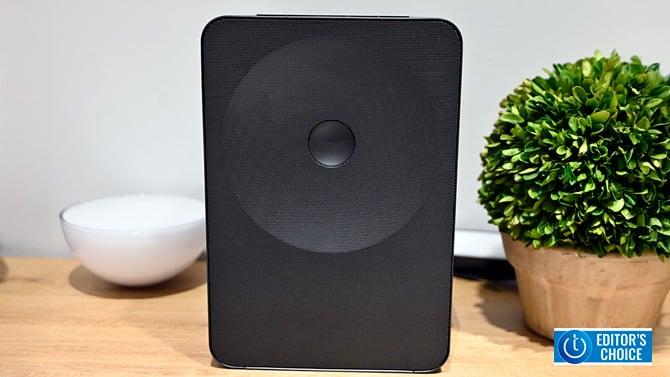
  <p><img alt="The Samsung Music Studio 7 charcoal black rectangular housing is minimalist and stately." class="imagecenter" src="https://www.techlicious.com/images/av/samsung-music-studio-front-670px.jpg" style="width: 670px; height: 377px;" /></p>
<p>I&rsquo;ve owned a number of televisions over the years. And I have to tell you, there have been more than a few moments when I&rsquo;ve gnashed my teeth because the audio is nowhere near the visual quality. The result? Researching and investing in a soundbar or speaker setup to achieve some audio-visual parity. However, when it comes to home theater setups, no matter how simple the company says it will be, there will be some kind of calibration as you work to bring the different channels into alignment to create an optimal audio experience in the room. And as much as I like to tinker, sometimes I want to just unbox, plug it in, and go.</p>
<p>Samsung is offering such a solution with its Music Studio Wi-Fi smart speakers. Designed to work independently or with other audio components such as a soundbar, Music Studio 7 delivers warm, balanced audio and a bunch of features designed to enhance your listening experience. I recently had the opportunity to test the Music Studio 7. Here are my thoughts.&nbsp;</p>
<table border="1" cellpadding="2" cellspacing="1" style="width: 670px">
	<tbody>
		<tr>
			<td>
				<span style="font-size:175%"><strong>&nbsp;+ Pros</strong></span></td>
			<td>
				<span style="font-size:175%"><strong>&nbsp;&ndash; Cons</strong></span></td>
		</tr>
		<tr>
			<td>
				<div>
				<ul>
					<li>Rich, powerful audio</li>
					<li>Easy setup and syncing capabilities</li>
					<li>Lots of features</li>
				</ul>
				</div>
			</td>
			<td>
				<ul>
					<li>A bit pricey</li>
				</ul>
			</td>
		</tr>
		<tr>
			<td colspan="2">
				<table cellpadding="10" cellspacing="0" style=" width: 670px; border: 0 !important;">
					<tbody>
						<tr>
							<td>
								<em><span style="font-size:150%">&quot;Set it and forget it speakers never looked or sounded this good.&quot;</span></em></td>
						</tr>
					</tbody>
				</table>
			</td>
		</tr>
	</tbody>
</table>
<h2>Pricing and availability</h2>
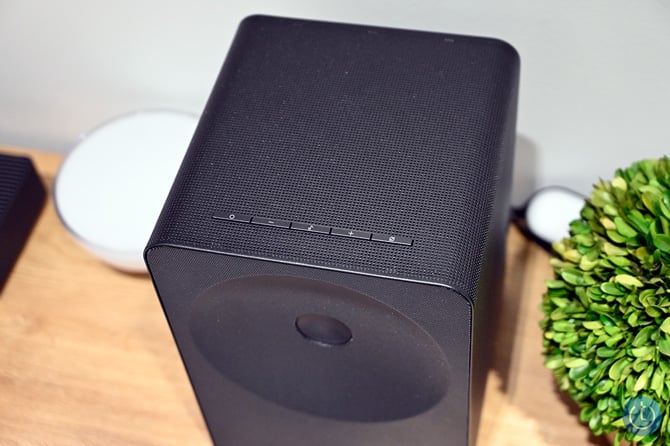
<p>The Music Studio speakers are currently available in two varieties. I demoed the <a href="https://howl.link/qg2npkvy6xrhm" target="_blank">Music Studio 7</a>, which costs $499.99 per speaker. Each speaker features a 3.1.1 channel setup consisting of three main channels &ndash; left, front/center, and right channels &ndash; plus an up-firing driver and a built-in subwoofer. The Studio 7 offers a more immersive audio experience than its counterpart, the Music Studio 5 speaker. Priced at $299.99, the <a href="https://howl.link/3ojkl5jienf5a" target="_blank">Music Studio 5</a> has a 2.0 channel setup of two tweeters and an integrated subwoofer.&nbsp;</p>
<p><img alt="The Samsung Music Studio 7 has an upfiring driver built into the top." class="imagecenter" src="https://www.techlicious.com/images/av/samsung-music-studio-top-670px.jpg" style="width: 670px; height: 446px;" /></p>
<h2>Design</h2>
<p>The Music Studio 7 makes for a fine-looking pair of speakers. The charcoal black rectangular housing is minimalist and stately, toeing the line between art and furniture. The result of a collaboration with renowned artist and designer Erwan Bourollec, the Dot Design focuses on the titular circular dot on the front of the device. They&rsquo;re not the centerpiece of the room, but they add a touch of elegance to just about any decor, nonetheless.</p>
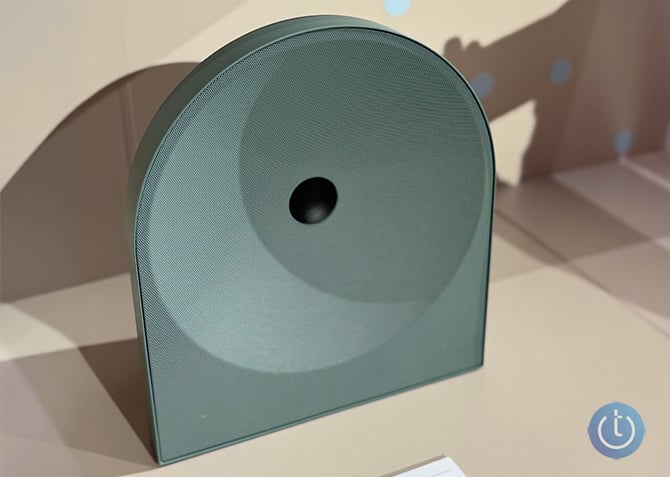
<p>Nine out of ten, when it comes to audio, I&rsquo;m going to choose the speaker with the best performance and features. However, I have to say, I prefer the Studio 5 as it eschews the rectangular shape, going all in on the circular motif. They offer a more visually striking presentation that speaks to me.</p>
<p><img alt="The two-channel Samsung Music Studio 5 eschews the Music Studio 7's rectangular shape, going all in on the circular motif. " class="imagecenter" src="https://www.techlicious.com/images/av/samsung-music-studio-5-front-670px.jpg" style="width: 670px; height: 477px;" /></p>
<p>In terms of dimensions, neither pair of speakers takes up much real estate. The Music Studio 5 weighs 5.29 pounds and measures 9.88 x 11.18 x 5.39 inches. The Music Studio 7 has a more substantial footprint of 7.28 x 10.59 x 7.5 inches and weighs 12.35 pounds. Either can fit comfortably in an entertainment system or on a TV stand.</p>
<h2>Features</h2>
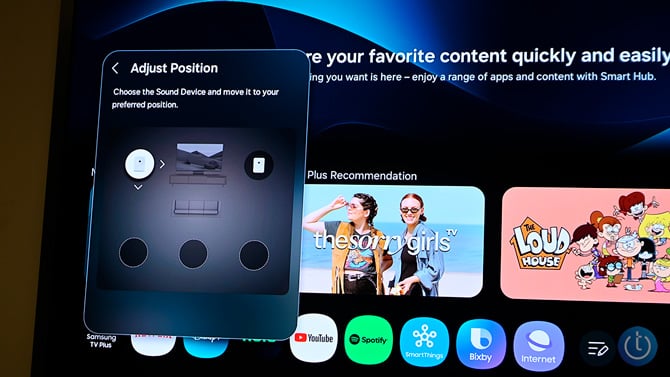
<p>The Studio 7 comes packed with features. My favorite is SpaceFit Sound Pro, which utilizes integrated mics to examine audio reflections in whatever room you&rsquo;re planning to use the speakers in, using test acoustics. From there, the software calibrates the audio to best match the room. In addition to optimizing audio for every channel plus the subwoofer, the Sound Pro also keeps track of content engagement and automatically adapts the sound according to circumstance. So, whether you&rsquo;re watching a breathy romance, an action movie bursting with explosions, or slaying a dragon in a game, Sound Pro will adjust without you lifting a finger.&nbsp;</p>
<p><img alt="The SpaceFit Sound Pro feature calibrates the audio to best match the Music Studio 7's placement in the room" class="imagecenter" src="https://www.techlicious.com/images/av/samsung-music-studio-onscreen-menu-670px.jpg" style="width: 670px; height: 377px;" /></p>
<p>Q-Symphony is another cool feature. It allows for wireless syncing between the Studio 7, your Samsung TV, and up to three additional Samsung audio devices. Want even more audio power? Throw a soundbar in for good measure. Samsung has also launched a new app called Samsung Sound that acts as an aggregator of all your connected Samsung audio devices, allowing you to create custom audio groups for multi-room or single-room experiences. You can also tailor your listening preferences with equalizers and sound mods.</p>
<p>For the bass lovers, there&rsquo;s AI Dynamic Bass Control, a patented Samsung technology that uses AI to monitor your audio, adjusting the lows in real time. The result is powerful bass that isn&rsquo;t diffused or distorted. The Studio 7 also has Waveguide Technology, another patent that helps the speakers create immersive audio with a wider soundstage and better clarity. That means instead of having to sit in the very center of the speakers to snag that coveted sweet spot, I got a stellar performance even though I was sitting left of center.</p>
<p>Finally, to further improve audio clarity, you have the company&rsquo;s Pattern Control Technology. It uses algorithms to manage audio signals and works to cut down on signal overlap between different audio channels, for a cleaner result when Dolby Atmos 3D audio is enabled. In short, the technology prevents audio bleed between the three channels (left, front/center, right), ensuring that finer details like a whisper or the flicker of a flame instead aren&rsquo;t buried under a weighty explosion or loud soundtrack music.</p>
<h2>Performance</h2>
<p>The Music Studio 7 sounds pretty gosh darn good. I listened to several tracks as well as watched a few movie clips. And no matter what I watched or listened to, the Studio 7 delivered warm, balanced audio with a generous soundstage and clean detail.</p>
<p>I started my testing with a scene from &ldquo;The Old Guard&rdquo;. Andy (actor Charlize Theron) and her team infiltrate what&rsquo;s supposed to be an enemy base, only to discover the entire operation is a setup. The scene opens with a helicopter dropping the team off at their destination; the steady pulse of the blades spinning punctuates the heavy strings of the background music. The gentle bleating of goats and the soft crunch of footsteps as the team made their way to their destination were crisp. The same can be said for the blunt, meaty sound as a bullet hit an unsuspecting guard. A satisfying metallic clink from the spent bullet casing isn&rsquo;t buried under the pulsating drumline as the team infiltrates the base.</p>
<p>The scene culminates as Andy lets out a tight, frustrated expletive that&rsquo;s cut off by an explosive volley of gunfire. The team goes down in a hail of bullets punctuated by the sound of numerous shell casings hitting the concrete floor. I was impressed at how well the speakers handled the finer details of the scene, particularly the dialogue. It&rsquo;s been my experience that on certain speakers and soundbars, dialogue comes in lower than music, explosions, or other background noise. It was nice to hear that Theron&rsquo;s swear word wasn&rsquo;t lost in the midst of the action.</p>
<p>I also streamed a few songs from Spotify. To test the speakers&rsquo; Hi-Fi chops, I set the stream quality to Lossless (up to 24-bit/44.1kHz). Speaking of which, the Studio 7 has Spotify Tap, so you can start listening to your playlist with the tap of a button. But back to the testing. I started with Van Morrison&rsquo;s &ldquo;Moondance&rdquo;. My ears were immediately buffeted with warm piano, complete with a tinkling trill. I clearly heard the strumming of the bass as the artist&rsquo;s dulcet tenor drove the song, while a clean flute, a brassy horn, and crisp percussion completed the composition. The generous soundstage allowed me to focus on individual parts of the track without much effort. And although I wasn&rsquo;t sitting in the center of the Studio 7 speakers, I didn&rsquo;t notice any deficits.</p>
<p>Next, I listened to one of my favorite songs, Santana&rsquo;s &ldquo;Europa (Earth&rsquo;s Cry Heaven&rsquo;s Smile)&rdquo;. And as expected, Santana's electric guitar was front and center. But it didn't overwhelm the organ, warm bass, or synthesized strings. The sound was so clean, I could hear the brassiness of the cymbals right along with hits to the snare, kick, and high-hat.</p>
<h2>Verdict</h2>
<p>Set it and forget it never looked or sounded this good. The Samsung Music Studio 7 speakers are made for those of us who just want to turn a gadget on and have it just work. The 3.1.1 channel system, combined with Samsung&rsquo;s proprietary technologies, ensures a great listening experience regardless of where you are in the space and what you&rsquo;re watching or listening to. They&rsquo;re stylish, even if they sport a more traditional design, and can synchronize with up to four additional Samsung audio sources. They&rsquo;re a little pricey compared to some competing systems, but for the number of features and ease of use, it&rsquo;s worth spending a little more.&nbsp;</p>
<p><a href="https://howl.link/qg2npkvy6xrhm" id="Link to buy Music Studio 7 on Samsung" rel="sponsored" style="       display:inline-block;      padding:12px 20px;      background-color:#0b67a1;      color:#ffffff;      text-decoration:none;      font-weight:600;      border-radius:6px;      font-family:Arial, sans-serif;" target="_blank"> CHECK PRICE ON SAMSUNG</a></p>
<p class="clr">[Image credit: Sherri L. Smith/Techlicious, Jonathan Takiff/Techlicious]</p>
      ]]></content>
    </entry>


    <entry>
      <title>What a Smart Ring Taught Me About My Own Sleep</title>

      <link rel="alternate" type="text/html" href="https://www.techlicious.com/blog/what-a-smart-ring-taught-me-about-my-own-sleep/" />

      <id>tag:techlicious.com,2026:/www.techlicious.com/blog/1.8344</id>
      <published>2026-04-08T14:03:09Z</published>
      <updated>2026-04-08T14:06:10Z</updated>

      <author>
        <name>Andrea Smith</name>
        <uri>https://www.techlicious.com/about/</uri>
      </author>

            <media:content url="https://www.techlicious.com/images/health/ringconn-gen-2-air-phone-1200px.jpg" medium="image" type="image/jpeg" />
      <media:thumbnail url="https://www.techlicious.com/images/health/ringconn-gen-2-air-phone-1200px.jpg" />
      

      <category term="News"
        scheme="https://www.techlicious.com/blog/category/news/"
        label="News" />

      <category term="Partner Content"
        scheme="https://www.techlicious.com/blog/category/sponsored/"
        label="Partner Content" />

      <category term="Health and Home"
        scheme="https://www.techlicious.com/blog/category/health-home/"
        label="Health and Home" />

      <category term="Health &amp; Fitness"
        scheme="https://www.techlicious.com/blog/category/health-fitness/"
        label="Health &amp; Fitness" />

      <category term="Blog"
        scheme="https://www.techlicious.com/blog/category/blog/"
        label="Blog" />

      <summary type="html"><![CDATA[
<div>A smart ring revealed what my sleep habits were really doing to my body, including one apnea risk alert I never saw coming.</div>
      ]]></summary>

      <content type="html"><![CDATA[
  <p><img alt="Silver RingConn shown on index finger while holding smartphone" class="imagecenter" src="https://www.techlicious.com/images/health/ringconn-gen-2-air-phone-670px.jpg" style="width: 670px; height: 377px;" /></p>
<p>Every March, World Sleep Day serves as a reminder that a lot of us aren't sleeping as well as we think. This year, it nudged me to do something I hadn't done before, actually look closely at the sleep data I'd been passively collecting for months on my RingConn Gen 2 Smart Ring. I used to assume I was a decent sleeper. I'd fall asleep easily, rarely wake up in the middle of the night, and usually felt okay in the morning. A few weeks of paying attention to my overnight numbers told a more complicated story.</p>
<p>Now I understand my sleep in a way I never did when I was going purely by feel. Including one night that genuinely caught me off guard.</p>
<h2>Why I chose a ring over a watch</h2>
<p>I've tested a lot of smartwatches over the years. Most track sleep, but I've never been able to wear one to bed comfortably. Even lightweight models that I love during the day feel bulky and intrusive at night. I'd end up taking it off before bed, which meant missing the data I actually needed.</p>
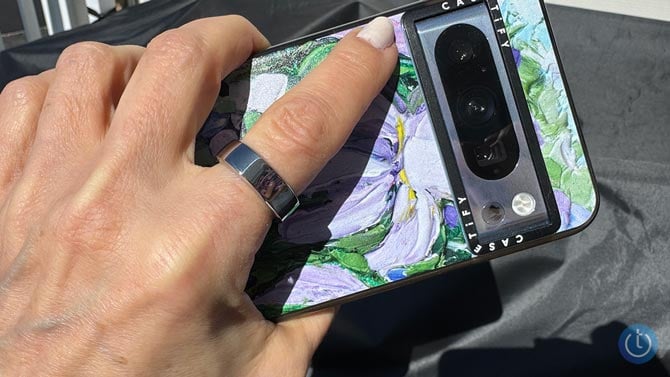
<p>A smart ring solves that problem. The RingConn Gen 2 is small and light enough that I genuinely forget I'm wearing it. Because the sensors sit close to the arteries in my finger, it captures heart rate, body movement, and subtle physiological signals throughout the night, the same data a wrist device would collect, in a form factor that doesn't interrupt my sleep to get it.</p>
<h2>What the ring is actually tracking</h2>
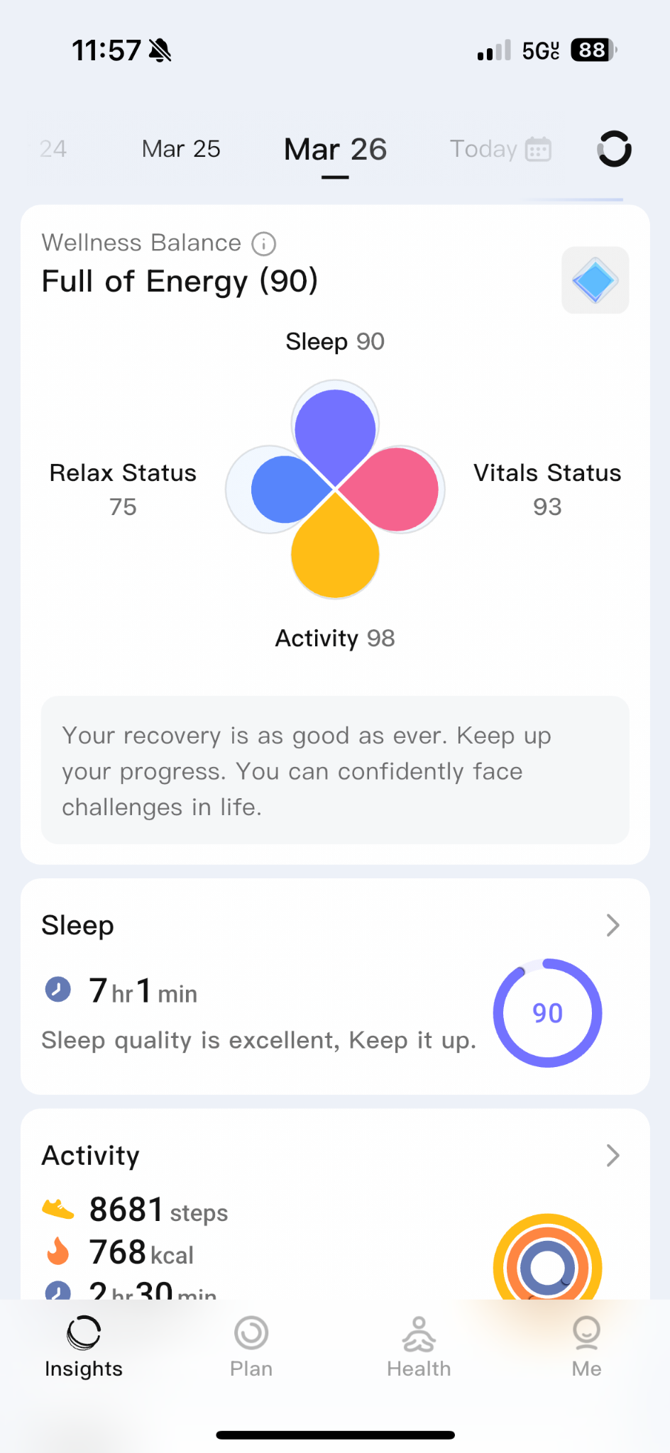
<p>Each morning, the RingConn app greets me with a Sleep Score. That number is the first thing I check, but over time I've learned the score itself isn't the most interesting part. What's behind it is.</p>
<p><img alt="RingConn sleep score screen shot showing energy level, sleep time, and daily activity in steps and kcal" class="imagecenter" src="https://www.techlicious.com/images/health/ringconn-sleep-score-670.png" style="width: 500px; height: 1084px;" /></p>
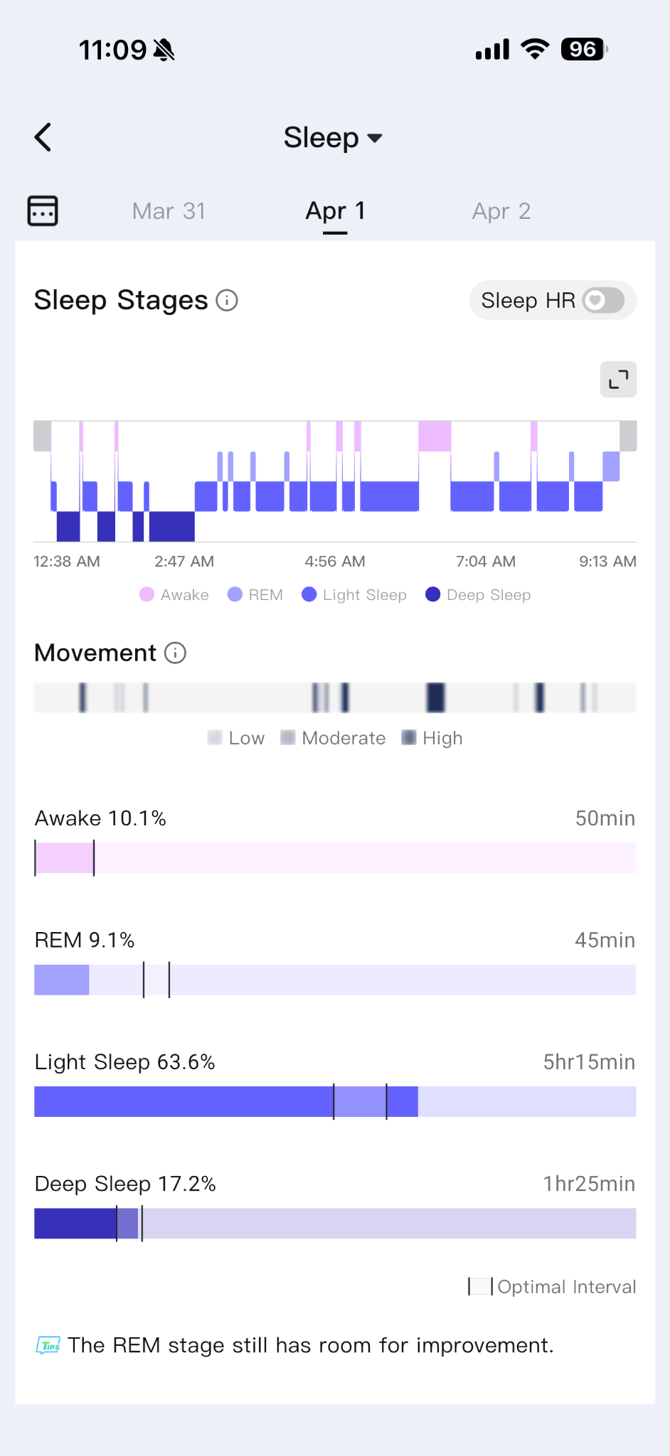
<p>The app breaks down each night into sleep stages: light sleep, deep sleep, and REM. Light sleep makes up the largest portion of most nights and helps the body transition between stages. Deep sleep is where physical recovery happens, muscle repair, immune function, the body doing its maintenance work. REM sleep is tied to memory processing and emotional regulation. How your night is divided among these stages affects how restored you feel the next day.</p>
<p><img alt="ringconn app screenshot showing chart of nightly sleep stages with movement and time awake vs rem vs light sleep vs deep sleep" class="imagecenter" src="https://www.techlicious.com/images/health/ringconn-sleep-stages-monitoring-670.png" style="width: 500px; height: 1087px;" /></p>
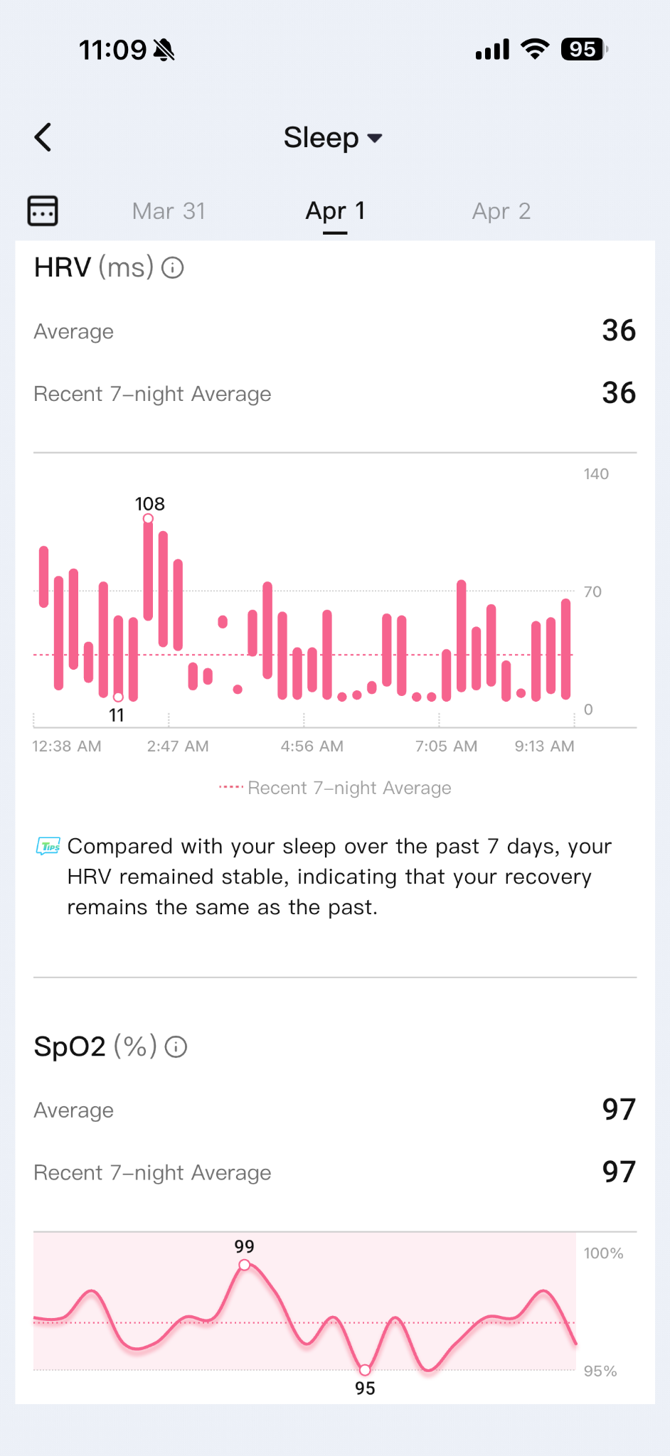
<p>Two other signals I watch closely are resting heart rate and heart rate variability, or HRV. During deep recovery, heart rate typically drops. When it stays elevated overnight, that's usually a sign that something is working against rest, stress, illness, a late meal, or alcohol. HRV measures the variation between individual heartbeats and works as a recovery indicator in the opposite direction. Higher variability generally means your body is well rested, while lower numbers can point to fatigue or strain.</p>
<p><img alt="ringconn app screen shot showing heart rate through the nights and pulseox" class="imagecenter" src="https://www.techlicious.com/images/health/ringconn-hr-ox-monitoring-670.png" style="width: 500px; height: 1087px;" /></p>
<h2>The night the data surprised me</h2>
<p>A few weeks into paying closer attention, I had what I thought was a perfectly fine Saturday night. Two glasses of wine with friends, home by 11, solid eight hours in bed. I woke up feeling okay. By early afternoon, I was dragging.</p>
<p>When I checked my data, the story was right there. My overnight heart rate had stayed noticeably elevated compared to a typical night. My deep sleep was lower than usual. My recovery score was down. My body had spent the night working harder than it should have been. I just didn't feel it until six hours later.</p>
<p>Research backs this up. Alcohol raises nighttime heart rate and disrupts sleep cycles even when it doesn't feel that way. But seeing it in my own data, tied to a specific night I remembered clearly, made it land differently than just reading about it.</p>
<h2>The alert I didn't expect</h2>
<p>Then came a night that made me pay attention in a different way.</p>
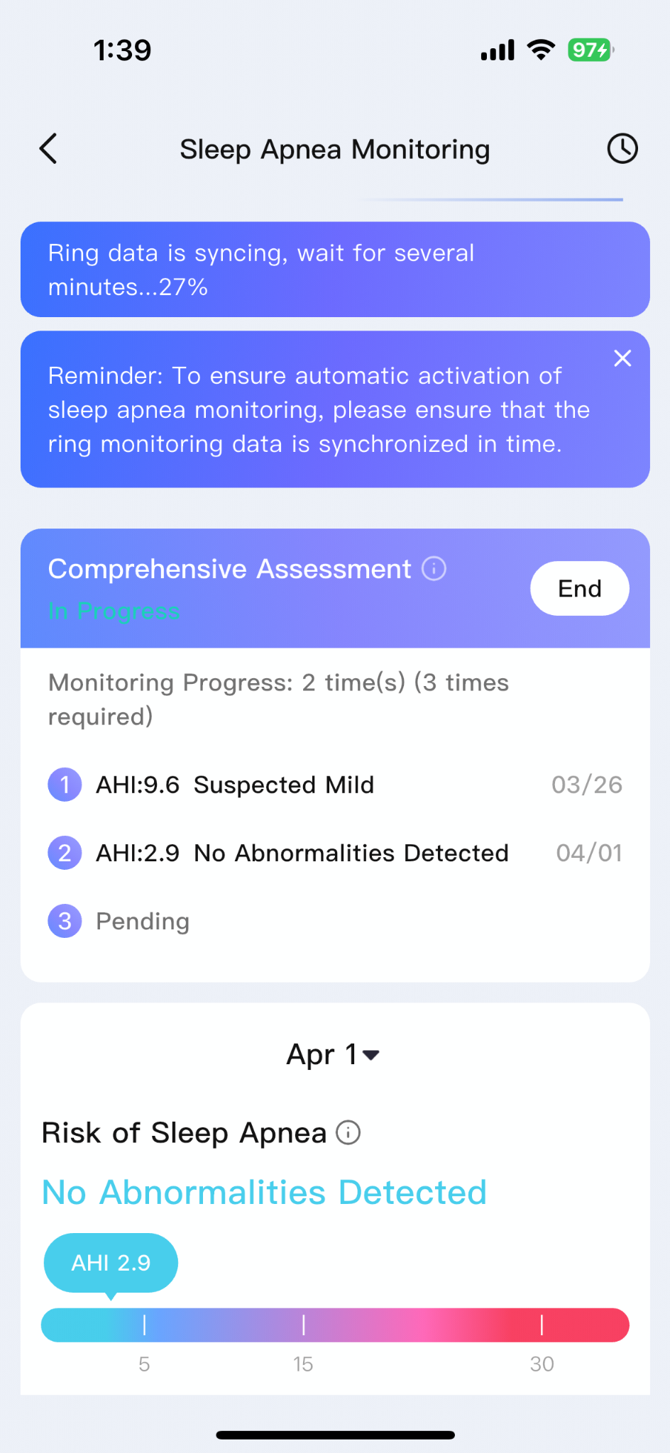
<p>I woke up to a sleep apnea risk flag in the app. The RingConn Gen 2 includes monitoring that analyzes patterns in blood oxygen levels, heart rate, and breathing throughout the night, and that morning, it had flagged an elevated risk score. Not a diagnosis or an emergency alert, but a signal that something in my overnight data had looked unusual enough to surface.</p>
<p><img alt="ringconn app screenshot should an alert for suspected mild sleep apnea" class="imagecenter" src="https://www.techlicious.com/images/health/ringconn-sleep-apnea-alert-670px.png" style="width: 500px; height: 1084px;" /></p>
<p>It only happened once and there was no pattern or repeat flags in the nights that followed. But that single alert made me aware of something I never would have noticed on my own, and it prompted me to mention it to my doctor during my next visit. RingConn says the Gen 2 is one of the only smart rings that analyzes trends in blood oxygen, heart rate, and breathing patterns together to offer this type of sleep apnea risk monitoring. After seeing that flag, I understood why that distinction matters.</p>
<p>Sleep apnea affects an estimated 30 million Americans, and many of them have no idea. The condition causes breathing interruptions during sleep that fragment rest and strain the cardiovascular system, often without obvious symptoms beyond daytime fatigue that's easy to chalk up to something else. Traditionally, identifying it has required an overnight sleep study, which many people never pursue because they don't realize they need one. A device that can notice irregularities in your breathing patterns night after night and flag them when something looks off is a meaningful step toward catching a problem that might otherwise go undetected for years.</p>
<h2>What the patterns taught me over time</h2>
<p>That apnea alert was a one-off, but the broader lesson stuck that the data sees things I can't. Since poor sleep can affect focus, mood, and long-term health, including heart disease and metabolism, I want to be armed with actionable data.</p>
<p>Work travel shows up consistently in my numbers. Flights, late dinners, unfamiliar time zones, all of it pushes my overnight heart rate up and pulls my deep sleep down. I can't always avoid that, but seeing the pattern has made me more intentional about building in a genuine recovery night after I get home instead of pushing straight back into a full schedule.</p>
<p>Bedtime consistency turned out to matter more than I expected. Nights when I go to bed and wake up at roughly the same time tend to show better efficiency and more balanced sleep stages than nights when I stay up later, even when the total hours are similar.</p>
<p>I've also learned my own perception is not a reliable guide. There have been mornings when I was sure I'd slept well, only to see weak recovery numbers. Other nights that felt middling showed stronger scores. The data offers a more honest picture than my gut sense ever did.</p>
<h2>What to do with what you learn</h2>
<p>Sleep tracking is most useful when you zoom out. A single low score doesn't mean much. A pattern of low scores after late nights, travel, or a stressful week starts to tell you something actionable. An unexpected flag, like my sleep apnea alert, is also worth taking seriously, even if it doesn't repeat.</p>
<p>The data works best as a nudge rather than a verdict. For me, that has meant skipping a drink on nights when I want to feel sharp the next day, going to bed earlier when I see several nights of poor recovery stacking up, and paying attention when the ring notices something I didn't.</p>
<h2>Awareness is the real benefit</h2>
<p>The <a href="https://bit.ly/ringconnsleepday" rel="sponsored">RingConn Gen 2 Smart Ring</a> hasn't transformed my sleep overnight. What it has done is make my habits visible, demonstrating a connection between what I do during the day and how I recover at night that is impossible to ignore. Features like sleep apnea risk monitoring can also help flag potential concerns that might otherwise go unnoticed. That kind of awareness is worth more than a perfect sleep score.</p>
      ]]></content>
    </entry>


    <entry>
      <title>FBI Report: Online Scams Stole $20.9 Billion from Americans in 2025</title>

      <link rel="alternate" type="text/html" href="https://www.techlicious.com/blog/fbi-online-scam-losses-2025/" />

      <id>tag:techlicious.com,2026:/www.techlicious.com/blog/1.8343</id>
      <published>2026-04-07T23:00:34Z</published>
      <updated>2026-04-07T23:00:35Z</updated>

      <author>
        <name>Josh Kirschner</name>
        <uri>https://www.techlicious.com/about/</uri>
      </author>

            <media:content url="https://www.techlicious.com/images/computers/online-extortion-concept-1200px.jpg" medium="image" type="image/jpeg" />
      <media:thumbnail url="https://www.techlicious.com/images/computers/online-extortion-concept-1200px.jpg" />
      

      <category term="News"
        scheme="https://www.techlicious.com/blog/category/news/"
        label="News" />

      <category term="Computers and Software"
        scheme="https://www.techlicious.com/blog/category/computers-software/"
        label="Computers and Software" />

      <category term="Internet &amp; Networking"
        scheme="https://www.techlicious.com/blog/category/internet-networking/"
        label="Internet &amp; Networking" />

      <category term="Blog"
        scheme="https://www.techlicious.com/blog/category/blog/"
        label="Blog" />

      <category term="Privacy"
        scheme="https://www.techlicious.com/blog/category/protecting-your-privacy/"
        label="Privacy" />

      <summary type="html"><![CDATA[
<p>Americans filed more than 1 million fraud complaints in 2025, with AI-powered fraud, crypto cons, and sextortion driving the surge.&nbsp;</p>
      ]]></summary>

      <content type="html"><![CDATA[
  <p><img alt="" class="imagecenter" src="https://www.techlicious.com/images/computers/online-extortion-concept-670px.jpg" style="width: 670px; height: 377px;" /></p>
<p>We&rsquo;ve all gotten those sketchy texts from someone claiming to be your bank, a suspicious call from &quot;Social Security,&quot; or a too-good-to-be-true investment tip from a new online friend. While many are obvious scams, advancements in techniques and technology are making many harder to detect. And according to a recent FBI report, the people behind those messages are becoming more successful and richer by the day.</p>
<p>The FBI's Internet Crime Complaint Center (IC3) released its <a href="https://www.ic3.gov/AnnualReport/Reports/2025_IC3Report.pdf" target="_blank">2025 annual report</a> [PDF] this week, and the data in it tell a very troubling story. Americans reported losing a record $20.877 billion to internet-enabled crime last year &ndash; a 26% increase from 2024 and more than double the losses from just three years ago. And the volume of complaints behind those losses is surging just as fast. The IC3 received 1,008,597 complaints in 2025, averaging nearly 3,000 reports every single day and crossing the million-complaint threshold for the first time in its 25-year history.</p>
<h2>Investment fraud leads in damages</h2>
<p>The single biggest loss category was investment fraud, which cost victims $8.6 billion &ndash; nearly half of all reported losses. It was also the fourth-most-reported crime type by volume, with nearly 73,000 complaints, up 52% from 2024.</p>
<p>Most of that damage is tied to cryptocurrency investment scams, known as &quot;pig butchering,&quot; where fraudsters build trust with potential targets through social media, dating apps, or seemingly misdirected text messages before steering them toward fake investment platforms. Those who take the hook watch their fake account balances grow, sometimes for months, before attempting to withdraw. At that point, they're hit with bogus taxes and fees &ndash; a final attempt to extract even more funds &ndash; before the scammers vanish with everything. The FBI reported $7.2 billion in crypto investment fraud losses in 2025, with complaint volume jumping 48% from the prior year.</p>
<p>Business email compromise ranked second in losses at $3 billion across nearly 25,000 complaints, while tech support scams generated $2.1 billion in losses from almost 48,000 reports. Phishing and spoofing &ndash; a catch-all category for deceptive emails, texts, and calls &ndash; remained the most common complaint type by far at 191,561 reports. Direct losses in that category were comparatively modest at $215 million, but accounts lost to phishing can later be used for identity theft and to perpetuate other types of financial fraud.</p>
<p><strong>Read more</strong>: <em><a href="https://www.techlicious.com/how-to/how-to-tell-if-email-has-been-spoofed/">How to Tell if an Email Has Been Spoofed</a></em></p>
<h2>Older Americans bear the heaviest burden</h2>
<p>Adults 60 and older filed 201,266 complaints in 2025 &ndash; a 37% increase from the prior year &ndash; and reported $7.7 billion in losses, a 59% jump. That works out to an average loss of over $38,000 per victim. The specific crimes hitting this group hardest financially are investment fraud ($3.5 billion), tech support scams ($1 billion), and confidence and romance fraud ($584 million).</p>
<p>What makes these numbers particularly grim is the complaint growth rate. Phishing complaints from this group nearly doubled year-over-year, jumping from about 23,000 to 48,000. Investment fraud complaints among seniors rose 79%, from roughly 9,400 to nearly 17,000. While government impersonation complaints &ndash; where criminals pose as Social Security or Medicare officials &ndash; almost doubled as well.</p>
<h2>AI is making scams harder to spot</h2>
<p>Not surprisingly, AI makes a big splash for the first time in this year&rsquo;s report. In 2025 &ndash; the first year IC3 tracked AI as a complaint descriptor &ndash; the agency logged more than 22,000 AI-related complaints, resulting in $893 million in losses.</p>
<p>The FBI notes that, &ldquo;AI-enabled synthetic content is becoming increasingly difficult to detect and easier to make, which allows criminal actors to potentially conduct successful fraud schemes against individuals, businesses, and financial institutions.&rdquo; Historical tells for detecting scam content, such as bad grammar, awkward phrasing, or obvious visual cues in images and videos, are disappearing. As a result, the technology is showing up across nearly every major fraud category.</p>
<p>Voice cloning has supercharged the grandparent scam, with criminals generating audio that sounds exactly like a family member in distress &ndash; same voice, same cadence &ndash; to demand emergency cash. Victims lost more than $5 million to these distress scams in 2025, and the FBI warns the tactic is expanding to mimic friends and other relatives across a growing range of fake emergencies.</p>
<p>In investment fraud, deepfake videos of celebrities and financial experts are being used to fake endorsements on social media and in video calls. Business email compromise attacks are getting sharper, too. AI-generated text now produces polished executive impersonations that are increasingly hard to distinguish from the real thing, with businesses reporting more than $30 million in confirmed AI-assisted losses. Even job interviews aren't safe: the report flags a rise in AI-generated video used during remote hiring, where fraudulent &quot;interviewers&quot; are attempting to use information gained from hopeful candidates to infiltrate corporate networks.</p>
<h2>Sextortion is exploding in volume</h2>
<p>Extortion complaints reached 89,129 in 2025, nearly double the 48,223 reported in 2023 and the second-highest complaint category overall. Much of that growth is driven by sextortion &ndash; cases where criminals threaten to publish intimate images of a victim unless paid.</p>
<p>The FBI says sextortion often begins when people believe they are communicating with someone who is interested in a relationship, a process known as catfishing. If they are convinced to send nude images or videos, the scammer threatens to release them unless demands for more images or money are met. In other cases, the initial threats are <a href="https://www.techlicious.com/blog/is-the-porn-blackmail-scam-real/" target="_blank">bluffs by the scammer based on claims of evidence of porn use</a>. In all, the FBI received more than 75,000 sextortion-related submissions in 2025, with 11,000 of those complaints coming from people under 20. But that figure almost certainly undercounts the true damage, with the FBI noting that shame and fear keep many victims from reporting at all.</p>
<h2>FBI shows success in stopping some fraud</h2>
<p>When a victim reports a fraudulent wire transfer quickly enough, the FBI's IC3 Recovery Asset Team (RAT) can trigger a process called the Financial Fraud Kill Chain &ndash; a rapid coordination effort with banking partners designed to freeze funds before they move beyond reach. In 2025, the RAT processed nearly 3,900 incidents involving $1.16 billion in attempted theft and froze $679 million, a 58% success rate.</p>
<p>Launched in January 2024, Operation Level Up takes a different approach &ndash; contacting people who are actively being victimized by cryptocurrency investment fraud before they lose everything. In 2025, the operation notified 3,780 victims of active scams, with estimated savings totaling $225 million. Strikingly, 78% had no idea they were being scammed at the time of contact.</p>
<p>Beyond the raw numbers are the human stories of the damage being prevented. The FBI reports that Operation Level Up stopped one victim from cashing out $750,000 from his 401(k), another from selling her house to invest $500,000, and a third from taking out a loan to send $400,000 to scammers. Perhaps most sobering: 38 victims were referred to FBI Victim Specialists for suicide intervention.</p>
<h2>What you can do</h2>
<p>The FBI's core advice hasn't changed much, but with the rise of AI, the urgency of it has. Be deeply skeptical of any unsolicited contact &ndash; by text, phone, email, or social media &ndash; that involves money, investment opportunities, or requests for personal information. If someone you've never met in person is asking you to send cryptocurrency, buy gift cards, or wire funds anywhere, those are all major red flags.</p>
<p>If you or someone you know has been targeted, report it at <a href="http://www.ic3.gov/" target="_blank">ic3.gov</a> immediately and include as much transaction detail as possible. In fraud cases involving wire transfers, every minute counts.</p>
<p>[Image credit: Suzanne Kantra/Techlicious via ChatGPT]</p>
      ]]></content>
    </entry>


    <entry>
      <title>This Free Android App Uses Sound to Fight Motion Sickness</title>

      <link rel="alternate" type="text/html" href="https://www.techlicious.com/blog/motion-sickness-app-samsung-hearapy/" />

      <id>tag:techlicious.com,2026:/www.techlicious.com/blog/1.8342</id>
      <published>2026-04-06T22:43:37Z</published>
      <updated>2026-04-06T22:52:39Z</updated>

      <author>
        <name>Yash Wate</name>
        <uri>https://www.techlicious.com/about/</uri>
      </author>

            <media:content url="https://www.techlicious.com/images/misc/samsung-hearpy-app-hand-1200px.jpg" medium="image" type="image/jpeg" />
      <media:thumbnail url="https://www.techlicious.com/images/misc/samsung-hearpy-app-hand-1200px.jpg" />
      

      <category term="News"
        scheme="https://www.techlicious.com/blog/category/news/"
        label="News" />

      <category term="Phones and Mobile"
        scheme="https://www.techlicious.com/blog/category/phones-mobile/"
        label="Phones and Mobile" />

      <category term="Mobile Apps"
        scheme="https://www.techlicious.com/blog/category/mobile-apps/"
        label="Mobile Apps" />

      <category term="Android Apps"
        scheme="https://www.techlicious.com/blog/category/android-apps/"
        label="Android Apps" />

      <category term="Travel &amp; Entertainment"
        scheme="https://www.techlicious.com/blog/category/travel-entertainment/"
        label="Travel &amp; Entertainment" />

      <category term="Travel"
        scheme="https://www.techlicious.com/blog/category/travel/"
        label="Travel" />

      <category term="Health &amp; Fitness"
        scheme="https://www.techlicious.com/blog/category/health-fitness/"
        label="Health &amp; Fitness" />

      <category term="Blog"
        scheme="https://www.techlicious.com/blog/category/blog/"
        label="Blog" />

      <summary type="html"><![CDATA[
<p>Scientific research shows that playing a low-frequency tone using the Hearapy app for 60 seconds can provide up to 2 hours of relief from motion sickness.&nbsp;</p>
      ]]></summary>

      <content type="html"><![CDATA[
  <p><img alt="Hearapy app shown on a Google Pixel phone" class="imagecenter" src="https://www.techlicious.com/images/misc/samsung-hearpy-app-hand-670px.jpg" style="width: 670px; height: 377px;" /></p>
<p>Ever tried using your phone in a moving vehicle, only to feel lightheaded and nauseated? That&rsquo;s motion sickness kicking in. While over-the-counter medications can help alleviate motion sickness, what if you could hear your way out of it?</p>
<p>Samsung&rsquo;s new app, Hearapy, does exactly that. It plays specialized sound frequencies through earphones to treat the problem at its source, in our inner ear, and neutralize its effects. Hearapy is completely free to use and available for all Android devices, including non-Samsung phones.</p>
<h2>How does Hearapy work?</h2>
<p>Motion sickness is a sensory conflict problem. When you look at your phone&rsquo;s screen in a moving car, your inner ear (the vestibular system) senses the movement and reports it to your brain, but your eyes (the visual system) signal that you&rsquo;re stationary. This mixed reporting confuses the brain, causing the familiar motion sickness symptoms of nausea and dizziness.</p>
<p>Samsung&rsquo;s Hearapy app is based on a peer-reviewed study from <a href="https://www.sciencedaily.com/releases/2025/04/250404122627.htm" target="_blank">Nagoya University</a>&nbsp;that found exposure to a 100Hz tone for a minute helped reduce these motion sickness symptoms. The app works by playing a 100 Hz bass sine wave through earphones at 80-85dB. This stimulates the vestibular system and overrides the mixed signals, resetting the balance system and preventing the brain from triggering its stress response. Samsung claims that listening to the tone for 60 seconds provides roughly two hours of relief.</p>
<h2>How to use Hearapy</h2>
<p>Using the Hearapy app is easy. Download <a href="https://play.google.com/store/apps/details?id=com.samsung.a100hz&amp;hl=en_US" target="_blank">Hearapy</a> from the Google Play Store. It works with any Android phone, not just Samsung Galaxy phones. Connect your earbuds to your phone. Hit the &ldquo;tap here to start&rdquo; text on the screen, and the tone will start playing.</p>
<p>It&rsquo;s important to listen to the tone at a high volume. However, there&rsquo;s no way to measure the output; Samsung says to &ldquo;set the volume loud but still comfortable.&rdquo; When testing the app, I could feel a slight vibration in my ear with the volume turned most of the way up.</p>
<p>Almost any pair of earbuds can vibrate at 100Hz, but not all of them can hit 85dB with the required clarity. Many entry-level buds induce distortion, turning the pure sine wave into a square-ish wave. As a result, they may not be able to adequately stimulate your inner ear.</p>
<p>Of course, Samsung recommends using its <a href="https://www.amazon.com/Samsung-Wireless-Bluetooth-Optimized-Translation/dp/B0G1PJLWLZ?th=1&amp;linkCode=ll2&amp;tag=techlicious-20&amp;linkId=09c76bf946913e9657070232b52f0a40&amp;language=en_US&amp;ref_=as_li_ss_tl" id="Amazon link to buy Samsung Galaxy Buds 4 Pro" target="_blank">Galaxy Buds 4 Pro</a> ($249.99) for clear, powerful 100Hz sound. But other earphones should work fine too. I recommend using in-ear buds or over-ear headphones, as they should provide a good acoustic seal to preserve the tone's integrity. Any pair of better headphones with a dual- or triple-driver architecture should be able to reproduce the tone perfectly.</p>
<p>We&rsquo;ve tested and recommend the <a href="https://www.techlicious.com/blog/hands-on-with-soundpeats-h3-earbuds/" id="Amazon link to buy Soundpeats H3" target="_blank">Soundpeats H3</a> (available on <a href="https://www.amazon.com/SoundPEATS-H3-Cancellation-Microphones-Transparent/dp/B0FJKYVSMP?th=1&amp;linkCode=ll1&amp;tag=techlicious-20&amp;linkId=5d6f764905adbd2c860d91844d434f8e&amp;language=en_US&amp;ref_=as_li_ss_tl">Amazon</a> for under $100) as a high-performance budget option. Its triple-driver architecture has a dedicated low-frequency driver to reproduce clean bass. If you have more to spend, our favorite in-ear buds for travel are the <a href="https://www.techlicious.com/review/bose-quietcomfort-ultra-earbuds-gen-2-review/" id="Amazon link to buy Bose QuietComfort Ultra 2" target="_blank">Bose QuietComfort Ultra 2</a> (available on <a href="https://www.amazon.com/Bose-QuietComfort-Bluetooth-Cancelling-Immersive/dp/B0F7M3HPBD?th=1&amp;linkCode=ll1&amp;tag=techlicious-20&amp;linkId=386de5bc2bdfd7c20dba0e623407f812&amp;language=en_US&amp;ref_=as_li_ss_tl">Amazon</a> for $299.00). For kids with motion sickness, we recommend the <a href="https://www.amazon.com/Puro-Sound-Labs-Noise-Cancelling-Headphones/dp/B0CHYVZ3HP?th=1&amp;linkCode=ll2&amp;tag=techlicious-20&amp;linkId=07aac281118edfe9cc4769db7254d5aa&amp;language=en_US&amp;ref_=as_li_ss_tl" id="Amazon link to buy Puro Sound Labs PuroPro" target="_blank">Puro Sound Labs PuroPro</a> ($125.00), which can be set to prevent output from exceeding 85dB.</p>
<p>I didn&rsquo;t get a chance to test the motion sickness claim of the Hearapy app, but the underlying concept has scientific backing, and the audio-based approach is more practical than existing solutions. If you have an Android phone and a pair of headphones, I&rsquo;d advise trying Hearapy as an experiment the next time you feel motion sick before reaching for your usual medication.</p>
<p>[Image credit: Suzanne Kantra/Techlicious]</p>
      ]]></content>
    </entry>


    <entry>
      <title>Flighty App Predicts When Airport&#39;s Delays Will End</title>

      <link rel="alternate" type="text/html" href="https://www.techlicious.com/blog/flighty-flight-tracking-app-airport-delay-predictions/" />

      <id>tag:techlicious.com,2026:/www.techlicious.com/blog/1.8340</id>
      <published>2026-04-06T22:11:13Z</published>
      <updated>2026-04-06T22:16:14Z</updated>

      <author>
        <name>Palash Volvoikar</name>
        <uri>https://www.techlicious.com/about/</uri>
      </author>

            <media:content url="https://www.techlicious.com/images/misc/flighty-airport-intelligence-feature-1200px.jpg" medium="image" type="image/jpeg" />
      <media:thumbnail url="https://www.techlicious.com/images/misc/flighty-airport-intelligence-feature-1200px.jpg" />
      

      <category term="News"
        scheme="https://www.techlicious.com/blog/category/news/"
        label="News" />

      <category term="Travel &amp; Entertainment"
        scheme="https://www.techlicious.com/blog/category/travel-entertainment/"
        label="Travel &amp; Entertainment" />

      <category term="Travel"
        scheme="https://www.techlicious.com/blog/category/travel/"
        label="Travel" />

      <category term="Blog"
        scheme="https://www.techlicious.com/blog/category/blog/"
        label="Blog" />

      <category term="Time Savers"
        scheme="https://www.techlicious.com/blog/category/time-savers/"
        label="Time Savers" />

      <summary type="html"><![CDATA[
<p>Flighty&rsquo;s Airport Intelligence uses real-time aviation data to forecast delays, cancellations, and airport disruptions in plain English.</p>
      ]]></summary>

      <content type="html"><![CDATA[
  <p><img alt="Flighty app showing the new airport intelligence feature." class="imagecenter" src="https://www.techlicious.com/images/misc/flighty-airport-intelligence-feature-670px.jpg" style="width: 670px; height: 377px;" /></p>
<p>If you've ever been stuck at the airport wondering when delays will end, Flighty, my&nbsp;go-to app for flight-tracking, can now tell you. It can also alert you to problems at your airport before your airline does. The new feature, called Airport Intelligence, monitors live conditions at over 14,000 airports, translating raw aviation data into plain-English summaries.</p>
<p>The update taps into the same real-time data feeds that pilots and air traffic controllers rely on, such as weather observations, terminal forecasts, and notices of closed runways or equipment outages. Flighty then translates all of that aviation jargon into plain-English summaries, so you can actually understand what is going on at your airport without needing a pilot's license.</p>
<p>I use Flighty every time I travel, and it is one of my favorite apps on my phone. Airport Intelligence is a solid addition, especially for understanding what is happening at an airport I have never been to or checking on conditions at one I know well before heading out.</p>
<p>The big feature here is the delay forecast. You get a timeline showing when delays should start piling up and, more importantly, when they should stop. If you have ever sat at a gate wondering whether things are getting better or worse, this is exactly the kind of information that will help ease that travel anxiety. The forecasts are paired with AI-generated summaries, so you'll get a quick read on the situation without having to dig through the data.</p>
<p>In addition, the update adds new airport warnings for issues such as hail, low visibility, de-icing, and lightning. You can mark airports as favorites and get notifications when major disruptions hit, even before your flight is affected. There are also new arrival and departure boards with hourly performance trends, so you can see when delays tend to build throughout the day.</p>
<p>Airport Intelligence is also integrated directly into your flight's detail page, showing airport status and personalized alerts specific to your trip. That is a nice touch because it means you do not have to go looking for the information separately.</p>
<p>Flighty is also now finally available on the web for free at&nbsp;<a href="https://flighty.com/airports" target="_blank">flighty.com/airports</a>, so anyone can check an airport's live status without downloading the app or paying for a subscription. You can search for any airport and see current delays, on-time percentages, cancellation rates, and weather warnings on the web, which is pretty neat.</p>
<p>One of the biggest pain points for US travelers is still the landside experience &ndash; security line wait times and terminal congestion. Airport Intelligence is focused entirely on flight operations, which it does well, but I would love to see Flighty tackle that other half of the airport experience down the road. Knowing how far the app has come, I expect it to get to that down the line.</p>
<p>The <a href="https://flighty.com/" target="_blank">Flighty app</a> is available on iOS and Android. Airport Intelligence is included with Flighty Pro, which costs $59.99 per year billed annually or $299 for lifetime access. The free web version at <a href="https://flighty.com/airports" target="_blank">Flighty.com</a> is available to everyone.</p>
<p><strong>Read more</strong>: <a href="https://www.techlicious.com/blog/united-cracks-down-on-loud-phone-use-on-planes/"><em>United Airlines targets loud passengers with new in-flight ban</em></a></p>
<p>[Image credit: Flighty]</p>
      ]]></content>
    </entry>


    <entry>
      <title>Samsung&#8217;s New S90H OLED Might Be the Sweet Spot TV of the Year</title>

      <link rel="alternate" type="text/html" href="https://www.techlicious.com/review/samsung-s90h-oled-tv-review/" />

      <id>tag:techlicious.com,2026:/www.techlicious.com/review/10.8341</id>
      <published>2026-04-03T18:54:04Z</published>
      <updated>2026-04-03T19:00:05Z</updated>

      <author>
        <name>Sherri L. Smith</name>
        <uri>https://www.techlicious.com/about/</uri>
      </author>

            <media:content url="https://www.techlicious.com/images/av/samsung-s90h-oled-tv-reds-ec-1200px.jpg" medium="image" type="image/jpeg" />
      <media:thumbnail url="https://www.techlicious.com/images/av/samsung-s90h-oled-tv-reds-ec-1200px.jpg" />
      

      <category term="Music and Video"
        scheme="https://www.techlicious.com/music-video/"
        label="Music and Video" />

      <category term="TVs &amp; Video Players"
        scheme="https://www.techlicious.com/televisions-video-players/"
        label="TVs &amp; Video Players" />

      <category term="Guides &amp; Reviews"
        scheme="https://www.techlicious.com/guides-reviews/"
        label="Guides &amp; Reviews" />

      <category term="Top Picks"
        scheme="https://www.techlicious.com/top-picks/"
        label="Top Picks" />

      <summary type="html"><![CDATA[
<p>The S90H OLED blends premium performance, anti-glare tech, and gaming features in a more affordable package.</p>
      ]]></summary>

      <content type="html"><![CDATA[
  <p><img alt="The Samsung S90H OLED TV shows a multitude of red flowers on screen." class="imagecenter" src="https://www.techlicious.com/images/av/samsung-s90h-oled-tv-reds-ec-670px.jpg" style="width: 670px; height: 377px;" /></p>
<p>I&rsquo;m an unabashed lover of OLED. Doesn&rsquo;t matter if it&rsquo;s a smartphone, tablet, laptop, or television, if I have my druthers, I&rsquo;m angling for an OLED display. The colors are incredibly vibrant, and the blacks and darker contrasts are typically rich and defined. It&rsquo;s a feast for the eyes. And for my money, it&rsquo;s one of the best options for watching sports, animal documentaries, and gaming at least until MicroLED options become a little more affordable.</p>
<p>Samsung recently announced its latest lineup of televisions of various sizes and features. To coincide with the launch, the company also gave me the opportunity to visit its campus and get some serious eyes on time with some of its upcoming TV models, including its new <a href="https://howl.link/nbf6v5mq7az6f" id="Link to buy Samsung S90H series TVs on Samsung site" target="_blank">S Series line of OLED TVs</a>. One of my favorites was the S90H, an OLED television that comes with a host of useful features that enhance both the viewing and listening experience. And whether it&rsquo;s the hottest new show, grinding levels for an impending boss battle in a game, or enjoying some art, Samsung&rsquo;s S Series line of OLED televisions has something for everyone.</p>
<table border="1" cellpadding="2" cellspacing="1" style="width: 670px">
	<tbody>
		<tr>
			<td>
				<span style="font-size:175%"><strong>&nbsp;+ Pros</strong></span></td>
			<td>
				<span style="font-size:175%"><strong>&nbsp;&ndash; Cons</strong></span></td>
		</tr>
		<tr>
			<td>
				<div>
				<ul>
					<li>Gorgeous OLED display</li>
					<li>Slim, minimalist design</li>
					<li>Lots of smart features</li>
				</ul>
				</div>
			</td>
			<td>
				<div>
				<ul>
					<li>Expensive</li>
					<li>Lacks wireless One Connect Box compatibility</li>
				</ul>
				</div>
			</td>
		</tr>
		<tr>
			<td colspan="2">
				<table cellpadding="10" cellspacing="0" style=" width: 670px; border: 0 !important;">
					<tbody>
						<tr>
							<td>
								<em><span style="font-size:150%">&quot;The super-slim S90H comes with a host of features that make it a great choice for gamers, sports enthusiasts, and movie buffs alike.&quot;</span></em></td>
						</tr>
					</tbody>
				</table>
			</td>
		</tr>
	</tbody>
</table>
<h2>Pricing and availability</h2>
<p>Samsung&rsquo;s S Series line of OLED TVs comes in three flavors: the S85H, the S90H, and the S95H. The S95H ranges in sizes from 55 inches to a whopping 83 inches, with a starting price of $2,499.99 for a 55-inch model and maxing out at a wallet-draining $6,499.99 for the 83-inch unit. The S90H and S85H also tap out at 83 inches, but the former offers a 42-inch model while the latter only goes down to 48 inches, with starting prices of $1,399.99 and $1,199.99. respectively.</p>
<h2>Design</h2>
<p>No matter where you put it, a TV tends to become the focal point of the room. So you want something that looks good. The S90H has you covered. It&rsquo;s sleek and minimalist, featuring a bezeless design with a Graphite Black colored housing. I love this design as it means more screen real estate and less of those unsightly black borders.</p>
<p>The S90H also utilizes Samsung&rsquo;s LaserSlim design, which prioritizes slim dimensions without sacrificing durability. The TV uses a large base to help it stand, as opposed to a pair of slim feet, as on the S85H and S95H. Of course, it can be mounted to a wall via a VESA mount.</p>
<p>Just to give you an idea of the size, I wanted to quickly talk about the differences between the 65-inch models. The 65-inch S95H weighs 46.1 pounds and measures 59.4 x 35.2 x 1 inches. At 65 inches, the S90H, the middle child, is slightly lighter than the S95 at 42.1 pounds, but is slightly thicker at 56.9 x 32.7 x 1.6 inches. At 38.4 pounds, the 57 x 32.7 x 1.3-inch S85H is hands-down the lightest of the trio.</p>
<h2>Ports and Connectivity</h2>
<p>The S90H offers four HDMI inputs and three USB-A ports with an Ethernet port and an Optical port, an RF connection for cable boxes, and an RS-232C connection in case you want to connect a laptop and use the television as a very grand second display. For connectivity, the S90H features Wi-Fi 6E and Bluetooth 5.3.</p>
<h2>Display</h2>
<p>The pictures I captured on S90H screens don&rsquo;t do it justice. The OLED 4K panels offered up a bounty of rich, sumptuous colors. The lush greens in a nature documentary has an almost 3D effect. During the marketplace scene in <em>The Old Guard</em>, despite the initially rainy backdrop, my eye was instantly drawn to the red, blue, and pink balloons a young boy in the shot held. Details were so clean that I could make out the striations in actor Chiwetel Ejiofor&rsquo;s blue linen shirt.</p>
<p><img alt="The Samsung S90H OLED TV shows a range of greens on the screen. " class="imagecenter" src="https://www.techlicious.com/images/av/samsung-s90h-oled-tv-greens-2-670px.jpg" style="width: 670px; height: 377px;" /></p>
<p>For the gaming portion of my testing, I queued up <em>Forza Horizon 5</em>. Once the game began, the screen was awash in a captivating scene of bright greens, warm yellows, and dazzling blues. Before it took off flying, I could see the individual feathers on a perfectly pink flamingo. The inky-black tires on my Corvette C8 bit into the sepia-colored trail as I pushed the car through the jungle terrain onto an actual road. I&rsquo;d definitely love to play <em>Hades II</em> or <em>Ghost of Yotei</em> on the S90H.</p>
<p>The S90H has a 165Hz refresh rate, matching the S95H and topping the S85H, which is capped at 120Hz. For the uninitiated, the refresh rate is the number of times per second the screen updates with a new image. The higher the refresh rate, the smoother the image. This is especially important for gamers, as a faster refresh rate can increase accuracy during shooting games by cutting down on input lag from a controller. Sports fans will also want a television with a higher refresh rate, as it gives better image quality and cuts down on motion blur.</p>
<p>But in a move clearly directed at the gamers, the S90H features AMD&rsquo;s Freesync Premium Pro software as well as Nvidia&rsquo;s G-Sync tech. Both are technologies designed to synchronize a monitor&rsquo;s refresh rate with the GPU of the connected device. This eliminates unsightly screen tearing, making for buttery smooth images. That means when you hook up your Xbox, PlayStation, Nintendo Switch, or even a PC, thanks to the built-in software and hardware, you&rsquo;ll get the best quality image possible. The S95H also features AMD Freesync Premium Pro, which is similar to Freesync Premium, but throws in the added bonus of working with HDR (High Dynamic Range), which means not only do you get a smoother gaming experience, you also get the eye-popping color that HDR brings to the table.</p>
<p>Another thing to note is that the S90H has Samsung&rsquo;s anti-glare technology, which disperses ambient light with a textured layer to reduce or eliminate reflections, resulting in a matte finish. I have to mention that I tested the television in an ideal viewing environment with no sunlight or direct light. However, we've seen Samsung&rsquo;s anti-glare tech in action on last year&rsquo;s model, the S95F OLED TV. It works really well, drastically cutting down on reflections and glare even under bright lights. (Note the lack of reflections from the overhead lights in the photo below). This is good news, since most of us find ourselves closing curtains, squinting, or using other means to enjoy watching our shows in direct sunlight.</p>
<p><img alt="The Samsung S90H OLED TV shows fireworks on screen. Note the lack of reflections from the overhead lights." class="imagecenter" src="https://www.techlicious.com/images/av/samsung-s90h-oled-tv-lighting-2-670px.jpg" style="width: 670px; height: 377px;" /></p>
<h2>Features</h2>
<p>Outside of its stunning screen, packed with color, the S90H comes with a host of features. In addition to playing nice with AirPlay and Google Cast, S Series TVs are also SmartThings compatible, Samsung&rsquo;s smart home automation platform. The app transforms your TV into a smart home hub, allowing control of connected smart devices, including lights, security cameras, and even thermostats, from your set. You can also use your smartphone as a remote control when the inevitable happens, and you lose track of the remote.</p>
<p>As with most devices these days, the S90H has some AI baked in. Dubbed Samsung Vision AI, you have some of the features you&rsquo;d expect, such as a chatbot capable of answering most queries via Vision AI Companion. The Companion can also help navigate other AI features or help you figure out what to watch next. Next, you have AI Soccer Mode, which is designed to enhance color and audio during soccer matches. Finally, there&rsquo;s AI Sound Controller, which allows viewers to adjust dialogue and other sound effects individually. You can even make adjustments for background noise.</p>
<p>Speaking of audio, the S90H has Q-Symphony baked in, which allows easy connectivity with Samsung soundbars. Instead of cutting out the television&rsquo;s audio, the integrated speakers play simultaneously with the connected external audio source (i.e., a soundbar or pair of smart speakers), providing a richer audio experience.</p>
<p>On the gaming front, the S90H comes with Samsung&rsquo;s Gaming Hub, which includes access to cloud gaming services, including Xbox Cloud Gaming, Nvidia GeForce Now, Boosteroid, Amazon Luna, Blacknut, and Antstream. Not sure what settings to use for each game genre? Samsung has you covered with its AI Auto Game Mode, which analyzes games and automatically applies optimal settings. There&rsquo;s also ALLM (Auto Low Latency Mode) and Game Motion Plus to help eliminate input lag while reducing any screen tearing. Games played incredibly smoothly over cloud gaming services, and there wasn&rsquo;t a hint of stutter or lag.</p>
<p>The S95H has a couple of extra features that I would have liked to see on the S90H. It&rsquo;s one of the first televisions outside of Samsung&rsquo;s Frame art TVs to access the company&rsquo;s art store. The Samsung Art Store, a subscription service ($4.99 monthly or $49.99 yearly), gives art lovers access to over 3,000 works of art. Folks who don&rsquo;t want to subscribe can still interact with a limited collection of artwork.</p>
<p>Another exclusive perk of the S95H is compatibility with the Samsung Wireless One Connect Box (OCB). Another feature of The Frame series TVs, the OCB lets the S95H receive 4K video and audio signals from attached peripherals wirelessly at 120Hz, as long as the signal box is within 30 feet of the television. It&rsquo;s an elegant solution for people who aren&rsquo;t fond of having a lot of visible wires. Put the Box out of sight in another room with all those unsightly wires. The OCB&rsquo;s ability to handle 4K at 120Hz means that you can use your cloud gaming services without fear of slowdown. It&rsquo;s definitely a feature I wish the S90H had.</p>
<h2>Performance</h2>
<p>The secret sauce in the S90H (and the S95H) is the NQ4 AI Gen3 processor. The processor uses machine learning algorithms to smoothly upscale low-resolution content to 4K. That means content shot in 1080p gets a boost to 4K with all the vibrancy and brightness you&rsquo;d expect from 4K content, taking advantage of HDR. The effect also works on older games.</p>
<h2>Verdict</h2>
<p>The S90H series TVs are definitely a sight to behold, no matter which size you choose. They&rsquo;ve got super-slim, modern designs and come with a host of features that make them a great choice for gamers, sports enthusiasts, and movie buffs alike. If I had to choose, I&rsquo;d personally go with the 65-inch model as it is my Goldilocks size (not too big, not too small). And it has most of the premium S95H's features, particularly on the gaming front. Of course, I&rsquo;d be shelling out $2,699.99, which is essentially rent money, and as such is a tall order. Of course, I could go for a smaller option, but where&rsquo;s the fun in that?</p>
<p>Overall, the S90H TV offers tantalizing visuals, bolstered by a host of features designed for optimal viewing. If you want a television that looks good no matter the situation, look no further.</p>
<p><a href="https://www.amazon.com/Samsung-55-Inch-Processor-Upscaling-Enhancer/dp/B0GPYHR94N?th=1&amp;linkCode=ll2&amp;tag=techlicious-20&amp;linkId=7b07f37ddd338c59b82ab5d44c4e31d6&amp;language=en_US&amp;ref_=as_li_ss_tl" id="Link to buy Samsung S90H series TVs on Amazon" rel="sponsored" style="       display:inline-block;      padding:12px 20px;      background-color:#0b67a1;      color:#ffffff;      text-decoration:none;      font-weight:600;      border-radius:6px;      font-family:Arial, sans-serif;" target="_blank"> CHECK PRICE ON AMAZON </a><br />
<br />
<a href="https://howl.link/nbf6v5mq7az6f" id="Link to buy Samsung S90H series on Samsung site." rel="sponsored" style="       display:inline-block;      padding:12px 20px;      background-color:#0b67a1;      color:#ffffff;      text-decoration:none;      font-weight:600;      border-radius:6px;      font-family:Arial, sans-serif;" target="_blank"> CHECK PRICE ON SAMSUNG</a></p>
<p class="clr">[Image credit: Sherri L. Smith/Techlicious]</p>
      ]]></content>
    </entry>


    <entry>
      <title>FBI Warns: Foreign Apps Are a Bigger Risk Than You Think</title>

      <link rel="alternate" type="text/html" href="https://www.techlicious.com/blog/fbi-warns-chinese-apps-data-risk/" />

      <id>tag:techlicious.com,2026:/www.techlicious.com/blog/1.8335</id>
      <published>2026-04-02T16:40:16Z</published>
      <updated>2026-04-02T16:43:18Z</updated>

      <author>
        <name>Suzanne Kantra</name>
        <uri>https://www.techlicious.com/about/</uri>
      </author>

            <media:content url="https://www.techlicious.com/images/phones/app-spying-sending-data-to-china-1200px.jpg" medium="image" type="image/jpeg" />
      <media:thumbnail url="https://www.techlicious.com/images/phones/app-spying-sending-data-to-china-1200px.jpg" />
      

      <category term="News"
        scheme="https://www.techlicious.com/blog/category/news/"
        label="News" />

      <category term="Phones and Mobile"
        scheme="https://www.techlicious.com/blog/category/phones-mobile/"
        label="Phones and Mobile" />

      <category term="Mobile Apps"
        scheme="https://www.techlicious.com/blog/category/mobile-apps/"
        label="Mobile Apps" />

      <category term="Computer Safety &amp; Support"
        scheme="https://www.techlicious.com/blog/category/safety-support/"
        label="Computer Safety &amp; Support" />

      <category term="Blog"
        scheme="https://www.techlicious.com/blog/category/blog/"
        label="Blog" />

      <category term="Privacy"
        scheme="https://www.techlicious.com/blog/category/protecting-your-privacy/"
        label="Privacy" />

      <summary type="html"><![CDATA[
<p>Chinese-developed apps can collect your data even when you're not using them. The FBI says it's time to take app permissions seriously.</p>
      ]]></summary>

      <content type="html"><![CDATA[
  <p><img alt="Concept image of an app spying on a person and sending data to China" class="imagecenter" src="https://www.techlicious.com/images/phones/app-spying-sending-data-to-china-670px.jpg" style="width: 670px; height: 447px;" /></p>
<p>The FBI <a href="https://www.ic3.gov/PSA/2026/PSA260331" target="_blank">issued a stark warning this week</a>: the apps on your phone may be putting your personal data at risk if they were developed outside of the U.S. And there's a good chance you have no idea it's happening.</p>
<p>As of early 2026, the FBI asserts that many of the most downloaded and top-grossing apps in the U.S. are developed and maintained by foreign companies, particularly those based in China. The FBI didn't name names, but the origin of apps like Temu and DeepSeek isn't exactly a mystery.</p>
<p>However, the issue goes beyond where an app is developed. Apps that maintain servers in China are subject to China's extensive national security laws, which enable the Chinese government to potentially access users' data, according to the FBI. Specifically, China's 2017 National Intelligence Law requires any organization or citizen to support, assist, and cooperate with state intelligence work, and companies don't get to opt out.</p>
<h2>What the FBI is worried about</h2>
<p>The potential risks the bureau outlines fall into two categories: aggressive data collection and malware.</p>
<p>On data collection, the situation is worse than most people assume. Once a user grants permissions, some apps may continue collecting private information even when the app is closed. That persistent access can include your address book, which is a big deal. It's not just your information; you are also giving up the names, phone numbers, email addresses, and physical addresses of your family, friends, and business associates. Your contacts didn't agree to any of this, but their information is now fair game.</p>
<p>Some apps state that collected data, including personal information and user prompts, are stored on servers for as long as the developers deem necessary. And in some cases, you can't use the app at all unless you consent to data sharing; it's an all-or-nothing proposition.</p>
<p>In addition, according to the FBI, apps may contain malicious code, backdoors, and additional downloaded packages designed to expand access to a victim's device and data. If you download apps from anywhere other than official app stores, your risk is much higher.</p>
<p>Unfortunately, neither the Google Play Store nor the Apple App Store makes it easy to identify where a developer is based. In most cases, you have to dig through a privacy policy or track down a company website. Even then, the information can be vague, misleading, or missing entirely.</p>
<h2>Keep tabs on your installed apps</h2>
<p>If you want to reduce your exposure, check what your apps are doing with the permissions you gave them. On iPhone, turn on App Privacy Report under Settings &gt; Privacy &amp; Security. It shows you which apps are accessing your camera, microphone, location, and contacts &ndash; and how often. On Android, go to Settings &gt; Security &amp; Privacy &gt; Privacy &gt; Permission Manager to see access broken down by permission type. Revoke any permissions that aren't essential to what the app actually does.</p>
<p>While the FBI's warning was specifically about foreign apps, the advice for staying safe is standard digital hygiene that applies to any app, regardless of where it was developed. Only download from official app stores, which have built-in malware detection tools and developer policies. Always check what permissions you're granting when you install an app and don't agree if you're not comfortable. And keeps tabs on your installed apps &ndash; if you don't like what an app is doing with your data, delete it.</p>
<p><strong>Read next</strong>: <a href="https://www.techlicious.com/how-to/how-to-tell-if-email-has-been-spoofed/"><em>How to Tell if an Email Has Been Spoofed</em></a></p>
<p>[Image credit: Suzanne Kantra/Techlicious via ChatGPT]</p>
      ]]></content>
    </entry>


    <entry>
      <title>ExpressVPN launches private AI that won&#8217;t train on your chats</title>

      <link rel="alternate" type="text/html" href="https://www.techlicious.com/blog/expressai-private-ai-platform-expressvpn/" />

      <id>tag:techlicious.com,2026:/www.techlicious.com/blog/1.8338</id>
      <published>2026-04-02T13:25:53Z</published>
      <updated>2026-04-02T13:26:54Z</updated>

      <author>
        <name>Palash Volvoikar</name>
        <uri>https://www.techlicious.com/about/</uri>
      </author>

            <media:content url="https://www.techlicious.com/images/computers/expressvpn-expressai-laptop-1200px.jpg" medium="image" type="image/jpeg" />
      <media:thumbnail url="https://www.techlicious.com/images/computers/expressvpn-expressai-laptop-1200px.jpg" />
      

      <category term="News"
        scheme="https://www.techlicious.com/blog/category/news/"
        label="News" />

      <category term="Computers and Software"
        scheme="https://www.techlicious.com/blog/category/computers-software/"
        label="Computers and Software" />

      <category term="Software &amp; Games"
        scheme="https://www.techlicious.com/blog/category/software-games/"
        label="Software &amp; Games" />

      <category term="Productivity"
        scheme="https://www.techlicious.com/blog/category/productivity/"
        label="Productivity" />

      <category term="Blog"
        scheme="https://www.techlicious.com/blog/category/blog/"
        label="Blog" />

      <category term="Privacy"
        scheme="https://www.techlicious.com/blog/category/protecting-your-privacy/"
        label="Privacy" />

      <summary type="html"><![CDATA[
<p>ExpressVPN's new ExpressAI platform gives you access to multiple AI models with the promise that your data stays private and off-limits for training.</p>
      ]]></summary>

      <content type="html"><![CDATA[
  <p><img alt="ExpressVPN ExpressAI chat screen" class="imagecenter" src="https://www.techlicious.com/images/computers/expressvpn-expressai-laptop-670px.jpg" style="width: 670px; height: 377px;" /></p>
<p>One of the biggest concerns with using AI tools like ChatGPT or Google's Gemini is that your conversations could end up training future models. It's my biggest hesitation about using AI, and I know a lot of people feel the same way. <a href="https://go.expressvpn.com/c/38949/1462855/16063" rel="sponsored" target="_blank">ExpressVPN</a> is now offering an alternative with ExpressAI, a new AI platform built around the idea that no one should be able to see or use your prompts &ndash; not even ExpressVPN itself.</p>
<p>The way it works is that your messages are processed inside a secure, encrypted environment on the server. No one else can read them, not ExpressVPN, nor the companies that made the models. The company also says that your conversations will never be used to train models, and nothing is reviewed by humans.</p>
<h2>How ExpressAI works</h2>
<p>You get access to five different models in one interface, covering everything from everyday writing and Q&amp;A to document analysis, coding help, and math. You can also run the same prompt across multiple models side by side and compare results, which is a nice touch. There's built-in web search, too, so the models can pull in current information when you need it.</p>
<p><img alt="ExpressVPN ExpressAI screenshot showing output from ChatGPT, DeepSeek, and Qwen models." class="imagecenter" src="https://www.techlicious.com/images/computers/expressai-model-comparison-light-670px.jpg" style="width: 670px; height: 377px;" /></p>
<p>ExpressAI gives you 500 credits per day (one credit per prompt) and you can upload files for the AI to analyze. If you don't want your conversations to be stored at all, even for your own use, there's a Ghost Mode that automatically deletes them. Otherwise, your chat history is encrypted so only you can access it with your password.</p>
<p>The platform is included at no extra cost with the <a href="https://go.expressvpn.com/c/38949/1462856/16063" rel="sponsored" target="_blank">ExpressVPN Pro plan</a>, which starts at $4.87 per month and also gets you the company's VPN service and its ExpressKeys password manager. It's rolling out now to Pro plan users, with broader global access coming later. You can try it at <a href="https://go.expressvpn.com/c/38949/3778678/16063" rel="sponsored" target="_blank">app.expressai.com</a>.</p>
<p>Now, it is worth knowing that ExpressVPN did not build these models from scratch. These are existing open-source tools from the likes of OpenAI, NVIDIA, and others, running inside ExpressVPN's privacy layer. So I'm looking forward to testing how they work with this platform. But for anyone who has held back from using AI over privacy concerns, ExpressAI is to be a good option to try out.</p>
<p><strong>Read More</strong>: <a href="https://www.techlicious.com/blog/ads-in-chatgpt-free-and-budget-plans-privacy-safety/"><em>What Ads in ChatGPT Free and Budget Plans Mean for Privacy and Safety</em></a></p>
<p>[Image credit: Screenshots via ExpressVPN, mockup via Canva]</p>
      ]]></content>
    </entry>


    <entry>
      <title>You Can Now Change Your Gmail Address Without a New Account</title>

      <link rel="alternate" type="text/html" href="https://www.techlicious.com/blog/change-gmail-address-without-new-account/" />

      <id>tag:techlicious.com,2026:/www.techlicious.com/blog/1.8337</id>
      <published>2026-04-02T00:17:11Z</published>
      <updated>2026-04-02T18:54:12Z</updated>

      <author>
        <name>Palash Volvoikar</name>
        <uri>https://www.techlicious.com/about/</uri>
      </author>

            <media:content url="https://www.techlicious.com/images/computers/google-change-gmail-address-laptop-1200px.jpg" medium="image" type="image/jpeg" />
      <media:thumbnail url="https://www.techlicious.com/images/computers/google-change-gmail-address-laptop-1200px.jpg" />
      

      <category term="News"
        scheme="https://www.techlicious.com/blog/category/news/"
        label="News" />

      <category term="Computers and Software"
        scheme="https://www.techlicious.com/blog/category/computers-software/"
        label="Computers and Software" />

      <category term="Software &amp; Games"
        scheme="https://www.techlicious.com/blog/category/software-games/"
        label="Software &amp; Games" />

      <category term="Productivity"
        scheme="https://www.techlicious.com/blog/category/productivity/"
        label="Productivity" />

      <category term="Blog"
        scheme="https://www.techlicious.com/blog/category/blog/"
        label="Blog" />

      <summary type="html"><![CDATA[
<p>Google now lets U.S. users change their Gmail address without starting over. Your old address stays active, and your data stays put.</p>
      ]]></summary>

      <content type="html"><![CDATA[
  <p><img alt="GMail's new email address change feature." class="imagecenter" src="https://www.techlicious.com/images/computers/google-change-gmail-address-laptop-670px.jpg" style="width: 670px; height: 477px;" /></p>
<p>Google is now letting you change your @gmail.com address without creating a new account. If you've been stuck with a Gmail username that no longer fits (like an old nickname, something you picked when you were 14), you can finally swap it out. The company started testing this last year, and it's now available to all U.S. Google Account users.</p>
<p>To change yours, go to your Google Account settings. Click your profile photo in the upper right of any Google service, then Manage your Google Account &gt; Personal info &gt; Email &gt; Google Account email. If the option is live for you, you should see &quot;Change Google Account email.&quot; Pick a new username, confirm, and that's it.</p>
<h2>What happens to your old email address</h2>
<p>Your old Gmail address is not going anywhere. It stays on your account as an alternate email, so any messages sent to it will still show up in your inbox. You will still be able to sign in with it, too. All your existing data like Drive files, Photos, purchase history, and old emails will stay untouched.</p>
<p>One thing to note is that Google does not update old stuff retroactively. So, Calendar events you sent before the change and shared Drive documents will still show your previous email address.</p>
<p>You can only create a new Gmail address once every 12 months, with a lifetime cap of three new addresses per account. You can switch back to a previous address at any time, though. Google also recommends backing up your data before making the switch, just as a precaution. Some app settings may reset, similar to when you sign in on a new device.</p>
<p>If you've been waiting for this since we first reported on it back in December, now's the time. I think this is a great feature and I can&rsquo;t wait to see it become globally available.</p>
<p><strong>Read next: </strong><a href="https://www.techlicious.com/tip/how-to-delete-your-old-facebook-account/"><em>How to Delete an Old Facebook Account When You Can't Log In</em></a></p>
<p>[Image credit: screenshot via Techlicious, mockup via Canva]</p>
      ]]></content>
    </entry>


    <entry>
      <title>MOVA&#8217;s AtomForm Palette 300 rethinks multi&#45;color 3D printing</title>

      <link rel="alternate" type="text/html" href="https://www.techlicious.com/blog/mova-atomform-palette-300-rethinks-multi-color-3d-printing/" />

      <id>tag:techlicious.com,2026:/www.techlicious.com/blog/1.8336</id>
      <published>2026-04-01T22:55:29Z</published>
      <updated>2026-04-02T19:23:30Z</updated>

      <author>
        <name>Josh Kirschner</name>
        <uri>https://www.techlicious.com/about/</uri>
      </author>

            <media:content url="https://www.techlicious.com/images/misc/atomform-palette-300-hero-1200.jpg" medium="image" type="image/jpeg" />
      <media:thumbnail url="https://www.techlicious.com/images/misc/atomform-palette-300-hero-1200.jpg" />
      

      <category term="News"
        scheme="https://www.techlicious.com/blog/category/news/"
        label="News" />

      <category term="Partner Content"
        scheme="https://www.techlicious.com/blog/category/sponsored/"
        label="Partner Content" />

      <category term="Computers &amp; Accessories"
        scheme="https://www.techlicious.com/blog/category/computers-accessories/"
        label="Computers &amp; Accessories" />

      <category term="Blog"
        scheme="https://www.techlicious.com/blog/category/blog/"
        label="Blog" />

      <summary type="html"><![CDATA[
<p>The MOVA AtomForm Palette 300 aims to reduce filament waste and boost speed with automatic 12-nozzle swapping and support for 36 colors.</p>
      ]]></summary>

      <content type="html"><![CDATA[
  <p><img alt="AtomForm Palette 300 shown next to 6 RFD-6 units" class="imagecenter" src="https://www.techlicious.com/images/misc/atomform-palette-300-hero-670.jpg" style="width: 670px; height: 377px;" /></p>
<p>AtomForm officially launched its new Palette 300 3D printer in San Jose last week, and the company is taking a very different approach to one of multi-color 3D printing&rsquo;s biggest headaches: waste. Instead of relying on the usual purge-heavy process every time the printer switches colors or materials, the Palette 300 uses what AtomForm says is the world&rsquo;s first automatic 12-nozzle swapping system. That means the printer can swap to another nozzle that is already loaded with the next filament, rather than flushing out the old material and starting over, delivering less wasted filament, faster transitions, and cleaner multi-color prints.</p>
<p>Multi-color printing is often slow, messy, and wasteful, especially on prints with frequent color changes. With the Palette 300, AtomForm says nozzle swaps are up to 50% faster and filament waste is reduced by up to 90% versus traditional purge-based multi-material printing. Paired with up to six RFD-6 filament units, each holding up to six spools, it can support up to 12 materials at once, with as many as 36 colors in a single system. That sounds pretty darn impressive, and all of the 3D makers and journalists I spoke with at the event were excited to test this out when the Palette 300 hits the market.</p>
<p><img alt="Closeup of RFD-6 unit showing six colored filament spools inside" class="imagecenter" src="https://www.techlicious.com/images/computers/atomform-rfd-open-670px.jpg" style="width: 670px; height: 497px;" /></p>
<p>The rest of the hardware specs are ambitious by consumer-printer standards. The Palette 300 has a 300 x 300 x 300 mm build volume, a maximum print speed of 800 mm/s, acceleration up to 25,000 mm/s&sup2;, a 350C hot end, a 65C heated chamber, hardened steel extruder components, dual cooling fans, and FOC step-servo motors. AtomForm's goal is to allow makers to move well beyond basic PLA toy printing and into more serious multi-material and engineering-grade work. AtomForm says the printer supports everything from PLA and PETG to more demanding materials such as PC and PPA.</p>
<p>The companion RFD-6 is not just a spool box. MOVA says it combines drying, storage, and feeding in one unit, with a dual-zone design that can dry filament at up to 85C while another spool is being fed into the printer. The company is also leaning hard into automation, with automatic nozzle identification, positioning compensation down to plus or minus 0.02 mm, active auto-leveling with three independent Z-axis motors, vibration compensation, PA calibration, app-based monitoring, and onboard camera-based print monitoring.</p>
<p>Thankfully, the engineers at AtomForm didn't get so caught up in the specs that they forgot about the design. The blue-backlit 12-nozzle unit inside the printer looks more like something out of a Star Wars warp drive than a home 3D printer. High-quality materials for the cases and glass, along with a large bright display on the main Palette 300 unit, round out the overall premium feel.</p>
<p><img alt="AtomForm 12 nozzle system with glowing blue light behind it" class="imagecenter" src="https://www.techlicious.com/images/misc/atomform-palette-300-nozzle-670px.jpg" style="width: 670px; height: 377px;" /></p>
<p>As a launch statement, the Palette 300 gets my attention. If MOVA&rsquo;s nozzle-swapping approach works as advertised, it could address some of the most annoying compromises in multi-color FDM printing instead of just asking users to tolerate it.</p>
<p>MOVA says the Palette 300 will be available in the second quarter of 2026. Pricing has not been announced. For more information visit <a href="https://atomform.tech/" target="_blank">atomform.tech</a>.</p>
<p>[Image credit: Josh Kirschner/Techlicious]</p>
      ]]></content>
    </entry>


    <entry>
      <title>Newsom Takes on Trump Over Who Sets the Rules for AI</title>

      <link rel="alternate" type="text/html" href="https://www.techlicious.com/blog/california-ai-procurement-standards/" />

      <id>tag:techlicious.com,2026:/www.techlicious.com/blog/1.8334</id>
      <published>2026-04-01T14:14:08Z</published>
      <updated>2026-04-01T14:15:09Z</updated>

      <author>
        <name>Josh Kirschner</name>
        <uri>https://www.techlicious.com/about/</uri>
      </author>

            <media:content url="https://www.techlicious.com/images/misc/newsom-v-trump-ai-arm-wrestle-concept-1200px.jpg" medium="image" type="image/jpeg" />
      <media:thumbnail url="https://www.techlicious.com/images/misc/newsom-v-trump-ai-arm-wrestle-concept-1200px.jpg" />
      

      <category term="News"
        scheme="https://www.techlicious.com/blog/category/news/"
        label="News" />

      <category term="Computers and Software"
        scheme="https://www.techlicious.com/blog/category/computers-software/"
        label="Computers and Software" />

      <category term="Internet &amp; Networking"
        scheme="https://www.techlicious.com/blog/category/internet-networking/"
        label="Internet &amp; Networking" />

      <category term="Computer Safety &amp; Support"
        scheme="https://www.techlicious.com/blog/category/safety-support/"
        label="Computer Safety &amp; Support" />

      <category term="Blog"
        scheme="https://www.techlicious.com/blog/category/blog/"
        label="Blog" />

      <summary type="html"><![CDATA[
<p>California's new AI procurement order puts it on a collision course with the Trump administration's hands-off approach to regulating the technology.</p>
      ]]></summary>

      <content type="html"><![CDATA[
  <p><img alt="Newsom battles Trump over the future of AI." class="imagecenter" src="https://www.techlicious.com/images/misc/newsom-v-trump-ai-arm-wrestle-concept-670px.jpg" style="width: 670px; height: 377px;" /></p>
<p>Governor Gavin Newsom <a href="http://www.gov.ca.gov/2026/03/30/as-trump-rolls-back-protections-governor-newsom-signs-first-of-its-kind-executive-order-to-strengthen-ai-protections-and-responsible-use/" target="_blank">signed an executive order Monday</a> aimed at strengthening how California vets and purchases AI technology &ndash; a move that puts the state on a direct collision course with the Trump administration's newly released national AI policy framework. As the world's fourth-largest economy and home to 33 of the top 50 privately held AI companies globally, according to the governor's office, California is one of the few states with the size and power to go head-to-head with the federal government.&nbsp;</p>
<p>The Newsom order directs California's Department of General Services and Department of Technology to develop new certification requirements for AI companies that want to do business with the state. Within 120 days, those agencies must submit recommendations for standards that would require vendors to attest to their safeguards around illegal content, algorithmic bias, and civil rights protections including free speech, voting rights, and protections from unlawful surveillance.</p>
<p>The White House <a href="https://www.whitehouse.gov/wp-content/uploads/2026/03/03.20.26-National-Policy-Framework-for-Artificial-Intelligence-Legislative-Recommendations.pdf" target="_blank">released its own national AI policy framework</a>&nbsp;(PDF) earlier this month, and it looks nothing like Newsom's. The Trump document, which lays out legislative recommendations to Congress, calls for preempting state AI laws that the administration considers &quot;burdensome&quot;. It argues that AI development is &quot;an inherently interstate phenomenon with key foreign policy and national security implications,&quot; and that states should not be permitted to regulate it.</p>
<p>Newsom's order fires back directly. It instructs California's Chief Information Security Officer to review any federal designations of AI companies as supply chain risks, and gives the state the authority to overrule those designations if it deems them improper. In plain terms: if the Trump administration tries to block California from buying AI products from a particular company, the state reserves the right to keep buying from them anyway.</p>
<p>The White House framework takes a decidedly hands-off approach to AI oversight. It opposes creating any new federal rulemaking body for AI, deferring to industry-led standards and existing regulatory agencies. And while it does address child safety and intellectual property, the framework's overriding priority is keeping the U.S. dominant in the global AI race.</p>
<p>In contrast, Newsom's order puts forth a philosophy grounded in consumer protection. It requires companies to explain, in writing, how they prevent misuse of their technology before they can sell to the state. It also pushes for watermarking guidelines for AI-generated images and video, as a likely reaction to the exploding prevalence of deep fakes across the internet.</p>
<p>To offer a financial carrot to AI companies as a counterbalance to the restrictions, Newsom's order directs the state to build a public-facing AI tool that helps Californians navigate government services organized around life events like job searching, starting a business, or applying for disaster relief. This could lead to significant licensing revenue for AI companies supplying the underlying technology to support these services.</p>
<p>The federal preemption question is unresolved. If Congress acts on the White House's recommendations and passes legislation to override state AI laws, California's order could face serious legal challenges.</p>
<p>For now, the two visions of AI governance are pointed in opposite directions. Washington wants to clear the runway for AI companies to build fast. Sacramento wants to make those same companies prove they are building responsibly before they get a state contract. Both positions come with tradeoffs, and consumers are caught in the middle of a fight that is only getting started.</p>
<p><strong>Read next</strong>: <a href="https://www.techlicious.com/blog/trump-moves-to-shut-down-state-ai-laws-across-the-us/"><em>Trump Moves to Shut Down State AI Laws Across the U.S</em></a>.</p>
<p>[Image credit: Josh Kirschner/Techlicious via ChatGPT]</p>
      ]]></content>
    </entry>


    <entry>
      <title>Google Translate Just Got a Major Upgrade for Travelers</title>

      <link rel="alternate" type="text/html" href="https://www.techlicious.com/blog/google-translate-live-translate-iphone/" />

      <id>tag:techlicious.com,2026:/www.techlicious.com/blog/1.8332</id>
      <published>2026-03-31T19:33:15Z</published>
      <updated>2026-03-31T19:33:17Z</updated>

      <author>
        <name>Suzanne Kantra</name>
        <uri>https://www.techlicious.com/about/</uri>
      </author>

            <media:content url="https://www.techlicious.com/images/misc/google-live-translate-with-headphones-iphone-1200px.jpg" medium="image" type="image/jpeg" />
      <media:thumbnail url="https://www.techlicious.com/images/misc/google-live-translate-with-headphones-iphone-1200px.jpg" />
      

      <category term="News"
        scheme="https://www.techlicious.com/blog/category/news/"
        label="News" />

      <category term="Phones and Mobile"
        scheme="https://www.techlicious.com/blog/category/phones-mobile/"
        label="Phones and Mobile" />

      <category term="Mobile Apps"
        scheme="https://www.techlicious.com/blog/category/mobile-apps/"
        label="Mobile Apps" />

      <category term="Travel &amp; Entertainment"
        scheme="https://www.techlicious.com/blog/category/travel-entertainment/"
        label="Travel &amp; Entertainment" />

      <category term="Travel"
        scheme="https://www.techlicious.com/blog/category/travel/"
        label="Travel" />

      <category term="Blog"
        scheme="https://www.techlicious.com/blog/category/blog/"
        label="Blog" />

      <summary type="html"><![CDATA[
<p>Google rolls out Live Translate with real-time voice and tone detection, plus improved translations for slang and local expressions.</p>
      ]]></summary>

      <content type="html"><![CDATA[
  <p><img alt="" class="imagecenter" src="https://www.techlicious.com/images/misc/google-live-translate-with-headphones-iphone-670px.jpg" style="width: 670px; height: 377px;" /></p>
<p>Google just announced an upgrade to its Translate app that could significantly improve international travel. The new feature, called Live Translate, delivers translations in more than 70 languages &ndash; and it does something previous tools haven't: it interprets how something is said, not just what is said. According to Google, if someone is excited, frustrated, or whispering, the emotional tone will be preserved for a more accurate translation.</p>
<p>The Live Translate feature is available through Google's existing Google Translate app and works with any pair of headphones. Just tap &quot;Live Translate&quot; and point your phone toward whoever is speaking. There's also a &quot;Listening mode&quot; for situations where a conversation isn't the goal. For example, you can use the feature at a train station to hear platform changes or emergency updates, or follow along during a guided museum tour.</p>
<p>I was in Spain last month, and while I can get by ordering coffee or asking basic directions in Spanish, the moment a native speaker fired back a fast, detailed answer, I was lost. Live Translate would have been incredibly useful.</p>
<p>In addition to real-time audio translation, Google also upgraded text translation in Search and the Translate app, improving handling of idioms, slang, and local expressions, rather than defaulting to literal translations. That's a long-overdue fix.</p>
<p>Android users in the US, India, and Mexico gained access to the beta version of Live Translate in December 2025. With this new rollout, iPhone owners are getting official iOS support, and the markets where the feature is available on Google Play have expanded to include France, Germany, Italy, Japan, Mexico, Spain, Thailand, and the U.K.</p>
<p>The app is available on both the Apple App Store and Google Play.</p>
<p><strong>Read next</strong>: <em><a href="https://www.techlicious.com/blog/united-cracks-down-on-loud-phone-use-on-planes/">United Airlines warns: Watching videos without headphones can get you banned</a></em></p>
<p>[Image credit: Suzanne Kantra/Techlicious]</p>
      ]]></content>
    </entry>


    <entry>
      <title>KitchenAid Upgrades Its Iconic Stand Mixer After 70 Years</title>

      <link rel="alternate" type="text/html" href="https://www.techlicious.com/blog/kitchenaid-artisan-plus-stand-mixer/" />

      <id>tag:techlicious.com,2026:/www.techlicious.com/blog/1.8333</id>
      <published>2026-03-31T16:01:50Z</published>
      <updated>2026-03-31T16:02:51Z</updated>

      <author>
        <name>Suzanne Kantra</name>
        <uri>https://www.techlicious.com/about/</uri>
      </author>

            <media:content url="https://www.techlicious.com/images/health/kitchenaid-artisan-plus-tilted-1200px.jpg" medium="image" type="image/jpeg" />
      <media:thumbnail url="https://www.techlicious.com/images/health/kitchenaid-artisan-plus-tilted-1200px.jpg" />
      

      <category term="News"
        scheme="https://www.techlicious.com/blog/category/news/"
        label="News" />

      <category term="Health and Home"
        scheme="https://www.techlicious.com/blog/category/health-home/"
        label="Health and Home" />

      <category term="Kitchen"
        scheme="https://www.techlicious.com/blog/category/kitchen/"
        label="Kitchen" />

      <category term="Blog"
        scheme="https://www.techlicious.com/blog/category/blog/"
        label="Blog" />

      <summary type="html"><![CDATA[
<p>KitchenAid just upgraded its iconic stand mixer with fold speed, soft start, and a silicone edge beater. Here's what $599.99 gets you.</p>
      ]]></summary>

      <content type="html"><![CDATA[
  <p><img alt="KitchenAid Artsan Plus tilted open showing the new double flex edge beater with silicone edges ." class="imagecenter" src="https://www.techlicious.com/images/health/kitchenaid-artisan-plus-tilted-670px.jpg" style="width: 670px; height: 377px;" /></p>
<p class="font-claude-response-body break-words whitespace-normal leading-[1.7]">KitchenAid is calling its new Artisan Plus Stand Mixer the biggest advancement to its tilt-head design since 1955. That's a bold claim, but the new features back it up, at least on paper.</p>
<p class="font-claude-response-body break-words whitespace-normal leading-[1.7]">The Artisan Plus, available now at <a href="http://www.kitchenaid.com/countertop-appliances/stand-mixers/tilt-head-stand-mixers/p.kitchenaid-artisan-plus-mixer.KSM50PKVXWB.html" target="_blank">KitchenAid.com</a> for $599.99, adds a handful of genuinely useful upgrades over the classic Artisan: a precision speed dial, a half-speed fold setting, a double flex edge beater, a soft start function, and a built-in LED bowl light.</p>
<p>I've been baking with my mother's KitchenAid stand mixer for years, and it handles everything I throw at it &ndash; kneading dough, creaming butter, whipping cream, mixing cookie dough. But it was never designed for delicate work. The Artisan Plus makes me reconsider that. The new double flex edge beater uses silicone edges to scrape the bowl as it mixes, cutting down on the manual stop-and-scrape routine. More importantly, the new half-speed fold setting and infinitely adjustable speed control could finally make it suitable for tasks that usually demand a light touch: folding egg whites or incorporating soft-peak whipped cream without deflating them.</p>
<p>The soft-start feature is the one I expect I'll appreciate the most. I can't tell you how many times I, or one of my kids, have turned on our stand mixer only to watch flour erupt across the counter. KitchenAid says the gradual speed ramp-up keeps ingredients in the bowl and reduces splatter. I'm eager to test that out when I get my hands on a review unit.</p>
<p><img alt="Closeup of the KitchenAid Artsan Plus speed settings." class="imagecenter" src="https://www.techlicious.com/images/health/kitchenaid-artisan-plus-speed-670px.jpg" style="width: 670px; height: 377px;" /></p>
<p>The LED bowl light is a nice touch, but not a big upgrade. If your kitchen is well-lit, I can't imagine it makes a difference. However, I would have loved it in my mother's dimly lit old kitchen. I can perhaps see it being helpful for checking batter consistency or making sure you haven't missed a pocket of dry ingredients.</p>
<p><img alt="KitchenAid Artsan Plus shown with the light off on the left and the light on on the right." class="imagecenter" src="https://www.techlicious.com/images/health/kitchenaid-artisan-plus-light-off-on-670px.jpg" style="width: 670px; height: 377px;" /></p>
<p>The Artisan Plus comes in 15 color options: four new exclusive colorways (Sundried Tomato, Wild Blueberry, Iron Ore Bronze, and Oat) plus 11 of KitchenAid's existing shades. And every Artisan Plus comes with stainless steel attachments &ndash; bowl, double flex edge beater, dough hook, wire whisk, and flat beater &ndash; that are all dishwasher safe. The mixer also works with KitchenAid's full lineup of hub-powered attachments, so existing accessories won't become obsolete.</p>
<p><img alt="KitchenAid Artsan Plus attachments from the left: double flex edge beater, flat beater, wire whisk, and dough hook." class="imagecenter" src="https://www.techlicious.com/images/health/kitchenaid-artisan-plus-attachments-670px.jpg" style="width: 670px; height: 377px;" /></p>
<p>At $600, the <a href="https://www.kitchenaid.com/countertop-appliances/stand-mixers/tilt-head-stand-mixers/p.kitchenaid-artisan-plus-mixer.KSM50PKVXWB.html" target="_blank">Artisan Plus</a> commands a $200 premium over the standard Artisan. Whether the upgraded speed control and fold setting are worth the price bump depends entirely on what you're making. For serious bakers who work with meringues, souffl&eacute;s, or anything that requires gentle incorporation, this could be the KitchenAid that finally handles the full range. Since KitchenAid's mixers last for years (or decades in my case), I could also see it making a very nice house warming or wedding gift. For everyone else, I&rsquo;ll render my verdict after I&rsquo;ve completed my testing.</p>
<p><strong>Read next</strong>: <a href="https://www.techlicious.com/review/reencle-prime-kitchen-composter-review/"><em>This Kitchen Composter is Powerful and Requires Minimal Maintenance</em></a></p>
<p>[Image credit: KitchenAid]</p>
      ]]></content>
    </entry>


    <entry>
      <title>Which Roku Should You Buy? All the Roku Streaming Players Compared</title>

      <link rel="alternate" type="text/html" href="https://www.techlicious.com/guide/best-roku-streaming-player/" />

      <id>tag:techlicious.com,2026:/www.techlicious.com/guide/15.6775</id>
      <published>2026-03-30T20:21:52Z</published>
      <updated>2026-03-30T20:23:53Z</updated>

      <author>
        <name>Suzanne Kantra</name>
        <uri>https://www.techlicious.com/about/</uri>
      </author>

            <media:content url="https://www.techlicious.com/images/av/roku-streaming-stick-4k-ec-1200px.jpg" medium="image" type="image/jpeg" />
      <media:thumbnail url="https://www.techlicious.com/images/av/roku-streaming-stick-4k-ec-1200px.jpg" />
      

      <category term="Music and Video"
        scheme="https://www.techlicious.com/music-video/"
        label="Music and Video" />

      <category term="Video Players &amp; Recorders"
        scheme="https://www.techlicious.com/video-players-recorders/"
        label="Video Players &amp; Recorders" />

      <category term="Music &amp; Video Services"
        scheme="https://www.techlicious.com/music-video-services/"
        label="Music &amp; Video Services" />

      <category term="Guides &amp; Reviews"
        scheme="https://www.techlicious.com/guides-reviews/"
        label="Guides &amp; Reviews" />

      <category term="Top Picks"
        scheme="https://www.techlicious.com/top-picks/"
        label="Top Picks" />

      <summary type="html"><![CDATA[
<p>Not sure which Roku to buy? I break down every Roku device, compare features, and recommend the best Roku for your TV and budget.</p>
      ]]></summary>

      <content type="html"><![CDATA[
  <p>If you&#8217;re considering buying a Roku player, you might feel a bit overwhelmed by the variety of models available &ndash; many of which are very similar. To help you make the right decision, I&#8217;ll break down all the models, compare their features, and give you my recommendations.</p>
<p>The key thing to understand is this: every Roku has the same interface and access to the same channels, so what you&#8217;re really choosing comes down to performance, picture quality, and a few convenience features.</p>
<p><em>So which Roku device should you buy?</em></p>
<p>It depends on your TV, your budget, and how much performance you need. For most people, the Streaming Stick 4K hits the best balance of price and performance, while the Ultra adds extra features for those who want the most complete setup. If you&#8217;re on a budget, the entry-level Streaming Stick is the most affordable way to get the Roku experience.</p>
<h2>What are the key differences between Roku devices?</h2>
<p>The biggest difference between the various Roku devices is resolution and video support. Entry-level models like the Roku Streaming Stick are limited to HD, while midrange and premium models add 4K support. Higher-end devices, like the Roku Streaming Stick 4K and Roku Ultra, also support advanced formats like Dolby Vision and HDR10+, which can significantly improve picture quality if your TV supports them.</p>
<p>Form factor is the next key differentiator. Roku offers both small set-top boxes (like the Ultra) and streaming sticks that plug directly into your TV&rsquo;s HDMI port. The sticks are more compact and easier to hide behind a TV, while boxes tend to offer better performance, more stable connections, and additional features like Ethernet ports. Also important: the sticks can be powered directly by your TV (if your TV has a powered USB port), which makes them ideal for wall-mounted TVs.</p>
<p>The included remote control varies by model as well. Higher-end Roku devices come with voice remotes that support hands-free commands and, for the Roku Ultra, a rechargeable battery and backlit buttons. Lower-cost models often include more basic remotes without these extras.</p>
<p>Performance also comes into play. More expensive Roku devices use faster processors and more memory, which means quicker app launches, smoother navigation, and fewer slowdowns when switching between apps. In day-to-day use, I&#8217;ve found the difference in speed between a basic Roku and a premium model to be noticeable, though all are fast enough for normal use.</p>
<p>Most, but not all, of the Roku devices support Bluetooth Headphone Mode, which allows you to connect your headphones directly to the Roku for private listening. All the models also support Bluetooth headphone listening via the Roku app on your phone.</p>
<p>Finally, there are a few premium-only features. The Roku Ultra, for example, adds an Ethernet port for more reliable streaming, a USB port for local media playback, and a remote finder function &ndash; small touches that can matter if you use your Roku as your primary streaming device.</p>
<p><strong>Read more</strong>: <a href="https://www.techlicious.com/tip/how-to-pair-bluetooth-headphones-with-roku-player/"><em>Pair Your Bluetooth Headphones with Roku: A Step-by-Step Guide</em></a></p>
<h2>Comparing the Roku models</h2>
<p>The Roku Streaming Stick is the most basic option. It&rsquo;s a Full HD streamer with a Voice Remote and Wi-Fi 4, and it supports Bluetooth Headphone Mode for private listening. If you&rsquo;re using an older TV or just want the cheapest option, it gets the job done.</p>
<p>Step up to the Roku Streaming Stick Plus, and you add 4K video with HDR and faster Wi-Fi 5. It&rsquo;s an easy upgrade if you want 4K without spending much more, and like the base model, it supports Bluetooth Headphone Mode.</p>
<p>In my opinion, the Roku Streaming Stick 4K offers better bang for the buck. It adds Dolby Vision support, a newer processor and a stronger Wi-Fi connection thanks to dual-band MIMO and a receiver built into the power cable for better range. The Streaming Stick 4K doesn&rsquo;t support device-level Bluetooth headphone pairing, but you can still use private listening through the Roku app on your phone. In real-world use, this is the model that balances price and performance the best, which is why it&rsquo;s the one most people should buy.</p>
<p>The Roku Streambar SE is a bit different. It combines a 4K streaming player with a compact soundbar, so you&rsquo;re upgrading your TV&rsquo;s audio at the same time. If your TV speakers sound thin or hard to hear, especially for dialogue, this can be a simple all-in-one fix. It also supports Bluetooth Headphone Mode, but it comes with a simpler remote without voice controls.</p>
<p>At the top of the lineup, the Roku Ultra is the most powerful player Roku makes. It&rsquo;s the only model with Wi-Fi 6 and an Ethernet port for the most reliable connection, and it supports Dolby Vision and Dolby Atmos. It also comes with Roku&rsquo;s best remote, with backlit buttons, USB-C charging, and a lost remote finder. If you want the fastest performance and the most complete feature set, this is the one to get.</p>
<h3>Roku device quick comparison chart</h3>
<table style="width: 100%; max-width: 676px; border-collapse: collapse; font-family: Arial, sans-serif; font-size: 16px; line-height: 23px; margin: 20px 0;">
	<tbody>
		<tr>
			<th style="border: 1px solid #d9d9d9; padding: 12px; text-align: left; vertical-align: top; background-color: #f7f7f7; width: 18%;">
				Feature</th>
			<th style="border: 1px solid #d9d9d9; padding: 12px; text-align: left; vertical-align: top; width: 16.4%;">
				<a href="https://www.amazon.com/Roku-Streaming-Stick-HD-2025/dp/B0DXXYS4BJ?th=1&amp;linkCode=ll2&amp;tag=techlicious-20&amp;linkId=9644faf63a9e2c4211c107ff9d01c4f5&amp;language=en_US&amp;ref_=as_li_ss_tl" target="_blank">Roku Streaming Stick</a></th>
			<th style="border: 1px solid #d9d9d9; padding: 12px; text-align: left; vertical-align: top; width: 16.4%;">
				<a href="https://www.amazon.com/Roku-Streaming-Stick-Plus-2025/dp/B0DXY833HV?th=1&amp;linkCode=ll2&amp;tag=techlicious-20&amp;linkId=f2c4892beb861978c21c4fcf8ad1d10a&amp;language=en_US&amp;ref_=as_li_ss_tl" id="Amazon link to Roku Streaming Stick Plus" target="_blank">Roku Streaming Stick Plus</a></th>
			<th style="border: 1px solid #d9d9d9; padding: 12px; text-align: left; vertical-align: top; width: 16.4%;">
				<a href="https://www.amazon.com/Roku-Streaming-Device-Vision-Controls/dp/B09BKCDXZC?th=1&amp;linkCode=ll2&amp;tag=techlicious-20&amp;linkId=6494922e960bd2bab5f119fcfa6e4d7e&amp;language=en_US&amp;ref_=as_li_ss_tl" id="Amazon Link to Roku Streaming Stick 4K" target="_blank">Roku Streaming Stick 4K</a></th>
			<th style="border: 1px solid #d9d9d9; padding: 12px; text-align: left; vertical-align: top; width: 16.4%;">
				<a href="https://www.amazon.com/dp/B0CTBF4MKS?th=1&amp;linkCode=ll2&amp;tag=techlicious-20&amp;linkId=f87bd13bddb0d62fec516b2a5e70e1fb&amp;language=en_US&amp;ref_=as_li_ss_tl" id="Amazon link to Roku Streambar SE" target="_blank">Roku Streambar SE</a></th>
			<th style="border: 1px solid #d9d9d9; padding: 12px; text-align: left; vertical-align: top; width: 16.4%;">
				<a href="https://www.amazon.com/Roku-Ultra-2024-Streaming-Rechargeable/dp/B0DF44RTTP?th=1&amp;linkCode=ll2&amp;tag=techlicious-20&amp;linkId=5075b1a40293efab51eca08d67c47a6b&amp;language=en_US&amp;ref_=as_li_ss_tl" id="Amazon link to Roku Ultra" target="_blank">Roku Ultra</a></th>
		</tr>
		<tr>
			<td style="border: 1px solid #d9d9d9; padding: 12px; vertical-align: top; background-color: #f7f7f7;">
				<strong>Best for</strong></td>
			<td style="border: 1px solid #d9d9d9; padding: 12px; vertical-align: top;">
				Basic HD streaming</td>
			<td style="border: 1px solid #d9d9d9; padding: 12px; vertical-align: top;">
				Easy 4K upgrade</td>
			<td style="border: 1px solid #d9d9d9; padding: 12px; vertical-align: top;">
				Most people</td>
			<td style="border: 1px solid #d9d9d9; padding: 12px; vertical-align: top;">
				Better TV sound</td>
			<td style="border: 1px solid #d9d9d9; padding: 12px; vertical-align: top;">
				Home theater / power users</td>
		</tr>
		<tr>
			<td style="border: 1px solid #d9d9d9; padding: 12px; vertical-align: top; background-color: #f7f7f7;">
				<strong>Design</strong></td>
			<td style="border: 1px solid #d9d9d9; padding: 12px; vertical-align: top;">
				Stick</td>
			<td style="border: 1px solid #d9d9d9; padding: 12px; vertical-align: top;">
				Stick</td>
			<td style="border: 1px solid #d9d9d9; padding: 12px; vertical-align: top;">
				Stick</td>
			<td style="border: 1px solid #d9d9d9; padding: 12px; vertical-align: top;">
				Soundbar</td>
			<td style="border: 1px solid #d9d9d9; padding: 12px; vertical-align: top;">
				Box</td>
		</tr>
		<tr>
			<td style="border: 1px solid #d9d9d9; padding: 12px; vertical-align: top; background-color: #f7f7f7;">
				<strong>Resolution</strong></td>
			<td style="border: 1px solid #d9d9d9; padding: 12px; vertical-align: top;">
				1080p HD</td>
			<td style="border: 1px solid #d9d9d9; padding: 12px; vertical-align: top;">
				4K + HDR</td>
			<td style="border: 1px solid #d9d9d9; padding: 12px; vertical-align: top;">
				4K + Dolby Vision</td>
			<td style="border: 1px solid #d9d9d9; padding: 12px; vertical-align: top;">
				4K + HDR</td>
			<td style="border: 1px solid #d9d9d9; padding: 12px; vertical-align: top;">
				4K + Dolby Vision</td>
		</tr>
		<tr>
			<td style="border: 1px solid #d9d9d9; padding: 12px; vertical-align: top; background-color: #f7f7f7;">
				<strong>Audio</strong></td>
			<td style="border: 1px solid #d9d9d9; padding: 12px; vertical-align: top;">
				Dolby Audio</td>
			<td style="border: 1px solid #d9d9d9; padding: 12px; vertical-align: top;">
				Dolby Audio</td>
			<td style="border: 1px solid #d9d9d9; padding: 12px; vertical-align: top;">
				Dolby Audio</td>
			<td style="border: 1px solid #d9d9d9; padding: 12px; vertical-align: top;">
				Upgraded TV sound + speech clarity</td>
			<td style="border: 1px solid #d9d9d9; padding: 12px; vertical-align: top;">
				Dolby Atmos support</td>
		</tr>
		<tr>
			<td style="border: 1px solid #d9d9d9; padding: 12px; vertical-align: top; background-color: #f7f7f7;">
				<strong>Wi-Fi</strong></td>
			<td style="border: 1px solid #d9d9d9; padding: 12px; vertical-align: top;">
				Wi-Fi 4</td>
			<td style="border: 1px solid #d9d9d9; padding: 12px; vertical-align: top;">
				Wi-Fi 5</td>
			<td style="border: 1px solid #d9d9d9; padding: 12px; vertical-align: top;">
				Wi-Fi 5 (long-range)</td>
			<td style="border: 1px solid #d9d9d9; padding: 12px; vertical-align: top;">
				Wi-Fi 5</td>
			<td style="border: 1px solid #d9d9d9; padding: 12px; vertical-align: top;">
				Wi-Fi 6 + Ethernet</td>
		</tr>
		<tr>
			<td style="border: 1px solid #d9d9d9; padding: 12px; vertical-align: top; background-color: #f7f7f7;">
				<strong>Bluetooth headphone mode</strong></td>
			<td style="border: 1px solid #d9d9d9; padding: 12px; vertical-align: top;">
				Yes</td>
			<td style="border: 1px solid #d9d9d9; padding: 12px; vertical-align: top;">
				Yes</td>
			<td style="border: 1px solid #d9d9d9; padding: 12px; vertical-align: top;">
				No - app only</td>
			<td style="border: 1px solid #d9d9d9; padding: 12px; vertical-align: top;">
				Yes</td>
			<td style="border: 1px solid #d9d9d9; padding: 12px; vertical-align: top;">
				Yes</td>
		</tr>
		<tr>
			<td style="border: 1px solid #d9d9d9; padding: 12px; vertical-align: top; background-color: #f7f7f7;">
				<strong>Remote</strong></td>
			<td style="border: 1px solid #d9d9d9; padding: 12px; vertical-align: top;">
				Voice Remote</td>
			<td style="border: 1px solid #d9d9d9; padding: 12px; vertical-align: top;">
				Voice Remote</td>
			<td style="border: 1px solid #d9d9d9; padding: 12px; vertical-align: top;">
				Voice Remote</td>
			<td style="border: 1px solid #d9d9d9; padding: 12px; vertical-align: top;">
				Simple Remote</td>
			<td style="border: 1px solid #d9d9d9; padding: 12px; vertical-align: top;">
				Voice Remote Pro</td>
		</tr>
		<tr>
			<td style="border: 1px solid #d9d9d9; padding: 12px; vertical-align: top; background-color: #f7f7f7;">
				<strong>Performance</strong></td>
			<td style="border: 1px solid #d9d9d9; padding: 12px; vertical-align: top;">
				Basic</td>
			<td style="border: 1px solid #d9d9d9; padding: 12px; vertical-align: top;">
				Good</td>
			<td style="border: 1px solid #d9d9d9; padding: 12px; vertical-align: top;">
				Fast</td>
			<td style="border: 1px solid #d9d9d9; padding: 12px; vertical-align: top;">
				Fast</td>
			<td style="border: 1px solid #d9d9d9; padding: 12px; vertical-align: top;">
				Fastest</td>
		</tr>
		<tr>
			<td style="border: 1px solid #d9d9d9; padding: 12px; vertical-align: top; background-color: #f7f7f7;">
				<strong>Typical price</strong></td>
			<td style="border: 1px solid #d9d9d9; padding: 12px; vertical-align: top;">
				$29.99</td>
			<td style="border: 1px solid #d9d9d9; padding: 12px; vertical-align: top;">
				$39.99</td>
			<td style="border: 1px solid #d9d9d9; padding: 12px; vertical-align: top;">
				$49.99</td>
			<td style="border: 1px solid #d9d9d9; padding: 12px; vertical-align: top;">
				$99.99</td>
			<td style="border: 1px solid #d9d9d9; padding: 12px; vertical-align: top;">
				$99.99</td>
		</tr>
	</tbody>
</table>
<hr />
<h2>My picks for the best Roku devices</h2>
<p>Having tested all of the Roku devices, here are the Roku models I recommend, based on how most people actually use them.</p>
<p><img alt="Roku Ultra 2024 with remote control on wooden table with TV. The Techlicious Editor's Choice Award logo is in the lower right corner." class="imagecenter" src="https://www.techlicious.com/images/av/roku-ultra-2024-remote-670px.jpg" style="width: 670px; height: 447px;" /></p>
<h3>Best Roku device: Roku Ultra</h3>
<p>Of all the choices, I can confidently recommend the Roku Ultra as the best Roku player. While it&#8217;s the most expensive at $99, it offers the best of everything that&#8217;s important &ndash; 4K streaming with support for Dolby Vision and HDR10+, WiFi 6 (802.11ax MIMO) wireless, and the most advanced remote control, the Voice Remote Pro (2nd Gen).</p>
<p>As Roku&#8217;s flagship streaming player, the Ultra supports the most video and audio formats. In addition to HDR10/10+, it supports Dolby Vision for video and Dolby Atmos for audio. For home theater enthusiasts, this is the one to get.</p>
<p>The Ultra is also the first Roku streaming player to support WiFi 6, which provides better throughput and range. Combined with the Ultra&#8217;s processor, which is the fastest to date, the user experience is faster and smoother than any other Roku player.</p>
<p>The bundled Voice Remote Pro (2nd Gen) is Roku&#8217;s best remote for two key reasons: it&#8217;s the only one with backlit keys, allowing use in the dark, and it runs on a rechargeable battery (via USB-C) that lasts about a month on a single charge. Like its predecessor, it offers an always-listening mode for Roku voice commands. When enabled, you can find your remote just by asking, &quot;Hey Roku, where&#8217;s my remote?&quot; and control Roku search, play shows, and more. Additionally, it features two user-programmable &quot;shortcut buttons&quot; that can be assigned to any task you can perform with a voice command.</p>
<p>The one potential drawback is the design. Some people might prefer the stick form factor of the Streaming Stick 4K over the Ultra&#8217;s box design for wall mounted TVs.</p>
<p>Price: $99.99</p>
<p><a href="https://www.amazon.com/Roku-Ultra-2024-Streaming-Rechargeable/dp/B0DF44RTTP?th=1&amp;linkCode=ll2&amp;tag=techlicious-20&amp;linkId=5075b1a40293efab51eca08d67c47a6b&amp;language=en_US&amp;ref_=as_li_ss_tl" id="Amazon link to Roku Ultra" rel="sponsored" style="       display:inline-block;      padding:12px 20px;      background-color:#0b67a1;      color:#ffffff;      text-decoration:none;      font-weight:600;      border-radius:6px;      font-family:Arial, sans-serif;" target="_blank"> CHECK PRICE ON AMAZON </a></p>
<hr />
<p><img alt="The Roku Streaming Stick 4K sits on a table with a remote and cup of coffee. The Techlicious Editor's Choice Award logo is in the lower right corner." class="imagecenter" src="https://www.techlicious.com/images/av/roku-streaming-stick-4k-ec-670px.jpg" style="width: 670px; height: 477px;" /></p>
<h3>Best Roku device for most people: Roku Streaming Stick 4K</h3>
<p>While the Roku Ultra may offer the most bells and whistles, I recommend the Streaming Stick 4K as the best Roku device for most people. It hits the sweet spot between price and performance, offering everything most people need without paying for features you may never use.</p>
<p>You get 4K streaming with support for Dolby Vision and HDR10+, along with Wi-Fi 5 dual-band MIMO and a Wi-Fi receiver built into the USB-C power cable for extra range. In my experience, that extra range can make a real difference if you don&#8217;t have strong Wi-Fi. Plus, you can pair Bluetooth headphones with the Streaming Stick 4K through the Roku app for private listening.</p>
<p>While it doesn&rsquo;t have quite the same processing power as the Ultra, the Streaming Stick 4K is still fast and responsive in everyday use. Apps load quickly, navigation is smooth.</p>
<p>The design is also a big advantage. Because it plugs directly into your TV and can be powered by USB, you don&rsquo;t have to deal with extra boxes or cables. It&rsquo;s a clean setup that works especially well for wall-mounted TVs or smaller spaces.</p>
<p>The bottom line is that the Streaming Stick 4K delivers the full Roku experience at a very reasonable price.</p>
<p>Price: $49.99</p>
<p><a href="https://www.amazon.com/Roku-Streaming-Device-Vision-Controls/dp/B09BKCDXZC?th=1&amp;linkCode=ll2&amp;tag=techlicious-20&amp;linkId=6494922e960bd2bab5f119fcfa6e4d7e&amp;language=en_US&amp;ref_=as_li_ss_tl" id="Amazon link to Roku Streaming Stick 4K" rel="sponsored" style="       display:inline-block;      padding:12px 20px;      background-color:#0b67a1;      color:#ffffff;      text-decoration:none;      font-weight:600;      border-radius:6px;      font-family:Arial, sans-serif;" target="_blank"> CHECK PRICE ON AMAZON </a></p>
<hr />
<p><img alt="Roku Streaming Stick TV with remote control in bag. The Techlicious Editor's Choice Award logo is in the lower right corner." class="imagecenter" src="https://www.techlicious.com/images/av/roku-streaming-stick-with-remote-bag-ec-670px.jpg" style="width: 670px; height: 477px;" /></p>
<h3>Best budget Roku device: Roku Streaming Stick</h3>
<p>If you don&#8217;t have a 4K TV and are on a budget, the Roku Streaming Stick is the best choice. You can enjoy the same easy-to-use Roku interface as the more expensive models, is supports Bluetooth Headphone Mode, and the remote supports voice commands and can operate your TV power and volume.</p>
<p>It&rsquo;s also the simplest, cleanest setup Roku offers &ndash; everything can plug directly into your TV, including power, so there&rsquo;s no extra clutter.</p>
<p>The tradeoff is that you&rsquo;re limited to Full HD and you don&rsquo;t get HDR or Dolby Vision, and performance isn&rsquo;t quite as fast as the higher-end models. But if you&rsquo;re using an older TV or just want the cheapest way to stream, those tradeoffs are easy to live with.</p>
<p>Price: $29.99</p>
<p><a href="https://www.amazon.com/Roku-Streaming-Stick-HD-2025/dp/B0DXXYS4BJ?th=1&amp;linkCode=ll2&amp;tag=techlicious-20&amp;linkId=9644faf63a9e2c4211c107ff9d01c4f5&amp;language=en_US&amp;ref_=as_li_ss_tl" id="Amazon link to Roku Streaming Stick HD" rel="sponsored" style="       display:inline-block;      padding:12px 20px;      background-color:#0b67a1;      color:#ffffff;      text-decoration:none;      font-weight:600;      border-radius:6px;      font-family:Arial, sans-serif;" target="_blank"> CHECK PRICE ON AMAZON </a></p>
<p><em>Updated on 3/30/2026 with current model information</em></p>
<p>[Image credit: Roku]</p>

<p>&nbsp;</p>
      ]]></content>
    </entry>


    <entry>
      <title>Pair Your Bluetooth Headphones with Roku: A Step&#45;by&#45;Step Guide</title>

      <link rel="alternate" type="text/html" href="https://www.techlicious.com/tip/how-to-pair-bluetooth-headphones-with-roku-player/" />

      <id>tag:techlicious.com,2026:/www.techlicious.com/tip/6.7279</id>
      <published>2026-03-30T19:02:51Z</published>
      <updated>2026-03-30T20:05:52Z</updated>

      <author>
        <name>Suzanne Kantra</name>
        <uri>https://www.techlicious.com/about/</uri>
      </author>

            <media:content url="https://www.techlicious.com/images/av/roku-ultra-jabra-elite-7-pro-1200x675px.jpg" medium="image" type="image/jpeg" />
      <media:thumbnail url="https://www.techlicious.com/images/av/roku-ultra-jabra-elite-7-pro-1200x675px.jpg" />
      

      <category term="Music and Video"
        scheme="https://www.techlicious.com/music-video/"
        label="Music and Video" />

      <category term="Video Players &amp; Recorders"
        scheme="https://www.techlicious.com/video-players-recorders/"
        label="Video Players &amp; Recorders" />

      <category term="Music &amp; Video Services"
        scheme="https://www.techlicious.com/music-video-services/"
        label="Music &amp; Video Services" />

      <category term="Tips &amp; How&#45;Tos"
        scheme="https://www.techlicious.com/tips-how-to/"
        label="Tips &amp; How&#45;Tos" />

      <summary type="html"><![CDATA[
<p>Find out how to connect Bluetooth headphones to Roku for uninterrupted, personal listening. Enjoy your favorite shows and movies without disturbing the family.</p>
      ]]></summary>

      <content type="html"><![CDATA[
  <p><img alt="Roku Ultra with the Voice Remote Pro and Jabra Elite Pro 7 headphones on top." class="imagecenter" src="https://www.techlicious.com/images/av/roku-ultra-jabra-elite-7-pro-670px.jpg" style="width: 670px; height: 377px;" /></p>
<p>I have used almost every model of Roku player since they first hit the market. And while pairing Bluetooth headphones with your Roku player or Roku TV may seem daunting, it's quite straightforward. Once set up, you'll be able to listen to your audio privately, without disturbing others.</p>
<p>There are two ways to get Bluetooth audio from your Roku. Most devices support what Roku calls Bluetooth Headphone Mode, where your headphones connect directly to the player. For those that don't offer this feature, you can use the Roku app with your phone for the same result.</p>
<h2>Pairing headphones using Roku Bluetooth Headphone Mode</h2>
<p>Bluetooth Headphone Mode is supported on most recent Roku devices: the Roku Ultra (models 4800, 4802, and 4850), Roku Streaming Stick (3840), Roku Streaming Stick Plus (3830), Streambar (model 9102), Streambar Pro (model 9101R2), Roku Pro Series TVs, Roku Select Series 4K TV, and Plus Series TVs.</p>
<p>The Roku Streaming Stick 4K is the only model in Roku's current lineup that isn't supported. For the Roku Streaming Stick 4K and older devices, skip down to the section on connecting through the Roku app.</p>
<p>Here's how to set up Bluetooth Headphone Mode:</p>
<ol>
	<li>Press the &quot;<strong>Home</strong>&quot; button on your Roku remote.</li>
	<li>Select &quot;<strong>Settings</strong>.&quot;</li>
	<li>Choose &quot;<strong>Remotes &amp; devices&quot;</strong> and then &quot;<strong>Wireless headphones</strong>.&quot;</li>
	<li>Select <strong>Add new wireless headphones</strong>.</li>
	<li>Put your Bluetooth headphones in pairing mode. Once they appear on your Roku's screen, select them to establish the connection.</li>
</ol>
<p>Your Roku player will attempt to automatically reconnect to your Bluetooth headphones whenever you turn them on. If you prefer to manage this connection manually, Toggle off the <strong>Auto-detect</strong> feature to stop automatic reconnection. Reconnecting them is a breeze: select your headphones from the list of previously paired headphones and select &quot;<strong>Connect</strong>.&quot; If you're already playing content, pressing the &quot;<strong>Star</strong>&quot; button on your Roku remote is a shortcut that will take you directly to the headphones connection menu.</p>
<p>Once your Bluetooth headphones are connected, you can fine-tune your audio settings. Go back to &quot;<strong>Settings&quot;</strong> and select &quot;<strong>Audio</strong>,&quot; where you can set &quot;<strong>Volume modes&quot;</strong> and &quot;<strong>Sound leveling&quot;</strong> to customize your listening experience.</p>
<h2>Pairing headphones using the Roku app</h2>
<p>Not all Roku players come with built-in Bluetooth capability. However, you can still enjoy private listening through the Roku mobile app. This method allows up to four individuals to stream audio to their Bluetooth headphones simultaneously.</p>
<p>Here's how to use your smartphone and the Roku app for private listening:</p>
<ol>
	<li>Ensure your Bluetooth headphones are paired with your smartphone.</li>
	<li>Open the Roku mobile app and tap the &quot;<strong>Remote&quot;</strong> icon in the bottom navigation bar.</li>
	<li>Activate private listening by tapping the &quot;<strong>Headphone&quot;</strong> icon. (Tapping the &quot;Headphone&quot; icon again turns off private listening.&quot;</li>
</ol>
<p><strong>Read more</strong>: <a href="https://www.techlicious.com/guide/best-roku-streaming-player/"><em>All of the Roku Streaming Players Compared</em></a></p>
<h2>Troubleshooting common Roku Bluetooth connection issues</h2>
<p>Encountering issues while pairing or during audio playback is not uncommon. Here are some common troubleshooting tips:</p>
<h3>Headphones not pairing</h3>
<ol>
	<li><strong>Restart your Roku device</strong>: Sometimes, a simple reboot can resolve pairing issues.</li>
	<li><strong>Re-pair your Bluetooth headphones</strong>: Turn off your headphones, then go through the pairing instructions above. When you see your headphones, select them and choose to forget them. Put your headphones back in pair mode and follow the pairing instructions above.</li>
	<li><strong>Reset your Bluetooth headphones: </strong>If that re-pairing doesn't work, consult your headphone's user manual to reset them. Resetting will clear all connections on your headphones, so try re-paring first.</li>
</ol>
<h3>Audio lag or sync issues</h3>
<ol>
	<li><strong>Restart both devices</strong>: This often helps to resynchronize the audio.</li>
	<li><strong>Check for obstructions</strong>: Ensure there are no physical barriers between your Roku device and the headphones which can interfere with the Bluetooth signal.</li>
</ol>
<p><em>Updated 3/30/2026 wirth current model support for Bluetooth Headphone Mode</em></p>
<p>[Image credit: Suzanne Kantra/Techlicious]</p>
      ]]></content>
    </entry>


    <entry>
      <title>If your monitor feels cramped, this 32&#45;inch 4K upgrade is under $153</title>

      <link rel="alternate" type="text/html" href="https://www.techlicious.com/blog/acer-aopen-31.5-inch-monitor-delivers-a-big-screen-for-153/" />

      <id>tag:techlicious.com,2026:/www.techlicious.com/blog/1.8329</id>
      <published>2026-03-27T19:23:19Z</published>
      <updated>2026-03-27T19:29:20Z</updated>

      <author>
        <name>Palash Volvoikar</name>
        <uri>https://www.techlicious.com/about/</uri>
      </author>

            <media:content url="https://www.techlicious.com/images/computers/acer-aopen-32sa2qk-31-1200px.jpg" medium="image" type="image/jpeg" />
      <media:thumbnail url="https://www.techlicious.com/images/computers/acer-aopen-32sa2qk-31-1200px.jpg" />
      

      <category term="News"
        scheme="https://www.techlicious.com/blog/category/news/"
        label="News" />

      <category term="Computers and Software"
        scheme="https://www.techlicious.com/blog/category/computers-software/"
        label="Computers and Software" />

      <category term="Computers &amp; Accessories"
        scheme="https://www.techlicious.com/blog/category/computers-accessories/"
        label="Computers &amp; Accessories" />

      <category term="Blog"
        scheme="https://www.techlicious.com/blog/category/blog/"
        label="Blog" />

      <category term="Hot Deals"
        scheme="https://www.techlicious.com/blog/category/hot-deals/"
        label="Hot Deals" />

      <summary type="html"><![CDATA[
<p>Tired of juggling windows on a small screen? This 32-inch 4K Acer monitor delivers more space and sharper text at a 45% discount.</p>
      ]]></summary>

      <content type="html"><![CDATA[
  <p><img alt="The Acer AOPEN 32SA2QK monitor is shown from the back and front." class="imagecenter" src="https://www.techlicious.com/images/computers/acer-aopen-32sa2qk-31.5-inch-monitor-670px_.jpg" style="width: 670px; height: 377px;" /></p>
<p>If you have been working on a small 1080p screen and feel like you are constantly shuffling windows around, a bigger 4K monitor makes a real difference. The Acer AOPEN 32SA2QK is a 31.5-inch 4K UHD monitor built for home office and everyday use, and at $153 it is one of the most affordable options we've seen for that kind of screen space.</p>
<p>AOPEN is Acer's budget-friendly monitor brand, but this one punches above its weight. The 4K resolution means text looks sharp, and you get plenty of room to work with multiple windows side by side. At 31.5 inches, it is large enough to replace a dual-monitor setup for most people. It has HDR10 support for better contrast when you are streaming movies or shows, and AMD FreeSync keeps things smooth if you do some casual gaming on the side. You get a DisplayPort 1.2 and two HDMI 2.0 ports, so connecting a laptop and a console at the same time won't be an issue.</p>
<p>One thing to keep in mind is that the refresh rate is 60Hz, so this is not the monitor for fast-paced competitive gaming. But if you are looking for a big, sharp screen for work and media, 60Hz is perfectly fine. It also has low blue light and flicker-free features, which help if you spend long hours in front of it.</p>
<p>Amazon's Big Spring Sale has the AOPEN 32SA2QK <a href="https://www.amazon.com/AOPEN-3840x2160-ZeroFrame-Technology-Ultra-Thin/dp/B0CK9FZRLT?th=1&amp;linkCode=ll2&amp;tag=techliciousdeals-20&amp;linkId=069942b436f2c84d224a8a988b7bbd98&amp;language=en_US&amp;ref_=as_li_ss_tl" id="Link on Amazon to buy Acer AOPEN 32SA2QK" target="_blank">down to $152.99</a> from $276.04, a 45% discount. You would normally pay well over $200 for a 4K panel of this size. This one of the best monitor deals we've found. The deal runs through March 31.</p>
<p><a href="https://www.amazon.com/AOPEN-3840x2160-ZeroFrame-Technology-Ultra-Thin/dp/B0CK9FZRLT?th=1&amp;linkCode=ll2&amp;tag=techliciousdeals-20&amp;linkId=069942b436f2c84d224a8a988b7bbd98&amp;language=en_US&amp;ref_=as_li_ss_tl" id="Link on Amazon to buy Acer AOPEN 32SA2QK" rel="sponsored" style="       display:inline-block;      padding:12px 20px;      background-color:#0b67a1;      color:#ffffff;      text-decoration:none;      font-weight:600;      border-radius:6px;      font-family:Arial, sans-serif;" target="_blank"> GET THE DEAL ON AMAZON </a></p>
<p>[Image credit: Acer]</p>
      ]]></content>
    </entry>


    <entry>
      <title>Kash Patel&#39;s Gmail got hacked. We read the files so you don&#39;t have to</title>

      <link rel="alternate" type="text/html" href="https://www.techlicious.com/blog/kash-patels-gmail-got-hacked-we-read-the-files/" />

      <id>tag:techlicious.com,2026:/www.techlicious.com/blog/1.8330</id>
      <published>2026-03-27T19:22:31Z</published>
      <updated>2026-03-27T19:22:32Z</updated>

      <author>
        <name>Suzanne Kantra</name>
        <uri>https://www.techlicious.com/about/</uri>
      </author>

            <media:content url="https://www.techlicious.com/images/misc/kash-patel-at-doj-press-conference-1200px.jpg" medium="image" type="image/jpeg" />
      <media:thumbnail url="https://www.techlicious.com/images/misc/kash-patel-at-doj-press-conference-1200px.jpg" />
      

      <category term="News"
        scheme="https://www.techlicious.com/blog/category/news/"
        label="News" />

      <category term="Internet &amp; Networking"
        scheme="https://www.techlicious.com/blog/category/internet-networking/"
        label="Internet &amp; Networking" />

      <category term="Computer Safety &amp; Support"
        scheme="https://www.techlicious.com/blog/category/safety-support/"
        label="Computer Safety &amp; Support" />

      <category term="Blog"
        scheme="https://www.techlicious.com/blog/category/blog/"
        label="Blog" />

      <category term="Privacy"
        scheme="https://www.techlicious.com/blog/category/protecting-your-privacy/"
        label="Privacy" />

      <summary type="html"><![CDATA[
<p>Iranian hackers breached FBI Director Kash Patel's personal Gmail and dumped 300+ emails online. We reviewed the files. There's almost nothing there.</p>
      ]]></summary>

      <content type="html"><![CDATA[
  <p><img alt="Kash Patel at a Department of Justice press conference" class="imagecenter" src="https://www.techlicious.com/images/misc/kash-patel-at-doj-press-conference-670px.jpg" style="width: 670px; height: 377px;" /></p>
<p>The head of the FBI just got hacked. Let that sink in for a moment.</p>
<p>An Iranian government-backed hacking group called Handala claimed Friday that it broke into FBI Director Kash Patel's personal Gmail account and dumped the contents online. A Justice Department official <a href="https://www.reuters.com/world/us/iran-linked-hackers-claim-breach-of-fbi-directors-personal-email-doj-official-2026-03-27/" target="_blank">confirmed to Reuters</a> that the breach was real and that the material posted online appeared authentic.</p>
<p>We pulled the files from Handala's webpage and went through them. Honestly, there's not much there.</p>
<h2>Very old, boring emails.</h2>
<p>Handala published more than 300 emails and photos. Most of them are over a decade old. We're talking family messages, travel itineraries, and personal photos. Nothing classified. Nothing that would make Patel sweat. The published sample spans personal and work correspondence dating between 2010 and 2019. The newest item we found was a plane ticket receipt from 2022.</p>
<p>This looks like either an old account Patel barely used or a breach that happened years ago and just sat on a shelf waiting for the right moment. The FBI's own statement backs that up. &quot;The information in question is historical in nature and involves no government information,&quot; a spokesperson told <a href="https://techcrunch.com/2026/03/27/iranian-hackers-claim-breach-of-fbi-director-kash-patels-personal-email-account/" target="_blank">TechCrunch</a>.</p>
<p>Cybersecurity experts agree with that reading. Alex Orleans, head of threat intelligence at Sublime Security, <a href="https://www.nbcnews.com/tech/security/iranian-hackers-publish-emails-allegedly-stolen-kash-patel-rcna265490" target="_blank">told NBC News</a> the Iranians likely had this material sitting around for a while. &quot;Iranian actors sit on all kinds of odds and ends for a rainy day,&quot; he said. He also noted that if Handala had fresh access to Patel's account, you'd expect them to release something far more damaging than decade-old family photos.</p>
<h2>Why now?</h2>
<p>The timing is no accident. Earlier this month, the Justice Department seized four domains tied to Handala as part of a crackdown on Iranian hacking and transnational repression operations. Patel personally piled on in a <a href="https://www.justice.gov/opa/pr/justice-department-disrupts-iranian-cyber-enabled-psychological-operations" target="_blank">March 19 press release</a>, declaring &quot;Iran thought they could hide behind fake websites and keyboard threats to terrorize Americans and silence dissidents,&quot; and that the FBI wasn't done going after them.</p>
<p>The U.S. government is putting real money on the table. The <a href="https://rewardsforjustice.net/rewards/foreign-malicious-cyber-activity-against-u-s-critical-infrastructure/" target="_blank">State Department's Rewards for Justice program</a> is offering up to $10 million for information leading to the identification of Handala's members.</p>
<p>Handala didn't take that well. The <a href="https://handala-team.to/kash-patel-current-director-of-the-fbi-hacked/" target="_blank">group posted online</a> that it had decided &quot;to respond to this ridiculous show in a way that will be remembered forever.&quot;</p>
<h2>Who is Handala?</h2>
<p>The group presents itself as pro-Palestinian vigilante hackers, but many Western researchers consider it a front for Iranian government cyberintelligence units. It has been busy. Handala claimed responsibility for an attack on medical tech giant Stryker that wiped tens of thousands of employee devices.</p>
<p>Gil Messing of Israeli cybersecurity firm Check Point told <a href="https://www.theglobeandmail.com/world/us-politics/article-iran-linked-hackers-breach-fbi-director-kash-patel-email/" target="_blank">The Globe and Mail</a> that the operation fits Iran's broader strategy of trying to make U.S. officials &quot;feel vulnerable.&quot; The Iranians, he said, are &quot;firing whatever they have.&quot;</p>
<h2>The lesson that never seems to stick</h2>
<p>Even a dud breach is a reminder of an obvious risk that too many senior officials seem oblivious to &ndash; personal accounts are easy targets. Patel got lucky, his account appears to largely have been a digital junk drawer. But as Director of the FBI, having any account breached is not a good look.</p>
<p><strong>Read more</strong>: <a href="https://www.techlicious.com/tip/two-factor-authentication-explained-safest-ways-to-protect-your-accounts/"><em>2FA Explained: The Safest Ways to Protect Your Accounts</em></a></p>
<p>[Image credit: FBI.gov]</p>
      ]]></content>
    </entry>


    <entry>
      <title>These $80 open&#45;ear buds keep you safe during outdoor exercise</title>

      <link rel="alternate" type="text/html" href="https://www.techlicious.com/blog/soundcore-aerofit-2-keep-you-aware-while-delivering-rich-sound/" />

      <id>tag:techlicious.com,2026:/www.techlicious.com/blog/1.7100</id>
      <published>2026-03-26T23:50:14Z</published>
      <updated>2026-03-26T23:50:15Z</updated>

      <author>
        <name>Palash Volvoikar</name>
        <uri>https://www.techlicious.com/about/</uri>
      </author>

            <media:content url="https://www.techlicious.com/images/phones/soundcore-aerofit-2-hand-1200px.jpg" medium="image" type="image/jpeg" />
      <media:thumbnail url="https://www.techlicious.com/images/phones/soundcore-aerofit-2-hand-1200px.jpg" />
      

      <category term="News"
        scheme="https://www.techlicious.com/blog/category/news/"
        label="News" />

      <category term="Phones and Mobile"
        scheme="https://www.techlicious.com/blog/category/phones-mobile/"
        label="Phones and Mobile" />

      <category term="Headphones"
        scheme="https://www.techlicious.com/blog/category/headphones/"
        label="Headphones" />

      <category term="Music and Video"
        scheme="https://www.techlicious.com/blog/category/music-video/"
        label="Music and Video" />

      <category term="Blog"
        scheme="https://www.techlicious.com/blog/category/blog/"
        label="Blog" />

      <category term="Hot Deals"
        scheme="https://www.techlicious.com/blog/category/hot-deals/"
        label="Hot Deals" />

      <summary type="html"><![CDATA[
<p>Stay aware while you listen. Soundcore&rsquo;s AeroFit 2 open-ear earbuds are down to $79.98 with all-day battery life and rich sound with impressive bass.</p>
      ]]></summary>

      <content type="html"><![CDATA[
  <p><img alt="The Soundcore AeroFit 2 sit in their charging case." class="imagecenter" src="https://www.techlicious.com/images/phones/soundcore-aerofit-2-hand-670px.jpg" style="width: 670px; height: 377px;" /></p>
<p>Open-ear earbuds have been blowing up lately, and for good reason &ndash; they don't plug your ear canal, so you can hear traffic, conversations, and everything around you while still listening to music or podcasts. That makes them great for running, walking, or even working at a desk where you need to stay aware of your surroundings. The tradeoff is that they are not ideal for noisy environments like subways or loud gyms, but that is kind of the point.</p>
<p>One of our favorite pairs of open-ear buds is the Soundcore AeorFit 2. Open-ear earbuds used to sound pretty thin, but the AeroFit 2 surprised us with their sound quality. Soundcore uses larger racetrack-shaped drivers here that push noticeably better bass than what you would expect from the category. These buds also support LDAC for higher-quality audio streaming if your phone supports it, which is a nice bonus.</p>
<p>The AeroFit 2 are also very comfortable to wear. They have adjustable ear hooks that Soundcore says fit over 99% of ear shapes, and at about 10 grams per earbud, they are light enough that you tend to forget they're there. Battery life is 10 hours per charge with another 42 hours in the case, so you are not going to run out mid-day. They also have an IP55 water-resistant rating, which means sweat and light rain should not be an issue.</p>
<p><strong>Read more</strong>:&nbsp;<a href="https://www.techlicious.com/guide/best-open-ear-headphones-you-can-buy-today/"><em>The Best Open Ear Headphones You Can Buy Today</em></a></p>
<div>In short, there are a ton of reasons these earbuds made our list of the best open-ear headphones. And now we can add price to the mix. Amazon's Big Spring Sale has the&nbsp;<a href="https://www.amazon.com/dp/B0DCZ2QFV8" id="Link to Soundcore AeroFit 2 on Amazon" rel="sponsored" target="_blank">Soundcore AeroFit 2 down to $79.98</a>, a 38% discount from its usual $129.99. That's $50 off, and the lowest price we&rsquo;ve seen on this pair of earbuds. The deal is live on Amazon right now and runs through March 31.</div>
<p><a href="https://tk.com" rel="sponsored" style=" 
      display:inline-block;
      padding:12px 20px;
      background-color:#0b67a1;
      color:#ffffff;
      text-decoration:none;
      font-weight:600;
      border-radius:6px;
      font-family:Arial, sans-serif;" target="_blank"> GET THE DEAL ON AMAZON</a></p>
<p>[Image credit: Techlicious]</p>
      ]]></content>
    </entry>


    <entry>
      <title>If your room needs some pop, this lighting fix brings it home</title>

      <link rel="alternate" type="text/html" href="https://www.techlicious.com/blog/lepro-smart-corner-light-adds-brightness-and-color/" />

      <id>tag:techlicious.com,2026:/www.techlicious.com/blog/1.8326</id>
      <published>2026-03-26T22:01:04Z</published>
      <updated>2026-03-26T22:02:05Z</updated>

      <author>
        <name>Palash Volvoikar</name>
        <uri>https://www.techlicious.com/about/</uri>
      </author>

            <media:content url="https://www.techlicious.com/images/health/lepro-oe1-ai-corner-floor-lamp-1200px.jpg" medium="image" type="image/jpeg" />
      <media:thumbnail url="https://www.techlicious.com/images/health/lepro-oe1-ai-corner-floor-lamp-1200px.jpg" />
      

      <category term="News"
        scheme="https://www.techlicious.com/blog/category/news/"
        label="News" />

      <category term="Health and Home"
        scheme="https://www.techlicious.com/blog/category/health-home/"
        label="Health and Home" />

      <category term="Lighting"
        scheme="https://www.techlicious.com/blog/category/lighting/"
        label="Lighting" />

      <category term="Blog"
        scheme="https://www.techlicious.com/blog/category/blog/"
        label="Blog" />

      <category term="Hot Deals"
        scheme="https://www.techlicious.com/blog/category/hot-deals/"
        label="Hot Deals" />

      <summary type="html"><![CDATA[
<p>Skip basic floor lamps. This smart floor lamp adds depth, color, and usable light without cluttering your space.</p>
      ]]></summary>

      <content type="html"><![CDATA[
  <p><img alt="The Lepro OE1 AI Corner Floor Lamp produces subtle background lighting (shown here) and full room lighting with up to 1,000 lumens." class="imagecenter" src="https://www.techlicious.com/images/health/lepro-oe1-ai-corner-floor-lamp-670px.jpg" style="width: 670px; height: 377px;" /></p>
<p>If you have been seeing those tall, glowing multi-colored RGB floor lamps all over TikTok and Instagram and thought they might add some pop to your space, now is a great time to grab one. Lepro's OE1 Corner Floor Lamp is down to&nbsp;<a href="https://www.amazon.com/dp/B0F9PC8PQP?&amp;linkCode=ll2&amp;tag=techliciousdeals-20&amp;linkId=da50069e416e433545aed76453106dec&amp;language=en_US&amp;ref_=as_li_ss_tl" id="Amazon link to Lepro OE1 corner floor lamp" rel="sponsored" target="_blank">$53.19 on Amazon</a>&nbsp;from $95.99, a 45% discount, as part of&nbsp;<a href="https://www.amazon.com/events/bigspringsale?&amp;linkCode=ll2&amp;tag=techliciousdeals-20&amp;linkId=fcef6da635588158e8a16a454f93c2e2&amp;language=en_US&amp;ref_=as_li_ss_tl" id="Link to Amazon Big Spring Sale" rel="sponsored" target="_blank">Amazon's Big Spring Sale</a>.</p>
<p>The Lepro stands about 60 inches tall and tucks into a corner on a compact 9-inch base, so it does not eat up floor space. It puts out 2,300 lumens, which is bright enough to light a room rather than just glow in the background. It works equally well if you have a work setup that needs some lighting or you just want to jazz up your living room.</p>
<p>The Lepro app lets you pick from 16 million colors, set warm or cool white tones for everyday use, and sync the lights to music if you want to get fancy with it. You can even draw custom color patterns on the lamp using the app, which is a fun touch. It also works with both Alexa and Google Assistant, so you can control it with your voice if you have a smart speaker set up.</p>
<p>At $53, you are paying less than most basic floor lamps at Target or IKEA, and this one does a whole lot more. It is not going to replace your overhead lighting, but as an accent lamp, it makes a noticeable difference in how the space feels. It&rsquo;s also easy to set up thanks to a tool-free assembly, which takes about 10 minutes.</p>
<p>The deal runs through March 31 on Amazon.&nbsp;Note that it's a Prime Exclusive Deal, so you will need a <a href="https://www.amazon.com/amazonprime?&amp;linkCode=ll2&amp;tag=techliciousdeals-20&amp;linkId=c42c1a4a44920866856e20bce7dcba3d&amp;language=en_US&amp;ref_=as_li_ss_tl" id="Link to Amazon Prime signup page" target="_blank">Prime membership</a> to get the price.</p>
<p><a href="https://www.amazon.com/dp/B0F9PC8PQP?&amp;linkCode=ll2&amp;tag=techliciousdeals-20&amp;linkId=da50069e416e433545aed76453106dec&amp;language=en_US&amp;ref_=as_li_ss_tl" id="Amazon link to Lepro OE1 Corner Floor Lamp" rel="sponsored" style="       display:inline-block;      padding:12px 20px;      background-color:#0b67a1;      color:#ffffff;      text-decoration:none;      font-weight:600;      border-radius:6px;      font-family:Arial, sans-serif;" target="_blank"> GET THE DEAL ON AMAZON </a></p>
<p>[Image credit: Lepro]</p>
      ]]></content>
    </entry>


    <entry>
      <title>Turn your Pixel into a PC with the new Desktop Mode</title>

      <link rel="alternate" type="text/html" href="https://www.techlicious.com/tip/pixel-desktop-mode/" />

      <id>tag:techlicious.com,2026:/www.techlicious.com/tip/6.8321</id>
      <published>2026-03-26T14:35:28Z</published>
      <updated>2026-03-26T14:36:29Z</updated>

      <author>
        <name>Yash Wate</name>
        <uri>https://www.techlicious.com/about/</uri>
      </author>

            <media:content url="https://www.techlicious.com/images/phones/monitor-showing-pixel-desktop-mode-techlicious-site-1200px.jpg" medium="image" type="image/jpeg" />
      <media:thumbnail url="https://www.techlicious.com/images/phones/monitor-showing-pixel-desktop-mode-techlicious-site-1200px.jpg" />
      

      <category term="Phones and Mobile"
        scheme="https://www.techlicious.com/phones-mobile/"
        label="Phones and Mobile" />

      <category term="Phone Accessories"
        scheme="https://www.techlicious.com/phone-accessories/"
        label="Phone Accessories" />

      <category term="Mobile Apps"
        scheme="https://www.techlicious.com/mobile-apps/"
        label="Mobile Apps" />

      <category term="Android Apps"
        scheme="https://www.techlicious.com/android-apps/"
        label="Android Apps" />

      <category term="Tips &amp; How&#45;Tos"
        scheme="https://www.techlicious.com/tips-how-to/"
        label="Tips &amp; How&#45;Tos" />

      <summary type="html"><![CDATA[
<p>Turn your Pixel into a desktop PC with Google&rsquo;s new Desktop Mode. Here&rsquo;s what it can do, what you need, and where it still falls short.</p>
      ]]></summary>

      <content type="html"><![CDATA[
  <p><img alt="A Google Pixel phone connected to a monitor displays the Techlicious website." class="imagecenter" src="https://www.techlicious.com/images/phones/monitor-showing-pixel-desktop-mode-techlicious-site-670px.jpg" style="width: 670px; height: 377px;" /></p>
<p>Your phone is already one of the most powerful computers you own, so why can't you use it like one? You can. Google has offered a bare-bones version of Desktop Mode on its Pixel phones since 2019, but it was designed as a tool for app developers and wasn't optimized for consumer use. The company spent the following years on improvements and, as part of the March 2026 Feature Drop, rolled out a mature, functional version of Desktop Mode.</p>
<p>Desktop Mode now looks and operates more like a computer with a taskbar, a multi-window interface, and support for keyboard and mouse. There's support for data transfer, 4K video, and charging simultaneously through your phone's USB-C port, so you can use a single cable to plug into the monitor.</p>
<p>This means you can now use Desktop Mode to turn your phone into a PC for a full-screen desktop experience when needed. You can use a monitor in your hotel&rsquo;s business center to get real work done or give a PowerPoint presentation without carrying a laptop. And you don&rsquo;t face the security risks of using a public computer; you&rsquo;re using the device you already have in your pocket, with all your apps and files ready to go.</p>
<h2>How to set up and use Pixel Desktop Mode</h2>
<p>Google's Desktop Mode requires your Pixel phone&rsquo;s USB-C port to support DisplayPort Alt Mode (DP Alt Mode), which enables data, power, and video to travel together over a single USB-C cable. Currently, Pixel 8, Pixel 9, and Pixel 10 series phone have this feature. Your Pixel phone also needs to be running Android 16 (March 2026 Feature Drop) or later.</p>
<p><strong>Read more</strong>: <em><a href="https://www.techlicious.com/blog/google-pixel-10-launch/">Pixel 10: Big AI Leap and Magnetic Charging Upgrade</a></em></p>
<p>Next, you need the appropriate hardware to connect your phone to an external display. You can use a USB-C cable to connect your monitor, as long as it specifically says it supports DP Alt Mode, like the <a href="https://www.amazon.com/StarTech-com-3ft-USB-Cable-10Gbps/dp/B09J9BXFFD?th=1&amp;linkCode=ll2&amp;tag=techlicious-20&amp;linkId=698326c7053d61c34e568b6a1c8d461d&amp;language=en_US&amp;ref_=as_li_ss_tl" id="Amazon link to StarTech USB-C DP Alt Mode Cable" rel="sponsored" target="_blank">StarTech.com 3ft USB-C to USB-C Cable with DP Alt Mode</a> ($25.99) . However, you're more likely to encounter displays with an HMDI input. So, I recommend investing in a small USB-C hub with HDMI output, like the <a href="https://www.amazon.com/Anker-PowerExpand-Adapter-Delivery-Ethernet/dp/B087QZVQJX?th=1&amp;linkCode=ll2&amp;tag=techliciousdeals-20&amp;linkId=35676556d8fe9f72823ac29171e6a71a&amp;language=en_US&amp;ref_=as_li_ss_tl" id="Amazon link to Anker 555 8-in-1 hub" rel="sponsored" target="_blank">Anker 555 8-in-1</a> ($35.99). It's a reliable product we use at Techlicious, with verified DP Alt Mode support and sufficient PD passthrough at 100W. And with its multiple USB-C and USB-A ports, you can easily connect a wired keyboard and/or mouse.</p>
<p>Last but not least, you must have a mouse and keyboard to navigate and type. I recommend going with wireless options for a clutter-free experience. We're fans of the <a href="https://www.amazon.com/Logitech-Portable-Wireless-Keyboard-Bluetooth/dp/B0D2FJ6CN8?th=1&amp;linkCode=ll2&amp;tag=techlicious-20&amp;linkId=a89d57a0d1d77aa01fbf27096fcc3cd5&amp;language=en_US&amp;ref_=as_li_ss_tl" id="Amazon link to Logitech Keys-to-go 2" rel="sponsored" target="_blank">Logitech Keys-To-Go 2</a> ($79.99): it's slim, has a protective magnetic cover, and can pair with up to three devices so you can switch between your phone, tablet, and laptop without re-pairing. For the mouse, our go-to is the <a href="https://www.amazon.com/Logitech-Anywhere-Wireless-Bluetooth-Any-Surface/dp/B0CVFJ1YSX?th=1&amp;linkCode=ll2&amp;tag=techlicious-20&amp;linkId=bd057cd15c7fb5c1a0a5a8c37220c7ed&amp;language=en_US&amp;ref_=as_li_ss_tl" rel="sponsored" target="_blank">Logitech MX Anywhere 3S</a> ($79.99), which works on virtually any surface, connects via Bluetooth or a USB receiver, and is compact enough to put in a jacket pocket.</p>
<p>Once you've paired your mouse and keyboard to your phone, connect your Pixel phone to the display. Or, if you&rsquo;re using a wired keyboard and/or and mouse, plug them into the USB-C hub and then plug the hub into your phone's USB-C port.</p>
<p><img alt="A closeup of the Pixel 10 Pro plugged into a USB-C hub with monitor in the background." class="imagecenter" src="https://www.techlicious.com/images/phones/pixel-10-pro-on-stand-usb-c-hub-670px.jpg" style="width: 670px; height: 377px;" /></p>
<p>You should now see a notification titled &ldquo;Connect to external display&rdquo; on your screen. Select the &ldquo;Desktop&rdquo; option, and you should see Pixel UI&rsquo;s desktop view on your external display.</p>
<p>With Desktop Mode active, you&rsquo;re now all set. However, for a better experience, I suggest you configure a couple of display settings. You can adjust the display size and resolution to your preference by opening the &ldquo;Settings&rdquo; app and go to Connected devices &gt; External displays &gt; Beyond TV. You may also want to increase the screen timeout duration to prevent the phone from locking and, in turn, pausing Desktop Mode.</p>
<p>Desktop Mode supports multitasking, so you can work on multiple apps at once. While Google doesn&rsquo;t specify how many apps you can open on the screen at once, you&rsquo;re essentially only limited by your external display&rsquo;s screen size and the phone&rsquo;s RAM.</p>
<p>You can also open apps in different workspaces to keep them isolated. Desktop Mode currently lets you open up to four desktops active at once. To access the option, click the &ldquo;Recents&rdquo; button, then hit the square icon with a plus sign. You now have a new desktop, where you can open more apps. When you want to switch desktops, repeat the same steps and click the desktop you want to access.</p>
<p>Last but not least, master keyboard shortcuts to efficiently navigate your phone in Desktop Mode. Pressing the Windows key + / will pull up a list of keyboard shortcuts.</p>
<h2>Pixel's Desktop Mode isn't perfect, yet</h2>
<p>As of writing, Pixel&rsquo;s Desktop Mode isn&rsquo;t anywhere close to being a replacement for your main computer. It&rsquo;s just a handy feature for one-off use cases that require larger screen estate. Part of the reason is the hardware limitations: while Google&rsquo;s Tensor G chips can handle tasks decently well on a phone, they struggle to deliver the same performance when pushed in Desktop Mode. I noticed that web browsing and editing pictures in Lightroom were really slow.</p>
<p>Among other things, Pixel&rsquo;s Desktop Mode lacks a wireless display mode, and it doesn&rsquo;t let you use your phone&rsquo;s screen as a trackpad. You also can't customize the wallpaper or choose widgets, like you can on your Pixel's home screen. At times, changing mobile wallpaper in Desktop Mode breaks things, and you end up with a gray background. Scaling and text size inconsistencies are some other issues I experienced with Desktop Mode during my testing.</p>
<p>These are all problems that Google can and will resolve. Desktop Mode is part of a broader strategy to eventually merge Android and ChromeOS into a single platform. In fact, Google is actively developing Aluminium OS with with plans to launch this fall, as Google's Sameer Samat, President, Android Ecosystem, confirmed in an interview with <a href="https://www.androidauthority.com/google-aluminium-os-sameer-samat-interview-3646400/" target="_blank">Android Authority</a> earlier this month.</p>
<p><em>With additional reporting by Suzanne Kantra</em></p>
<p>[Image credit: Suzanne Kantra/Techlicious]</p>
      ]]></content>
    </entry>


    <entry>
      <title>Long TSA Lines, Glitchy Apps &#8211; How to Avoid Travel Disasters</title>

      <link rel="alternate" type="text/html" href="https://www.techlicious.com/blog/airline-app-outages-travel-delays/" />

      <id>tag:techlicious.com,2026:/www.techlicious.com/blog/1.8323</id>
      <published>2026-03-26T14:18:50Z</published>
      <updated>2026-03-26T14:20:51Z</updated>

      <author>
        <name>Elizabeth Harper</name>
        <uri>https://www.techlicious.com/about/</uri>
      </author>

            <media:content url="https://www.techlicious.com/images/misc/denver-international-airport-tsa-lines-bigstock-175341577-1200px.jpg" medium="image" type="image/jpeg" />
      <media:thumbnail url="https://www.techlicious.com/images/misc/denver-international-airport-tsa-lines-bigstock-175341577-1200px.jpg" />
      

      <category term="News"
        scheme="https://www.techlicious.com/blog/category/news/"
        label="News" />

      <category term="Phones and Mobile"
        scheme="https://www.techlicious.com/blog/category/phones-mobile/"
        label="Phones and Mobile" />

      <category term="Mobile Apps"
        scheme="https://www.techlicious.com/blog/category/mobile-apps/"
        label="Mobile Apps" />

      <category term="Travel &amp; Entertainment"
        scheme="https://www.techlicious.com/blog/category/travel-entertainment/"
        label="Travel &amp; Entertainment" />

      <category term="Travel"
        scheme="https://www.techlicious.com/blog/category/travel/"
        label="Travel" />

      <category term="Blog"
        scheme="https://www.techlicious.com/blog/category/blog/"
        label="Blog" />

      <summary type="html"><![CDATA[
<p>Airline apps can fail when you need them most. Here&rsquo;s how to avoid delays, access your boarding pass, and keep your trip on track.</p>
      ]]></summary>

      <content type="html"><![CDATA[
  <p><img alt="TSA lines at Denver International Airport" class="imagecenter" src="https://www.techlicious.com/images/misc/denver-international-airport-tsa-lines-bigstock-175341577-670px.jpg" style="width: 670px; height: 377px;" /></p>
<p>Travel delays continue to increase as TSA staffing shortages cause extreme wait times at airports &ndash; but missing a flight because you&rsquo;re stuck in a security line isn&rsquo;t the only thing that can ruin your spring break plans. Missed flights leave airlines scrambling to rebook passengers, redirect baggage, and manage aircraft and crew availability, all of which can add pressure to airline technology systems. While there haven't been outages, scattered reports on airline subreddits suggest intermittent issues.&nbsp;Even small glitches, like a boarding pass failing to load or a check-in not completing, can derail a trip if they happen at the wrong moment.</p>
<p>If you rely solely on an app for access&nbsp;provide to your boarding passes (or even digital IDs), you are more vulnerable when problems cause airline apps and websites to respond sluggishly or you can't get a data connection. You may not be able to check in for your flight, access your boarding pass, or even see your itinerary, which can cause further delays.</p>
<p>So how do you avoid problems at the airport when systems fail? Make sure you always have a backup plan in case you can&rsquo;t access your airline&rsquo;s app or website. Here are our top travel tips to help you through the airport, even when your airline&rsquo;s app is offline.</p>
<p><strong>Get your boarding pass early. </strong>Don&rsquo;t wait until you get to the airport to check in for your flight. Check in online as soon as your airline allows you to, so you have more time in case of an outage.</p>
<p><strong>Add your boarding pass to your digital wallet. </strong>When you check in to your flight through an airline app, you should see an option to save it to your digital wallet &ndash;&nbsp;Apple Wallet or Google Wallet. This saves a copy locally on your phone so you can use it even if technical problems prevent you from loading it. (You can also just take a screenshot of the boarding pass on your phone. Just be sure to screenshot both boarding passes if you have a connecting flight.)</p>
<p><strong>Print your boarding pass. </strong>Having a printed copy means you have easy access to your boarding pass no matter what fails. When you check in for your flight, you should have an option to print your boarding pass. If you don&rsquo;t have access to a printer, you can go to a check-in kiosk at the airport and print your pass.</p>
<p><strong>Always bring a physical ID.</strong> Even though some states offer&nbsp;<a href="" target="_blank">TSA-accepted digital IDs</a>, you should always carry a&nbsp;<a href="https://www.tsa.gov/travel/security-screening/identification" target="_blank">TSA-accepted physical ID&nbsp;</a>so you can get through security if technical issues&nbsp;prevent access to your digital ID.&nbsp;</p>
<p><strong>Have a copy of your itinerary.</strong> Just like with your boarding pass, you want to have a copy of your travel itinerary somewhere other than your airline&rsquo;s app in case of an outage. It's likely in your email, if you made the reservation. But if someone else made the reservation for you, make sure you get a copy of the ticket confirmation number and note it, along with the flight numbers and times in your phone&rsquo;s notes app or print them out.&nbsp;</p>
<p><strong>Stay informed. </strong>You can <a href="https://www.techlicious.com/blog/how-to-set-website-outage-alerts-in-ookla-speedtest-downdetector/" target="_blank">set up an alert on Downdetector</a> to see if your airline&rsquo;s website is down by downloading the Downdetector app on your phone and adding your airline to your favorites (you&rsquo;ll need to create an account to save favorites).&nbsp;</p>
<p><strong>Carry a backup battery.</strong> You don&rsquo;t want to have a dead phone when you&rsquo;re storing your boarding pass and itinerary. While airports tend to have plenty of charging stations, if there are severe delays (or you&rsquo;re stuck in a security line), you may not be able to access them. Portable power banks are small enough to pack easily and make sure your phone is always topped off. <a href="http://www.techlicious.com/guide/best-slim-and-fast-charging-portable-batteries/">Here are the power banks we recommend</a>.</p>
<p>Be prepared and don&rsquo;t let an airline&rsquo;s computer failures spoil your travel plans!&nbsp;</p>
<p>[Image credit: BickStockPhoto]</p>
      ]]></content>
    </entry>


    <entry>
      <title>This $32.99 Power Bank Outperforms Chargers Twice Its Size</title>

      <link rel="alternate" type="text/html" href="https://www.techlicious.com/blog/this-32-99-power-bank-outperforms-chargers-twice-its-size/" />

      <id>tag:techlicious.com,2026:/www.techlicious.com/blog/1.8325</id>
      <published>2026-03-26T14:00:37Z</published>
      <updated>2026-03-26T14:01:38Z</updated>

      <author>
        <name>Josh Kirschner</name>
        <uri>https://www.techlicious.com/about/</uri>
      </author>

            <media:content url="https://www.techlicious.com/images/phones/iniu-p50-spring-lifestyle-1200x675.jpg" medium="image" type="image/jpeg" />
      <media:thumbnail url="https://www.techlicious.com/images/phones/iniu-p50-spring-lifestyle-1200x675.jpg" />
      

      <category term="News"
        scheme="https://www.techlicious.com/blog/category/news/"
        label="News" />

      <category term="Partner Content"
        scheme="https://www.techlicious.com/blog/category/sponsored/"
        label="Partner Content" />

      <category term="Phones and Mobile"
        scheme="https://www.techlicious.com/blog/category/phones-mobile/"
        label="Phones and Mobile" />

      <category term="Phone Accessories"
        scheme="https://www.techlicious.com/blog/category/phone-accessories/"
        label="Phone Accessories" />

      <category term="Travel"
        scheme="https://www.techlicious.com/blog/category/travel/"
        label="Travel" />

      <category term="Blog"
        scheme="https://www.techlicious.com/blog/category/blog/"
        label="Blog" />

      <summary type="html"><![CDATA[
<p>This $32.99 power bank packs 10,000mAh and 45W fast charging into a pocket-sized package. It's on sale now for up to 30% off.</p>
      ]]></summary>

      <content type="html"><![CDATA[
  <p><img alt="man and woman sitting on chairs in a park taking a selfie" class="imagecenter" src="https://www.techlicious.com/images/phones/iniu-p50-spring-lifestyle-670.jpg" style="width: 670px; height: 327px;" /></p>
<p>There's a moment most of us know too well: you're out for the day, your phone is at 12%, and the nearest outlet is nowhere in sight. The INIU Pocket Rocket P50 is designed for exactly that situation. This cute little charger is one of the smallest 10,000mAh power banks on the market and delivers more output than a lot of far larger and heavier competitors.</p>
<p>Most compact power banks make you choose &ndash; go small and sacrifice charging speed, or get real performance and carry the bulk. The P50 avoids that tradeoff using INIU's patented TinyCell 2.0 technology, which shrinks the battery cell footprint without cutting capacity. Measuring just 3.3 x 2.0 x 1.0 inches and weighing 5.6 oz, you get a charger that easily fits in a jacket pocket and has enough juice for roughly two full charges of an iPhone 16 or about 1.5 for a Samsung S24.</p>
<h2>Fast charging and plenty of ports</h2>
<p>The P50 comes with two USB-C ports and one USB-A, so you can charge multiple devices at once &ndash; useful if you're traveling with a phone, earbuds, and a smartwatch. With 45W fast charging, it can push an iPhone 16 to 63% in about 25 minutes. It also supports Samsung Super Fast Charging 2.0 and USB Power Delivery (PD).</p>
<p>So you don&rsquo;t have to remember to bring an extra cable (which I often do), there's a detachable USB-C lanyard cable included.</p>
<p><img alt="man and woman sitting in a park showing a cellphone with the INIU power bank attached to the back" class="imagecenter" src="https://www.techlicious.com/images/phones/iniu-p50-power-bank-outdoor-670.jpg" style="width: 670px; height: 446px;" /></p>
<p>On the safety side, INIU built in what it calls a Next-Level Thermal Management System, using the same grade of inductors found in NVIDIA hardware. That means the P50 runs cooler while charging than most competitors in its class, providing better safety and long-term battery health.</p>
<p>All INIU products are backed by 24/7 support (with a 2-hour response time) and a 3-year warranty. If your device is damaged due to an INIU product, they offer lifetime compensation.</p>
<h2>Get big discounts on the P50 and more during INIU&rsquo;s spring sale</h2>
<p>The P50 normally runs $32.99 &ndash; already competitive for a 45W power bank at this capacity. Through April 20, INIU's Spring Sale brings it down further &ndash; up to 30% off sitewide, with tiered discounts applied automatically at checkout: $5 off orders over $50, $10 off orders over $80, and $20 off orders over $100. On Amazon, the sale window runs March 25&ndash;31, so if you prefer to buy through Prime, that's the one to watch.</p>
<p>Students get an additional 20% off with verified student status <a href="https://iniushop.com/pages/student-beans">through the INIU store</a>. INIU is also running a social giveaway &ndash; follow <a href="https://www.instagram.com/iniuofficial/">@INIUOfficial on Instagram</a> or <a href="https://www.tiktok.com/@iniu.global">@iniu.global on TikTok</a> for a chance to win a $100 Steam gift card.</p>
<p>The P50 comes in five fun pastel colors &ndash; Moonlit Vanilla, Blossom Pink, Glacier Blue, Oasis Mint, Twilight Purple &ndash; and a buttoned-down Bonfire Black.</p>
<p>You can shop the P50 and the full Spring Sale at <a href="https://iniushop.com/pages/spring-sale?utm_source=PR&amp;utm_medium=PR&amp;utm_campaign=SpringSale" rel="sponsored">iniushop.com</a> or pick it up directly on <a href="https://www.amazon.com/INIU-Portable-10000mAh-Essentials-Powerbank/dp/B0DQD35SQ4?th=1&amp;utm_source=PR&amp;utm_campaign=SpringSale" rel="sponsored">Amazon</a>.</p>
<p>[Image credit: INIU]</p>
      ]]></content>
    </entry>


    <entry>
      <title>Big discounts on Jackery power stations make home backup affordable</title>

      <link rel="alternate" type="text/html" href="https://www.techlicious.com/blog/jackery-amazon-spring-sale-powerstation-deep-discounts/" />

      <id>tag:techlicious.com,2026:/www.techlicious.com/blog/1.8324</id>
      <published>2026-03-25T18:56:41Z</published>
      <updated>2026-03-25T18:57:43Z</updated>

      <author>
        <name>Suzanne Kantra</name>
        <uri>https://www.techlicious.com/about/</uri>
      </author>

            <media:content url="https://www.techlicious.com/images/health/jackery-spring-sale-items-1200px.jpg" medium="image" type="image/jpeg" />
      <media:thumbnail url="https://www.techlicious.com/images/health/jackery-spring-sale-items-1200px.jpg" />
      

      <category term="News"
        scheme="https://www.techlicious.com/blog/category/news/"
        label="News" />

      <category term="Health and Home"
        scheme="https://www.techlicious.com/blog/category/health-home/"
        label="Health and Home" />

      <category term="Home Safety &amp; Security"
        scheme="https://www.techlicious.com/blog/category/safety-security/"
        label="Home Safety &amp; Security" />

      <category term="Outdoor Living"
        scheme="https://www.techlicious.com/blog/category/outdoor-living/"
        label="Outdoor Living" />

      <category term="Travel"
        scheme="https://www.techlicious.com/blog/category/travel/"
        label="Travel" />

      <category term="Blog"
        scheme="https://www.techlicious.com/blog/category/blog/"
        label="Blog" />

      <category term="Hot Deals"
        scheme="https://www.techlicious.com/blog/category/hot-deals/"
        label="Hot Deals" />

      <summary type="html"><![CDATA[
<p>From compact battery packs to whole-home backup, Jackery power stations are discounted by up to 50%. See which models deliver the most value for you.</p>
      ]]></summary>

      <content type="html"><![CDATA[
  <p><img alt="Jackery HomePower and Explorer products" class="imagecenter" src="https://www.techlicious.com/images/health/jackery-spring-sale-items-1200px.jpg" style="width: 670px; height: 377px;" /></p>
<p>Jackery&rsquo;s price during the Amazon Big Spring Sale is suddenly making backup power for your home a lot more accessible. Prices are deeply discounted across the lineup, from grab-and-go battery packs to serious whole-home backup systems. And with more people thinking about outages, travel flexibility, and energy costs, these aren&rsquo;t just niche products anymore; they&rsquo;re becoming practical household gear.</p>
<p>Here are the best deals we found and who they make the most sense for.</p>
<hr />
<p><img alt="Jackery Explorer 2000 v2 is shown powering a desktop computer." class="imagecenter" src="https://www.techlicious.com/images/health/jackery-explorer-2000-v2-670px.jpg" style="width: 670px; height: 377px;" /></p>
<h2>Explorer 2000 v2 &ndash; The sweet spot for home and portable power</h2>
<p><strong>Sale price: $749 (50% off $1,499)</strong></p>
<p>This is arguably the most practical option in Jackery&rsquo;s lineup for everyday consumers. The Explorer 2000 v2 delivers roughly 2,042Wh of capacity with a 2,200W continuous output (4,400W surge), which puts it squarely in &ldquo;run your essentials&rdquo; territory without being overly bulky.</p>
<p>In real-world terms, that means you can keep a laptop running for 25&ndash;30 hours, power a CPAP machine for multiple nights, or run a full-size refrigerator for 10&ndash;15 hours depending on usage cycles. It&rsquo;s also powerful enough to handle microwaves, coffee makers, and small space heaters, which many smaller power stations can&rsquo;t do reliably.</p>
<p>One key feature is its UPS capability. If you plug your home office setup into it, the unit can automatically switch over during a power outage, keeping your Wi-Fi, modem, and computer running without interruption..</p>
<p>The 2000 v2 is not expandable, so what you buy is what you get. But at this price, it hits a very compelling balance of capacity, portability, and output.</p>
<p><a href="https://www.amazon.com/dp/B0DFG2WDQH?th=1&amp;linkCode=ll2&amp;tag=techliciousdeals-20&amp;linkId=fc3920b9b5ecd758ce770280e2a52b87&amp;language=en_US&amp;ref_=as_li_ss_tl" id="Amazon link to buy Jackery Explorer 2000 v2" rel="sponsored" style="       display:inline-block;      padding:12px 20px;      background-color:#0b67a1;      color:#ffffff;      text-decoration:none;      font-weight:600;      border-radius:6px;      font-family:Arial, sans-serif;" target="_blank"> GET THE DEAL ON AMAZON </a></p>
<hr />
<p><img alt="Jackery HomePower 3600 Plus is shown in a garage with expansion batteries." class="imagecenter" src="https://www.techlicious.com/images/health/jackery-explorer-5000-plus-expansion-batteries-670px.jpg" style="width: 670px; height: 477px;" /></p>
<h2>HomePower 3600 Plus &ndash; Whole-home backup without the generator headaches</h2>
<p><strong>Sale price: From $1,549 (up to 45% off $2,799)</strong></p>
<p>This is where Jackery moves into serious home backup territory. The HomePower 3600 Plus offers around 3,600Wh of base capacity with a 3,600W output (7,200W surge), which is enough to run multiple circuits in your home &ndash; think refrigerator, lights, internet, and other kitchen appliances simultaneously.</p>
<p>Unlike gas generators, it&rsquo;s silent, fume-free, and safe to use indoors. And when paired with solar panels, it becomes a true off-grid or emergency solution that can recharge during extended outages.</p>
<p>What makes this system perfect for whole-home backup is that it&rsquo;s expandable. You can add additional battery packs to scale up to well over 10kWh of total capacity, turning it from a short-term outage solution into something that can power your home for days instead of hours.</p>
<p>In practical use, the base setup could keep essentials running for 12&ndash;24 hours, while expanded configurations can stretch that to multiple days, depending on how much you&rsquo;re powering.</p>
<p><a href="https://www.amazon.com/dp/B0FM8653F1?ref=t_ac_spc_accepted_tile&amp;linkCode=tr1&amp;tag=techlicious-20&amp;linkId=B0FM8653F1_1774460284619" id="Amazon link to Jackery HomePower 3600 Plus" rel="sponsored" style="       display:inline-block;      padding:12px 20px;      background-color:#0b67a1;      color:#ffffff;      text-decoration:none;      font-weight:600;      border-radius:6px;      font-family:Arial, sans-serif;" target="_blank"> GET THE DEAL ON AMAZON </a></p>
<hr />
<p><img alt="Jackery Explorer 5000 Plus is shown powering a space heater." class="imagecenter" src="https://www.techlicious.com/images/health/jackery-homepower-3600-plus-670px.jpg" style="width: 670px; height: 477px;" /></p>
<h2>Explorer 5000 Plus &ndash; Maximum power with real energy savings potential</h2>
<p><strong>Sale price: $2,699 (37% off $4,299)</strong></p>
<p>With around 5,040Wh of capacity and a 5,000W continuous output (10,000W surge), the Explorer 5000 Plus is one of the few portable systems that can realistically function as a whole-home backup solution. It can handle high-demand appliances like central air conditioners (smaller units), electric stoves, sump pumps, and full kitchen setups, in addition to all your essentials.</p>
<p>For perspective, it can run a refrigerator for 1&ndash;2 days, power a home office setup for several days, or keep critical systems running through an extended outage. And like the HomePower 3600 system, it&rsquo;s expandable, allowing you to add extra battery units to push total capacity significantly higher.</p>
<p>The Explorer 5000 Plus is not just for when you lose power, though. By storing energy when rates are low and using it when rates spike, a process called peak shaving, Jackery claims homeowners can save up to $11,800 per year. Of course, your savings will depend heavily on your local utility rates and usage patterns. Still, for people in high-cost electricity markets, this turns the unit into more than just a backup; it&rsquo;s an energy management tool.</p>
<p><a href="https://www.amazon.com/dp/B0DKJDRDDK?ref=t_ac_view_request_product_image&amp;campaignId=amzn1.campaign.3B6WJ192N9C3W&amp;linkCode=tr1&amp;tag=techlicious-20&amp;linkId=amzn1.campaign.3B6WJ192N9C3W_1774460402259" id="Amazon Link to Jackery Explorer 5000 Plus" rel="sponsored" style="       display:inline-block;      padding:12px 20px;      background-color:#0b67a1;      color:#ffffff;      text-decoration:none;      font-weight:600;      border-radius:6px;      font-family:Arial, sans-serif;" target="_blank"> GET THE DEAL ON AMAZON </a></p>
<hr />
<p><img alt="Jackery Explorer 300 is shown outdoors on a table next to a drone and camera." class="imagecenter" src="https://www.techlicious.com/images/health/jackery-power-station-explorer-300-670px.jpg" style="width: 670px; height: 477px;" /></p>
<h2>Explorer 300 &ndash; Small, affordable, and surprisingly useful</h2>
<p><strong>Sale price: $189 (27% off $259)</strong></p>
<p>At the other end of the spectrum, the Explorer 300 is all about portability. It offers around 293Wh of capacity with a 300W output (500W surge), making it ideal for lighter use cases.</p>
<p>This is the kind of power station you throw in the back of the car for a weekend trip, beach day, or tailgate. It can charge a smartphone 20&ndash;25 times, run a laptop for 4&ndash;5 charges, or power small devices like cameras, drones, portable fans, and lights for hours.</p>
<p>It&rsquo;s also solar-compatible, so you can recharge it off-grid, though at this size, it&rsquo;s more about convenience than full independence.</p>
<p>What it won&rsquo;t do is run large appliances &ndash; this isn&rsquo;t for refrigerators or space heaters. But as a backup for personal electronics or short trips, it&rsquo;s one of the easiest entry points into portable power.</p>
<p><a href="https://www.amazon.com/dp/B082TMBYR6?ref=t_ac_spc_accepted_tile&amp;linkCode=tr1&amp;tag=techlicious-20&amp;linkId=B082TMBYR6_1774460320562" id="Amazon Link to Jackery Explorer 300" rel="sponsored" style="       display:inline-block;      padding:12px 20px;      background-color:#0b67a1;      color:#ffffff;      text-decoration:none;      font-weight:600;      border-radius:6px;      font-family:Arial, sans-serif;" target="_blank"> GET THE DEAL ON AMAZON </a></p>
<p>[Image credit: Jackery]</p>
      ]]></content>
    </entry>


    <entry>
      <title>The best authenticator apps to protect your accounts in 2026</title>

      <link rel="alternate" type="text/html" href="https://www.techlicious.com/guide/the-best-two-factor-authentication-apps/" />

      <id>tag:techlicious.com,2026:/www.techlicious.com/guide/15.8320</id>
      <published>2026-03-24T01:07:22Z</published>
      <updated>2026-03-25T15:30:23Z</updated>

      <author>
        <name>Yash Wate</name>
        <uri>https://www.techlicious.com/about/</uri>
      </author>

            <media:content url="https://www.techlicious.com/images/phones/phone-ente-auth-app-1200px.jpg" medium="image" type="image/jpeg" />
      <media:thumbnail url="https://www.techlicious.com/images/phones/phone-ente-auth-app-1200px.jpg" />
      

      <category term="Computers and Software"
        scheme="https://www.techlicious.com/computers-software/"
        label="Computers and Software" />

      <category term="Computer Safety &amp; Support"
        scheme="https://www.techlicious.com/safety-support/"
        label="Computer Safety &amp; Support" />

      <category term="Phones and Mobile"
        scheme="https://www.techlicious.com/phones-mobile/"
        label="Phones and Mobile" />

      <category term="Mobile Apps"
        scheme="https://www.techlicious.com/mobile-apps/"
        label="Mobile Apps" />

      <category term="Guides &amp; Reviews"
        scheme="https://www.techlicious.com/guides-reviews/"
        label="Guides &amp; Reviews" />

      <category term="Privacy"
        scheme="https://www.techlicious.com/protecting-your-privacy/"
        label="Privacy" />

      <summary type="html"><![CDATA[
<p>SMS text codes aren&rsquo;t secure enough to protect your accounts. Here&rsquo;s why authenticator apps are safer, and the best ones to use now.</p>
      ]]></summary>

      <content type="html"><![CDATA[
  <p><img alt="A phone shows the Ente Auth two-factor identification app." class="imagecenter" src="https://www.techlicious.com/images/phones/phone-ente-auth-app-670px.jpg" style="width: 670px; height: 377px;" /></p>
<p>Using a strong password is critical to keeping your online accounts secure. However, it isn&rsquo;t enough on its own in today&rsquo;s online threat landscape. Even the strongest passwords can fail in the face of data breaches and are susceptible to keylogging, phishing, and other online threats.</p>
<p>That makes enabling two-factor authentication (2FA) on your accounts essential. Once done, your account prompts you for a second verification after entering the correct password. This ensures that even if someone has your password, they won&rsquo;t be able to log in until they authenticate successfully.</p>
<p>You can enable two-factor authentication on your accounts in multiple ways: SMS codes, email codes, authenticator apps, push notifications, and hardware security keys. But for most people, authenticator apps are the best choice. Below, we break down why that is the case and what to look for when choosing a 2FA app. We&rsquo;ll also share our top recommendations for authenticator apps at the end.</p>
<h2>Why choose authenticator apps over other 2FA methods?</h2>
<p>Authenticator apps generate codes locally on your device. So they work even without a cellular or Wi-Fi connection, and they aren&#8217;t tied to your phone number. That means SIM swapping can&rsquo;t touch them. Codes typically refresh every 30 seconds, which gives any would-be attacker an extremely narrow window to act. And because there are no push notifications to approve, you avoid the risk of accidentally approving a fraudulent login request. However, there is still the risk of being phished or being infected with malware that can capture codes in real time.</p>
<p>For a deeper look at how 2FA works and how the different methods stack up, see <a href="https://www.techlicious.com/tip/two-factor-authentication-explained-safest-ways-to-protect-your-accounts/" target="_blank">our complete guide to two-factor authentication</a>.</p>
<h2>How to choose the right 2FA app</h2>
<p>There are dozens of authenticator apps out there, and they&rsquo;re not all created equal. Some skip features you&rsquo;ll actually miss; others bolt on extras that add complexity without adding security. Here&rsquo;s what actually matters when you&rsquo;re choosing one.</p>
<p><strong>Security audits and open-source code: </strong>The most trustworthy 2FA apps are regularly audited by independent security firms &ndash; outside experts paid to find vulnerabilities before bad actors do. Open-source code adds another layer of accountability: when an app&rsquo;s code is publicly available, any developer or researcher can inspect it for hidden flaws or backdoors. Both matter, but third-party audits are the higher bar. An app can be open-source and never audited; an app that undergoes regular independent audits has actually proven its security claims, not just asserted them.</p>
<p><strong>Easy to set up and use: </strong>You want your 2FA app to have a clean interface, so you can quickly get in and check or copy the code without having to navigate multiple menus. Additionally, you want it to follow a simple setup process, as a complicated setup can often discourage you from setting up 2FA for all your accounts, leaving them vulnerable to online threats.</p>
<p>Most apps simplify the setup process by allowing you to scan a QR code. But that&rsquo;s not enough. You also want other options in case your phone&rsquo;s camera is broken, or you&rsquo;re setting up 2FA on the same device. Look for apps that also offer the option to manually enter a secret key or import a QR code from your phone gallery.</p>
<p><strong>Essential features: </strong>Look for a search bar, manual sorting, and the ability to import and export your codes. Import lets you bring your accounts over from another app; export means you&rsquo;re never locked in. App lock is non-negotiable &ndash; it prevents anyone who picks up your unlocked phone from reading your codes. Tap-to-copy and next code preview (which shows the incoming code before the current one expires) are small conveniences that add up fast.</p>
<p><strong>Secure and encrypted backups: </strong>Backup is another non-negotiable feature in an authenticator app. It ensures your secret keys for all accounts are backed up online in an encrypted manner. That way, if your device breaks, gets lost, or is stolen, you don&rsquo;t get locked out of your accounts, nor do you have to manually reset two-factor authentication on every single account. You simply need to restore the secret key on another device, and the app will start generating fresh codes immediately.</p>
<p>While having the backup feature is essential, it&rsquo;s equally crucial for a 2FA app to secure and encrypt the backups. It prevents unauthorized access to the secret keys, keeping your accounts secure even if someone manages to get hold of the backup.</p>
<p><strong>Multi-platform support and cross-device sync: </strong>If you use more than one device or plan to switch ecosystems, you want an app that works across Android, iOS, macOS, and Windows &ndash; and keeps your codes in sync across all of them automatically. That way, adding a new account on your phone shows up on your computer too, with no manual copying required.</p>
<h2>Best authenticator apps to protect your accounts</h2>
<p>If you&rsquo;ve read about 2FA, you&rsquo;ll have most likely heard about Google Authenticator, Microsoft Authenticator, and Codes in Apple&#8217;s Passwords app. All of these apps sync with the cloud, making it easy to keep your codes backed up. However, there are a couple of good reasons to choose an independent 2FA app.</p>
<p>Authenticators tied to your Google, Microsoft, or Apple account are convenient because your codes sync automatically. But that convenience comes with a trade-off. If someone gains full control of your account &ndash; not just your password, but enough access to pass its security checks &ndash; they could potentially load your codes onto another device.</p>
<p>There are also differences in how these platforms handle security. Apple and Microsoft protect authentication data with end-to-end encryption addition, while Google has said that end-to-end encryption is coming for Authenticator. However, it&#8217;s unclear whether encryption is currently in place.</p>
<p>That doesn&rsquo;t make these apps unsafe. But if you want to keep your second factor fully independent, an authenticator that isn&rsquo;t tied to a major account &ndash; or that gives you more control over how backups are handled &ndash; can offer better separation between your password and your 2FA codes.</p>
<h3>Ente Auth</h3>
<p><em>Best for: users who switch between platforms</em></p>
<p><a href="https://ente.io/auth/" target="_blank">Ente Auth</a> is the most versatile of our three picks. It stores your account seeds &ndash; the secret keys the app uses to generate your login codes &ndash; in its own encrypted cloud, so your codes sync seamlessly across every device and platform you use. And unlike most apps that make that claim, Ente Auth backs it up with regular independent security audits.</p>
<p>As for usability, the Ente Auth app has a sleek interface that&rsquo;s easy to navigate. It offers multiple ways to set up 2FA, easy import options to quickly import your account seeds from other 2FA apps, and organizational features like tagging and pinning. Other notable features include next code preview, a search bar for finding accounts, and notes to add important information to your entries. You also get the ability to securely share specific codes with others.</p>
<p>Ente Auth offers native apps for all major platforms: Android, iOS, Linux, macOS, and Windows. Plus, there&rsquo;s a web version, accessible via a web browser.</p>
<h3>2FAS</h3>
<p><em>Best for: users who want maximum privacy and stick to one ecosystem</em></p>
<p><a href="https://2fas.com/auth/" target="_blank">2FAS</a> is another open-source and privacy-focused 2FA app. Unlike Ente Auth, it doesn&rsquo;t use its own cloud service for backups. Instead, it creates an encrypted file containing your account seeds and stores it on Google Drive (on Android and Windows devices) or iCloud Drive (on Apple devices), allowing authentication codes to appear across all devices within the same ecosystem. As such, if you hate signing up for new services and don&rsquo;t like the idea of having all your data stored on a central server, 2FAS is your best bet.</p>
<p>That said, 2FAS&rsquo;s added security comes at a cost. If you want to access codes on two different devices, like an Android and an iPhone, you&rsquo;d have to set up 2FAS on one device, then copy the backup file and move it to the other device&rsquo;s cloud storage. Similarly, changes like adding a new account or removing an existing account won&rsquo;t be synced automatically; you&rsquo;d need to copy the backup file over again.</p>
<p>On the desktop, 2FAS offers a browser extension that simplifies entering authentication codes. Once you&rsquo;ve paired the extension with your app, it detects the 2FA box and sends a push notification to your phone. Approve the request, and your phone sends the code to the browser, where it&rsquo;s typed into the field automatically.</p>
<p>Moving on to other features, the 2FAS app offers multiple app lock options, quick search, next code preview, custom groups to organize accounts, and the ability to hide codes. For those with an Apple Watch, there&rsquo;s a native 2FAS app that shows your authentication codes right on the wrist for quick entry.</p>
<h3>Proton Authenticator</h3>
<p><em>Best for: existing Proton users or Google/Apple/Microsoft skeptics</em></p>
<p><a href="https://proton.me/authenticator" target="_blank">Proton Authenticator</a> is the newest of our three picks, launched in 2025 by the Swiss privacy company behind Proton Mail and Proton VPN. It&rsquo;s the natural choice if you already use other Proton services and want your 2FA app under the same trusted roof, with end-to-end encrypted sync across all your devices. It also works entirely without a Proton account, making it a strong option for anyone who distrusts Google and Microsoft but wants a cross-platform app with a proven privacy track record. Note that it&rsquo;s still a relatively young app &ndash; some users have reported minor sync and import bugs &ndash; so if rock-solid reliability is your top priority today, Ente Auth is the safer bet.</p>
<p>Similar to Ente Auth, Proton Authenticator offers end-to-end encrypted backup and sync, ensuring your account seeds are unreadable. This also means your codes are in sync at all times, and any changes you make are immediately synced across all devices, regardless of the ecosystem. Similarly, Proton Authenticator has undergone third-party security audits, offering added peace of mind.</p>
<p>With the Proton Authenticator app, you get multiple options for setting up accounts, as well as a quick and easy import method for importing accounts from various apps. Among other features, the app offers quick search, next code preview, and the option to hide codes. You can also lock the app to prevent unauthorized access. Proton Authenticator offers native apps on Android, iOS, macOS, Linux, and Windows. Plus, there&rsquo;s an Apple Watch app to view your codes directly on your wrist.</p>
<h2>Want to level up security? Get a hardware key</h2>
<p>A 2FA app is a straightforward and secure way to protect your accounts with two-factor authentication. Based on your preference, you can use any of our suggested 2FA apps or find one that ticks the boxes shared above to strengthen the security of your email, bank, and various other accounts.</p>
<p>That said, if you want even greater security, perhaps because you need to access high-stakes accounts or your accounts hold sensitive data, a hardware security key will serve you better. Anyone trying to hack your accounts would need physical possession of your key, and the key itself verifies your identity, so there&rsquo;s no code to intercept in a typical phishing attack. It&#8217;s quicker than typing in a code, but you have to remember to carry your key. You can get a hardware security key, like the <a href="https://www.amazon.com/Security-Key-NFC-Yubico-authentication/dp/B0BVNRXFHT?th=1&amp;linkCode=ll2&amp;tag=techlicious-20&amp;linkId=cf0e3fce2fda4f691c9f25d0b32ae2cb&amp;language=en_US&amp;ref_=as_li_ss_tl" id="Link to buy Yubico Security Key on Amazon" target="_blank">Yubico Security Key</a> for as little as $29.</p>
<p><strong>Read more</strong>: <a href="https://www.techlicious.com/tip/how-to-use-a-hardware-security-key/"><em>How to Use a Hardware Security Key to Protect Your Accounts</em></a></p>
<p>[Image credit: Screenshots via Techlicious, phone mockup via Canva]</p>

<p>&nbsp;</p>
      ]]></content>
    </entry>


    <entry>
      <title>FBI warns Russian spies targeted Signal app used by Hegseth and DOGE</title>

      <link rel="alternate" type="text/html" href="https://www.techlicious.com/blog/fbi-warns-russian-spies-targeted-signal-app/" />

      <id>tag:techlicious.com,2026:/www.techlicious.com/blog/1.8319</id>
      <published>2026-03-22T19:41:59Z</published>
      <updated>2026-03-22T19:50:00Z</updated>

      <author>
        <name>Josh Kirschner</name>
        <uri>https://www.techlicious.com/about/</uri>
      </author>

            <media:content url="https://www.techlicious.com/images/computers/jcode-operations-fbi-cyber-task-force-1200px.jpg" medium="image" type="image/jpeg" />
      <media:thumbnail url="https://www.techlicious.com/images/computers/jcode-operations-fbi-cyber-task-force-1200px.jpg" />
      

      <category term="News"
        scheme="https://www.techlicious.com/blog/category/news/"
        label="News" />

      <category term="Computers and Software"
        scheme="https://www.techlicious.com/blog/category/computers-software/"
        label="Computers and Software" />

      <category term="Computer Safety &amp; Support"
        scheme="https://www.techlicious.com/blog/category/safety-support/"
        label="Computer Safety &amp; Support" />

      <category term="Blog"
        scheme="https://www.techlicious.com/blog/category/blog/"
        label="Blog" />

      <summary type="html"><![CDATA[
<p>FBI and CISA warn Russian spies targeted Signal users in a phishing campaign that compromised thousands of messaging app accounts.</p>
      ]]></summary>

      <content type="html"><![CDATA[
  <p><img alt="A member of an FCyber Task Force joins her law enforcement colleagues in preparing for a Joint Criminal Opioid and Darknet Enforcement (JCODE) team operation in 2021" src="https://www.techlicious.com/images/computers/jcode-operations-fbi-cyber-task-force-670px.jpg" /></p>
<p>The Federal Bureau of Investigation (FBI) and the U.S. Cybersecurity and Infrastructure Security Agency (CISA) <a href="https://www.ic3.gov/PSA/2026/PSA260320">just warned</a> of a Russian Intelligence Services (RIS) phishing campaign targeting &ldquo;high intelligence value&rdquo; individuals. The campaign targeted commercial messaging apps, with Signal accounts specifically identified as a primary target.</p>
<p>Signal has reportedly been used by both the U.S. Department of Defense, <a href="https://www.militarytimes.com/news/pentagon-congress/2025/12/03/hegseth-put-us-troops-mission-at-risk-with-signal-use-watchdog-finds/">including Secretary Hegseth</a>, as well as the <a href="https://www.politico.com/news/2025/03/27/white-house-doge-signal-records-00254122">Department of Government Efficiency (DOGE)</a>. Importantly, the FBI says the attackers did not break Signal&rsquo;s encryption or hack the app itself, but instead used phishing to gain access to individual accounts.</p>
<p>According to the joint FBI/CISA report, the attacks successfully compromised &ldquo;thousands&rdquo; of individual Signal accounts linked to former U.S. government officials, military personnel, political figures, and journalists. This is especially concerning as a recent <a href="https://media.defense.gov/2025/Dec/04/2003834916/-1/-1/1/DODIG_2026_021.PDF">Department of Defense Inspector General&rsquo;s report</a> found that, in at least one instance, Hegseth&rsquo;s communication of nonpublic information over Signal during last year&rsquo;s bombing of Houthi forces in Yemen &ldquo;created a risk to operational security that could have resulted in failed U.S. mission objectives and potential harm to U.S. pilots.&rdquo;</p>
<h2>How the phishing attack was carried out</h2>
<p>The attack was implemented using standard phishing techniques. In this case, the FBI says the RIS sent messages masquerading as automated Signal support accounts. The messages were tailored to encourage their targets into taking an action, such as clicking a link or providing two-factor authentication codes and account PINs. In doing so, they provided the hackers direct access to their Signal account.</p>
<p>Samples of messages used were provided by the FBI.</p>
<p><img alt="A collection of phishing messages used in these schemes. They are: Dear user, this is Signal Security support ChatBot. We have noticed suspicious activity on your device, which could have led to data leak. We have also detected attempts to gain access to your private data on Signal. To prevent this, you have to pass verification procedure, entering the verification code to Signal Security Support Chatbot. Don't tell anyone the code. Not even Signal employees., Our system has detected a recent login attempt to your account from an unrecognized device or location. As a security measure, we have blocked this attempt and sent a verification code via SMS to your registered phone number. If this was NOT you: To secure your account and block this unauthorized access please reply to this message with the verification code you just received. If this WAS you: You can safely ignore this message. The login attempt will be automatically approved shortly. Thank you for helping us keep your account secure., Dear user, We noticed suspicious activity on your device, which have led to data leak. We have also detected attempts to gain access to your private data in Signal. To prevent this, we ask you to pass verification procedure, which will take less than a minute. Please let us know as soon as you are ready. Best regards, Signal support, Signal Security Team Recently, attempts to hack users of our messenger with the connection of third-party devices to the account have become more frequent. In this regard, Signal updates Terms of Service &amp; privacy policy and introduces Mandatory Two-factor Verification for users. Stay safe and thank you for using the most secure messenger with end-to-end encryption., Dear User, this is Signal Security support Chatbot. Another Samsung Galaxy S 10 device is connected to your account. Location: Drohobych, Lvivska oblast, Ukraine - IP: 178.212.97.211 If it were not you, send: /Cancel" class="imagecenter" src="https://www.techlicious.com/images/computers/signal-phishing-fbi-670.png" style="border-width: 0px; border-style: solid; width: 670px; height: 526px;" /></p>
<p>In some cases, attackers also exploited Signal&rsquo;s linked device feature, sending malicious links or QR codes that allowed them to connect their own device to a victim&rsquo;s account without taking it over completely.</p>
<p>Once an account was compromised, Russian spies were able to &ldquo;view the victims' messages and contact lists, send messages, and conduct additional phishing against other Signal accounts.&rdquo; The FBI warns that attackers may adjust their approach in the future to target additional messaging platforms or to directly install malware on users&rsquo; devices.</p>
<h2>Preventing a phishing attack</h2>
<p>Phishing remains one of the most common ways for hackers to gain illicit access to your accounts. These attacks may come through email, text, social media messages, or even phone calls. But in all cases, the process is the same &ndash; bad actors impersonate someone or something you trust to trick you into handing over sensitive information.</p>
<p>The FBI recommends vigilance as your primary defense. Treat unknown or unexpected messages with suspicion &ndash; if something feels off, pause before clicking any links or responding. And never share your PIN or 2FA codes for an action you did not initiate. Legitimate support services will not ask you to provide verification codes through messages within an app.</p>
<p>While there are multiple types of 2FA available, for accounts that require the highest level of protection using a <a href="https://www.techlicious.com/tip/two-factor-authentication-explained-safest-ways-to-protect-your-accounts/">physical security key or a passkey offers significant benefits over SMS codes</a>. These methods only allow access to an account if you are in physical possession of the connected device, so there is no code or password for hackers to intercept.</p>
<p><strong>Read more:</strong> <em><a href="https://www.techlicious.com/blog/how-troy-hunt-got-phished-and-why-2fa-did-not-save-him/">How this security expert got phished &ndash; and why 2FA didn&rsquo;t save him</a></em></p>
<p>[Image credit: FBI, CISA]</p>
      ]]></content>
    </entry>


    <entry>
      <title>Why fake customer support chats are scamming so many people</title>

      <link rel="alternate" type="text/html" href="https://www.techlicious.com/blog/why-fake-customer-support-chats-are-scamming-so-many-people/" />

      <id>tag:techlicious.com,2026:/www.techlicious.com/blog/1.8318</id>
      <published>2026-03-21T02:54:58Z</published>
      <updated>2026-03-31T19:11:59Z</updated>

      <author>
        <name>Yash Wate</name>
        <uri>https://www.techlicious.com/about/</uri>
      </author>

            <media:content url="https://www.techlicious.com/images/misc/fake-amazon-agent-1200px.jpg" medium="image" type="image/jpeg" />
      <media:thumbnail url="https://www.techlicious.com/images/misc/fake-amazon-agent-1200px.jpg" />
      

      <category term="News"
        scheme="https://www.techlicious.com/blog/category/news/"
        label="News" />

      <category term="Blog"
        scheme="https://www.techlicious.com/blog/category/blog/"
        label="Blog" />

      <category term="Shopping"
        scheme="https://www.techlicious.com/blog/category/shopping/"
        label="Shopping" />

      <category term="Privacy"
        scheme="https://www.techlicious.com/blog/category/protecting-your-privacy/"
        label="Privacy" />

      <summary type="html"><![CDATA[
<p>Scammers are using live chat tools to impersonate brands like PayPal and Amazon. Here&rsquo;s how the scam works and how to avoid it.</p>
      ]]></summary>

      <content type="html"><![CDATA[
  <p><img alt="Concept image of a fake Amazon customer service agent in front of a computer." class="imagecenter" src="https://www.techlicious.com/images/misc/fake-amazon-agent-670px.jpg" style="width: 670px; height: 377px;" /></p>
<p>Phishing attacks have evolved significantly over the years to find more effective ways to separate you from your personal information and your money. And live-chat phishing &ndash; where scammers disguise themselves as customer support agents &ndash; is a prime example of this.</p>
<p>Originally the domain of fake &ldquo;Microsoft support&rdquo; help desks, scammers are exploiting widely-used business support platforms to impersonate popular brands like PayPal and Amazon, <a href="https://cofense.com/blog/livechat-abuse-how-phishers-are-exploiting-saas-support-tools-to-steal-sensitive-data">according to a report by Cofense Phishing Defense Center (PDC)</a>. By using common chat tools, such as LiveChat which is <a href="https://www.livechat.com/benefits/" target="_blank">used by over 35,000 companies</a>, scammers can leverage the trust people have in those tools to make their attacks appear more legitimate.</p>
<h2>How scammers trick users with fake live chats</h2>
<p>Cofense found two types of phishing emails that scammers are using to dupe people into sharing personal data: fake refund notices and pending order confirmations. If you click the link in these emails, a live chat window opens with spoofed corporate branding. There, the scammer builds trust before asking for the information they need to take over your account or charge your credit card.</p>
<p>In one Cofense phishing example, a spoofed PayPal email was used to claim you received a $200 refund. A large &ldquo;View Transaction Details&rdquo; button is placed at the bottom, luring you in to determine the nature of this unexpected transaction. When you do, you're taken to a LiveChat window with the PayPal logo where the scammer offers to guide you through the refund process.</p>
<p>Of course there is no refund, the scammer is using this as an opportunity to trick you into providing your Paypal login credentials and a two-factor authentication codes. With these in hand, they now have control over your account and can send funds to themselves from your bank or connected credit cards.</p>
<p>In another example identified by Cofense, fraudsters were operating a similar scam using fake Amazon order confirmation emails promising an update on a pending order. Here too, potential victims are taking to a live chat environment in order to capture personal information and account details.</p>
<h2>Tips for dodging live chat phishing traps</h2>
<p>While Cofense highlighted these specific campaigns, scammers are likely to continuously change up their methods. The best way to shield yourself from live chat phishing attacks is to know how to spot them. To start, check to see who sent you the email. Is it a random email address, or does it look like it's coming from the real company? Then double-check to see if the email has been spoofed (<a href="https://www.techlicious.com/how-to/how-to-tell-if-email-has-been-spoofed/">how to tell if an email has been spoofed</a>).</p>
<p>Does the wording instill fear or a sense of urgency? Does it pique your interest with the promise of unexpected funds or a surprise delivery? Those are big red flags. Do not click links or buttons in the email; instead, go directly to the company&rsquo;s website or app and check your account there.</p>
<h2>What to do if you fall for the scam</h2>
<p>If the worst happens and you realize you've fallen prey to a live chat phishing attack, act fast to secure your accounts and identity. If you supplied credit card information, freeze that credit card, which you can usually do in your card&rsquo;s app, then contact your card issuer.</p>
<p>If you gave out personal information, like an SSN, place an alert or, preferably, a freeze on your credit with the major credit agencies: <a href="https://www.equifax.com/personal/credit-report-services/credit-fraud-alerts/" target="_blank">Equifax</a>, <a href="https://www.experian.com/fraud/center.html" target="_blank">Experian</a>, and <a href="http://www.transunion.com/personal-credit/credit-disputes/fraud-alerts.page" target="_blank">TransUnion</a>. This will block scammers from opening accounts in your name.</p>
<p>Also, change the passwords for any associated accounts if you entered login credentials and turn on two-factor authentication if you don&rsquo;t already use it.</p>
<p><strong>Read more:</strong> <em><a href="https://www.techlicious.com/tip/two-factor-authentication-explained-safest-ways-to-protect-your-accounts/">2FA Explained: The Safest Ways to Protect Your Accounts</a></em></p>
<p>[Image credit: Suzanne Kantra/Techlicious via ChatGPT]</p>
      ]]></content>
    </entry>


    <entry>
      <title>All the phones that have satellite messaging in 2026</title>

      <link rel="alternate" type="text/html" href="https://www.techlicious.com/guide/all-the-phones-that-have-satellite-messaging-2026/" />

      <id>tag:techlicious.com,2026:/www.techlicious.com/guide/15.8310</id>
      <published>2026-03-19T20:44:48Z</published>
      <updated>2026-03-19T20:44:49Z</updated>

      <author>
        <name>Suzanne Kantra</name>
        <uri>https://www.techlicious.com/about/</uri>
      </author>

            <media:content url="https://www.techlicious.com/images/phones/pixel-satellite-sos-1200px.jpg" medium="image" type="image/jpeg" />
      <media:thumbnail url="https://www.techlicious.com/images/phones/pixel-satellite-sos-1200px.jpg" />
      

      <category term="Phones and Mobile"
        scheme="https://www.techlicious.com/phones-mobile/"
        label="Phones and Mobile" />

      <category term="Cell Phones"
        scheme="https://www.techlicious.com/cell-phones/"
        label="Cell Phones" />

      <category term="Guides &amp; Reviews"
        scheme="https://www.techlicious.com/guides-reviews/"
        label="Guides &amp; Reviews" />

      <summary type="html"><![CDATA[
<p>When cell towers fail, these phones can still call for help. Find out which phones support satellite messaging and how to use it before your next emergency.</p>
      ]]></summary>

      <content type="html"><![CDATA[
  <p><img alt="A Google Pixel 9 Pro shows the Satellite SOS demo screen." class="imagecenter" src="https://www.techlicious.com/images/phones/pixel-satellite-sos-670px.jpg" style="width: 670px; height: 377px;" /></p>
<p>When cellular networks go down, whether it&rsquo;s a hurricane, wildfire, or just a dead zone on a road trip, your phone doesn&rsquo;t have to go silent anymore. Satellite messaging has quickly gone from a niche emergency feature on the most expensive phones to something that&rsquo;s becoming standard on more and more devices.</p>
<p>But not all satellite messaging is the same. Depending on your phone and carrier, you may get emergency SOS only, basic texting, or even app connectivity. And in all cases, satellite messaging is far slower than SMS or cellular data services, plus it requires a clear view of the sky for a reliable connection. So, it remains far from being a true cellular replacement.</p>
<p>Here&#8217;s the breakdown of where satellite messaging stands for each of the major device brands and US carriers.</p>
<h2>Latest iPhones have satellite messaging built-in</h2>
<p>If you have an iPhone 14 or newer, including the iPhone 16e, iPhone 17e, and iPhone Air, you get satellite messaging built in at no extra cost (at least for now). Apple uses the Globalstar satellite network, and the experience is tightly integrated into the phone.</p>
<p>When you call 911 and you don&rsquo;t have cellular or Wi-Fi service, your phone automatically prompts you to connect to a satellite. From there, you&rsquo;re guided through a short questionnaire that captures the critical details for emergency responders. Your location, Medical ID, and emergency contacts can all be shared automatically.</p>
<p>Apple has also rolled out support for location sharing through Find My, roadside assistance, and limited use of iMessages (and SMS texts) with select friends and family. Messages can take up to a minute to send, but the service works consistently when you need it.</p>
<p>If you have an older iPhone 13 series, you can subscribe to T-Mobile&#8217;s T-Satellite service for $10 per month (<a href="#t-mobile-t-satellite">see more below</a>).</p>
<p><strong>Read more</strong>: <a href="https://www.techlicious.com/blog/iphone-17e-finally-get-magsafe-but-missing-key-features/"><em>The iPhone 17e Finally Gets MagSafe &ndash; But It&rsquo;s Missing Key Features</em></a></p>
<h2>Most new Google Pixel phones have limited satellite messaging</h2>
<p>Satellite messaging is available for free on the Pixel 9 series (except the 9a) and all Pixel 10 models, including the 10a. These phones connect through Skylo, a satellite connectivity provider that works behind the scenes with multiple networks.</p>
<p>Like Apple, Pixel phones activate satellite messaging when you attempt to call emergency services without coverage. You&rsquo;re prompted to use Satellite SOS, and your phone automatically shares your location and key details.</p>
<p><strong>Read more</strong>: <em><a href="https://www.techlicious.com/blog/google-pixel-10a-launch/">Pixel 10a vs 9a: A Small Upgrade, Still a Smart Buy</a></em></p>
<h2>Samsung and other Android phones &ndash; it&#8217;s complicated&#8230;</h2>
<p>Beyond Pixel phones, the Android phone satellite story is more complicated because it depends on your carrier, not the phone manufacturer. Verizon only supports the Samsung Galaxy S25 series and later models. T-Mobile supports more than 60 models, including recent Samsung Galaxy and Motorola phones, as well as its own Revell 8 line. And AT&amp;T doesn&#8217;t have a satellite service up and running yet, but customers can subscribe to T-Mobile&#8217;s service. Here are the details.</p>
<h3><a name="t-mobile-t-satellite"></a>T-Mobile T-Satellite offers messaging and some app support</h3>
<p>T-Mobile&rsquo;s T-Satellite service is built on SpaceX&rsquo;s Starlink network, which orbits significantly lower than other satellite networks. That means lower latency and higher speeds. Starlink satellites connect directly to phones and don&rsquo;t require satellite hardware built in, so the service supports a surprisingly wide range of phones, including models that were never designed with satellite service in mind.</p>
<p>That list includes:</p>
<ul>
	<li>Pixel 9a and many recent Android phones (There&rsquo;s no official list, so use <a href="https://www.t-mobile.com/resources/bring-your-own-phone">T-Mobile&rsquo;s compatibility checker</a> or in your Android settings go to Settings &gt; Safety and Emergency and look for &quot;Satellite SOS&quot; to see if your model is satellite-ready.)</li>
	<li>Samsung Galaxy S21 and newer (plus select A series)</li>
	<li>Motorola Razr, Edge, and Moto G models (2024 and later)</li>
	<li>T-Mobile Revvl 8 and Revvl 8 Pro</li>
	<li>iPhone 13 series</li>
</ul>
<p>T-Satellite is included with T-Mobile&rsquo;s premium Experience Beyond and Better Value plans and is available for $10 per month to its other customers with supported phones. AT&amp;T and Verizon customers can also pay $10 per month without switching to T-Mobile.</p>
<p>What&rsquo;s new for this year is that T-Satellite is adding support for apps like WhatsApp, Google Maps, AllTrails, and AccuWeather. That&rsquo;s a big shift because it&rsquo;s not just for emergencies and quick communication anymore. That said, performance is still limited and you shouldn&rsquo;t expect real-time responsiveness.</p>
<h3>Verizon offers basic satellite messaging</h3>
<p>If you&rsquo;re on Verizon, free satellite messaging in partnership with Skylo is available on the Galaxy S25 series, Galaxy S26 series, Galaxy Z Fold 7, and Galaxy Z Flip 7. The service supports emergency messaging and basic texting. Owners of other devices can subscribe to T-Mobile&#8217;s T-Satellite.</p>
<h3>What about AT&amp;T?</h3>
<p>AT&amp;T is the one major U.S. carrier that hasn&rsquo;t launched a consumer satellite messaging service yet. The company is working with AST SpaceMobile to deliver full broadband satellite connectivity &ndash; meaning voice, data, and apps without special hardware. That&rsquo;s potentially more powerful than anything currently available, but it&rsquo;s still in development and hasn&rsquo;t rolled out to consumers. For now, AT&amp;T customers can head over to T-Mobile for the T-Satellite plan.</p>
<h2>Where satellite messaging works</h2>
<p>Coverage has expanded quickly, but it&rsquo;s not truly global. Depending on your device and provider, satellite messaging is now available across Canada and the United States (including Alaska and Hawaii on some services), most of Europe, Australia and New Zealand, as well as Japan and select other regions.</p>
<p>But geography isn&rsquo;t the only or biggest limitation &ndash; visibility is. If you don&rsquo;t have a clear view of the sky, your phone may not connect at all. That means no indoor use, and dense forests, mountains, urban canyons and even dense cloud cover can interfere.</p>
<p>The final take is that satellite messaging is one of the most important safety features added to phones in years, and it&#8217;s becoming available on more and more devices. If you&#8217;re in the market for a new smartphone, it&#8217;s worth seriously considering as a feature so you have it when you really need it.</p>
<p>[image credit: Techlicious]</p>

<p>&nbsp;</p>
      ]]></content>
    </entry>


    <entry>
      <title>United Airlines targets loud passengers with new in&#45;flight ban</title>

      <link rel="alternate" type="text/html" href="https://www.techlicious.com/blog/united-cracks-down-on-loud-phone-use-on-planes/" />

      <id>tag:techlicious.com,2026:/www.techlicious.com/blog/1.8317</id>
      <published>2026-03-19T18:51:46Z</published>
      <updated>2026-03-20T20:05:47Z</updated>

      <author>
        <name>Andrea Smith</name>
        <uri>https://www.techlicious.com/about/</uri>
      </author>

            <media:content url="https://www.techlicious.com/images/misc/united-plane-1200px.jpg" medium="image" type="image/jpeg" />
      <media:thumbnail url="https://www.techlicious.com/images/misc/united-plane-1200px.jpg" />
      

      <category term="News"
        scheme="https://www.techlicious.com/blog/category/news/"
        label="News" />

      <category term="Travel &amp; Entertainment"
        scheme="https://www.techlicious.com/blog/category/travel-entertainment/"
        label="Travel &amp; Entertainment" />

      <category term="Travel"
        scheme="https://www.techlicious.com/blog/category/travel/"
        label="Travel" />

      <category term="Headphones"
        scheme="https://www.techlicious.com/blog/category/headphones/"
        label="Headphones" />

      <category term="Blog"
        scheme="https://www.techlicious.com/blog/category/blog/"
        label="Blog" />

      <summary type="html"><![CDATA[
<p>Tired of hearing other people&rsquo;s music and videos? United now requires headphones on flights and could penalize passengers who refuse.</p>
      ]]></summary>

      <content type="html"><![CDATA[
  <p><img alt="United Airlines plane on a runway" class="imagecenter" src="https://www.techlicious.com/images/misc/united-plane-670px.jpg" style="width: 670px; height: 377px;" /></p>
<p>If you&rsquo;ve ever been stuck on a flight listening to someone scroll a TikTok feed or music blasting from their phone speaker, this news will come as a welcome relief. <a href="https://www.united.com/en/us/fly/contract-of-carriage.html#rule-21">United Airlines</a> has updated its passenger rules to require headphones when playing audio or video on personal devices.</p>
<p>Under the new policy, travelers must wear headphones or earbuds when listening to music, watching videos, or using any app that produces sound. If someone refuses after being asked to comply, even after being offered a free set of earbuds, the airline now has the authority to remove them from the aircraft (though I&rsquo;m not entirely sure how that removal would work once the plane is already in the air) and potentially ban them from flying United in the future.</p>
<p>With more passengers using their own devices for entertainment and onboard Wi-Fi more widely available, streaming movies or scrolling social media during flights has become routine. As someone who flies often for work, I&rsquo;ve experienced this annoyance more times than I care to count. I&rsquo;ve boarded flights hoping to get some work done or catch a little sleep, only to hear a tablet a few rows away playing &ldquo;Baby Shark&rdquo; on repeat or the soundtrack from an action movie echoing through the cabin. On a long flight, those bursts of dramatic explosions can feel a lot louder than they actually are.</p>
<p>At a time when airlines are already dealing with more disruptive passenger behavior, even something as simple as playing audio can quickly test everyone&rsquo;s patience. The <a href="https://www.faa.gov/unruly">FAA has reported</a> thousands of unruly passenger incidents in recent years, showing how quickly tensions can rise in a crowded cabin.</p>
<p>Under <a href="https://www.ecfr.gov/current/title-14/chapter-I/subchapter-G/part-121/subpart-T/section-121.580">federal law (14 CFR &sect; 121.580)</a>, refusing to follow crew instructions while onboard a plane is illegal. So while United is the first major US carrier to formalize a headphones rule, other airlines have language in their conditions of carriage that covers this. For example, <a href="https://www.aa.com/i18n/customer-service/support/conditions-of-carriage.jsp">American Airlines</a> doesn&rsquo;t explicitly spell out a headphone rule, but its conditions of carriage require passengers to behave &ldquo;appropriately and respectfully,&rdquo; giving crews broad authority to step in when someone is disturbing others.</p>
<h2>The best headphones to pack for your flight</h2>
<p>Of course, the easiest way to avoid becoming &ldquo;that passenger&rdquo; is to bring headphones. I recommend bringing a pair of earbuds, unless you have a lot of room in your carry-on. We've tested dozens of models for Techlicious &ndash; these are the ones that made it to the top of our must-pack list.</p>
<p>For the ultimate in noise cancelling, especially that low hum of the plane, the <a href="https://www.amazon.com/Bose-New-QuietComfort-Ultra-Earbuds/dp/B0F7M3HPBD?th=1&amp;linkCode=ll2&amp;tag=techlicious-20&amp;linkId=d4ae48151ad65f858014cd70e9186bd0&amp;language=en_US&amp;ref_=as_li_ss_tl" rel="sponsored" target="_blank">Bose QuietComfort Ultra Gen 2</a> ($299.00) easily beat out every other pair of earbuds we've tested. The sound quality is also excellent, though models like the <a href="https://www.amazon.com/Technics-Reference-Wireless-Cancelling-Multipoint/dp/B0DSCN2KPR?th=1&amp;linkCode=ll2&amp;tag=techlicious-20&amp;linkId=402140d32df1b05b27a7d583dabf18c4&amp;language=en_US&amp;ref_=as_li_ss_tl" rel="sponsored" target="_blank">Technics AZ-100</a> ($299.99) hold an edge for true musical fidelity. If those pairs are outside your budget, the <a href="https://www.amazon.com/Soundcore-Auto-Adjustable-Cancelling-Wireless-Headphone/dp/B0B1LVC5VZ?th=1&amp;linkCode=ll2&amp;tag=techlicious-20&amp;linkId=fe96be5f83573b35ff4611c8f548d1d0&amp;language=en_US&amp;ref_=as_li_ss_tl" target="_blank">Soundcore Space A40</a> ($49.99) delivers solid ANC and excellent sound for a fraction of the price.</p>
<p>If you're not a fan of in-ear buds, the <a href="https://www.amazon.com/SHOKZ-Open-Ear-Headphones-Comfortable-Water-Resistant/dp/B0DYCJSZLS?th=1&amp;linkCode=ll2&amp;tag=techlicious-20&amp;linkId=31df66b26acd26f5fc5e8f7afa4b4387&amp;language=en_US&amp;ref_=as_li_ss_tl" rel="sponsored" target="_blank">Shokz OpenFit Pro</a> ($199.95) sit just outside your ear instead of sealing the ear canal, making them extremely comfortable for long stretches. I can listen to music or a movie while still hearing flight announcements, and the AI-based noise reduction &ndash; a first in open-ear headphones &ndash; works surprisingly well.</p>
<p>For long-haul and overnight flights where you need to sleep, my co-workers at Techlicious swear by <a href="https://www.amazon.com/dp/B0FYFV2HLM?ref=t_ac_view_request_product_image&amp;campaignId=amzn1.campaign.2282B3PGF6CQ1&amp;linkCode=tr1&amp;tag=techlicious-20&amp;linkId=amzn1.campaign.2282B3PGF6CQ1_1773787561968" rel="sponsored" target="_blank">Soundcore&rsquo;s Sleep A30 earbuds</a> ($199.99). They are designed to fit flat inside your ear so they are comfortable even while leaning on your side to sleep. They can also play white noise independently from your phone, giving them exceptionally long battery life for use when you're getting some shut-eye. And with ANC, they do a good job at canceling out all those annoying airplane noises (or a partner snoring when used at home).</p>
<p>And if you&rsquo;re traveling with kids, a pair of volume-limited headphones like the <a href="https://www.amazon.com/JBuddies-Headphones-Regulators-Adjustable-Isolation/dp/B09B8R41MK?th=1&amp;linkCode=ll2&amp;tag=techlicious-20&amp;linkId=ba45905b42bd45efec3907fce4438c6a&amp;language=en_US&amp;ref_=as_li_ss_tl" rel="sponsored" target="_blank">JLab JBuddies Pro Kids Wireless Headphones</a> ($34.99) is an easy fix. They have soft, padded earcups and sound surprisingly good for kids' headphones. There's a 3.5mm jack for seatback entertainment and a hidden switch to enable volume limiting to 85dB to protect sensitive young eardrums.</p>
<p>Another travel accessory we always carry with us is the <a href="https://www.amazon.com/gp/aw/d/B0B1NRSRM3?th=1&amp;linkCode=ll2&amp;tag=techlicious-20&amp;linkId=2bf35d5d1f0ae002b0a933713dfee7d8&amp;language=en_US&amp;ref_=as_li_ss_tl" rel="sponsored" target="_blank">Twelve South AirFly Pro</a> ($54.99), a tiny device that plugs into the airplane&rsquo;s seatback headphone jack and sends the audio wirelessly to your Bluetooth headphones. That means you can watch in-flight movies without carrying an extra pair of wired headphones or dealing with the cords every time you or your fellow passenger need to hit the head.</p>
<p>[Image credit: United Airlines]</p>
      ]]></content>
    </entry>


    <entry>
      <title>Snail Games Reveals Big ARK Content News and Update on For The Stars</title>

      <link rel="alternate" type="text/html" href="https://www.techlicious.com/blog/snail-games-reveals-big-ark-news-and-update-on-for-the-stars/" />

      <id>tag:techlicious.com,2026:/www.techlicious.com/blog/1.8315</id>
      <published>2026-03-19T13:16:58Z</published>
      <updated>2026-03-20T13:17:59Z</updated>

      <author>
        <name>Josh Kirschner</name>
        <uri>https://www.techlicious.com/about/</uri>
      </author>

            <media:content url="https://www.techlicious.com/images/computers/ark-survival-ascended-dinosaur-rider-gameplay-1200px.png" medium="image" type="image/jpeg" />
      <media:thumbnail url="https://www.techlicious.com/images/computers/ark-survival-ascended-dinosaur-rider-gameplay-1200px.png" />
      

      <category term="News"
        scheme="https://www.techlicious.com/blog/category/news/"
        label="News" />

      <category term="Partner Content"
        scheme="https://www.techlicious.com/blog/category/sponsored/"
        label="Partner Content" />

      <category term="Computers and Software"
        scheme="https://www.techlicious.com/blog/category/computers-software/"
        label="Computers and Software" />

      <category term="Software &amp; Games"
        scheme="https://www.techlicious.com/blog/category/software-games/"
        label="Software &amp; Games" />

      <category term="Games"
        scheme="https://www.techlicious.com/blog/category/games/"
        label="Games" />

      <category term="Blog"
        scheme="https://www.techlicious.com/blog/category/blog/"
        label="Blog" />

      <summary type="html"><![CDATA[
<p>Snail Games revealed new ARK expansions, the space survival RPG For The Stars, and several upcoming titles during GDC week.</p>
      ]]></summary>

      <content type="html"><![CDATA[
  <p><img alt="Ark Survivial Ascended game shot showing man riding T-rex and acrocanthosaurus" class="imagecenter" src="https://www.techlicious.com/images/computers/ark-survival-ascended-dinosaur-rider-gameplay-670px.png" style="width: 670px; height: 376px;" /></p>
<p>Survival sandbox games have become one of the most popular genres in modern PC gaming, with players drawn to massive open worlds where they can explore, build, and shape their own stories. Snail Games has been a major player in that space thanks to its long-running ARK franchise, and the company used this year&rsquo;s Game Developers Conference (GDC) to preview how it plans to expand that universe while introducing several new projects.</p>
<p>At GDC in San Francisco, Snail Games hosted a private showcase for media and industry partners highlighting several upcoming titles, franchise updates, and indie projects. The event offered a look at what the publisher has planned across its gaming lineup, from major expansions to its long-running ARK franchise to new original games and smaller indie releases.</p>
<p>While ARK remains a central pillar of the company&rsquo;s strategy, Snail also emphasized its push into new intellectual property and hybrid entertainment formats that blend storytelling with interactive gameplay.</p>
<h2>Expanding the ARK Universe</h2>
<p>One of the most notable announcements was PixARK Worlds, a new title connected to the broader ARK universe. Developed by Studio Sirens in collaboration with Snail Games and guided by Studio Wildcard, the project is designed to expand the creative side of the ARK ecosystem through user-generated content. Players will be able to build and share their own ARK-inspired environments and gameplay experiences.</p>
<p>PixARK Worlds is currently being developed for the upcoming Nintendo Switch 2, positioning the title as a more accessible and portable way to explore the dinosaur-filled survival universe that helped make ARK a global success.</p>
<p>Snail also revealed a slate of upcoming content for <a href="https://survivetheark.com/" rel="sponsored"><em>ARK: Survival Ascended</em></a>, the Unreal Engine 5 remake of the original ARK survival game. Among the updates coming this year is <em>ARK: Tides of Fortune</em>, scheduled for June, which introduces sailing ships and large ocean environments. Later expansions include <em>ARK: Dragontopia</em> arriving in December and a custom ARK World Creator launching in May for consoles, giving players more tools to design their own maps and gameplay scenarios.</p>
<p>The company also teased <a href="https://store.steampowered.com/app/407530/ARK_Survival_of_the_Fittest" rel="sponsored"><em>ARK: The Survival of the Fittest</em></a>, a standalone competitive title that reimagines the franchise&rsquo;s survival mechanics in a more esports-style format where players compete in large-scale battles.</p>
<h2>An Update to Space Survival RPG: For The Stars</h2>
<p><img alt="For the Stars gameshot showing astronauts exploring alien planet" class="imagecenter" src="https://www.techlicious.com/images/computers/for-the-stars-planet-exploration-team-670px.png" style="width: 670px; height: 376px;" /></p>
<p>Outside the ARK universe, one of the most ambitious titles shown at GDC&rsquo;s News &amp; Demo Stage was <a href="https://store.steampowered.com/app/1415230/For_The_Stars" rel="sponsored"><em>For The Stars</em></a>, an open-universe survival RPG currently in development.</p>
<p><em>For The Stars </em>centers on exploration, survival mechanics, and multiplayer gameplay across a galaxy of procedurally generated planets. Players travel between worlds discovering alien ecosystems, gathering resources, and researching technologies needed to survive increasingly hostile environments. Rather than limiting players to a single map, <em>For The Stars</em> aims to create a persistent universe where actions such as terraforming planets or building colonies can permanently shape the evolving frontier.</p>
<p>The title is currently in development, with the team continuing to expand its scope and world-building.</p>
<h2>Indie Multiplayer Chaos: Gobby Gang</h2>
<p><img alt="Pormotional art showing Gobby Gang goblin and friends walking in a cave" class="imagecenter" src="https://www.techlicious.com/images/computers/gobby-gang-key-art-670px.png" style="width: 670px; height: 376px;" /></p>
<p>A smaller indie project shown during the event was <a href="https://store.steampowered.com/app/3387230/Gobby_Gang/" rel="sponsored"><em>Gobby Gang</em></a>, which takes a lighter, more chaotic approach to multiplayer gameplay.</p>
<p>The game features mischievous goblin-like characters competing in unpredictable environments filled with traps, obstacles, and fast-paced cooperative challenges. Early footage suggests a party-style experience designed for quick sessions and cooperative chaos rather than long survival campaigns.</p>
<p><em>Gobby Gang </em>is currently available to wishlist on <a href="https://store.steampowered.com/app/2648720/Gobby_Gang/" rel="sponsored">Steam</a>.</p>
<h2>Bellwright Passes One Million Copies</h2>
<p><img alt="Bellwright gameshot showing medieval soldiers standing in a river valley" class="imagecenter" src="https://www.techlicious.com/images/computers/bellwright-medieval-town-overview-670px.png" style="width: 670px; height: 376px;" /></p>
<p><a href="https://store.steampowered.com/app/1812450/Bellwright" rel="sponsored"><em>Bellwright</em></a>, Snail Games&rsquo; medieval survival strategy title, has now surpassed one million units sold, an impressive achievement for a game that is still in Early Access. Developers say community feedback from players has been a central force shaping the game&rsquo;s progression and long-term development roadmap.</p>
<p>Bellwright blends town-building, survival mechanics, and large-scale combat into a medieval setting where players lead a rebellion and build settlements while expanding their influence across the surrounding world.</p>
<p>A full 1.0 release is planned along with upcoming console versions for Xbox Series X|S and PlayStation 5.</p>
<h2>Floating Island Survival in Echoes of Elysium</h2>
<p><img alt="Echoes of Elysium gameshot showing a floating airship firing a laser cannon at another airship" class="imagecenter" src="https://www.techlicious.com/images/computers/echoes-of-elysium-airship-battle-670px.png" style="width: 670px; height: 376px;" /></p>
<p><a href="https://store.steampowered.com/app/2644050/Echoes_of_Elysium" rel="sponsored"><em>Echoes of Elysium</em></a> is a cooperative adventure set across floating islands suspended in the sky that recently launched in Early Access on Steam. In <em>Echoes of Elysium</em>, players gather resources, craft tools, and construct customizable airships while exploring fragmented landscapes filled with mysterious creatures and mechanical enemies. Players can tackle the world solo or work together with friends to construct sky-faring bases and explore the aerial environment.</p>
<p>As with <em>Bellwright</em>, Snail says player feedback is playing an important role in shaping upcoming updates and long-term development plans for the game, witnessed by an increased number of positive reviews since Early Access launch in January.</p>
<h2>Experimenting with Interactive Films</h2>
<p>Beyond traditional games, Snail Games also used the event to highlight a new initiative it calls Interactive Films (IF). The concept blends narrative-driven vertical video content with interactive gameplay elements to create full-motion video RPG experiences.</p>
<p>Players influence the story through choices and actions, combining cinematic storytelling with gameplay interactivity. Snail sees the approach as a way to bridge modern digital storytelling formats with traditional game design.</p>
<h2>Where Snail Games is Headed</h2>
<p>Together, the announcements show how Snail Games is increasingly experimenting with new ways to blend traditional game development with emerging media formats. As development continues across these projects, their GDC presence offered an early look at where Snail Games hopes to take its growing portfolio in the years ahead.</p>
<p>[Image credit: Snail Games]</p>
      ]]></content>
    </entry>


    <entry>
      <title>The US Government just registered aliens.gov. Yes, really.</title>

      <link rel="alternate" type="text/html" href="https://www.techlicious.com/blog/us-government-registers-aliens-gov/" />

      <id>tag:techlicious.com,2026:/www.techlicious.com/blog/1.8316</id>
      <published>2026-03-18T23:06:17Z</published>
      <updated>2026-03-18T23:09:18Z</updated>

      <author>
        <name>Josh Kirschner</name>
        <uri>https://www.techlicious.com/about/</uri>
      </author>

            <media:content url="https://www.techlicious.com/images/misc/aliens-gov-concept-1200px.jpg" medium="image" type="image/jpeg" />
      <media:thumbnail url="https://www.techlicious.com/images/misc/aliens-gov-concept-1200px.jpg" />
      

      <category term="News"
        scheme="https://www.techlicious.com/blog/category/news/"
        label="News" />

      <category term="Blog"
        scheme="https://www.techlicious.com/blog/category/blog/"
        label="Blog" />

      <summary type="html"><![CDATA[
<p>Whois records confirm that the US Government just registered the domain Aliens.gov &ndash; are we finally going to get the big reveal?</p>
      ]]></summary>

      <content type="html"><![CDATA[
  <p><img alt="Concept image of the aliens.gov website" class="imagecenter" src="https://www.techlicious.com/images/misc/aliens-gov-concept-670px.jpg" style="width: 670px; height: 447px;" /></p>
<p>On March 17<sup>th</sup>, the U.S. Cybersecurity and Infrastructure Security Agency (CISA)&nbsp;<a href="https://www.whois.com/whois/aliens.gov">officially registered</a> the domain name Aliens.gov. So, are we about to get the big reveal that extraterrestrials walk among us? Will top-secret photos from bunkers deep under Area 51 finally be released?</p>
<p><em>Let&rsquo;s back up a minute.</em></p>
<p>The latest hubbub around alien life visiting our planet started with <a href="https://www.instagram.com/p/DUy9E_UD9RR/">a February statement from former President Barack Obama</a> on a podcast with host Brian Tyler Cohen. When asked if aliens are real, Obama responded, &ldquo;They&rsquo;re real. But I haven&rsquo;t seen them. And they&rsquo;re not being kept in Area 51.&rdquo;</p>
<p>After reporting of his comments exploded across the internet, Obama later clarified that he was speaking about the statistical likelihood of alien life existing somewhere in the universe, given its vastness, and that he saw no evidence during his presidency that extraterrestrials had made contact with us. But that did little to tamp down the online chatter.</p>
<p>A few days later, President Donald Trump, when asked by reporters about Obama&rsquo;s remarks, responded that Obama had &ldquo;given classified information&quot;, without indicating what information was supposedly classified. Is it that extraterrestrials are real? Or is the secret that there are no alien bodies in Area 51?</p>
<p>Perhaps realizing that his comments only added fuel to the fire, Trump posted on his Truth Social account later that evening that <a href="https://x.com/WhiteHouse/status/2024654469745480105">he was directing government agencies</a> to &ldquo;begin the process of identifying and releasing Government files related to alien and extraterrestrial life, unidentified aerial phenomena (UAP), and unidentified flying objects (UFOs).&quot;</p>
<p>So, could this newly registered Aliens.gov site be the public repository for decades of government investigations and declassified secrets to be released by Trump? We&rsquo;ll have to wait and see. Until then, the question of &ldquo;Are we alone?&rdquo; will remain unanswered.</p>
<p><strong>Read more:&nbsp;</strong><em><a href="https://www.techlicious.com/tip/facebook-account-cloning/">Facebook Account Cloning: How to Spot It and Stop It</a></em></p>
<p>[Image credit: Suzanne Kantra/Techlicious via ChatGPT]</p>
      ]]></content>
    </entry>


    <entry>
      <title>The New TSA Shortcut That Gets You Through Security Faster</title>

      <link rel="alternate" type="text/html" href="https://www.techlicious.com/blog/the-new-tsa-shortcut-that-gets-you-through-security-faster/" />

      <id>tag:techlicious.com,2026:/www.techlicious.com/blog/1.8314</id>
      <published>2026-03-18T18:25:19Z</published>
      <updated>2026-03-18T18:27:20Z</updated>

      <author>
        <name>Suzanne Kantra</name>
        <uri>https://www.techlicious.com/about/</uri>
      </author>

            <media:content url="https://www.techlicious.com/images/misc/tsa-precheck-touchless-id-boarding-pass-1200px.jpg" medium="image" type="image/jpeg" />
      <media:thumbnail url="https://www.techlicious.com/images/misc/tsa-precheck-touchless-id-boarding-pass-1200px.jpg" />
      

      <category term="News"
        scheme="https://www.techlicious.com/blog/category/news/"
        label="News" />

      <category term="Travel &amp; Entertainment"
        scheme="https://www.techlicious.com/blog/category/travel-entertainment/"
        label="Travel &amp; Entertainment" />

      <category term="Travel"
        scheme="https://www.techlicious.com/blog/category/travel/"
        label="Travel" />

      <category term="Blog"
        scheme="https://www.techlicious.com/blog/category/blog/"
        label="Blog" />

      <summary type="html"><![CDATA[
<p>TSA&rsquo;s new Touchless ID lane uses facial recognition to speed you through security. Here&rsquo;s how it works, where it&rsquo;s available, and what to know before you fly.</p>
      ]]></summary>

      <content type="html"><![CDATA[
  <p><img alt="A person checks their boarding mobile boarding pass." class="imagecenter" src="https://www.techlicious.com/images/misc/tsa-precheck-touchless-id-boarding-pass-670px.jpg" style="width: 670px; height: 377px;" /></p>
<p>When TSA PreCheck launched in December 2013, it felt like a travel hack. I remember walking straight up to security in Orlando while hundreds of people stood in the regular line.</p>
<p>That advantage hasn&rsquo;t disappeared, but it has definitely shrunk. The Transportation Security Administration (TSA) says it hit 20 million active PreCheck members in 2024, up from 15 million the year before. In other words, the &ldquo;fast lane&rdquo; is getting crowded.</p>
<p>Now there&rsquo;s a new way to move through security even faster: TSA PreCheck Touchless ID.</p>
<p>With Touchless ID, your face becomes your ID. Instead of handing over your driver&rsquo;s license or passport, you scan your mobile boarding pass (paper won&rsquo;t work) and look into a camera for a quick facial recognition check. That&rsquo;s it. In my experience, these lanes move noticeably faster than standard PreCheck &ndash; at least for now.</p>
<p>To be clear, you still have to carry a valid ID with you. You just don&rsquo;t have to take it out unless something goes wrong or you&rsquo;re routed to a standard checkpoint.</p>
<p>For those with privacy concerns, the TSA says on its website, &ldquo;Images are not used for law enforcement, surveillance, nor shared with other entities. Your photo and personal data are deleted within 24 hours of your scheduled flight departure.&rdquo; That&rsquo;s consistent with the photo capture that already happens in many standard TSA lanes. However, as with any biometric system, you&rsquo;re ultimately relying on agency policy rather than something you can independently verify.</p>
<h2>Which airports and airlines accept Touchless ID</h2>
<p>To use Touchless ID, you need an active TSA PreCheck membership, a valid U.S. passport, and a participating airline with dedicated lanes at your airport. Most major U.S. carriers &ndash; including Alaska Airlines, American Airlines, Delta Air Lines, Southwest Airlines, and United Airlines &ndash; support the program, along with a number of international airlines.</p>
<p>You&rsquo;ll currently find TSA PreCheck Touchless ID at major hubs like Atlanta, Chicago O&rsquo;Hare, Dallas-Fort Worth, Denver, Detroit, Las Vegas, Los Angeles, Newark, New York (JFK and LaGuardia), San Francisco, Seattle, and more. TSA says it expects the program to expand to 65 airports this spring. It&rsquo;s also available in some international terminals. I recently used it flying Delta out of JFK to Spain, where the Touchless ID lane was clearly marked and moved quickly.</p>
<h2>How to set up&nbsp;TSA PreCheck Touchless ID</h2>
<p>Getting set up runs through your airline&rsquo;s app, which is effectively the gatekeeper. You enter your Known Traveler Number (from TSA PreCheck or Global Entry), scan your passport, and opt in to Touchless ID. Approval can take up to 48 hours, so this isn&rsquo;t something to leave until the night before your flight.</p>
<p>Once everything is set up, you&rsquo;ll see the TSA PreCheck Touchless ID logo when you check in. On the day of travel, have your mobile boarding pass ready on your phone. You can only use the lane if the logo is already on your mobile boarding pass; the airline check-in desk can&rsquo;t help you if it isn't. And even though you likely won&rsquo;t be asked for it, keep your Real ID or passport with you as a backup.&nbsp;</p>
<p><img alt="A Delta boarding pass shows the Touchless TSA Pre logo." class="imagecenter" src="https://www.techlicious.com/images/misc/tsa-precheck-touchless-id-boarding-pass-closeup-670px.jpg" style="width: 570px; height: 614px;" /></p>
<p>The bigger picture here is hard to miss. Airport security globally is steadily moving toward biometric identity, whether travelers are fully comfortable with it or not. On my flight back from Spain, everyone went through a biometric check to board instead of using a boarding pass. If you're willing to accept this tradeoff between privacy and expediency, Touchless ID is one of those rare security upgrades that delivers meaningful benefits to travelers.</p>
<p><strong>Read more</strong>:&nbsp;<em><a href="https://www.techlicious.com/blog/apple-joins-google-digital-id-flight-check-in/" target="_blank">Apple Joins Google to Provide Digital ID for Flight Check-in</a></em></p>
<p>[Image credit: Screenshot via Suzanne Kantra/Techlicious phone mockup via Canva]</p>
      ]]></content>
    </entry>


    <entry>
      <title>The IRS just flagged 12 scams that could hit your refund</title>

      <link rel="alternate" type="text/html" href="https://www.techlicious.com/blog/irs-just-flagged-12-tax-scams-that-could-hit-your-refund/" />

      <id>tag:techlicious.com,2026:/www.techlicious.com/blog/1.8313</id>
      <published>2026-03-18T00:27:11Z</published>
      <updated>2026-03-18T04:43:12Z</updated>

      <author>
        <name>Josh Kirschner</name>
        <uri>https://www.techlicious.com/about/</uri>
      </author>

            <media:content url="https://www.techlicious.com/images/misc/person-looking-at-warning-on-phone-1200px.jpg" medium="image" type="image/jpeg" />
      <media:thumbnail url="https://www.techlicious.com/images/misc/person-looking-at-warning-on-phone-1200px.jpg" />
      

      <category term="News"
        scheme="https://www.techlicious.com/blog/category/news/"
        label="News" />

      <category term="Internet &amp; Networking"
        scheme="https://www.techlicious.com/blog/category/internet-networking/"
        label="Internet &amp; Networking" />

      <category term="Computer Safety &amp; Support"
        scheme="https://www.techlicious.com/blog/category/safety-support/"
        label="Computer Safety &amp; Support" />

      <category term="Blog"
        scheme="https://www.techlicious.com/blog/category/blog/"
        label="Blog" />

      <category term="Privacy"
        scheme="https://www.techlicious.com/blog/category/protecting-your-privacy/"
        label="Privacy" />

      <summary type="html"><![CDATA[
<p>Scammers are using AI, social media, and fake tax advice to steal refunds and personal data. The IRS Dirty Dozen breaks down what to watch for.</p>
      ]]></summary>

      <content type="html"><![CDATA[
  <p><img alt="A person reviews an alert on their phone." class="imagecenter" src="https://www.techlicious.com/images/misc/person-looking-at-warning-on-phone-670px.jpg" style="width: 670px; height: 447px;" /></p>
<p>Every year, as tax season approaches, scammers come out of the woodwork to take advantage of American taxpayers. And this year is no different. The IRS just released its annual <a href="https://www.irs.gov/newsroom/dirty-dozen-tax-scams-for-2026-irs-reminds-taxpayers-to-watch-out-for-dangerous-threats" target="_blank">&ldquo;Dirty Dozen&rdquo; list of tax scams</a> that includes some oldies but goodies (baddies?), plus new scams that are on the rise.</p>
<p>According to IRS Chief Executive Officer Frank J. Bisignano, &ldquo;thieves continuously adjust the pitches they use to take advantage of honest taxpayers.&rdquo; And the IRS points out that it&rsquo;s not just individual taxpayers that need to be wary, business and tax professionals are also being targeted. So even if you consider yourself a seasoned tax pro, it pays to keep up with the latest threats.</p>
<p>The goal of these scams? Ultimately, it&rsquo;s all about the money. Scammers may fool you into giving up personal information like your social security numbers, which can then be used for identity theft, or file fraudulent refund requests on your behalf, leaving you to clean up the mess.</p>
<p>Here are the twelve scams the IRS says you need to watch out for.</p>
<h2>Fake IRS emails and texts</h2>
<p>Just like it sounds, scammers are sending emails and texts that claim to be from the IRS. The communications are likely to use urgent-sounding language intended to scare you into clicking a link or downloading a file before you have time to consider the consequences. Doing so may take you to a phishing site designed to steal your personal information or even install malware on your computer.</p>
<p>If you receive a notification from the IRS that requires your response, the safest approach is to contact the IRS through one of the online or phone options listed on the <a href="https://www.irs.gov/help/let-us-help-you" target="_blank">IRS help page</a>. Never call any phone number listed in the notification, as that may simply connect you directly to the scammers.</p>
<p><strong>Read more:</strong> <a href="https://www.techlicious.com/how-to/how-to-tell-if-email-has-been-spoofed/"><em>How to tell if an email from the IRS has been spoofed</em></a></p>
<h2>AI phone calls from fake IRS agents</h2>
<p>It shouldn&rsquo;t be a surprise that as AI tools evolve, scammers will increasingly take advantage of the capabilities to perpetuate criminal activity. The IRS reports it is seeing AI-enabled IRS phone impersonation that uses natural-language conversation and spoofed caller ID to appear to be coming from a legitimate IRS agent.</p>
<p>As with emails and texts, these calls may use threatening language, such as claims of arrest or large fines, to pressure you into providing information or making a payment. The goal is to create urgency, so you act before verifying whether the call is legitimate.</p>
<p>The IRS notes it generally contacts taxpayers by mail first and &ldquo;does not leave urgent, threatening prerecorded messages, call to demand immediate payment, or threaten arrest.&rdquo; If you receive a call of this nature, hang up and contact the IRS help center through the official channels listed above.</p>
<h2>Fake charities</h2>
<p>Seeing tragic events around us, such as natural disasters or wars, makes us want to loosen our purse strings to help those affected. And that outpouring of generosity is the perfect opportunity to open a fake charity to take advantage of good intentions.</p>
<p>Donating to one of these fake organizations means your money never reaches those who need it. And if you try to claim a tax deduction on that donation, you could face back taxes, interest, and penalties if the IRS disallows it. The IRS reminds taxpayers that &ldquo;charitable donations only count if they go to a qualified tax-exempt organization recognized by the IRS.&rdquo;</p>
<p>Be wary of giving to any charity based on a phone call or unsolicited mailing. Sites like <a href="https://www.charitynavigator.org/" target="_blank">Charity Navigator</a> will help you find legitimate charities matched to your interests and understand how effectively they use donations.</p>
<h2>Misleading tax advice on social media</h2>
<p>Social media is filled with people offering advice on just about every topic, regardless of whether they are qualified to do so. And that holds just as true for tax guidance. The IRS warns that &ldquo;social media-driven misinformation and disinformation remain a major driver of tax scams.&rdquo;</p>
<p>Sometimes the advice is simply incorrect. In other cases, what the IRS calls &ldquo;viral tax hacks&rdquo; are intentionally misleading and designed to push you toward paid services, downloadable guides, or other products.</p>
<p>Following bad advice can have real consequences. Filing a return with false information or claiming credits you don&rsquo;t qualify for can lead to delayed refunds, audits, and potentially significant civil or criminal penalties. It&rsquo;s best to rely on qualified tax professionals and reputable sources, not your favorite influencer.</p>
<h2>Identity theft involving your IRS online account</h2>
<p>Your IRS account is a goldmine for criminals. Once a scammer gains access, they can change your direct deposit information, file or modify returns, and redirect your refund to their own account. With access to your Social Security number, income history, and employer details, they can use that information for identity theft and other financial crimes.</p>
<p>The weak point isn&rsquo;t the IRS system &ndash; it&rsquo;s the user. Criminals don&rsquo;t hack the IRS directly. Instead, they rely on stolen data from breaches, phishing attacks, or tricks designed to get you to hand over login credentials or verification codes. In some cases, they may pose as &ldquo;tax helpers,&rdquo; offering to assist with account setup in order to collect your personal information.</p>
<p>The IRS recommends <a href="https://www.irs.gov/newsroom/create-an-irs-individual-online-account-today-for-security-and-convenience" target="_blank">creating your account directly through IRS.gov</a> and avoiding any unsolicited offers of help. It&rsquo;s also important to use a strong, unique password. A password manager &ndash; such as <a href="https://sovrn.co/1pzp3nr" id="Link to 1Password" rel="sponsored" target="_blank">1Password</a>, <a href="https://sovrn.co/1gh5wdq" id="Link to Dashlane" rel="sponsored" target="_blank">Dashlane</a>, Apple Passwords, or Google Password Manager &ndash; can make it easier to create and manage secure logins.</p>
<h2>Fake capital gains credit claims</h2>
<p>This is one of the more technical scams on the IRS list. Scammers are encouraging taxpayers to claim refunds using Form 2439, which applies to undistributed long-term capital gains from certain investment funds or real estate trusts. In these schemes, the supporting information is either fabricated or significantly overstated.</p>
<p>The pitch is straightforward: file this form, claim a credit, and receive a larger refund. But if you don&rsquo;t actually have qualifying investments, the claim is invalid. Filing a false claim can lead to delayed refunds, audits, penalties, or enforcement action.</p>
<h2>Bogus &ldquo;self-employment tax credit&rdquo; promotion.</h2>
<p>This scam is spreading rapidly online, targeting freelancers and small business owners. The messaging typically claims there is a little-known &ldquo;self-employment tax credit&rdquo; that can generate large refunds with minimal effort.</p>
<p>Scammers may offer to handle the filing for you &ndash; for a fee &ndash; or provide instructions on how to claim the credit yourself. In many cases, the credit is misrepresented or applied to taxpayers who do not actually qualify.</p>
<p>If you&rsquo;re being told you can easily qualify for a large refund without clear eligibility requirements, that should raise concerns. The IRS says they are closely reviewing these claims, and if you file incorrectly, you are responsible for repayment, penalties, and potential audits.</p>
<h2>Ghost tax preparers</h2>
<p>A &ldquo;ghost preparer&rdquo; is someone who prepares your tax return but refuses to sign it or include their Preparer Tax Identification Number (PTIN). While that may seem like a minor technical detail, it is one of the clearest warning signs of fraud.</p>
<p>Dishonest ghost tax return preparers may promise a big refund to get your business. But by not signing the return, the preparer avoids accountability for any false information or fraudulent claims, leaving you legally responsible for everything filed under your name.</p>
<p>If your preparer won&rsquo;t sign your return, won&rsquo;t provide a PTIN, or pressures you to sign an incomplete return, you should walk away. A legitimate tax professional will always stand behind their work.</p>
<h2>Non-cash charitable contribution schemes</h2>
<p>Donating property to charity can provide a legitimate tax deduction, but scammers have found ways to exploit that system. Promoters of these schemes may push structured arrangements involving land, artwork, or conservation easements, supported by highly inflated appraisals. The sales pitch typically promises that you can dramatically reduce &ndash; or even eliminate &ndash; your taxes through these donations.</p>
<p>When the IRS reviews these claims, it may disallow the deduction and assess you with back taxes, interest, and penalties. If someone is promising unusually large tax savings tied to a donation, talk to your accountant first. And, it should go without saying, don&rsquo;t file information you know or suspect to be false.</p>
<h2>Overstated withholding schemes</h2>
<p>This scheme occurs when scammers encourage individuals to report false withholding amounts on forms such as W-2s or 1099s to make it appear that more tax was paid than actually was. The goal is to generate a larger refund by claiming withholding that never occurred. In some variations, taxpayers are instructed to report little or no income while still claiming significant withholding from multiple sources.</p>
<p>The IRS cross-checks withholding against records from employers and financial institutions, so discrepancies are likely to be flagged. If you&rsquo;re advised to manipulate withholding numbers to increase your refund, that is a clear sign of fraud. Filing this type of return can lead to delayed refunds, audits, and financial penalties.</p>
<h2>Spear-phishing attacks targeting tax professionals</h2>
<p>This scam is primarily aimed at tax professionals and businesses, but it can have a direct impact on taxpayers whose data is stored in those systems. Attackers send targeted emails posing as new clients or legitimate contacts, often including links or attachments designed to install malware or steal login credentials.</p>
<p>At Techlicious, we&rsquo;ve seen examples of this type of attack disguised as <a href="https://www.techlicious.com/blog/i-almost-fell-for-this-docusign-phishing-scam/">DocuSign phishing attacks</a> and <a href="https://www.techlicious.com/blog/hackers-using-fake-invitations-to-take-over-pc/">malware hidden inside calendar invitations</a>.</p>
<p>Once a tax professional&rsquo;s system is compromised, scammers can gain access to large volumes of sensitive client information, including Social Security numbers, tax returns, and financial records. They may also impersonate your taxpayer to trick you into sending tax payments to an account under their control.</p>
<p>For individuals, the risk is indirect but significant. It&rsquo;s important to be cautious if you receive an unexpected request for sensitive information or to make a tax payment from your accountant. And for tax professionals, maintaining robust security practices is critical to protect yourself and your clients.</p>
<p><strong>Read more:</strong> <a href="https://www.techlicious.com/blog/i-almost-fell-for-this-docusign-phishing-scam/"><em>I Almost Fell for This DocuSign Phishing Scam</em></a></p>
<h2>Aggressive or misleading Offer in Compromise marketing (&ldquo;OIC mills&rdquo;)</h2>
<p>The IRS provides an Offer in Compromise (OIC) program that allows eligible taxpayers to settle their tax debt for less than the full amount owed. Scammers have built entire businesses around exploiting misunderstandings about how the program works.</p>
<p>These &ldquo;OIC mills&rdquo; may promise to settle tax debt for pennies on the dollar, often in exchange for high upfront fees. And, the IRS says that, in many cases, they target taxpayers who do not actually qualify for the program.</p>
<p>Before paying for OIC assistance, check your eligibility using the <a href="https://www.irs.gov/payments/offer-in-compromise" target="_blank">free OIC tools available on IRS.gov</a>. If a company says you&rsquo;re eligible, but the IRS tool says you&rsquo;re not, that should be a big red flag.</p>
<h2>How to protect yourself</h2>
<p>Scammers rely on a consistent playbook to execute their schemes: create urgency, appear legitimate, and get you to act before you think. If you get a phone call or email, see a slickly produced social media post, or even receive a message from your tax preparer, slow down and consult IRS.gov or your accountant before taking action.</p>
<p>If you think your tax identity has been compromised, visit <a href="https://IRS.gov/idtheft" target="_blank">IRS.gov/idtheft</a> for steps to protect your account and recover it if access has been lost.</p>
<p>[Image credit: Suzanne Kantra/Techlicious via ChatGPT]</p>
      ]]></content>
    </entry>


    <entry>
      <title>OPPO Find N6 Fixes Foldable Phones&#39; Biggest Flaw</title>

      <link rel="alternate" type="text/html" href="https://www.techlicious.com/blog/oppo-find-n6-foldable-phone-finally-makes-the-crease-disappear/" />

      <id>tag:techlicious.com,2026:/www.techlicious.com/blog/1.8312</id>
      <published>2026-03-17T15:53:38Z</published>
      <updated>2026-03-17T17:56:39Z</updated>

      <author>
        <name>Palash Volvoikar</name>
        <uri>https://www.techlicious.com/about/</uri>
      </author>

            <media:content url="https://www.techlicious.com/images/phones/oppo-find-n6-open-1200px.jpg" medium="image" type="image/jpeg" />
      <media:thumbnail url="https://www.techlicious.com/images/phones/oppo-find-n6-open-1200px.jpg" />
      

      <category term="News"
        scheme="https://www.techlicious.com/blog/category/news/"
        label="News" />

      <category term="Phones and Mobile"
        scheme="https://www.techlicious.com/blog/category/phones-mobile/"
        label="Phones and Mobile" />

      <category term="Cell Phones"
        scheme="https://www.techlicious.com/blog/category/cell-phones/"
        label="Cell Phones" />

      <category term="Blog"
        scheme="https://www.techlicious.com/blog/category/blog/"
        label="Blog" />

      <summary type="html"><![CDATA[
<p>The crease has always been the weak spot in foldables. After testing the OPPO Find N6, I&rsquo;m convinced it&rsquo;s closer than ever to solving it.</p>
      ]]></summary>

      <content type="html"><![CDATA[
  <p><img alt="The OPPO Find N6 has a nearly invisible crease in its screen." class="imagecenter" src="https://www.techlicious.com/images/phones/oppo-find-n6-670px.jpg" style="width: 670px; height: 377px;" /></p>
<p>Foldable phones have had the same problem since day one: that crease down the middle of the inner screen. It's the thing that reminds you, every single time you unfold your phone, that you're using a foldable. Not just that, it tends to be the part where foldable phones break the most. OPPO has been chipping away at this problem for years with its Find N series, and with the Find N6, the company is claiming to have finally solved it.</p>
<p>I've been daily driving OPPO's foldable N line for over two years now, and after spending some time with the Find N6, I can say the crease situation is a rather significant improvement. It's not completely invisible in every light, but it is noticeably reduced to the point where you stop thinking about it. Compared to the Find N5 from last year, this is a solid incremental update, but if you put the N6 next to the Find N3 from a couple of years ago, it feels like a whole different phone. That's how far OPPO has come.</p>
<h2>The crease is the headline, and it&rsquo;s impressive</h2>
<p>OPPO calls it the &quot;Zero-Feel Crease,&quot; which is the kind of marketing speak that usually makes me roll my eyes. But in practice, the screen feels smoother than any foldable I've used. The company achieved this with a 2nd-generation Titanium Flexion Hinge that uses a 3D Liquid Printing process to fill in microscopic surface irregularities. On top of that, OPPO developed what it calls Auto-Smoothing Flex Glass, which is 50% thicker than standard ultra-thin glass and should help the screen stay flat over time. TUV Rheinland has certified the device for 600,000 folds with minimal crease, and one million folds for overall reliability.</p>
<p><img alt="We compare the OPPO Find N3 to the OPPO Find N5 and the OPPO Find N6" class="imagecenter" src="https://www.techlicious.com/images/phones/oppo-find-n3-n5-n6-670px.jpg" style="width: 670px; height: 377px;" /></p>
<p>Based on my first impressions, I feel like the screen will hold up with minimal creasing as promised. It&rsquo;s noticeably better than the Find N5 was at launch, and that one held up decently well over a year of me daily driving it, so I have higher hopes for the N6. Time will tell, but the foundation here is rather impressive.</p>
<p>The hinge feels sturdier, too. OPPO redesigned it with an 11% wider waterdrop shape and a new Clover Balance Pivot that provides 20% more support force. The dimensions are very similar to last year's Find N5 &ndash; the phone is 8.93mm thick when folded and weighs 225 grams &ndash; but the feel in hand is better. It's the kind of thing that's hard to quantify, but you notice it when you're folding and unfolding the phone throughout the day.</p>
<h2>Cameras finally catch up</h2>
<p>Cameras have always been a pain point with foldables. The combination of moving parts and the race for thinness has meant you couldn't really fit a large sensor in there, and foldable cameras have lagged behind their bar-phone counterparts as a result. The Find N6 finally addresses this with a 200MP Hasselblad main camera, joined by a 50 MP ultrawide and a 50MP 3x periscope telephoto that can go up to 120x digital zoom.</p>
<p><img alt="The OPPO Find N6's camera has a 200 MP main camera, 50 MP ultrawide, and a 50 MP 3x telephoto." class="imagecenter" src="https://www.techlicious.com/images/phones/oppo-find-n6-back-670px.jpg" style="width: 670px; height: 377px;" /></p>
<p>I loved the photography on this phone. The 200MP sensor captures a level of detail that I haven't seen from a foldable before, and the Hasselblad color science produces natural, pleasing results. The telephoto lens doubles as a tele-macro with a 10cm minimum focus distance, which is a nice touch. There's also a dedicated True Color Camera &ndash; a spectral sensor that first showed up on OPPO's Find X9 Series &ndash; that helps nail white balance. All three rear cameras can shoot 4K 60 fps Dolby Vision video, with the main camera going up to 4K 120 fps. Night mode was pretty nice, too, and here&rsquo;s a photo of my new Royal Enfield Bear 650 motorcycle that I took with it.</p>
<p><img alt="A photo of my new Royal Enfield Bear 650 motorcycle taken with the OPPO Find N6 at night." class="imagecenter" src="https://www.techlicious.com/images/phones/oppo-find-n6-night-shot-670px.jpg" style="width: 670px; height: 893px;" /></p>
<p>All in all, I would put it a notch or two below the camera in the company&rsquo;s flagship series X Ultra phones, but it&rsquo;s still pretty great for a foldable phone.</p>
<h2>Software is clean, performance is flagship</h2>
<p>The Find N6 runs ColorOS 16 on a Snapdragon 8 Elite Gen 5, paired with 16GB of RAM and 512GB of storage. Software has been a strong suit for OPPO's foldables for a while now, and the N6 continues that trend. ColorOS is as clean as it has ever been.</p>
<p>OPPO has introduced Free-Flow Window, which lets you run up to four apps simultaneously with freely resizable windows. It integrates with the existing Boundless View feature (a foldable multitasking UI I have loved using), so you can switch between focused work and multitasking with a gesture. There's also a new OPPO AI Pen with 4,096 levels of pressure sensitivity that charges through the phone's reverse wireless charging, although I didn&rsquo;t get to test that. The battery is a 6,000mAh silicon-carbon cell &ndash; the largest in a Find N phone yet &ndash; with 80W wired and 50W wireless charging.</p>
<h2>Availability stops it from going up against the Galaxy Z Fold 7</h2>
<p>Samsung's Galaxy Z Fold 7 is pretty much the only real foldable competition in the U.S. market right now, and the Find N6 has it beat in a few areas. The battery is substantially larger &ndash; 6,000mAh versus the Fold 7's 4,400mAh &ndash; and the charging speeds are in a different league at 80W wired compared to Samsung's 25W. OPPO also offers a stylus with AI features, while Samsung dropped S-Pen support entirely on the Fold 7. And the crease on the Find N6 is noticeably less prominent.</p>
<p><strong>Read more</strong>: <a href="https://www.techlicious.com/review/samsung-galaxy-z-fold7-review/"><em>Galaxy Z Fold7 Review: Samsung Finally Gets the Fold Right</em></a></p>
<p>That said, I wish the Find N6 was available in the U.S. OPPO's foldables have been consistently impressive, but limited availability means most American buyers won't be able to get their hands on one easily.</p>
<p>The OPPO Find N6 is available globally starting March 20, 2026. It comes in two colors: Stellar Titanium and Blossom Orange, the latter featuring genuine gold accents on the titanium hinge. OPPO has revealed the pricing, and it starts at CNY 9,999 (approx. $1,437) for the base 12GB RAM and 256GB storage model, scaling up to CNY 11,999 (approx. $1,725) for the top-tier 16GB/1TB configuration. The phone will be available through OPPO's official stores and authorized retailers globally, although there's no official US release planned.</p>
<p>[Image credit: Palash Volvoikar/Techlicious]</p>
      ]]></content>
    </entry>


    <entry>
      <title>FBI warns hackers may be using your home internet without you knowing</title>

      <link rel="alternate" type="text/html" href="https://www.techlicious.com/blog/fbi-warns-hackers-may-be-using-your-home-internet-without-you-knowing/" />

      <id>tag:techlicious.com,2026:/www.techlicious.com/blog/1.8311</id>
      <published>2026-03-17T02:49:05Z</published>
      <updated>2026-03-17T02:55:06Z</updated>

      <author>
        <name>Suzanne Kantra</name>
        <uri>https://www.techlicious.com/about/</uri>
      </author>

            <media:content url="https://www.techlicious.com/images/misc/fbi-seal-building-1200px.jpg" medium="image" type="image/jpeg" />
      <media:thumbnail url="https://www.techlicious.com/images/misc/fbi-seal-building-1200px.jpg" />
      

      <category term="News"
        scheme="https://www.techlicious.com/blog/category/news/"
        label="News" />

      <category term="Health and Home"
        scheme="https://www.techlicious.com/blog/category/health-home/"
        label="Health and Home" />

      <category term="Home Safety &amp; Security"
        scheme="https://www.techlicious.com/blog/category/safety-security/"
        label="Home Safety &amp; Security" />

      <category term="Internet &amp; Networking"
        scheme="https://www.techlicious.com/blog/category/internet-networking/"
        label="Internet &amp; Networking" />

      <category term="Blog"
        scheme="https://www.techlicious.com/blog/category/blog/"
        label="Blog" />

      <category term="Privacy"
        scheme="https://www.techlicious.com/blog/category/protecting-your-privacy/"
        label="Privacy" />

      <summary type="html"><![CDATA[
<p>Criminals are routing cyberattacks through ordinary households using residential proxy networks. Learn how devices get hijacked and how to stop it.</p>
      ]]></summary>

      <content type="html"><![CDATA[
  <p><img alt="The outside of the FBI building shows the FBI seal." class="imagecenter" src="https://www.techlicious.com/images/misc/fbi-seal-building-670px.jpg" style="width: 670px; height: 377px;" /></p>
<p>The FBI is warning that everyday devices in your home &ndash; from smart TVs and streaming sticks to phones and routers &ndash; can be quietly hijacked and used by criminals without you realizing it. In a <a href="https://www.ic3.gov/PSA/2026/PSA260312" target="_blank">public service announcement</a> released March 12, 2026, the bureau says cybercriminals are increasingly building &ldquo;residential proxy networks&rdquo; that route their internet traffic through ordinary households to hide their identities and locations.</p>
<p>In practice, that means illegal activity such as phishing, fraud, and hacking attempts could appear to originate from your home internet connection, even though you had nothing to do with it. The FBI says many people have no idea their devices have been recruited into these networks until something goes wrong.</p>
<h2>What is a &ldquo;residential proxy&rdquo;?</h2>
<p>A residential proxy is essentially a relay point on the internet. Instead of connecting to a website directly, someone routes their traffic through another person&rsquo;s device so the activity appears to come from that location.</p>
<p>Normally, your internet provider assigns your home a unique IP address. Residential proxy services allow someone to borrow that IP address so their activity looks like it&rsquo;s coming from a real household in a specific city or country.</p>
<p>Cybercriminals like this approach because traffic coming from a legitimate residential connection makes illegal activity look like normal consumer internet traffic. Attackers use them to distribute malware, operate phishing campaigns, create fake social media accounts, and bypass security protections designed to block suspicious IP addresses. They can also rotate through thousands of residential IP addresses to launch large-scale password-guessing attacks or scrape websites without getting blocked.</p>
<h2>How your device gets pulled into these networks</h2>
<p>There are two main ways devices become part of a residential proxy network: people agree to it &ndash; often without realizing the consequences &ndash; or criminals install it without permission. One of the most common methods involves mobile apps that include hidden proxy software development kits (SDKs). Developers are sometimes paid to include these tools in their apps, which quietly route proxy traffic through a person&rsquo;s phone or tablet once the app is installed.</p>
<p>Another common tactic involves free VPN apps. Some free VPN providers bury language in their terms of service that allows them to use customers&rsquo; internet connections as proxy nodes.</p>
<p>Devices can also be compromised directly. The FBI says malware hidden in pirated software, free streaming apps, or unofficial app stores can infect devices and convert them into proxy relays. Internet-connected devices &ndash; including streaming boxes, digital picture frames, projectors, or routers &ndash; are particularly vulnerable if they run outdated software.</p>
<p>Some services even market the idea as &ldquo;passive income.&rdquo; They promise people small payments in exchange for sharing their internet bandwidth, without clearly explaining that criminals may use that connection for fraud or cyberattacks.</p>
<h2>How to protect your devices</h2>
<p>The FBI says that protecting yourself largely comes down to avoiding the most common infection routes. The bureau advises people to be skeptical of free streaming devices or apps that promise access to pirated sports, movies, or TV shows, which frequently contain hidden malware. Free VPN apps also deserve scrutiny &ndash; if the service is free, there is a good chance the company is monetizing your connection in some other way.</p>
<p>Using official app stores, keeping devices updated, and avoiding pirated software significantly reduce the chances of being pulled into a proxy network. The FBI also recommends regularly checking what devices are connected to your home network and watching for unusual internet activity.</p>
<p>Another overlooked risk involves cheap internet-connected devices that may arrive with malware already installed. This is a good reason to stick with known brands, rather than just buying the cheapest option on Amazon or Temu.</p>
<h2>What to do if you suspect your network is compromised</h2>
<p>If you think your device or internet connection may have been compromised, the FBI recommends reporting the incident through the agency&rsquo;s Internet Crime Complaint Center at <a href="https://www.ic3.gov/">ic3.gov</a>.</p>
<p>While residential proxy networks may sound technical, the underlying issue is simple: devices connected to the internet are valuable infrastructure for criminals. The more connected gadgets you add to your home, the larger the potential network attackers can quietly exploit.</p>
<p><strong>Read next</strong>: <em><a href="https://www.techlicious.com/tip/your-tv-is-watching-you-back-and-selling-what-it-learns/" target="_blank">Your TV Is Watching You Back &ndash; And Selling What It Learns</a></em></p>
<p>[Image credit: FBI.gov]</p>
      ]]></content>
    </entry>


    <entry>
      <title>Scammers Are Now Sending Fake &#39;Your Data Was Breached&#39; Emails</title>

      <link rel="alternate" type="text/html" href="https://www.techlicious.com/blog/scammers-are-sending-fake-your-data-was-breached-emails/" />

      <id>tag:techlicious.com,2026:/www.techlicious.com/blog/1.8309</id>
      <published>2026-03-17T01:10:00Z</published>
      <updated>2026-03-17T01:14:01Z</updated>

      <author>
        <name>Suzanne Kantra</name>
        <uri>https://www.techlicious.com/about/</uri>
      </author>

            <media:content url="https://www.techlicious.com/images/misc/ftc-building-crop-1200px.jpg" medium="image" type="image/jpeg" />
      <media:thumbnail url="https://www.techlicious.com/images/misc/ftc-building-crop-1200px.jpg" />
      

      <category term="News"
        scheme="https://www.techlicious.com/blog/category/news/"
        label="News" />

      <category term="Computers and Software"
        scheme="https://www.techlicious.com/blog/category/computers-software/"
        label="Computers and Software" />

      <category term="Computer Safety &amp; Support"
        scheme="https://www.techlicious.com/blog/category/safety-support/"
        label="Computer Safety &amp; Support" />

      <category term="Blog"
        scheme="https://www.techlicious.com/blog/category/blog/"
        label="Blog" />

      <summary type="html"><![CDATA[
<p>With real breaches constantly in the news, scammers are sending realistic warning emails to steal login credentials. Here&rsquo;s how to avoid the trap.</p>
      ]]></summary>

      <content type="html"><![CDATA[
  <p><img alt="Photograph of the FTC building in Washington, D.C." class="imagecenter" src="https://www.techlicious.com/images/misc/ftc-building-crop-670px.jpg" style="width: 670px; height: 377px;" /></p>
<p>When a major company announces a data breach, many people brace themselves for the inevitable follow-up email telling them their information may have been exposed. That message has become so routine that most of us react automatically &ndash; open the email, click the link, and change the password. Cybercriminals know this. Increasingly, they&rsquo;re exploiting that reflex with convincing phishing emails that claim your data was breached but are actually designed to steal your login credentials or infect your device with malware.</p>
<p>Recent reporting in <a href="https://www.wsj.com/tech/cybersecurity/cyber-breach-hack-0c2c44ad">The Wall Street Journal</a> highlights how scammers are weaponizing breach anxiety. Instead of waiting for victims to stumble into phishing traps, attackers now ride the wave of real cybersecurity incidents. When a well-known company reports a hack, scammers quickly send out waves of emails impersonating that company&rsquo;s security team. The messages warn that your account may be affected and urge you to &ldquo;secure your account immediately&rdquo; by clicking a link or downloading an attachment. The goal isn&rsquo;t to help you protect your data &ndash; it&rsquo;s to trick you into handing over your password or installing malicious software.</p>
<p>Scammers build their messages around that panic, adding corporate logos, security language, and even references to real breaches in the news to make the email look legitimate. AI tools have made the problem worse. Phishing campaigns used to rely on generic messages riddled with grammar mistakes. Today, scammers can generate polished emails that mimic the tone and branding of real companies. Some campaigns even personalize messages with your name or reference a service you actually use, which makes the warning feel more credible. <a href="https://arxiv.org/abs/2510.11915">Researchers at Cornell University</a> say the result is phishing emails that are far harder for the average person to spot.</p>
<p>Understanding how legitimate breach notifications work can help you avoid falling for the fake ones. In the United States, companies are generally required under state data-breach notification laws to inform affected people when personal information may have been exposed. Those notices usually explain what data was involved, what the company is doing to address the breach, and what steps you should take to protect yourself. They often arrive through multiple channels &ndash; email, official website announcements, and sometimes mailed letters &ndash; rather than a single urgent message pushing you to click a link immediately.</p>
<p>The fake versions tend to reveal themselves in subtler ways. The sender address may look close to the real company&rsquo;s domain, but include an extra word or unusual spelling. The email often creates intense urgency, insisting you must reset your password immediately or your account will be locked. Many include links that lead to convincing but fake login pages designed to capture your credentials. Others attach files that claim to contain breach details but actually install malware when opened.</p>
<p><strong>Read more</strong>: <em><a href="https://www.techlicious.com/how-to/how-to-tell-if-email-has-been-spoofed/">How to Tell if an Email Has Been Spoofed</a></em></p>
<p>The safest response to any breach alert is to treat it as a warning, not an instruction. Instead of clicking links in the message, open a new browser window and go directly to the company&rsquo;s official website or app. If the breach is legitimate, the company will usually have information about it posted publicly. From there, you can sign in and safely change your password. You can also check reputable breach-tracking services or security news coverage to see whether the incident being referenced is real.</p>
<p>If you do receive a legitimate breach notification, it&rsquo;s still wise to take protective steps. Change your password for the affected account, enable two-factor authentication if it&rsquo;s available, and watch for suspicious activity. The Federal Trade Commission also maintains identity-theft resources at IdentityTheft.gov that walk people through what to do if their personal information may have been exposed.</p>
<p><strong>Read more</strong>: <em><a href="https://www.techlicious.com/tip/two-factor-authentication-explained-safest-ways-to-protect-your-accounts/">2FA Explained: The Safest Ways to Protect Your Accounts</a></em></p>
<p>And if the message turns out to be fake, reporting it helps authorities track emerging scams. The FTC encourages consumers to report suspicious emails and phishing attempts through <a href="https://reportfraud.ftc.gov/">its fraud reporting system</a> so investigators can identify patterns and warn others.</p>
<p>Unfortunately, the rise of fake breach notifications means people now have to approach these messages with a healthy dose of skepticism. The irony is that security alerts &ndash; which are supposed to help people protect themselves &ndash; have become another tool scammers use to break into accounts. When an email claims your data was compromised, the smartest move isn&rsquo;t to panic. It&rsquo;s to slow down, verify the claim independently, and make sure the warning itself isn&rsquo;t the real threat.</p>
<p><strong>Read next</strong>: <a href="https://www.techlicious.com/how-to/how-to-tell-if-email-has-been-spoofed/" target="_blank"><em>How to Tell if an Email Has Been Spoofed</em></a></p>
<p>[Image credit: <a href="https://www.gsa.gov/real-estate/find-a-historic-federal-building/federal-trade-commission-building-washington-dc" target="_blank">GSA.gov</a>]</p>
      ]]></content>
    </entry>


    <entry>
      <title>What Every Snapchat Symbol Means</title>

      <link rel="alternate" type="text/html" href="https://www.techlicious.com/tip/snapchat-symbol-meaning/" />

      <id>tag:techlicious.com,2026:/www.techlicious.com/tip/6.6364</id>
      <published>2026-03-16T01:40:59Z</published>
      <updated>2026-03-16T03:09:00Z</updated>

      <author>
        <name>Elizabeth Harper</name>
        <uri>https://www.techlicious.com/about/</uri>
      </author>

            <media:content url="https://www.techlicious.com/images/misc/phone-with-snapchat-logo-hand-1200px.jpg" medium="image" type="image/jpeg" />
      <media:thumbnail url="https://www.techlicious.com/images/misc/phone-with-snapchat-logo-hand-1200px.jpg" />
      

      <category term="Phones and Mobile"
        scheme="https://www.techlicious.com/phones-mobile/"
        label="Phones and Mobile" />

      <category term="Mobile Apps"
        scheme="https://www.techlicious.com/mobile-apps/"
        label="Mobile Apps" />

      <category term="Android Apps"
        scheme="https://www.techlicious.com/android-apps/"
        label="Android Apps" />

      <category term="iPhone/iPad Apps"
        scheme="https://www.techlicious.com/iphone-ipad-apps/"
        label="iPhone/iPad Apps" />

      <category term="Photo / Video Sharing"
        scheme="https://www.techlicious.com/photo-video-sharing/"
        label="Photo / Video Sharing" />

      <category term="Tips &amp; How&#45;Tos"
        scheme="https://www.techlicious.com/tips-how-to/"
        label="Tips &amp; How&#45;Tos" />

      <summary type="html"><![CDATA[
<p>Learn what every Snapchat icon means &ndash; from hearts and arrows to colored dots, replay symbols, Snapstreak emojis, and Snapchat+ badges.</p>
      ]]></summary>

      <content type="html"><![CDATA[
  <p><em>Palash Volvoikar contributed to this article.</em></p>
<p>You can say a lot with a snapshot &ndash; and that&rsquo;s the beauty of Snapchat. You can capture quick images or short videos, add captions or filters, and send them off to as many friends as you&rsquo;d like. Because Snaps usually disappear after 24 hours, conversations feel faster and more spontaneous than on most social networks.</p>
<p>But Snapchat&rsquo;s interface isn&rsquo;t always obvious. The app uses dozens of emojis, arrows, dots, and icons to signal what&rsquo;s happening in your chats, stories, and friend list. Some indicate message status, others show activity or relationships, and newer features like Snapchat+ and Snap Map have added even more symbols to decode.</p>
<p>If you&rsquo;ve ever wondered what those arrows, hearts, dots, and stars mean, here&rsquo;s a clear guide to every Snapchat symbol.</p>
<h3>What do Snapchat icons mean?</h3>
<p>Snapchat icons show the status of messages, relationships with friends, activity on the app, and special features. The main categories include:</p>
<ul>
	<li>Friend emojis</li>
	<li>Message status icons (arrows and squares)</li>
	<li>Notification dots</li>
	<li>Story symbols</li>
	<li>Snap Map indicators</li>
	<li>Snapchat+ badges</li>
</ul>
<p>Below is a complete breakdown of what each symbol means.</p>
<h2>Snapchat friend emojis</h2>
<p><img alt="Snapchat friend emoji from the from top left: yellow heart, red heart, 2 pink hearts, grimace smile. Next row: smiling face, smiling face with glasses, flame, and hourglass" class="imagecenter" src="https://www.techlicious.com/images/misc/snapchat-friend-emojis-670px.jpg" style="width: 670px; height: 421px;" /></p>
<p>The emojis that show up next to your friends' names on your friends list aren't random &ndash; they say something specific about your relationship. This is what each one means:</p>
<ul>
<li>&#128155; Yellow heart (Besties): You're #1 best friends with each other.</li>
<li>&#10084;&#65039; Red heart (BFF): You've been #1 best friends for two weeks.</li>
<li>&#128149; Pink hearts (Super BFF): You've been #1 best friends for two months.</li>
<li>&#128556; Grimacing face: You share a #1 best friend.</li>
<li>&#128522; Smiling face (BFs): You are best friends, but not #1 best friends.</li>
<li>&#128526; Sunglasses face: You share a best friend.</li>
<li>&#11088; Gold star: Someone replayed this person's snaps.</li>
<li>&#128118; Baby: You just became friends.</li>
<li>&#128293; Fire: You're on a Snapstreak.</li>
<li>&#128175; Hundred: 100-day Snapstreak milestone.</li>
<li>&#8987; Hourglass: Your Snapstreak is about to end.</li>
<li>&#127874; Cake: It&rsquo;s your friend&rsquo;s birthday.</li>
</ul>
<p>Don't like the default emoji? You can customize them. To edit your friend emoji, just:</p>
<ol>
	<li>Tap the profile icon in the top left to open your profile</li>
	<li>Tap the gear icon in the top right to open Settings</li>
	<li>Scroll down and select Manage under Additional Services</li>
	<li>Tap Friend Emojis and click on each friend's status to pick a custom emoji to use</li>
</ol>
<p>Important note: Friend emojis update automatically based on your snap activity. If your friend emojis change unexpectedly &ndash; including losing BFF or Super BFF status &ndash; Snapchat Support won't be able to add, restore, or replace them for you.</p>
<h2>Snapchat Snap and message status icons</h2>
<p><img alt="Message status icons in columns from the left:filled-in arrows, empty arrows, filled in square, empty square, empty arrows stacked and pointing opposite directions, arrow formed in a circle pointing counter clockwise" class="imagecenter" src="https://www.techlicious.com/images/misc/snapchat-message-status-icons-670px.jpg" style="width: 670px; height: 375px;" /></p>
<p>Snapchat uses colored arrows and shapes to show the status of Snaps and messages. The color tells you the type of message, while the shape shows what happened to it.</p>
<p>Red icons represent Snaps without audio. Purple icons represent Snaps with audio. Blue icons represent Chat messages. While gray icons represent an issue of some sort.</p>
<p>With shapes, solid arrows mean a sent item wasn't opened. Unfilled arrows mean a sent item was opened. A solid square means an item you received hasn't been opened. An unfilled square means an item you received has been opened. Double arrows mean someone took a screenshot of your Snap or Chat. While a circle arrow means an item you sent was replayed. Snapchat allows someone to replay a Snap once after opening it, and when they do, the circular arrow symbol appears to indicate the replay.</p>
<p>That's a lot of shapes and colors to remember, so it can be a little confusing. Putting those together for you, here is what every Snapchat symbol means:</p>
<ul>
	<li><strong>Red solid arrow:</strong> You sent a Snap without audio that hasn&rsquo;t been opened</li>
	<li><strong>Red unfilled arrow:</strong> Your friend opened your Snap without audio</li>
	<li><strong>Red solid square:</strong> You received a Snap without audio</li>
	<li><strong>Red unfilled square:</strong> You viewed a Snap without audio</li>
	<li><strong>Red double arrows:</strong> A screenshot was taken of your Snap</li>
	<li><strong>Red circle arrow:</strong> Someone replayed your Snap</li>
	<li><strong>Purple solid arrow:</strong> You sent a Snap with audio that hasn&rsquo;t been opened</li>
	<li><strong>Purple unfilled arrow:</strong> Your Snap with audio was opened</li>
	<li><strong>Purple solid square:</strong> You received a Snap with audio</li>
	<li><strong>Purple unfilled square:</strong> You viewed a Snap with audio</li>
	<li><strong>Purple double arrows:</strong> Someone took a screenshot</li>
	<li><strong>Purple circle arrow:</strong> Someone replayed your Snap</li>
	<li><strong>Blue solid arrow:</strong> You sent a chat message</li>
	<li><strong>Blue unfilled arrow:</strong> Your message was opened</li>
	<li><strong>Blue solid square:</strong>&amp; You received a chat message</li>
	<li><strong>Blue unfilled square:</strong> You read the chat message</li>
	<li><strong>Blue double arrows:</strong> Someone screenshot the chat</li>
	<li><strong>Gray arrow:</strong> Your message is pending, or the friend request hasn&rsquo;t been accepted</li>
	<li><strong>Gray square:</strong> A Snap or message expired before it was opened</li>
</ul>
<h2>Chat and messaging symbols</h2>
<p>Beyond just sending messages, Snapchat has several indicators that show you what's happening in your conversations:</p>
<ul>
	<li>Bitmoji peeking (bottom-left corner of the chat): Someone is currently viewing your chat. If you can see their full torso, they're actively looking at your chat screen or typing a message.</li>
	<li>Bitmoji holding phone (Snapchat+ only): Your friend is present in the chat but not currently typing.</li>
	<li>&#128204; Pushpin icon: You've pinned this chat.</li>
	<li>&#127769; Moon icon: Do Not Disturb is enabled for this chat.</li>
</ul>
<h2>Notifications</h2>
<p>Snapchat uses colored dots to alert you to new content, notifications, and when friends are actively online:</p>
<ul>
	<li>Red dot: There's a notification or message waiting for you on your Bitmoji, Spotlight, or Stories icon. It can also indicate that there's a Snapchat memory to look at.</li>
	<li>Yellow dot: You have a new friend request, a friendship-related notification, or there's an available app update.</li>
	<li>Green dot: The person you're viewing is currently active on Snapchat. Keep in mind that users can disable this in their privacy settings with Ghost Mode, so the absence of a green dot doesn't guarantee someone is offline.</li>
	<li>Blue dot: You have an unread chat message.</li>
	<li>Purple dot: You have unread Stories.</li>
</ul>
<p>Opening the related section clears the notification.</p>
<h2>Story icons</h2>
<p>Snapchat has icons that represent both controls for interacting with a Story and the privacy status of a given Story.</p>
<p>When you post a photo or video to a Story (or feed), it's usually visible to all of your friends, and they can share your Story. Snapchat also lets you control the privacy settings for each of your Stories. The specific privacy level is represented by a unique icon:</span></h2>
<p><img alt="Snapchat story icons: on the far left you see the custom story icon pointed out and on the far right you see the Private story icon pointed out." class="imagecenter" src="https://www.techlicious.com/images/misc/snapchat-story-icons-670px.jpg" style="width: 670px; height: 411px;" /></h2>
<ul>
	<li>Private Story (&#128274; lock icon): A private Story is limited to your friends, whom you allow to view it, but not contribute to it. You know if you are viewing a private Story if you see a lock symbol on it. When the Stories are laid out on your Discover tab, you will see a lock on the bottom of each private story. If you are viewing them in succession, you will notice a small lock on the top left of the screen. You cannot see who else can view a private Story, and you cannot post to another person's private Story.</li>
	<li>Custom Story (&#128101; multi-person icon): This is a Story shared with a select group of friends who can both view and contribute to it. When Stories are laid out on your Discover tab, you'll see three dots at the bottom of each custom Story. If you're viewing them in succession, you'll notice three dots in the top-left corner of the screen. Contributors can view other contributing members and post their own content, but they can't add or remove friends from the Story.</li>
	<li>Public Story (no icon): This Story is visible to everyone.</li>
	<li>&#128064; Rewatch indicator (Snapchat+ only): If you subscribe to Snapchat+, you'll see an eyes emoji with a number showing how many times people rewatched your story.</li>
</ul>
<p>When you're viewing or managing Stories, you'll see several icons for interacting with them:</p>
<ul>
	<li>&#128247; Camera icon: Reply with a Snap.</li>
	<li>&#128172; Chat bubble: View or send replies.</li>
	<li>&#10084;&#65039; Heart: Save or bookmark the Story.</li>
	<li>&#128257; icon: Repost this snap.</li>
	<li>&#10145;&#65039; Arrow: Share the Story.</li>
	<li>&#8942; Three dots: The more options menu lets you edit the Story, add/remove friends, rename it, or delete specific Snaps from the Story.</li>
	<li><img alt="Circle arrow with play button inside on story screen" src="https://www.techlicious.com/images/phones/instagram-circle-arrow-play-icon-story-18px.jpg" style="width: 18px; height: 17px;" /> Circle arrow with a play button inside: This shows your Story has been replayed.</li>
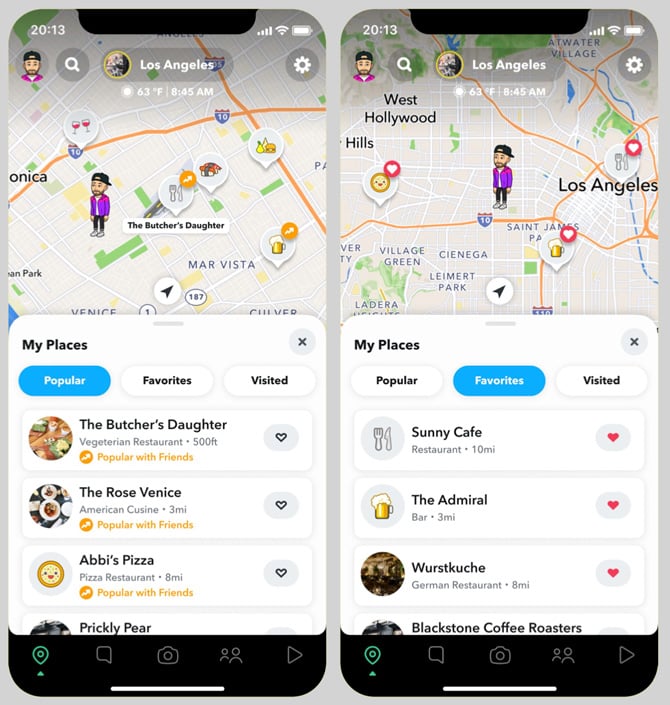
</ul>
<h2>Snap Map symbols and Bitmoji status</h2>
<p><img alt="Two screenshots of Snap Map. On the left, you see Popular places, and on the right, you see favorite places" class="imagecenter" src="https://www.techlicious.com/images/misc/snap-map-670px.jpg" style="width: 670px; height: 705px;" /></p>
<p>Your Bitmoji on Snap Map changes automatically based on your activity, location, time of day, and what Snapchat detects from your phone. Here's what the different indicators mean:</p>
<h3>Activity indicators</h3>
<ul>
	<li>Blue dot next to Bitmoji: This person recently opened Snapchat</li>
	<li>Shrinking circle around Bitmoji: Their location isn't updating in real-time; this is their last known position</li>
	<li>Grey or faded Bitmoji: This person hasn't opened Snapchat in a while and is likely offline</li>
	<li>Bitmoji doesn&rsquo;t appear: The user is in Ghost Mode (privacy setting enabled)</li>
	<li>Stars around your Bitmoji: You've been very active on Snap Map today</li>
</ul>
<h3>Automatic status changes (Actionmoji)</h3>
<p>Your Bitmoji automatically updates to show what you're doing. Common ones include:</p>
<ul>
	<li>Holding a phone (active in a voice call)</li>
	<li>At the gym or lifting weights (near a gym)</li>
	<li>On a plane or with luggage (at or near an airport)</li>
	<li>Sleeping in bed (nighttime, phone stationary)</li>
	<li>Driving a car (moving in a vehicle)</li>
	<li>Listening to music (headphones connected)</li>
	<li>At specific locations (coffee shop, beach, concert venue, etc.)</li>
</ul>
<h3>Special events</h3>
<p>On your birthday, your Bitmoji celebrates with party hats, cake, and balloons. During special events or festivals, you might see purple or gold backgrounds.</p>
<p>These status updates typically last about four hours or until your activity changes. Some Snap Map features, like ghost trails that show where friends have traveled, are exclusive to Snapchat+ subscribers.</p>
<h2>Snapstreaks</h2>
<p>Snapstreaks show how many consecutive days you and a friend have sent Snaps to each other. Here are the symbols associated with them:</p>
<ul>
	<li>&#128293; Fire emoji: You're on a Snapstreak! This shows up next to the number of consecutive days.</li>
	<li>&#128175; Hundred emoji: You've hit a 100-day Snapstreak milestone. This appears next to the fire emoji.</li>
	<li>&#8987; Hourglass emoji: Your Snapstreak is about to end. Both you and your friend need to send a Snap within 24 hours to keep it going.</li>
</ul>
<p>Restore Streak feature: If your Snapstreak ends, you might see a &quot;Restore Streak&quot; button or banner at the top of that chat for a limited time. You may also see a fire emoji button next to the chat that was on a streak. Tap it to recover your streak. This feature is only available shortly after a streak expires &ndash; if you don't see the fire button or restore option, it has been too long since the streak ended and you can&rsquo;t bring it back.</p>
<h2>Verified account emoji</h2>
<p>Snapchat shows verified accounts with a gold star emoji (&#11088;) or badge on public profiles. If you see this next to a username on a public account, it confirms they're who they claim to be &ndash; typically celebrities, brands, or public figures.</p>
<p>Don't confuse this with: The black star (&#10026;) next to regular users, which indicates a Snapchat+ subscriber, not a verified account.</p>
<h2>Snapchat+ exclusive symbols</h2>
<p>If you've noticed symbols that your friends don't seem to have, they might be Snapchat+ exclusive features. Here's what they mean:</p>
<ul>
	<li>Black star badge (&#10026;): This appears next to someone's name if they subscribe to Snapchat+. It's optional and can be disabled in settings, so not all subscribers will display it.</li>
	<li>Friend Solar System badges: When you tap on a Snapchat+ subscriber's profile, you might see special badges:</li>
	<li>&quot;Best Friends&quot; badge with gold ring: You're one of each other's eight closest friends. Tap it to see which planet you are in their solar system.</li>
	<li>&quot;Friends&quot; badge with gold ring: You're one of their eight closest friends, but they're not one of yours.</li>
	<li>Planet icons: Each planet represents your position on their Best Friends list (Mercury = #1 closest friend, Venus = #2, Earth = #3, and so on).</li>
	<li>&#128064; Eyes emoji with number: If you're a Snapchat+ subscriber, you'll see this on your Stories, showing how many times people rewatched them. The number indicates the total number of rewatches, not the number of individual viewers.</li>
	<li>&#128204; Pushpin icon: Snapchat+ users can pin a friend as their #1 Best Friend, overriding the algorithm.</li>
</ul>
<p>Note: Some features, like the Friend Solar System, only work if both you and your friend have Snapchat+.</p>
<h2>My AI symbols</h2>
<p><img alt="Screenshot of Chats showing My AI" class="imagecenter" src="https://www.techlicious.com/images/misc/snapchat-my-ai-670px.jpg" style="width: 670px; height: 430px;" /></p>
<p>Snapchat's built-in AI chatbot has its own symbols you'll see:</p>
<ul>
	<li>&#10024; Sparkle icon: This appears next to AI-powered features, like the Extend tool that uses AI to make a Snap appear more zoomed out. You'll also see sparkles next to someone's name when you're in a group chat together.</li>
	<li>Robot avatar: My AI's default purple/blue profile icon, unless the user has customized it.</li>
	<li>Ghost with sparkles watermark: When you save an AI-generated image to your Camera Roll, Snapchat adds a translucent ghost logo with sparkles. This indicates the content was created using AI and doesn't depict real events. Removing this watermark violates Snapchat's Terms of Service.</li>
</ul>
<h2>What about the purple boxes next to my friends&rsquo; names?</h2>
<p><img alt="Zodiac images in two rows, starting with Aries." class="imagecenter" src="https://www.techlicious.com/images/misc/snapchat-purple-horoscope-icons-670px.jpg" style="width: 670px; height: 250px;" /></p>
<p>If your friend has entered a birthday in Snapchat, their zodiac sign usually shows up as a purple box &ndash; though depending on the system you're using, they may look a little different than the one above. As long as you realize what you're looking at, these icons give you an idea of when their birthday is, even if you don&rsquo;t know the exact date. If it is your friend&rsquo;s birthday, a birthday cake emoji will show up as well.</p>
<p>From left to right, top to bottom, the symbols above indicate Aries (March 21 &ndash; April 19), Taurus (April 20 &ndash; May 20), Gemini (May 21 &ndash; June 20), Cancer (June 21 &ndash; July 22), Leo (July 23 &ndash; Aug 22), Virgo (Aug 23 &ndash; Sept 22), Libra (Sept 23 &ndash; Oct 22), Scorpio (Oct 23 &ndash; Nov 21), Sagittarius (Nov 22 &ndash; Dec 21), Capricorn (Dec 22 &ndash; Jan 19), Aquarius (Jan 20 &ndash; Feb 18), and Pisces (Feb 19 &ndash; Mar 20).</p>
<p>[Image credit: Phone with Snapchat logo Suzanne Kantra/Techlicious via ChatGPT, Snapchat, Techlicious/Snapchat screenshot]</p>
      ]]></content>
    </entry>


    <entry>
      <title>How to Tell if Your Number Was Spoofed &amp; What You Can Do About It</title>

      <link rel="alternate" type="text/html" href="https://www.techlicious.com/tip/how-to-tell-if-your-number-was-spoofed-and-what-you-can-do-about-it/" />

      <id>tag:techlicious.com,2026:/www.techlicious.com/tip/6.7222</id>
      <published>2026-03-13T19:52:12Z</published>
      <updated>2026-03-13T20:51:13Z</updated>

      <author>
        <name>Suzanne Kantra</name>
        <uri>https://www.techlicious.com/about/</uri>
      </author>

            <media:content url="https://www.techlicious.com/images/phones/caller-id-spoof-1200x675px.jpg" medium="image" type="image/jpeg" />
      <media:thumbnail url="https://www.techlicious.com/images/phones/caller-id-spoof-1200x675px.jpg" />
      

      <category term="Phones and Mobile"
        scheme="https://www.techlicious.com/phones-mobile/"
        label="Phones and Mobile" />

      <category term="Internet &amp; Networking"
        scheme="https://www.techlicious.com/internet-networking/"
        label="Internet &amp; Networking" />

      <category term="Tips &amp; How&#45;Tos"
        scheme="https://www.techlicious.com/tips-how-to/"
        label="Tips &amp; How&#45;Tos" />

      <category term="Privacy"
        scheme="https://www.techlicious.com/protecting-your-privacy/"
        label="Privacy" />

      <summary type="html"><![CDATA[
<p>If scammers have spoofed your number, there&rsquo;s no obvious sign on your phone or bill. However, here are a couple of ways to tell if your number has been spoofed.</p>
      ]]></summary>

      <content type="html"><![CDATA[
  <p>When I see a call coming in from a number I don&rsquo;t recognize, my first instinct is to ignore it. But since I have kids, I need to pick up that phone call if it's from my area code in the off chance there is some issue at school. Scammers are aware that we're more likely to answer these calls from familiar area codes, so they exploit this tendency through number spoofing to display a false number on your caller ID. And now I'm listening to a robocall about the extended warranty for my car...</p>
<p><img alt="Cellphone showing an example of a Caller ID number" class="imagecenter" src="https://www.techlicious.com/images/phones/caller-id-spoof-670px.jpg" style="width: 670px; height: 377px;" /></p>
<p>It's bad enough when you're getting the spam calls, but it's even worse when your number is the one that is being spoofed to make spam calls to others. Because spoofing simply falsifies the caller ID, there&rsquo;s usually no sign on your phone or bill. However, there are a couple of ways to tell if your number has been spoofed.</p>
<h2>1. Unexpected calls</h2>
<p>Most people find out that their number is being spoofed when they start receiving calls or messages from individuals claiming they were contacted by you, despite you not having made any calls. These people are likely returning calls from the scammer who spoofed your number. You can tell callers to ignore calls from your number for the next few weeks until the situation is likely resolved. Or, if you don't want to answer calls from potentially irate spam call recipients, I recommend creating a voicemail greeting that explains the fact that your number has been spoofed and let unknown calls go there.</p>
<h2>2. Your number has been reported as spam</h2>
<p>Some spam call-blocking services allow you to check if your number has been reported for spam or malicious activity. There is no centralized database that covers all reports. So, try a few of the most popular ones to see if your number has been reported.</p>
<p>I use and recommend <a href="https://www.robokiller.com/" target="_blank">RoboKiller</a> and <a href="https://www.truecaller.com/" target="_blank">Truecaller</a> for their spam-blocking capabilities, and both services let you check whether your number has been reported as spam for free.</p>
<p>RoboKiller offers a free <a href="https://lookup.robokiller.com/" target="_blank">Scam Phone Number Lookup</a> feature. By entering your number, you receive a report on your phone number's reputation and call-blocking status on RoboKiller, based on its database of spam callers.</p>
<p><img alt="Robokiller report for a phone number showing not spam" class="imagecenter" src="https://www.techlicious.com/images/phones/robokiller-report-670px.jpg" style="width: 670px; height: 334px;" /></p>
<p>Truecaller will also search for your number for free with its <a href="https://www.truecaller.com/reverse-phone-number-lookup" target="_blank">Reverse Phone Lookup tool</a>. However, you'll need to create an account to access the feature. Make sure you uncheck the &quot;Enhanced Search&quot; option, else you're agreeing to send your contacts to Truecaller to enhance their database. Once you've created your account, you can input your number to see if any Truecaller customer or its database has flagged you as spam. You're limited to three free Reverse Phone Lookups unless you subscribe.</p>
<p>Another tool to try is <a href="https://spydialer.com/" target="_blank">Spydialer</a>, my go-to site for checking phone numbers I don't recognize. Spydialer scrapes data from public websites and databases to match numbers to names, as well as checking if a number has been flagged as spam. When you go to Spydialer, you input your number and select the &quot;Search&quot; button. When you see the next page, select the &quot;Phone Spam&quot; option and click on the blue &quot;Search&quot; button. There are a lot of confusing ads on the page, so make sure you're clicking the correct button.</p>
<p><img alt="Screenshot of Spydialer site showing Phone Spam circled in red." class="imagecenter" spam="" src="https://www.techlicious.com/images/phones/spydialer-spam-call-lookup-670px.jpg" style="width: 670px; height: 449px;" /></p>
<h2>What to do if your number has been spoofed</h2>
<p>Fortunately, scammers will rotate spoofed numbers once they start getting blocked or reported, which may take anywhere from a few days to a few weeks. So I recommend waiting it out. However, there are a few things you can do if the situation drags on or if you have friends and family who may be especially vulnerable to scammers.</p>
<h3>Tell your contacts</h3>
<p>When scammers use number spoofing, they're usually randomly dialing numbers that use your area code and prefix, a practice called neighbor spoofing. So, if your number is 212-555-1212, they may call 212-555-1313 or 212-555-2121. They usually don't know who you are and won't be targeting your friends and family. Even so, you may want to alert anyone whom you feel may be particularly vulnerable to scams so they don't get fooled in the off chance they get a call from your spoofed number.</p>
<h3>File a report</h3>
<p>According to the FCC, &quot;Under the Truth in Caller ID Act, FCC rules prohibit anyone from transmitting misleading or inaccurate caller ID information with the intent to defraud, cause harm or wrongly obtain anything of value.&quot; So, if you confirm that your number has been spoofed by a scammer, report it to your carrier and the FCC. You can use the <a href="https://consumercomplaints.fcc.gov/hc/en-us/requests/new?ticket_form_id=39744" target="_blank">FCC&rsquo;s Phone Complaint Form</a> to report the spoofing, which may help them track and shut down scam operations.</p>
<h3>Change your number</h3>
<p>If spoofing persists, consider changing your number only as a last resort. It will be a significant effort to notify everyone of your new number, your carrier may charge to change your number, and, chances are, the scammer will move on from your phone number within days, anyhow.</p>
<p>By following the above steps, you can determine if your number has been spoofed and take the necessary measures to safeguard your privacy and the safety of your loved ones.</p>
<p><strong>Read more:</strong> <em><a href="https://www.techlicious.com/how-to/how-to-tell-if-email-has-been-spoofed/" target="_blank">How to tell if an email is real or spoofed.</a></em></p>
<p>Updated on 3/13/2026 with current screenshots and&nbsp;</p>
<p>[Image credit: Screenshot via Techlicious, <a href="https://www.bigstockphoto.com/image-463268693/stock-photo-scam-phone-call-from-unknown-number-anti-scam-fishing-app-block-scam-and-unwanted-calls-concept" target="_blank">phone with caller ID</a> via BigStockPhoto]</p>
      ]]></content>
    </entry>


    <entry>
      <title>How to Tell if an Email Has Been Spoofed</title>

      <link rel="alternate" type="text/html" href="https://www.techlicious.com/how-to/how-to-tell-if-email-has-been-spoofed/" />

      <id>tag:techlicious.com,2026:/www.techlicious.com/tip/6.6260</id>
      <published>2026-03-13T19:49:17Z</published>
      <updated>2026-03-27T14:59:18Z</updated>

      <author>
        <name>Josh Kirschner</name>
        <uri>https://www.techlicious.com/about/</uri>
      </author>

            <media:content url="https://www.techlicious.com/images/computers/woman-shocked-at-computer-1200px.jpg" medium="image" type="image/jpeg" />
      <media:thumbnail url="https://www.techlicious.com/images/computers/woman-shocked-at-computer-1200px.jpg" />
      

      <category term="Computers and Software"
        scheme="https://www.techlicious.com/computers-software/"
        label="Computers and Software" />

      <category term="Computer Safety &amp; Support"
        scheme="https://www.techlicious.com/safety-support/"
        label="Computer Safety &amp; Support" />

      <category term="Tips &amp; How&#45;Tos"
        scheme="https://www.techlicious.com/tips-how-to/"
        label="Tips &amp; How&#45;Tos" />

      <category term="Privacy"
        scheme="https://www.techlicious.com/protecting-your-privacy/"
        label="Privacy" />

      <category term="Tech 101"
        scheme="https://www.techlicious.com/tech-101/"
        label="Tech 101" />

      <summary type="html"><![CDATA[
<p>Not sure if an email is real or spoofed? Here are the clear signs in the email header that will show if an email has been spoofed or is the real deal.</p>
      ]]></summary>

      <content type="html"><![CDATA[
  <p><img alt="A woman looks shocked when she reads an email." class="imagecenter" src="https://www.techlicious.com/images/computers/woman-shocked-at-computer-670px.jpg" style="width: 670px; height: 377px;" /></p>
<p>There are numerous email scams that land in your inbox every day, from malware-ridden attachments supposedly from a friend to IRS impersonators to <a href="https://www.techlicious.com/blog/hackers-using-fake-invitations-to-take-over-pc/" target="_blank">fake calendar invitations</a>. And what makes many of these scams harder to recognize is that they rely on a <a href="https://en.wikipedia.org/wiki/Email_spoofing" target="_blank">&ldquo;spoofed&rdquo; email address</a> to make it appear that they are coming from someone you trust (or even your own email address) rather than a scammer 6,000 miles away. So learning how to tell if an email has been spoofed is critical to protecting yourself.</p>
<p>Part of the reason why spoofed emails are so prevalent is that it is incredibly easy to spoof an address. Any mail server can be set up to send from a given domain (e.g., irs.gov), and there are even websites that will let you send one-off emails using any email address for free. And while most email services will send these to spam, it's possible one may get through, or you may be wondering whether an email that landed in your spam folder is real.</p>
<p>Fortunately, these methods leave telltale tracks that give it away as spoofed.</p>
<p>To find these tracks, you need to look at the email header. The header contains critical components of every email &ndash; From, To, Date, and Subject &ndash; as well as detailed information about where the email came from and how it was routed to you. Importantly, it also contains the results of the verification process your email provider used to determine if the sending server has permission to send using that domain (i.e., is this server authorized to send emails from irs.gov?). Checking these clues in the header is the most reliable way to tell if an email has been spoofed.</p>
<h2>How to find email header information</h2>
<p>Showing your email headers varies depending on which email service you&rsquo;re using. The instructions below are all for your computer or the &quot;desktop view&quot; using your phone's browser.</p>
<h3>How to show email headers for Gmail</h3>
<p>For Gmail, open the email and click on the three vertical dots next to the reply arrow and select &ldquo;Show Original&rdquo;.</p>
<p><img alt="Screenshot of Gmail message entitled  This is real email. Not scam. Honest. with the triple dot menu icon pointed out and a dropdown menu with Reply, Forward, Filter messages like this, Print, Delete this message, Block Josh Kirschner, Report spam Report phishing, show original (pointed out), translate message download message and mark as read. " class="imagecenter" src="https://www.techlicious.com/images/computers/gmail-show-original-670px.jpg" style="width: 670px; height: 475px;" /></p>
<h3>How to show email headers for Outlook and Outlook.com</h3>
<p>For Outlook, open the email. Click on &quot;File&quot; and then &quot;Properties.&quot; The headers will show in the &quot;Internet headers&quot; box.</p>
<p>For Outlook.com, open the email. Click on the more icon (three dots) and select &quot;View&quot; and then &quot;View message source.&quot; The headers will show in a pop-up box.</p>
<h3>How to show email headers for Proton Mail</h3>
<p>For Proton Mail, open the email. Click on the more icon (three dots) and select &quot;View headers.&quot; The headers will show in a new window.</p>
<h3>How to show email headers for Apple Mail</h3>
<p>For Apple Mail, open the email. Click View &gt; Message &gt; All Headers. The headers will show in the window below your inbox.</p>
<h3>How to show email headers for Yahoo! Mail</h3>
<p>For Yahoo! Mail, open the email. Click on the more icon (three dots) and select &ldquo;View raw message.&rdquo; The headers will show in a new window.</p>
<h2>How to find the header information that shows an email is spoofed</h2>
<p>Below is an example of a spoofed email I sent using an online spoofing service, pretending it came from my own address. Looks pretty real. It says it came from my email address, and if I reply, it will go to the same address (unless the attacker set a different &ldquo;Reply-To&rdquo; address, which scammers sometimes use to redirect responses).</p>
<p>But the header information gives it away as spoofed. There&rsquo;s a lot of technical stuff in here, and you can ignore most of it. The two things that matter most are the domain name and IP address in the &ldquo;Received&rdquo; field, and the validation results in the &ldquo;Received-SPF&rdquo; field.</p>
<p><img alt="spoofed email header showing email being sent from is emkei.cz (the email spoofing site) in the email header Received field. Also pointed out is the Received-SPF showing as a softfail.  " class="imagecenter" src="https://www.techlicious.com/images/computers/spoofed-email-header-640px.jpg" style="width: 650px; height: 737px; border-width: 1px; border-style: solid;" /></p>
<p>The &ldquo;Received&rdquo; headers show each mail server the message passed through. By examining the earliest &ldquo;Received&rdquo; entry (usually at the bottom), you can often identify the server that originally sent the message.</p>
<p>As you can see above, the domain name this email is being sent from is emkei.cz (the email spoofing site), not Techlicious.com, so that&rsquo;s a dead giveaway. But if the domain name is similar or it&rsquo;s listed as just an IP address, you should check the IP address too and see if it passes the smell test.</p>
<p>To check an IP address, go to <a href="https://whois.domaintools.com/" target="_blank">Domain Tools</a> and enter the &ldquo;from&rdquo; IP address in the Received field into the Whois Lookup. When I do that with 46.167.245.206 from the example above, it tells me this is a host called emkei.cz out of the Czech Republic &ndash; not what I would expect to see if this were really an email sent by Techlicious.</p>
<p>Next, look at the Received-SPF field to see whether it shows a soft fail. <a href="https://support.securityscorecard.com/hc/en-us/articles/115003319223-SPF-Record-Contains-a-Soft-Fail" target="_blank">Sender Policy Framework</a> (SPF) is a way for a domain (e.g., Techlicious.com) to specify what servers are permitted to send mail on its behalf. Mail sent from permitted servers will appear as &ldquo;Pass&rdquo; in the Received-SPF field, which is a strong indicator that the email is legitimate. If the results show &ldquo;<strong>Fail</strong>&rdquo; or &ldquo;<strong>Softfail</strong>&rdquo;, that&rsquo;s a sign the email may be spoofed, though it&rsquo;s not 100% certain, since some domains don&rsquo;t keep their SPF records up to date, which can cause legitimate emails to fail authentication checks.</p>
<p>Many email services include an &ldquo;Authentication-Results&rdquo; line in the header that summarizes whether SPF (checks if the sending server is authorized to send for that domain), DKIM (a digital signature verifying the email was sent by that domain and wasn&rsquo;t altered), and DMARC (a policy that confirms the sender domain matches the visible &ldquo;From&rdquo; address and instructs mail servers what to do if authentication fails) passed or failed. If all of them fail, that&rsquo;s a strong sign the email may be spoofed.</p>
<p>Taken together, the sending IP address and SPF validation will give you a very good sense of whether an email truly comes from the person purportedly sending it. And don&rsquo;t forget to trust your gut. If an email sounds implausible, it probably is. Don&rsquo;t respond directly or open any attachments. If it is a company, bank, or government organization, find their contact information online and reach out to them directly to verify whether the email is legit.</p>
<p><em>Updated on 3/13/2026 with clarifications on what to look for in a spoofed email header</em></p>
<p>[Image Credit: <a href="https://www.bigstockphoto.com/image-239151403/stock-photo-shocked-african-woman-looking-at-laptop-in-shared-office%2C-stressed-black-female-employee-terrified-r" target="_blank">BigStock-Woman at Computer</a>]</p>
      ]]></content>
    </entry>


    <entry>
      <title>How to Update an Old iPad</title>

      <link rel="alternate" type="text/html" href="https://www.techlicious.com/tip/how-to-update-an-old-iPad/" />

      <id>tag:techlicious.com,2026:/www.techlicious.com/tip/6.6656</id>
      <published>2026-03-13T18:51:06Z</published>
      <updated>2026-03-13T18:54:07Z</updated>

      <author>
        <name>Suzanne Kantra</name>
        <uri>https://www.techlicious.com/about/</uri>
      </author>

            <media:content url="https://www.techlicious.com/images/computers/ipados-update-bar-1200x675px.jpg" medium="image" type="image/jpeg" />
      <media:thumbnail url="https://www.techlicious.com/images/computers/ipados-update-bar-1200x675px.jpg" />
      

      <category term="Computers and Software"
        scheme="https://www.techlicious.com/computers-software/"
        label="Computers and Software" />

      <category term="Tablets &amp; eReaders"
        scheme="https://www.techlicious.com/tablets-ereaders/"
        label="Tablets &amp; eReaders" />

      <category term="Mobile Apps"
        scheme="https://www.techlicious.com/mobile-apps/"
        label="Mobile Apps" />

      <category term="iPhone/iPad Apps"
        scheme="https://www.techlicious.com/iphone-ipad-apps/"
        label="iPhone/iPad Apps" />

      <category term="Tips &amp; How&#45;Tos"
        scheme="https://www.techlicious.com/tips-how-to/"
        label="Tips &amp; How&#45;Tos" />

      <summary type="html"><![CDATA[
<p>Not all iPads can run the new iPadOS 26. Find out which version of iOS or iPadOS is the latest that's available for your old iPad and how to install it.</p>
      ]]></summary>

      <content type="html"><![CDATA[
  <p>While most iPads can be upgraded to the latest operating system, iPadOS 26, some are stuck at an earlier generation of the operating system. Apple leaves devices behind when they lack the necessary hardware to run the new operating system smoothly. This time, it's the 7th-generation iPad released in 2019.</p>
<p><img alt="Screenshot of Apple logo with a bar showing the progress of an iPadOS update." class="imagecenter" src="https://www.techlicious.com/images/computers/ipados-update-bar-670px.jpg" style="width: 670px; height: 377px;" /></p>
<p>Consult the chart below to find out the latest version of iOS or iPadOS that your tablet supports. To <a href="https://support.apple.com/en-us/HT201471" target="_blank">identify which iPad model you own</a>, turn it over, and you will find it printed in very small type on the back under the iPad logo. You can also go to Settings &gt; General &gt; About. There you will find the &quot;Model Name&quot; and &quot;Model Number.&quot; The model number is a letter followed by four numbers. If you see a slash in a string of characters (for example, MY3K2LL/A), you're looking at the part number. Tap it to reveal the model number.</p>
<p>Have an old iPhone? Check out our story on <a href="https://www.techlicious.com/tip/how-to-update-an-old-iPhone/" target="_blank">how to update an old iPhone</a>.</p>
<h2>The Latest Version of iOS or iPadOS by iPad Model</h2>
<table border="2" style="max-width:676px; margin:0 auto; border-collapse:collapse; font-family:Arial, sans-serif; font-size:16px; line- color:#222; border:1px solid #d9d9d9;width: 100%; height: 23px">
	<thead>
		<tr>
			<th style="text-align:left; vertical-align:top; padding:12px 14px; border-bottom:1px solid #d9d9d9; background:#f5f5f5; width:74%;">
				Devices</th>
			<th style="text-align:left; vertical-align:top; padding:12px 14px; border-bottom:1px solid #d9d9d9; background:#f5f5f5; width:26%;">
				Latest Version of iOS or iPadOS</th>
		</tr>
	</thead>
	<tbody>
		<tr>
			<td style="vertical-align:top; padding:14px; border-bottom:1px solid #e6e6e6;">
				<div><strong>iPad &ndash; 1st generation</strong> (2010)</div>
				<div style="color:#555;">Model numbers: A1219, A1337</div>
			</td>
			<td style="vertical-align:top; padding:14px; border-bottom:1px solid #e6e6e6;">
				iOS 5</td>
		</tr>
		<tr>
			<td style="vertical-align:top; padding:14px; border-bottom:1px solid #e6e6e6; background:#fcfcfc;">
				<div style="margin-bottom:10px;">
				<div><strong>iPad 2 &ndash; 2nd generation</strong> (2011)</div>
				<div style="color:#555;">Model numbers: A1395, A1396, A1397</div>
				</div>
				<div style="margin-bottom:10px;">
				<div><strong>iPad &ndash; 3rd generation</strong> (early 2012)</div>
				<div style="color:#555;">Model numbers: A1403, A1430, A1416</div>
				</div>
				<div>
				<div><strong>iPad mini &ndash; 1st generation</strong> (2012)</div>
				<div style="color:#555;">Model numbers: A1432, A1454, A1455</div>
				</div>
			</td>
			<td style="vertical-align:top; padding:14px; border-bottom:1px solid #e6e6e6; background:#fcfcfc;">
				iOS 9</td>
		</tr>
		<tr>
			<td style="vertical-align:top; padding:14px; border-bottom:1px solid #e6e6e6;">
				<div><strong>iPad with Retina Display &ndash; 4th generation</strong> (2012)</div>
				<div style="color:#555;">Model numbers: A1458, A1459, A1460</div>
			</td>
			<td style="vertical-align:top; padding:14px; border-bottom:1px solid #e6e6e6;">
				iOS 10</td>
		</tr>
		<tr>
			<td style="vertical-align:top; padding:14px; border-bottom:1px solid #e6e6e6; background:#fcfcfc;">
				<div style="margin-bottom:10px;">
				<div><strong>iPad mini 2 &ndash; 2nd generation</strong> (2013)</div>
				<div style="color:#555;">Model numbers: A1489, A1490, A1491</div>
				</div>
				<div style="margin-bottom:10px;">
				<div><strong>iPad mini 3 &ndash; 3rd generation</strong> (2014)</div>
				<div style="color:#555;">Model numbers: A1599, A1600<br />
				&nbsp;</div>
				</div>
				<div>
				<div><strong>iPad Air &ndash; 1st generation</strong> (2013)</div>
				<div style="color:#555;">Model numbers: A1474, A1475, A1476</div>
				</div>
			</td>
			<td style="vertical-align:top; padding:14px; border-bottom:1px solid #e6e6e6; background:#fcfcfc;">
				iOS 12</td>
		</tr>
		<tr>
			<td style="vertical-align:top; padding:14px; border-bottom:1px solid #e6e6e6;">
				<div style="margin-bottom:10px;">
				<div><strong>iPad mini 4 &ndash; 4th generation</strong> (2015)</div>
				<div style="color:#555;">Model numbers: A1550, A1538</div>
				</div>
				<div>
				<div><strong>iPad Air 2</strong> (2014)</div>
				<div style="color:#555;">Model numbers: A1566, A1567</div>
				</div>
			</td>
			<td style="vertical-align:top; padding:14px; border-bottom:1px solid #e6e6e6;">
				iPadOS 15</td>
		</tr>
		<tr>
			<td style="vertical-align:top; padding:14px; border-bottom:1px solid #e6e6e6; background:#fcfcfc;">
				<div style="margin-bottom:10px;">
				<div><strong>iPad &ndash; 5th generation</strong> (2017)</div>
				<div style="color:#555;">Model numbers: A1822, A1823<br />
				&nbsp;</div>
				</div>
				<div style="margin-bottom:10px;">
				<div><strong>iPad Pro 12.9-inch &ndash; 1st generation</strong> (2015)</div>
				<div style="color:#555;">Model numbers: A1584, A1652</div>
				</div>
				<div>
				<div><strong>iPad Pro 9.7-inch &ndash; 1st generation</strong> (2016)</div>
				<div style="color:#555;">Model numbers: A1673, A1674, A1675</div>
				</div>
			</td>
			<td style="vertical-align:top; padding:14px; border-bottom:1px solid #e6e6e6; background:#fcfcfc;">
				iPadOS 16</td>
		</tr>
		<tr>
			<td style="vertical-align:top; padding:14px; border-bottom:1px solid #e6e6e6;">
				<div style="margin-bottom:10px;">
				<div><strong>iPad &ndash; 6th generation</strong> (2018)</div>
				<div style="color:#555;">Model numbers: A1893, A1954<br />
				&nbsp;</div>
				</div>
				<div style="margin-bottom:10px;">
				<div><strong>iPad Pro 10.5-inch &ndash; 1st generation</strong> (2017)</div>
				<div style="color:#555;">Model numbers: A1701, A1709</div>
				</div>
				<div>
				<div><strong>iPad Pro 12.9-inch &ndash; 2nd generation</strong> (2017)</div>
				<div style="color:#555;">Model numbers: A1670, A1671</div>
				</div>
			</td>
			<td style="vertical-align:top; padding:14px; border-bottom:1px solid #e6e6e6;">
				iPadOS 17</td>
		</tr>
		<tr>
			<td style="vertical-align:top; padding:14px; border-bottom:1px solid #e6e6e6; background:#fcfcfc;">
				<div><strong>iPad &ndash; 7th generation</strong> (2019)</div>
				<div style="color:#555;">Model numbers: A2197, A2198, A2200</div>
			</td>
			<td style="vertical-align:top; padding:14px; border-bottom:1px solid #e6e6e6; background:#fcfcfc;">
				iPadOS 18</td>
		</tr>
		<tr>
			<td style="vertical-align:top; padding:14px;">
				<div style="margin-bottom:14px;">
				<div style="font-weight:bold; margin-bottom:6px;">iPad</div>
				<div style="margin-bottom:8px;">
				<div><strong>iPad &ndash; 8th generation</strong> (2020)</div>
				<div style="color:#555;">Model numbers: A2270, A2428, A2429, A2430</div>
				</div>
				<div style="margin-bottom:8px;">
				<div><strong>iPad &ndash; 9th generation</strong> (2021)</div>
				<div style="color:#555;">Model numbers: A2602, A2604, A2603, A2605</div>
				</div>
				<div style="margin-bottom:8px;">
				<div><strong>iPad &ndash; 10th generation</strong> (2022)</div>
				<div style="color:#555;">Model numbers: A2696, A2757, A2777</div>
				</div>
				<div>
				<div><strong>iPad (A16)</strong> (2025)</div>
				<div style="color:#555;">Model numbers: A3354, A3355, A3356</div>
				</div>
				</div>
				<div style="margin-bottom:14px;">
				<div style="font-weight:bold; margin-bottom:6px;">iPad mini</div>
				<div style="margin-bottom:8px;">
				<div><strong>iPad mini &ndash; 5th generation</strong> (2019)</div>
				<div style="color:#555;">Model numbers: A2124, A2126, A2133</div>
				</div>
				<div style="margin-bottom:8px;">
				<div><strong>iPad mini &ndash; 6th generation</strong> (2021)</div>
				<div style="color:#555;">Model numbers: A2567, A2568, A2569</div>
				</div>
				<div>
				<div><strong>iPad mini (A17 Pro)</strong> (2024)</div>
				<div style="color:#555;">Model numbers: A2993, A2995, A2996</div>
				</div>
				</div>
				<div style="margin-bottom:14px;">
				<div style="font-weight:bold; margin-bottom:6px;">iPad Air</div>
				<div style="margin-bottom:8px;">
				<div><strong>iPad Air &ndash; 3rd generation</strong> (2019)</div>
				<div style="color:#555;">Model numbers: A2152, A2123, A2153</div>
				</div>
				<div style="margin-bottom:8px;">
				<div><strong>iPad Air &ndash; 4th generation</strong> (2020)</div>
				<div style="color:#555;">Model numbers: A2316, A2324, A2325, A2072</div>
				</div>
				<div style="margin-bottom:8px;">
				<div><strong>iPad Air &ndash; 5th generation</strong> (2022)</div>
				<div style="color:#555;">Model numbers: A2588, A2589</div>
				</div>
				<div style="margin-bottom:8px;">
				<div><strong>iPad Air 11-inch (M2)</strong> (2024)</div>
				<div style="color:#555;">Model numbers: A2902, A2903, A2904</div>
				</div>
				<div style="margin-bottom:8px;">
				<div><strong>iPad Air 13-inch (M2)</strong> (2024)</div>
				<div style="color:#555;">Model numbers: A2898, A2899, A2900</div>
				</div>
				<div style="margin-bottom:8px;">
				<div><strong>iPad Air 11-inch (M3)</strong> (2025)</div>
				<div style="color:#555;">Model numbers: A3266, A3267, A3270</div>
				</div>
				<div style="margin-bottom:8px;">
				<div><strong>iPad Air 13-inch (M3)</strong> (2025)</div>
				<div style="color:#555;">Model numbers: A3268, A3269, A3271</div>
				</div>
				<div style="margin-bottom:8px;">
				<div><strong>iPad Air 11-inch (M4)</strong> (2026)</div>
				<div style="color:#555;">Model numbers: A3459, A3460, A3463</div>
				</div>
				<div>
				<div><strong>iPad Air 13-inch (M4)</strong> (2026)</div>
				<div style="color:#555;">Model numbers: A3461, A3462, A3464</div>
				</div>
				</div>
				<div>
				<div style="font-weight:bold; margin-bottom:6px;">iPad Pro</div>
				<div style="margin-bottom:8px;">
				<div><strong>iPad Pro 11-inch &ndash; 1st generation</strong> (2018)</div>
				<div style="color:#555;">Model numbers: A1980, A2013, A1934</div>
				</div>
				<div style="margin-bottom:8px;">
				<div><strong>iPad Pro 12.9-inch &ndash; 3rd generation</strong> (2018)</div>
				<div style="color:#555;">Model numbers: A1876, A2014, A1895</div>
				</div>
				<div style="margin-bottom:8px;">
				<div><strong>iPad Pro 11-inch &ndash; 2nd generation</strong> (2020)</div>
				<div style="color:#555;">Model numbers: A2228, A2068, A2230</div>
				</div>
				<div style="margin-bottom:8px;">
				<div><strong>iPad Pro 12.9-inch &ndash; 4th generation</strong> (2020)</div>
				<div style="color:#555;">Model numbers: A2229, A2069, A2232</div>
				</div>
				<div style="margin-bottom:8px;">
				<div><strong>iPad Pro 11-inch &ndash; 3rd generation</strong> (2021)</div>
				<div style="color:#555;">Model numbers: A2377, A2459, A2460</div>
				</div>
				<div style="margin-bottom:8px;">
				<div><strong>iPad Pro 12.9-inch &ndash; 5th generation</strong> (2021)</div>
				<div style="color:#555;">Model numbers: A2378, A2461, A2462</div>
				</div>
				<div style="margin-bottom:8px;">
				<div><strong>iPad Pro 11-inch &ndash; 4th generation</strong> (2022)</div>
				<div style="color:#555;">Model numbers: A2759, A2435, A2761, A2762</div>
				</div>
				<div style="margin-bottom:8px;">
				<div><strong>iPad Pro 12.9-inch &ndash; 6th generation</strong> (2022)</div>
				<div style="color:#555;">Model numbers: A2436, A2764, A2437, A2766</div>
				</div>
				<div style="margin-bottom:8px;">
				<div><strong>iPad Pro 11-inch (M4)</strong> (2024)</div>
				<div style="color:#555;">Model numbers: A2836, A2837, A3006</div>
				</div>
				<div style="margin-bottom:8px;">
				<div><strong>iPad Pro 13-inch (M4)</strong> (2024)</div>
				<div style="color:#555;">Model numbers: A2925, A2926, A3007</div>
				</div>
				<div style="margin-bottom:8px;">
				<div><strong>iPad Pro 11-inch (M5)</strong> (2025)</div>
				<div style="color:#555;">Model numbers: A3357, A3358, A3359</div>
				</div>
				<div>
				<div><strong>iPad Pro 13-inch (M5)</strong> (2025)</div>
				<div style="color:#555;">Model numbers: A3360, A3361, A3362</div>
				</div>
				</div>
			</td>
			<td style="vertical-align:top; padding:14px;">
				iPadOS 26</td>
		</tr>
	</tbody>
</table>
<h2>How to update an old iPad</h2>
<p>There are two ways to update your old iPad. You can update it wirelessly over WiFi or connect it to a computer and use the iTunes app.</p>
<h3>How to update an old iPad wirelessly</h3>
<h4>Back up your iPad</h4>
<p>Make sure your iPad is connected to Wi-Fi and plugged into a power source during installation. Then go to Settings &gt; Apple ID [Your Name] &gt; iCloud &gt; iCloud Backup. Make sure iCloud Backup is turned on and select &quot;Back Up Now.&quot; You'll receive a confirmation when the backup is complete.&nbsp;</p>
<h4>Check for and install the latest iPadOS</h4>
<p>To check for the latest software, go to Settings &gt; General &gt; Software Update. Your iPad will then check for a software update. On the screen, you'll see either your current version of iOS or iPad OS with the message &quot;Your software is up to date,&quot; or, if your software is not up to date, you'll see the option to &quot;Download and Install.&quot;</p>
<h3>How to update an old iPad using your computer</h3>
<h4>Back up your iPad</h4>
<p>Connect your iPad to your computer with your Lightning or USB-C cable. (You may see a message asking for your iPad passcode or for you to &quot;Trust This Computer.&quot; Follow the directions.)</p>
<p>On a Mac with macOS Catalina 10.15 or later, open Finder. Select your iPad, select &quot;General,&quot; and select &quot;Back up all of the data on your iPad to this Mac.&quot;</p>
<p>On a Mac with macOS Mojave 10.14 or earlier, launch iTunes. Locate your iPad in iTunes and click on it. You'll then see an option to &quot;Back Up Now.&quot; Click on the &quot;Back Up Now&quot; button, and you'll receive a confirmation when the backup is complete.</p>
<p>On a Windows PC, open the Apple Devices app (or iTunes if you&rsquo;re using an older system). Select your iPad in the sidebar, then&nbsp;select &quot;General,&quot; and select &quot;Back up all of the data on your iPad to this PC.&quot;&nbsp;</p>
<h4>Check for and install the latest iPadOS</h4>
<p>On a Mac with macOS Catalina 10.15 or later, open Finder. Select your iPad, select &quot;General,&quot; and select &quot;Check for Update.&quot; If an update is available, select &quot;Update.&quot;</p>
<p>On a Mac with macOS Mojave 10.14 or earlier, open iTunes. Then, connect your device to your computer. Locate your device on your computer. Click &quot;General&quot; or &quot;Settings,&quot; then click &quot;Check for Update.&quot; Click &quot;Download and Update.&quot; You may be asked to enter your passcode.</p>
<p>On a Windows PC, open the Apple Devices app (or iTunes if you&rsquo;re using an older system). Then, connect your device to your computer. Select your iPad in the sidebar, then click &quot;Check for Update&quot; and follow the prompts.</p>
<p><em>Updated on 3/13/2026 with new model number information, iPadOS 26 compatibility, and instructions for using the Apple Device app for Windows.</em></p>
<p>[Image credit: <a href="https://www.bigstockphoto.com/image-386223070/stock-photo-frankfurt%2C-germany-september-17th-2020%3A-a-german-photographer-installing-the-all-new-ipados-14-sof" target="_blank">iPad updating</a> via BigStockPhoto]</p>
      ]]></content>
    </entry>


    <entry>
      <title>Google Maps just got two huge upgrades &#8211; here&#8217;s what it can do</title>

      <link rel="alternate" type="text/html" href="https://www.techlicious.com/blog/google-maps-just-got-two-huge-upgrades/" />

      <id>tag:techlicious.com,2026:/www.techlicious.com/blog/1.8307</id>
      <published>2026-03-13T01:52:19Z</published>
      <updated>2026-03-13T01:54:20Z</updated>

      <author>
        <name>Palash Volvoikar</name>
        <uri>https://www.techlicious.com/about/</uri>
      </author>

            <media:content url="https://www.techlicious.com/images/misc/google-maps-ask-maps-1200px.jpg" medium="image" type="image/jpeg" />
      <media:thumbnail url="https://www.techlicious.com/images/misc/google-maps-ask-maps-1200px.jpg" />
      

      <category term="News"
        scheme="https://www.techlicious.com/blog/category/news/"
        label="News" />

      <category term="Phones and Mobile"
        scheme="https://www.techlicious.com/blog/category/phones-mobile/"
        label="Phones and Mobile" />

      <category term="Mobile Apps"
        scheme="https://www.techlicious.com/blog/category/mobile-apps/"
        label="Mobile Apps" />

      <category term="Travel &amp; Entertainment"
        scheme="https://www.techlicious.com/blog/category/travel-entertainment/"
        label="Travel &amp; Entertainment" />

      <category term="Travel"
        scheme="https://www.techlicious.com/blog/category/travel/"
        label="Travel" />

      <category term="Blog"
        scheme="https://www.techlicious.com/blog/category/blog/"
        label="Blog" />

      <summary type="html"><![CDATA[
<p data-end="2043" data-start="1832">Google Maps&rsquo; new Gemini-powered Ask Maps assistant can plan outings, recommend stops, and guide you with immersive 3D navigation.</p>
      ]]></summary>

      <content type="html"><![CDATA[
  <p><img alt="Google Maps new Ask Maps feature lets you ask conversational questions, like where can I charge my phone without paying for a coffee." class="imagecenter" src="https://www.techlicious.com/images/misc/google-maps-ask-maps-670px.jpg" style="width: 670px; height: 477px;" /></p>
<p>Google Maps is finally getting the full AI treatment, and I actually like it this time around. This major update brings two major new features powered by Gemini AI models. One is a conversational tool called Ask Maps that answers the kind of specific, real-world questions you'd normally spend 20 minutes researching on your own. The other is dubbed Immersive Navigation, and it&rsquo;s the app's biggest navigation redesign in over a decade.</p>
<p>The first big addition is Ask Maps. Instead of typing a search query and scrolling through results, you can now ask Google Maps a full question like you would ask an AI assistant. You can ask for something like a quiet cafe nearby where you can get some work done, or a playground that's not too far and has shade. Maps will then give you recommendations based on its massive catalogue of 300 million places, and these recommendations draw on reviews from more than 500 million contributors. Not only that, but it also personalizes these results using your Maps history, like your saved places, cuisines you tend to search for, and other relevant details.</p>
<p>This is one of those AI use cases that actually makes sense. It makes planning outings easier by taking care of much of the legwork. You can use it to plan your trips as well. For example, you could ask it for good stops along a road trip route, and Maps will get you directions, ETAs, and tips pulled from real reviews. Once you pick a place, you can reserve it, save it to a list, or share it with friends right from the conversation. Ask Maps is rolling out now in the U.S. and India on Android and iOS, with desktop coming soon.</p>
<p><strong>Read more</strong>: <a href="https://www.techlicious.com/blog/waze-is-about-to-get-better-at-warning-you-about-whats-ahead/"><em>Waze Is About to Get Better at Warning You What&rsquo;s Ahead</em></a></p>
<h2>The other half is a navigation overhaul</h2>
<p>The navigation side of Maps is also getting a full visual refresh. You&rsquo;ll now see your route in a 3D view that reflects the actual buildings, overpasses, and terrain around you, similar to Apple Maps. Maps will also highlight lane markings, crosswalks, traffic lights, and stop signs to help you merge or turn with more confidence. Google is again using Gemini models here to analyze fresh Street View and aerial imagery data to make sure you see an accurate 3D interpretation. It's a big upgrade over the existing navigation UI, which I never really found to be lacking by any means, but these upgrades sure are nice.</p>
<p><img alt="Google Maps new 3D navigation interface." class="imagecenter" src="https://www.techlicious.com/images/misc/google-maps-3d-nav-670px.jpg" style="width: 670px; height: 252px;" /></p>
<p>Although the visuals are great, the functionality is where it gets interesting for me. You now get a broader view of your route with smart zooms and transparent buildings, so you&rsquo;ll be able to see the tricky turns well in advance. Voice guidance has gotten an upgrade as well, sounding more natural like a friend giving you directions than a GPS barking robot-like commands at you. Maps will also show you tradeoffs for alternate routes, like whether a longer route has less traffic or a faster one has a toll. That kind of route context is something I always felt was missing from Google Maps. I frequently take longer routes to avoid traffic, so if you&rsquo;re like me, you&rsquo;ll find this feature pretty useful.</p>
<p>Google is overhauling even the final stretch of your drive. You can preview your destination with Street View before heading out, get parking recommendations, and see which side of the street the entrance is on as you approach. If you have parking anxiety, this feature will save you a few trips around the block.</p>
<p>This update is a bunch of exactly the right changes that Maps could use. Immersive Navigation is rolling out across the U.S. on iOS and Android, with CarPlay, Android Auto, and cars with Google built-in getting support over the coming months.</p>
<p>[Image credit: Google]</p>
      ]]></content>
    </entry>


    <entry>
      <title>Trump Moves to Shut Down State AI Laws Across the U.S.</title>

      <link rel="alternate" type="text/html" href="https://www.techlicious.com/blog/trump-moves-to-shut-down-state-ai-laws-across-the-us/" />

      <id>tag:techlicious.com,2026:/www.techlicious.com/blog/1.8306</id>
      <published>2026-03-12T21:30:30Z</published>
      <updated>2026-03-12T21:32:31Z</updated>

      <author>
        <name>Suzanne Kantra</name>
        <uri>https://www.techlicious.com/about/</uri>
      </author>

            <media:content url="https://www.techlicious.com/images/misc/president-trump-signs-executive-order-1200px.jpg" medium="image" type="image/jpeg" />
      <media:thumbnail url="https://www.techlicious.com/images/misc/president-trump-signs-executive-order-1200px.jpg" />
      

      <category term="News"
        scheme="https://www.techlicious.com/blog/category/news/"
        label="News" />

      <category term="Internet &amp; Networking"
        scheme="https://www.techlicious.com/blog/category/internet-networking/"
        label="Internet &amp; Networking" />

      <category term="Blog"
        scheme="https://www.techlicious.com/blog/category/blog/"
        label="Blog" />

      <summary type="html"><![CDATA[
<p>California and New York have passed major AI safety laws. Now the White House is trying to kill them and prevent other states from passing new ones.</p>
      ]]></summary>

      <content type="html"><![CDATA[
  <p><img alt="President Donald Trump signs proclamations and executive orders in the Oval Office" class="imagecenter" src="https://www.techlicious.com/images/misc/president-trump-signs-executive-order-670px.jpg" style="width: 670px; height: 377px;" /></p>
<p>Artificial intelligence is moving so fast that lawmakers are struggling to keep up. Some states have started passing their own AI rules to deal with safety, transparency, and bias in AI systems. Now the Trump administration is trying to stop many of those laws before they take effect.</p>
<p>In December, the <a href="https://www.whitehouse.gov/presidential-actions/2025/12/eliminating-state-law-obstruction-of-national-artificial-intelligence-policy/" target="_blank">White House issued an executive order</a> aimed at preventing what it calls a &ldquo;patchwork&rdquo; of state regulations for artificial intelligence. The order argues that state-by-state rules could slow innovation and make it harder for American companies to compete globally. The move sets up a major clash between the federal government and states that want to regulate AI themselves.</p>
<h2>The White House wants a single national AI rulebook</h2>
<p>The executive order directs federal agencies to push back against state AI laws that conflict with a future national framework. In the order, the administration says the U.S. needs &ldquo;a minimally burdensome national policy framework&rdquo; to maintain leadership in AI.</p>
<p>To enforce that policy, the order does several things. First, it creates a new AI Litigation Task Force inside the Department of Justice. Its job is to challenge state AI laws in court if they are seen as interfering with federal policy or interstate commerce. Second, the Department of Commerce must review existing state AI laws and identify which ones conflict with the administration&rsquo;s approach. Third, the federal government could withhold certain federal funding from states that pass what the administration considers &ldquo;onerous&rdquo; AI regulations.</p>
<p><a href="https://www.whitehouse.gov/presidential-actions/2025/12/eliminating-state-law-obstruction-of-national-artificial-intelligence-policy/" target="_blank">According to the White House</a>, its stated goal is to prevent &ldquo;an inconsistent and costly compliance regime resulting from varying state laws.&rdquo;</p>
<h2>Why states started regulating AI in the first place</h2>
<p>The federal government hasn&rsquo;t passed comprehensive AI legislation yet, and that vacuum has pushed states to step in. California and New York have been the first to pass laws.</p>
<p>In September 2025, California enacted the <a href="https://www.gov.ca.gov/2025/09/29/governor-newsom-signs-sb-53-advancing-californias-world-leading-artificial-intelligence-industry/">Transparency in Frontier Artificial Intelligence Act (SB 53)</a>, which requires large AI developers to publish safety frameworks and report major incidents involving AI systems. New York followed in December 2025 with the <a href="https://www.governor.ny.gov/news/governor-hochul-signs-nation-leading-legislation-require-ai-frameworks-ai-frontier-models">RAISE Act</a>, which requires AI companies to conduct risk assessments, report safety incidents within 72 hours, and face penalties of up to $3 million for violations.</p>
<p>Supporters of these laws argue that they&rsquo;re necessary to address real risks posed by powerful AI models. In a statement posted on the <a href="https://www.governor.ny.gov/news/governor-hochul-signs-nation-leading-legislation-require-ai-frameworks-ai-frontier-models" target="_blank">New York Governor's website</a>, Gov. Kathy Hochul said, &ldquo;By enacting the RAISE Act, New York is once again leading the nation in setting a strong and sensible standard for frontier AI safety, holding the biggest developers accountable for their safety and transparency protocols.&rdquo;</p>
<p>The conflict isn&rsquo;t just between the White House and blue states. According to <a href="https://www.axios.com/2026/03/06/white-house-red-state-ai-laws-scrutiny">Axios reporting</a>, lawmakers in several Republican-led states have slowed or abandoned their own AI safety bills amid concerns about clashing with Trump. In Utah, an AI safety bill reportedly collapsed after federal officials criticized the proposal. Similar tensions have emerged in Florida and Ohio as state lawmakers reconsider their own AI rules.</p>
<h2>The legal fight is just beginning</h2>
<p>Even though the executive order signals the administration&rsquo;s intentions, it doesn&rsquo;t automatically erase state laws.&nbsp;<a href="https://statt.com/blog/state-ai-laws/" target="_blank">A brief from Statt</a>, a public policy platform that monitors legislative and regulatory change, warns that federal agencies will likely have to challenge many of those laws in court. And states may argue that the federal government cannot override their authority without congressional legislation.</p>
<p>Statt also warns that using federal funding as leverage could face legal challenges from states that see the move as coercive. In the meantime, tech companies may find themselves stuck in the middle.</p>
<p>The battle over AI rules is really a debate about who should control the technology&rsquo;s future. Some policymakers want strong guardrails to prevent discrimination, misinformation, and safety risks posed by powerful AI systems. <a href="https://www.whitehouse.gov/presidential-actions/2025/12/eliminating-state-law-obstruction-of-national-artificial-intelligence-policy/">The White House argues</a> that too many rules could slow innovation in a field where the U.S. is competing with countries like China.</p>
<p>Until Congress creates a national AI framework, the tug-of-war between Washington and the states is likely to continue. And that means the rules governing artificial intelligence in the United States may remain uncertain for quite some time.</p>
<p>[Image credit: WhiteHouse.gov]</p>
      ]]></content>
    </entry>


    <entry>
      <title>Most phones are impossible to read in sunlight &#8211; this one fixes that</title>

      <link rel="alternate" type="text/html" href="https://www.techlicious.com/blog/tcl-nxtpaper-pro-phone-with-color-paper-mode-kills-glare/" />

      <id>tag:techlicious.com,2026:/www.techlicious.com/blog/1.8305</id>
      <published>2026-03-12T20:10:43Z</published>
      <updated>2026-03-12T20:15:44Z</updated>

      <author>
        <name>Palash Volvoikar</name>
        <uri>https://www.techlicious.com/about/</uri>
      </author>

            <media:content url="https://www.techlicious.com/images/computers/tcl-nxtpaper-70-pro-color-mode-1200px.jpg" medium="image" type="image/jpeg" />
      <media:thumbnail url="https://www.techlicious.com/images/computers/tcl-nxtpaper-70-pro-color-mode-1200px.jpg" />
      

      <category term="News"
        scheme="https://www.techlicious.com/blog/category/news/"
        label="News" />

      <category term="Phones and Mobile"
        scheme="https://www.techlicious.com/blog/category/phones-mobile/"
        label="Phones and Mobile" />

      <category term="Cell Phones"
        scheme="https://www.techlicious.com/blog/category/cell-phones/"
        label="Cell Phones" />

      <category term="Blog"
        scheme="https://www.techlicious.com/blog/category/blog/"
        label="Blog" />

      <summary type="html"><![CDATA[
<p>Glossy phone screens are nearly impossible to read in bright sunlight. TCL&rsquo;s new phone has a matte, paper-like display that dramatically cuts glare.</p>
      ]]></summary>

      <content type="html"><![CDATA[
  <p><img alt="The TCL NXTPAPER 70 Pro in shown with its default standard color viewing mode." class="imagecenter" src="https://www.techlicious.com/images/phones/tcl-nxtpaper-70-pro-670px.jpg" style="width: 670px; height: 477px;" /></p>
<p>If you've ever tried using your phone outside on a sunny day, you know it can often be a struggle. Most AMOLED screens are glossy, and while phone makers have been pushing brightness higher and higher to make screens readable in daylight, that doesn't actually solve the glare problem. The TCL NXTPAPER 70 Pro takes a different approach with its NXTPAPER 4.0 technology, using a matte anti-glare coating and what TCL calls nano-matrix lithography to cut reflections at the hardware level. It's an excellent option if you want AMOLED color quality without the glossy aspect, and it's TCL's first phone with a stylus to use NXTPAPER technology.&nbsp;</p>
<p>The phone has a dedicated NXTPAPER Key on the side that lets you switch between three display modes. Color Paper Mode is the default everyday mode. Ink Paper Mode dials the saturation back for a softer look. Max Ink Mode turns the screen into a paper-like monochrome display for distraction-free reading, and TCL says it can last up to seven days of reading on a single charge in this mode. It even comes with 500+ pre-installed books and AI reading tools like AI Outline, AI Q&amp;A, and AI Audiobook.</p>
<p>The TCL NXTPAPER 70 Pro won our <a href="https://www.techlicious.com/blog/techlicious-mwc-2026-editors-choice-awards/">Techlicious Editor's Choice Award at MWC 2026</a>, and for good reason. The e-ink-like Max Ink Mode is really impressive in person, easy on the eyes when you're scrolling through long articles or books.</p>
<h2>Not a flagship phone, but plenty capable beyond the screen</h2>
<p>Beyond the screen, this is a pretty capable phone. It runs on a MediaTek Dimensity 7300 with 8GB of RAM (expandable up to 24GB through virtual RAM expansion) and up to 512GB of storage, which is pretty solid hardware for a midrange phone. The phone has a 50MP main camera with OIS, which means fewer blurry photos, and there's an 8MP ultrawide and a 32MP front camera. Powering the phone is a 5200mAh battery with 33W fast charging, which should comfortably get you through a full day. On the AI side, it has Gemini built in for voice queries and on-screen context, plus real-time translation tools for subtitles and face-to-face conversations.</p>
<p>The TCL NXTPAPER 70 Pro also supports the T-Pen stylus for handwriting and note-taking, with features like &ldquo;Off Screen Memo&rdquo; that let you jot down ideas without even unlocking the phone. It's a nice addition at this price point, especially if you prefer scribbling quick notes rather than typing them, which will be easier on the paper-like screen.</p>
<p>The TCL NXTPAPER 70 Pro starts at &euro;299 for the 256GB model and &euro;359 for the 512 GB. It's available in Asia-Pacific, Europe, Latin America, the Middle East and Africa, and North America. The US pricing is yet to be announced, but it should hit the US shores by April.</p>
<p><strong>Read next</strong>:&nbsp;<a href="https://www.techlicious.com/blog/tcl-tab-8-nxtpaper-5g-launches-on-verizon-for-199/" target="_blank"><em>TCL NXTPAPER Tablet Feels Like Reading on Paper</em></a></p>
<p>[Image credit: Josh Kirschner/Techlicious]</p>
      ]]></content>
    </entry>


    <entry>
      <title>YouTube unleashes new tool to hunt down political deepfakes</title>

      <link rel="alternate" type="text/html" href="https://www.techlicious.com/blog/how-youtube-unleashes-new-tool-to-hunt-down-political-deepfakes/" />

      <id>tag:techlicious.com,2026:/www.techlicious.com/blog/1.8304</id>
      <published>2026-03-12T01:10:28Z</published>
      <updated>2026-03-12T01:12:29Z</updated>

      <author>
        <name>Suzanne Kantra</name>
        <uri>https://www.techlicious.com/about/</uri>
      </author>

            <media:content url="https://www.techlicious.com/images/misc/trump-walking-to-plane-with-ai-grid-overlay-1200px.jpg" medium="image" type="image/jpeg" />
      <media:thumbnail url="https://www.techlicious.com/images/misc/trump-walking-to-plane-with-ai-grid-overlay-1200px.jpg" />
      

      <category term="News"
        scheme="https://www.techlicious.com/blog/category/news/"
        label="News" />

      <category term="Photo / Video Sharing"
        scheme="https://www.techlicious.com/blog/category/photo-video-sharing/"
        label="Photo / Video Sharing" />

      <category term="Computer Safety &amp; Support"
        scheme="https://www.techlicious.com/blog/category/safety-support/"
        label="Computer Safety &amp; Support" />

      <category term="Music &amp; Video Services"
        scheme="https://www.techlicious.com/blog/category/music-video-services/"
        label="Music &amp; Video Services" />

      <category term="Blog"
        scheme="https://www.techlicious.com/blog/category/blog/"
        label="Blog" />

      <summary type="html"><![CDATA[
<p>YouTube&rsquo;s new likeness detection tool scans videos for AI-generated impersonations, giving politicians a faster way to review and report harmful deepfakes.</p>
      ]]></summary>

      <content type="html"><![CDATA[
  <p><img alt="President Trump bids farewell to Malaysian officials at Kuala Lumpur International Airport. An AI patterned overlay has been added on top of the people. " class="imagecenter" src="https://www.techlicious.com/images/misc/trump-walking-to-plane-with-ai-grid-overlay-670px.jpg" style="width: 670px; height: 377px;" /></p>
<p>Artificial intelligence has made it alarmingly easy to create convincing fake videos of real people, including politicians. With elections and public debates increasingly shaped by online video, that raises a serious question: what happens when a deepfake spreads before anyone can stop it?</p>
<p>This week, <a href="https://blog.youtube/news-and-events/expanding-likeness-detection-civic-leaders-journalists/" target="_blank">YouTube announced</a> it is trying to solve that problem by expanding a new detection system designed to spot AI-generated impersonations of public figures. Its likeness detection tool will now be available to a pilot group of government officials, political candidates, and journalists.</p>
<p>The system works a bit like YouTube&rsquo;s <a href="https://support.google.com/youtube/answer/2797370?" target="_blank">Content ID technology</a>, which identifies copyrighted music or video. Instead of detecting media rights, this tool scans uploaded videos for a person&rsquo;s facial likeness. When a match is found, the individual can review the video and submit a removal request through YouTube&rsquo;s privacy complaint process.</p>
<p>The reason for targeting civic figures first is straightforward. &ldquo;The risks of AI impersonation are particularly high for those in the civic space,&rdquo; Leslie Miller, YouTube&rsquo;s vice president of government affairs and public policy, <a href="https://www.axios.com/2026/03/10/youtube-deepfake-detection-journalists-politicians" target="_blank">told Axios</a> when describing the effort as a way to protect the integrity of public debate.</p>
<p>There are already examples of how damaging this kind of content can be. In a 2025 U.S. Senate race in Georgia, an AI-generated video circulated online that <a href="https://www.cbsnews.com/atlanta/news/georgia-rep-mike-collins-campaign-uses-ai-generated-deepfake-of-senator-jon-ossoff-in-tight-senate-showdown/" target="_blank">appeared to show Sen. Jon Ossoff mocking farmers</a> and defending a government shutdown &ndash; statements he never actually made.</p>
<p>YouTube&rsquo;s new system is designed to slow that kind of damage. However, detection does not automatically mean takedown. The company says it will still weigh factors such as satire, parody, and newsworthiness before deciding whether a video should remain online.</p>
<p>Technology alone won&rsquo;t solve the deepfake problem. Even the best detection tools can miss videos, and platforms are often reluctant to remove content that might fall under satire or political commentary. There&rsquo;s also the reality that misinformation rarely stays on just one platform. A fake video taken down from YouTube may continue circulating on other social networks, messaging apps, or websites where moderation is less consistent.</p>
<p><strong>Read more</strong>: <em><a href="https://www.techlicious.com/tip/facebook-account-cloning/">Facebook Account Cloning: How to Spot It and Stop It</a></em></p>
<p>The broader issue is that deepfakes are becoming easier and faster to produce than platforms can stop them. Tools like YouTube&rsquo;s likeness detection system are an important step, particularly during election cycles when manipulated videos can have real-world consequences. But for viewers, the safest assumption remains the same: if a video of a politician saying something shocking suddenly appears online, it&rsquo;s worth pausing before believing &ndash; or sharing &ndash; it.</p>
<p>[Image credit: Photo of President Trump bidding farewell to Malaysian officials at Kuala Lumpur International Airport: WhiteHouse.gov, AI overlay via ChatGPT]</p>
      ]]></content>
    </entry>


    <entry>
      <title>The Cruel New Scam Targeting People Searching for Lost Pets</title>

      <link rel="alternate" type="text/html" href="https://www.techlicious.com/blog/cruel-new-scam-targeting-people-searching-for-lost-pets/" />

      <id>tag:techlicious.com,2026:/www.techlicious.com/blog/1.8303</id>
      <published>2026-03-11T19:13:16Z</published>
      <updated>2026-03-11T19:15:17Z</updated>

      <author>
        <name>Suzanne Kantra</name>
        <uri>https://www.techlicious.com/about/</uri>
      </author>

            <media:content url="https://www.techlicious.com/images/family/woman-on-phone-missing-dog-poster-1200px.jpg" medium="image" type="image/jpeg" />
      <media:thumbnail url="https://www.techlicious.com/images/family/woman-on-phone-missing-dog-poster-1200px.jpg" />
      

      <category term="News"
        scheme="https://www.techlicious.com/blog/category/news/"
        label="News" />

      <category term="Family and Parenting"
        scheme="https://www.techlicious.com/blog/category/family-parenting/"
        label="Family and Parenting" />

      <category term="Pets"
        scheme="https://www.techlicious.com/blog/category/pets/"
        label="Pets" />

      <category term="Computer Safety &amp; Support"
        scheme="https://www.techlicious.com/blog/category/safety-support/"
        label="Computer Safety &amp; Support" />

      <category term="Blog"
        scheme="https://www.techlicious.com/blog/category/blog/"
        label="Blog" />

      <category term="Privacy"
        scheme="https://www.techlicious.com/blog/category/protecting-your-privacy/"
        label="Privacy" />

      <summary type="html"><![CDATA[
<p>Fraudsters are using AI-generated photos and emotional pressure to trick people searching for missing pets. We explain how the scam works.</p>
      ]]></summary>

      <content type="html"><![CDATA[
  <p><img alt="A woman receives a call with a poster of a missing dog in the background." class="imagecenter" src="https://www.techlicious.com/images/family/woman-on-phone-missing-dog-poster-670px.jpg" style="width: 670px; height: 377px;" /></p>
<p>When a pet goes missing, people will do almost anything to get them back. Unfortunately, scammers know that &ndash; and a disturbing new scam is now targeting people during one of the most emotional moments a pet owner can face.</p>
<p>A recent case highlighted by identity protection service <a href="https://go.nordprotect.net/aff_c?offer_id=973&amp;aff_id=3685" target="_blank">NordProtect</a> shows how convincing these scams can be. An elderly California man searching for his missing dog, Chewie, received a call from someone claiming the dog had been found and taken to a veterinary clinic. The caller even sent photos of the dog supposedly recovering after surgery and demanded payment for the care. The situation sounded believable enough that the owner nearly paid before deciding to call the clinic directly to verify the story &ndash; and discovered it was all a scam.</p>
<p>According to Tomas Sinicki, managing director at NordProtect, the scam represents a troubling evolution of social engineering. Criminals can now take small pieces of public information, like a pet&rsquo;s name and photo from a &quot;Missing&quot; poster, and use AI tools to generate convincing images, voices, or messages that make the story feel real. In emotionally charged situations, that &ldquo;proof&rdquo; can be enough to override skepticism. Sinicki warns that AI is lowering the barrier for cybercrime, allowing criminals to create personalized scams at scale.</p>
<p><strong>Read more</strong>: <em><a href="https://www.techlicious.com/blog/rings-new-ai-feature-may-help-bring-your-dog-home/" target="_blank">Lost Dog? Ring&rsquo;s New AI Feature May Help Bring Them Home</a></em></p>
<p>I know I&rsquo;d be devastated if our dog, Hudson, went missing. When you&rsquo;re consumed by worry, you&rsquo;re looking for any sign of hope. If someone called saying they had found him, especially if they supplied photos, it would be easy to believe them. That emotional pressure is exactly what scammers are counting on.</p>
<p>Like most scams, this one follows a predictable pattern once you know what to look for. The first warning sign is urgency: a caller saying your pet needs immediate medical treatment or that you must pay right away. Another red flag is secrecy, such as being told not to contact the vet clinic directly or to keep the situation private. And finally, there&rsquo;s the request for money, often through unusual payment methods.</p>
<p>If you ever receive a message claiming your pet has been found, pause before reacting. Verify the claim by contacting the veterinary clinic, shelter, or organization directly using a phone number you find yourself &ndash; not the one provided by the caller. Treat photos, videos, or voice messages with skepticism, especially if they arrive unexpectedly. AI tools can now generate convincing images and voices, which means you can&rsquo;t assume something is real just because it looks authentic.</p>
<p>It&rsquo;s unfortunate, but these days you have to be on higher alert for scams whenever you&rsquo;re dealing with a difficult situation. We&rsquo;ve seen criminals target families after natural disasters, people grieving a death in the family, and now, pet owners searching for a missing animal. Staying skeptical, even when emotions are running high, may be the only thing that prevents a heartbreaking situation from becoming an expensive one as well.</p>
<p><strong>Read next</strong>: <a href="https://www.techlicious.com/blog/blueair-petair-pro-air-purifier-and-cat-bed/" target="_blank"><em>Blueair PetAir Pro: The Air Purifier That Doubles as a Cat Bed</em></a></p>
<p>[Image credit: Suzanne Kantra/Techlicious via ChatGPT]</p>
      ]]></content>
    </entry>


    <entry>
      <title>AGIBOT X2 Offers a Glimpse at the Future of Humanoid Robotics</title>

      <link rel="alternate" type="text/html" href="https://www.techlicious.com/blog/agibot-x2-offers-glimpse-at-the-future-of-humanoid-robotics/" />

      <id>tag:techlicious.com,2026:/www.techlicious.com/blog/1.8302</id>
      <published>2026-03-11T16:05:37Z</published>
      <updated>2026-03-11T16:05:38Z</updated>

      <author>
        <name>Josh Kirschner</name>
        <uri>https://www.techlicious.com/about/</uri>
      </author>

            <media:content url="https://www.techlicious.com/images/misc/agibot-x2-hero1200x675.jpg" medium="image" type="image/jpeg" />
      <media:thumbnail url="https://www.techlicious.com/images/misc/agibot-x2-hero1200x675.jpg" />
      

      <category term="News"
        scheme="https://www.techlicious.com/blog/category/news/"
        label="News" />

      <category term="Partner Content"
        scheme="https://www.techlicious.com/blog/category/sponsored/"
        label="Partner Content" />

      <category term="Dining &amp; Entertainment"
        scheme="https://www.techlicious.com/blog/category/entertainment/"
        label="Dining &amp; Entertainment" />

      <category term="Blog"
        scheme="https://www.techlicious.com/blog/category/blog/"
        label="Blog" />

      <summary type="html"><![CDATA[
<p>AGIBOT&rsquo;s X2 humanoid robot shows how quickly robotics is evolving, with advanced mobility, expressive interaction, and growing real-world uses.</p>
      ]]></summary>

      <content type="html"><![CDATA[
  <p><img alt="AGIBOT X2 shown standing" class="imagecenter" src="https://www.techlicious.com/images/misc/agibot-x2-670px.jpg" style="width: 670px; height: 477px;" /></p>
<p>Humanoid robots have long been a staple of science fiction, but the industry is beginning to shift from laboratory prototypes to machines designed for real-world environments. At Mobile World Congress 2026, I had the chance to see one of the latest examples up close: the <a href="https://www.agibot.com/products/X2" rel="sponsored" target="_blank">AGIBOT X2</a>, a compact humanoid robot built for commercial interaction and entertainment.</p>
<p>AGIBOT is part of a growing wave of robotics companies working to combine advanced mechanics with increasingly capable AI systems. During MWC, I spoke with three company executives &ndash; William Shi, President of AGIBOT Europe, Patrick Gao, the company&rsquo;s general manager for North America, and Howard Qiu, AGIBOT&rsquo;s Chief Operating Officer of AGIBOT D1 &ndash; about where humanoid robotics stands today and where it may be heading.</p>
<p>While the long-term vision for humanoid robots includes industrial work, logistics, and household assistance, many of the first real-world deployments are happening in places where robots interact directly with people. That&rsquo;s exactly the environment the X2 was designed for.</p>
<h2>A Compact Robot Designed for Human Interaction</h2>
<p>The AGIBOT X2 is a half-size humanoid robot standing about 131 cm (just over 4 feet) tall and weighing 35 kg. The robot&rsquo;s mechanical system includes 25 degrees of freedom, allowing it to move fluidly and perform a wide range of gestures and full-body motions. It can walk at speeds up to 2 meters per second and runs on a 500 Wh battery that provides about two hours of operation.</p>
<p>Where the X2 differs from many robotics systems is its focus on interaction rather than heavy-duty physical work. The robot includes an interactive RGB camera system and a variety of sensors that allow it to recognize faces, track body movement, respond to voice commands, and react to touch. The robot can even display animated facial expressions that help convey emotion or status during conversations.</p>
<p>Those features may sound simple, but they&rsquo;re critical for environments like retail stores, exhibitions, or tourism venues where robots are expected to engage with visitors in a natural way.</p>
<h2>Motion That Shows How Far Robotics Has Come</h2>
<p>Seeing the X2 in person at MWC was a proof-point for how quickly humanoid robotics has progressed. The robot&rsquo;s balance, agility, and expressive movements were noticeably more fluid than what we saw from many earlier humanoid platforms just a few years ago.</p>
<p>The X2 supports more than 20 preset motion skills and can perform complex sequences of gestures and movement. It can transition between different body positions and even recover from a fall using self-righting capabilities. That level of physical control makes it possible for the robot to do things like greet visitors, demonstrate products, or even perform choreographed routines at events.</p>
<h2>Early Use Cases for Humanoid Robots</h2>
<p>Despite the impressive demonstrations, AGIBOT&rsquo;s leadership emphasized that humanoid robotics remains in a very early stage of development.</p>
<p>On an expert panel at MWC, Shi said that one of the biggest challenges facing the industry today is data. Unlike language models trained on vast quantities of internet text, robots need enormous amounts of real-world physical data to learn how to interact safely and reliably with their environment.</p>
<p>That&rsquo;s one reason companies like AGIBOT are focused on getting robots into real environments as quickly as possible. According to Qiu, the robots improve as they operate. Data collected from real-world deployments feeds back into the training process, allowing future versions of the systems to become smarter and more capable. It&rsquo;s a feedback loop similar to what we&rsquo;ve seen in other areas of AI: the more systems that are deployed, the faster the technology improves.</p>
<h2>A Glimpse of the Future</h2>
<p>Today there are still relatively few humanoid robots operating in the world. Shi estimated that the total number across all companies remains surprisingly small, though production is expected to scale rapidly in the coming years.</p>
<p>Over time, the range of applications could expand significantly. Gao noted that many industries are already facing shortages of skilled workers, particularly for repetitive or physically demanding jobs. In those cases, robotics could help fill gaps rather than simply replace human workers. Factories, logistics centers, and service businesses are increasingly exploring automation to maintain productivity as labor shortages grow.</p>
<p>For now, the AGIBOT X2 represents an early step in that direction &ndash; a glimpse of how humanoid robots may soon move from show floors and demonstrations into everyday environments where they work alongside people to enhance productivity and convenience.</p>
      ]]></content>
    </entry>


    <entry>
      <title>I Tested This Tiny Cooling Gadget &#8211; My Skin Temperature Dropped 14&#176;</title>

      <link rel="alternate" type="text/html" href="https://www.techlicious.com/blog/sharkninja-chillpill-feels-like-air-conditioning-in-your-hand/" />

      <id>tag:techlicious.com,2026:/www.techlicious.com/blog/1.8301</id>
      <published>2026-03-11T13:29:57Z</published>
      <updated>2026-03-11T15:46:58Z</updated>

      <author>
        <name>Suzanne Kantra</name>
        <uri>https://www.techlicious.com/about/</uri>
      </author>

            <media:content url="https://www.techlicious.com/images/site/sharkninja-chillpill-1200px.jpg" medium="image" type="image/jpeg" />
      <media:thumbnail url="https://www.techlicious.com/images/site/sharkninja-chillpill-1200px.jpg" />
      

      <category term="News"
        scheme="https://www.techlicious.com/blog/category/news/"
        label="News" />

      <category term="Health and Home"
        scheme="https://www.techlicious.com/blog/category/health-home/"
        label="Health and Home" />

      <category term="Outdoor Living"
        scheme="https://www.techlicious.com/blog/category/outdoor-living/"
        label="Outdoor Living" />

      <category term="Travel &amp; Entertainment"
        scheme="https://www.techlicious.com/blog/category/travel-entertainment/"
        label="Travel &amp; Entertainment" />

      <category term="Travel"
        scheme="https://www.techlicious.com/blog/category/travel/"
        label="Travel" />

      <category term="Blog"
        scheme="https://www.techlicious.com/blog/category/blog/"
        label="Blog" />

      <summary type="html"><![CDATA[
<p>The ChillPill packs three cooling methods in a gadget small enough to carry anywhere. I tested whether it actually works as promised.</p>
      ]]></summary>

      <content type="html"><![CDATA[
  <p><img alt="The SharkNinja ChillPill dispenses a cool mist. It's two other attachments are nearby, the cooling plate (on the left) and the fan (on the right)." class="imagecenter" src="https://www.techlicious.com/images/misc/sharkninja-chillpill-towel-670px.jpg" style="width: 670px; height: 477px;" /></p>
<p>When the temperature spikes, most portable fans don&rsquo;t cool the air &ndash; they simply move it across your skin, which can make you feel a bit cooler. SharkNinja&rsquo;s new <a href="https://www.amazon.com/Shark-ChillPill-InstaChill-rechargeable-FA022LV/dp/B0GGVDTGKV?th=1&amp;linkCode=ll2&amp;tag=techlicious-20&amp;linkId=93d774e24a4297e23a4825cae9b9e794&amp;language=en_US&amp;ref_=as_li_ss_tl" id="Link to buy ChillPill on Amazon" target="_blank">ChillPill</a> takes a different approach that promises to provide far more cooling effect than a standard fan.</p>
<p>Instead of relying on airflow alone, the ChillPill delivers cooling in three ways. There&rsquo;s an InstaChill cryo-cooling plate designed to rapidly pull heat away from your skin, a bladeless fan with ten speed settings that pushes air at up to 25 feet per second, and a &ldquo;dry-touch&rdquo; mist that adds evaporative cooling without leaving you wet. According to SharkNinja, the cooling plate can drop skin temperature by up to 16&deg;F.</p>
<p>At first glance, the ChillPill looks more like a fashion accessory than a cooling gadget. The design is reminiscent of a pair of opera glasses, with two circular ends connected by a short handle and a small LCD display on top. It&rsquo;s compact enough to toss in a bag or hold in your hand, and the styling wouldn&rsquo;t look out of place whether you&rsquo;re commuting, at an outdoor event, or even dressed up for dinner. And it comes in a variety of colors.</p>
<p><img alt="ChillPill comes in seven colors (from the left): Rose Gold, Ice Latte, Carbon, Haze, Glacier, Dragonfruit, and Matcha." class="imagecenter" src="https://www.techlicious.com/images/misc/sharkninja-chillpill-colors-670px.jpg" style="width: 670px; height: 269px;" /></p>
<p><strong>Read more</strong>:&nbsp;<a href="https://www.techlicious.com/blog/apple-airttag-gen-2-louder-with-extended-range/" target="_blank"><em>Apple&rsquo;s New AirTag Fixes the One Thing That Drove Me Crazy</em></a></p>
<p>In my testing, the ChillPill was surprisingly powerful for such a tiny device. The fan speed was more than I needed when holding it in my hand. Even when I set it a few feet away, I could still feel a stiff breeze, which is impressive for something this small.</p>
<p>But the cryo-cooling plate is the feature that really stood out. When I tested it on my skin, I measured a temperature drop of about 14 degrees within a few minutes, and the surface of the plate felt extremely cold to the touch. On a hot day, that direct cooling can be instantly refreshing. The plate runs for eight minutes at a time, which seems like a sensible limit &ndash; long enough for a quick cooldown without draining the battery.</p>
<p>The misting feature works a bit differently than typical portable misters. The spray is extremely fine and almost dry, so your face doesn&rsquo;t feel wet. The trade-off is that you need to be close to it &ndash; within about a foot &ndash; for the cooling effect to really register. There&rsquo;s also an intermittent mode designed to extend battery life, but in my testing that setting didn&rsquo;t feel like it would keep you very cool.</p>
<p>The water reservoir is also quite small. In continuous mist mode, the tank only lasts about four minutes, which feels short if you&rsquo;re trying to stay cool for an extended period.</p>
<p>Controls are handled through a small LCD display that&rsquo;s easy to read and intuitive to use. You can quickly adjust fan speed, misting mode, and cooling plate settings. My one complaint is the battery indicator. It&rsquo;s functional, but I wish it provided a more detailed view of remaining battery life so you can better gauge how much runtime you have left.</p>
<p><strong>Read more</strong>: <a href="https://www.techlicious.com/blog/bmx-solidsafe-air-5000mah-wireless-charing-bank/" target="_blank"><em>This Ultra-Thin Charger Won&rsquo;t Set Your Pants on Fire</em></a></p>
<p>Despite those minor limitations, the ChillPill is an interesting rethink of the handheld cooling gadget. Instead of just blowing air, it combines airflow, evaporative cooling, and contact cooling into one compact device. For quick relief during a commute, outdoor workout, or sweltering summer event, it delivers a surprising amount of cooling power for its size. The ChillPill is available now for $149.99 on <a href="https://www.amazon.com/Shark-ChillPill-InstaChill-rechargeable-FA022LV/dp/B0GGVDTGKV?th=1&amp;linkCode=ll2&amp;tag=techlicious-20&amp;linkId=93d774e24a4297e23a4825cae9b9e794&amp;language=en_US&amp;ref_=as_li_ss_tl" id="Link to buy SharkNinja ChillPill on Amazon" target="_blank">Amazon</a>.</p>
<p>[Image credit: Suzanne Kantra/Techlicious, SharkNinja]</p>
      ]]></content>
    </entry>


</feed>