Unlike traditional artwork, digital frames glow and need power cords. That combo makes them a design nightmare if you want to hang your frame on a wall or want the natural look of your art to shine through, rather than an LCD backlight.
The SwitchBot AI Art Frame finally solves all of that - if you've been waiting for a digital photo frame that doesn't look like a screen stuck on your wall, this is pretty much it. We gave it a Techlicious award when we first saw it at IFA 2025, and after spending two months at home with the 13.3-inch model, I can confirm it keeps its promise.
The problem digital frames have always had is that they look like tech. When you plug one in, you've got a glowing rectangle with a power cord that runs down to the nearest outlet (and if you don’t have a nearby outlet, you’re outta luck). For a screen that’s supposed to be a part of your decor, you expect it to blend in better than a mini TV.
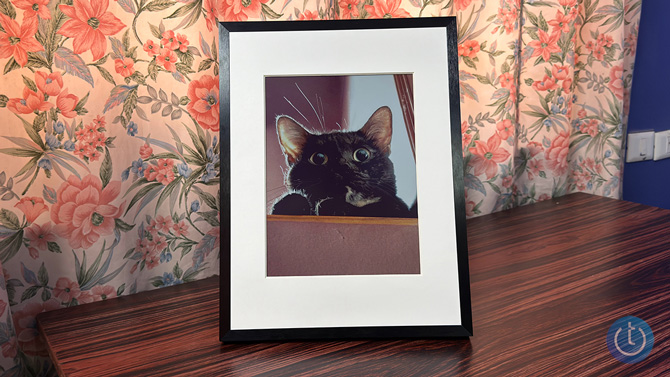
The AI Art Frame uses E Ink Spectra 6 color e-paper instead of an LCD, which means that there's no backlight, glow, or blue light. The image on the display looks like it's printed on matte paper. Color E Ink has been showing up in more places lately. E-readers like the Amazon Kindle Colorsoft and TCL's NXTPAPER tablet displays have already proven that the tech works well for everyday use. A digital art frame is a pretty obvious next step, and SwitchBot's implementation is the most convincing version I've seen.
Better yet, that means there’s no need for a cord - the built-in battery can last for up to two years - allowing you to place it anywhere in the home. And the AI Art Frame comes in three sizes: 7.3 inches for $149.99, 13.3 inches for $349.99, and 31.5 inches for $1,299.99 on the Switchbot site.
I've had a photo of my cat on my frame for two months now, and I actually had to tell people that it’s a screen. The aluminum housing has a clean, minimal look. The E Ink reflects ambient light like a real painting would, which makes this frame blend into the room. I can't say that about any other digital frame I've tried before.
Setting up the Switchbot AI Art Frame is simple
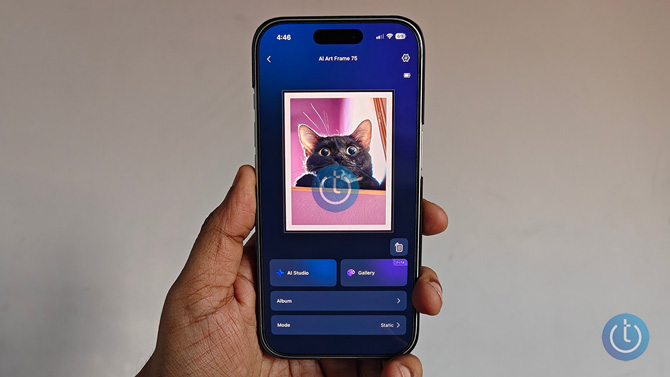
The setup is rather simple with the SwitchBot app. Once you connect your phone to the frame via Bluetooth, you can upload your own photos, pick from AI-generated art, or use the AI Art Remix feature to convert a photo into something that looks like a watercolor or oil painting.
SwitchBot's AI Studio is powered by a Google Gemini model called NanoBanana, and you get a 30-day free trial with up to 400 AI generations per month. After that, it's $3.99 a month. The AI stuff is fun to play around with, but I honestly just preferred uploading my own photos or actual artwork.
The remix feature is probably the most useful AI addition if you want to give a personal photo an art-style makeover. You can take a regular photo and turn it into something that looks like a watercolor, oil painting, or sketch. It gives your personal photos a completely new look rather than just tweaking what's already there.
Read more: Amazon’s $899 Art TV Pushes Picture-Frame TVs Into the Mainstream
You upload your art through the SwitchBot app from your phone's gallery. If your image doesn't match the frame's aspect ratio, the app lets you crop and reposition it before sending. The upload process isn't the fastest, and the frame takes about 15 to 30 seconds to refresh when you change an image, flashing through some colors while updating, but that's all pretty typical of E Ink. This is a static display, so video and animations aren't an option. You can set it to cycle through photos on a schedule, but I've been perfectly happy leaving one image up for weeks at a time.
The battery life is the real upside
The battery life is the thing that puts this in a completely different category from traditional digital frames. SwitchBot says the battery lasts up to two years on a single charge, and from what I've seen so far, that checks out.
After two months with a single photo displayed, my frame has gone from 100% to 91%. This is an excellent result because you can keep this frame on the wall for years with no power cord, no outlet, and no wire running down the wall. You can mount it on a nail, keep it on a shelf with the built-in kickstand, and even pop the panel into an IKEA RÖDALM frame if you want a different look. The months between charges mean you won’t need to fiddle with the frame too much. When it’s ready to recharge, just plug it into the USB-C charging cable, and you’ll be good to go for another year or two.
It's not the only E Ink frame on the market, but SwitchBot has the edge on longevity. The Aura Ink ($499, 13-inch) uses the same E Ink Spectra 6 display and claims up to three months of battery life when changing one photo per day. It also lets you text photos directly to the frame, which is a nice touch. B. SwitchBot is also $150 cheaper for the same screen size, and throws in AI art generation tools that the Aura doesn't offer.
Who this is best for
At $349.99 for the 13.3-inch model, the Switchbot AI Art Frame is definitely a premium compared to a $50-$150 LCD frame. But I think that comparison is pointless. This isn't really competing with cheap digital frames. It's meant as something to replace actual wall art on prominent walls in your home. At that price, it's way more versatile than a single canvas or paper art print.
If you're a renter who can't drill into walls or run wires for new outlets, this frame would work well for you, as well. It's also a solid pick for anyone who thinks traditional digital frames look tacky or gaudy, because this one genuinely doesn't.
One thing I could see being useful is a backlight for dimly lit rooms, but skipping it makes the frame behave more like real artwork. A regular painting wouldn't glow at night either. It also preserves the battery life and the paper-like look, so the trade-off makes sense. I'm looking forward to testing the 31.5-inch model next, which should make an even bigger impact as a wall piece.
After 13 years of testing tech products, this one honestly lands among my favorites. I have barely thought about it since I set it up; that’s a solid marker of a great tech product. You set it up, load a photo or photo set, and just enjoy it.
[Image credit: Palash Volvoikar/Techlicious]